AI for RFP Response: How to Answer Enterprise RFPs Faster
Using AI for Request for Proposal (RFP) response cuts the average enterprise bid from 23.8 hours to 4 to 5 hours without reducing the quality scores buyers use to evaluate submissions.
This guide covers the five-step AI for RFP response workflow with a copy-paste prompt at every stage. For the discovery call that often precedes a formal bid, followed by the outreach email that starts the RFP relationship, see how to prepare for the discovery call that precedes an RFP and how to write the email that starts the RFP relationship.
What Is an RFP and When Are They Used?
An RFP (Request for Proposal) is a formal document issued by a buying organisation asking vendors to submit a structured response demonstrating their ability to meet specific requirements.
Enterprise buyers use RFPs to evaluate multiple vendors simultaneously, typically before committing to a significant contract. They are most common in large B2B deals where procurement teams need documented proof of capability, compliance, and value before a decision is made.
Why RFP Response Speed Matters
In most enterprise procurement processes, the buyer evaluates submissions in the order they arrive, and teams that respond in the first half of the available window are reviewed more carefully than those racing to beat the deadline. Submitting early signals organisation and confidence. Submitting under pressure, with incomplete answers or inconsistent terminology, signals the opposite.
The problem is that manual RFP responses are slow by design. Enterprise RFP responses are time-consuming because they require pulling accurate information from scattered sources, coordinating input across legal, security, technical, and commercial teams, and maintaining consistent language across hundreds of questions within a deadline that rarely exceeds two weeks.
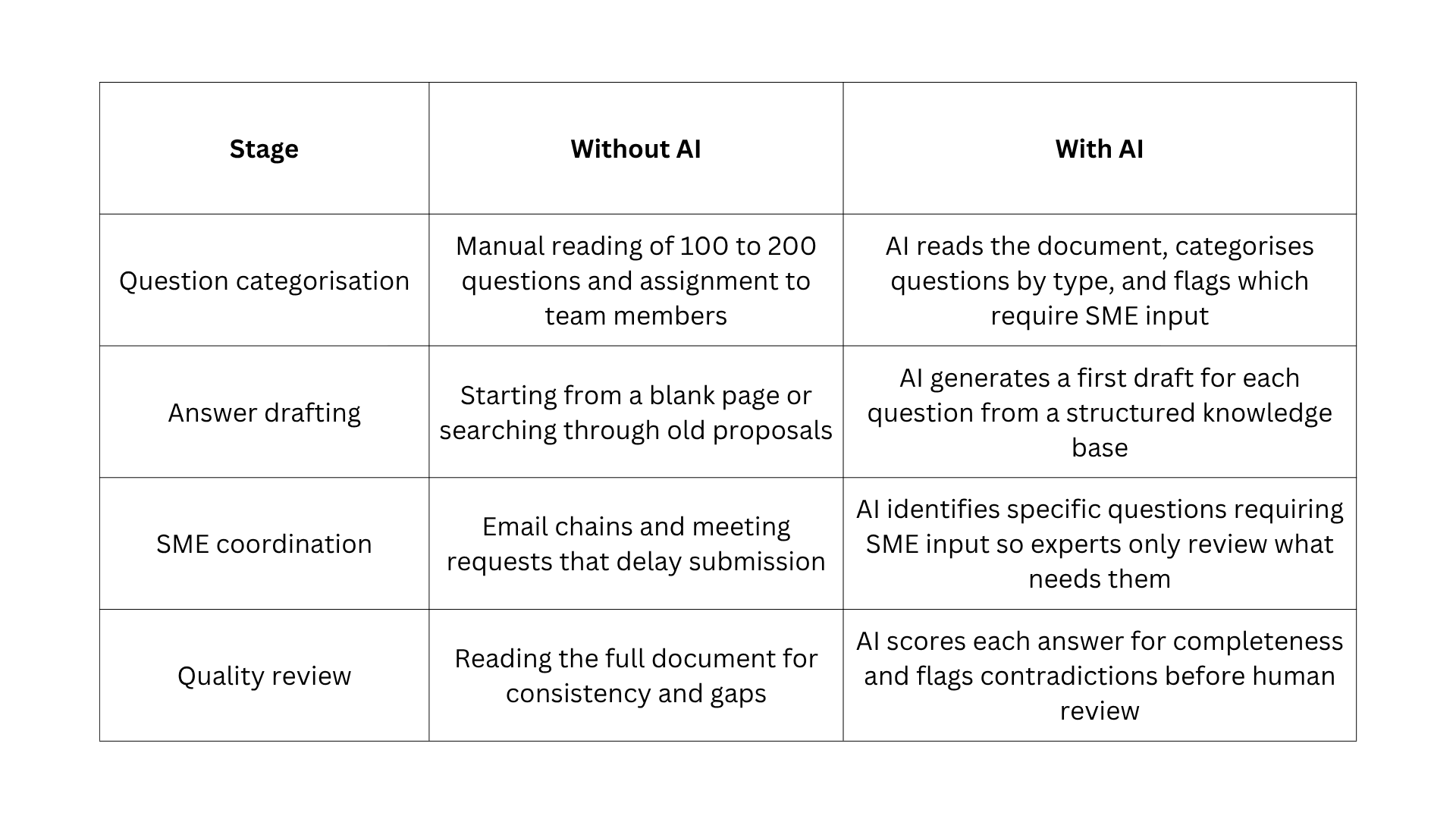
The core problem is not the writing. It is the research, coordination, and quality checking. AI for RFP response addresses all three and delivers the most value at the categorisation, drafting, and review stages.
39% of enterprise deals involve some form of formal response management. Here is what changes at each stage when AI for RFP response enters the workflow:
The Five-Step AI Workflow for RFP Responses
AI for RFP response follows a five-step sequence where the tool compresses the categorisation, drafting, and review stages while the rep and subject matter experts provide the judgment and verified facts.
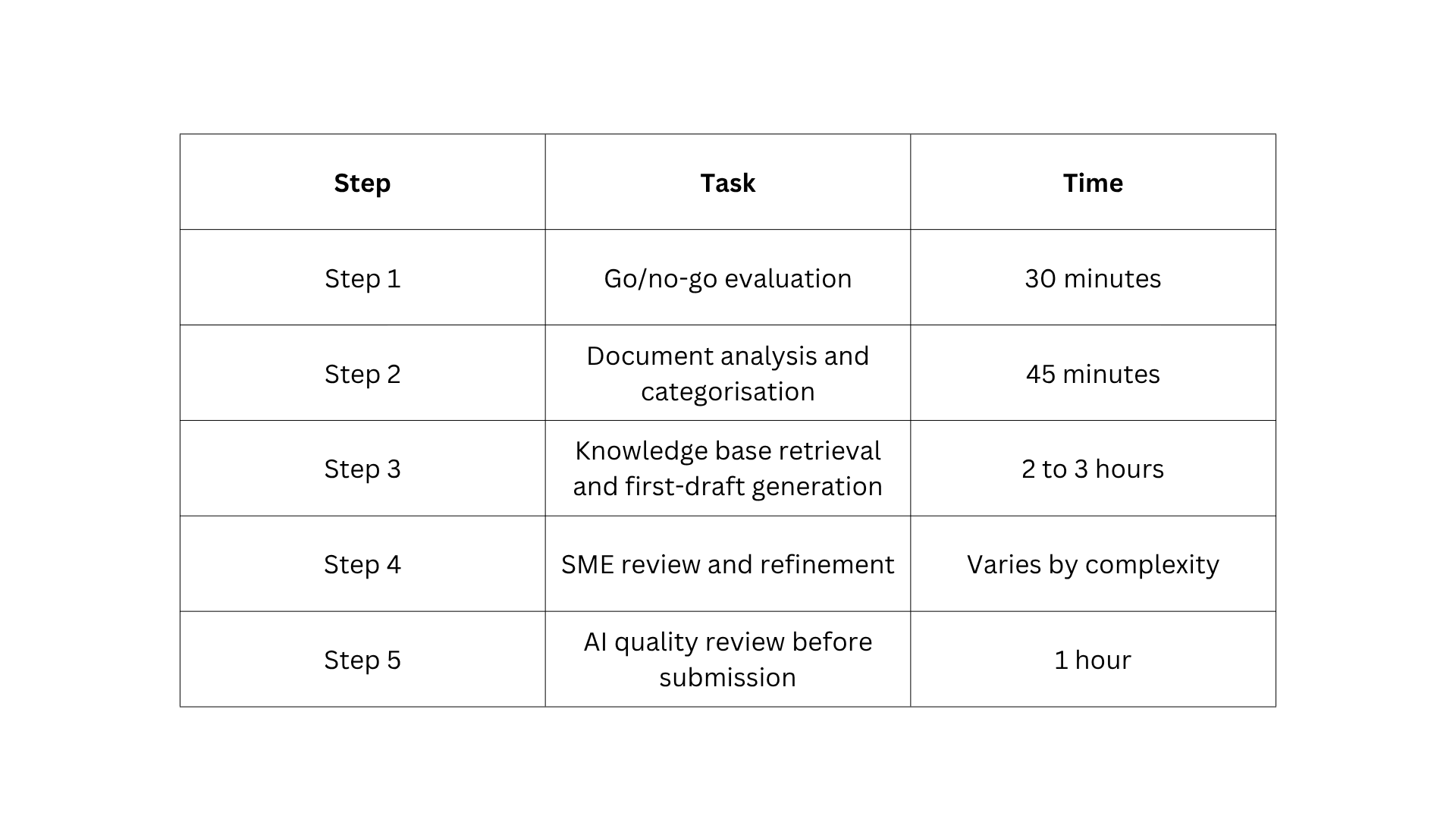
Step 1: Make the Go/No-Go Decision Before Investing Any Time (30 Minutes)
The first component of AI for RFP response is deciding whether to bid at all. A poor-fit RFP that consumes 23 hours and loses is more expensive than declining at the evaluation stage.
Five criteria determine whether a bid is worth pursuing:
- ICP fit: Does the buyer's company match the profile of customers the product genuinely serves well, including industry, size, and the specific use case described in the RFP?
- Relationship status: Is there a pre-existing champion inside the buying organisation, or is this a blind bid against unknown competition?
- Win probability: Do the product's capabilities strongly match the buyer's stated primary evaluation criteria?
- Resource availability: Does the team have the subject matter experts, proposal capacity, and time to produce a high-quality response without deprioritising active deals?
- Strategic value: Does winning this RFP advance a goal such as entering a new industry, establishing a reference customer, or expanding in a key geography?
The go/no-go bid evaluation tool runs this assessment in under 30 minutes from the RFP executive summary.
AI prompt to use:
I have received an enterprise RFP from [company name] in the [industry] sector.

Here is the RFP summary or key requirements section:
[paste the executive summary or requirements overview from the RFP].

Evaluate this opportunity against five criteria and score each one as
strong, moderate, or weak based on the information available.

ICP fit: does this buyer match a profile we serve well?

Relationship advantage: are there signals that we have an inside advocate
or prior relationship?

Win probability: how well do the stated requirements match what our
product does best?

Resource requirement: based on the scope and deadline, estimate the
team effort this response requires.

Strategic value: does winning this bid advance any goal beyond the
immediate revenue?

Provide a final recommendation: respond, decline, or respond with
limited scope.
Step 2: Read and Categorise the RFP Document with AI (45 Minutes)
The categorisation stage is where AI for RFP response saves the most time early in the process. Organising every question before a single answer is written reveals where effort should concentrate and which questions require specialist input.
Four question categories structure every AI RFP response:
- Standard questions have answers in previous proposals and can be retrieved or adapted without new content, typically covering company background, team structure, and general capabilities.
- Technical questions require input from engineering, product, or solutions teams and cover integration capabilities, API documentation, security protocols, and architecture.
- Legal and compliance questions require review from legal or security teams and cover data residency, GDPR compliance, certifications, and audit requirements.
- Differentiating questions are those where a strong, specific answer separates the response from competitors by connecting the buyer's stated priorities to real customer outcomes.
The RFP document analysis and question extraction tool processes large RFP documents and extracts the full question list without manually reading through hundreds of pages.
AI prompt to use:
Here is the full question list from an enterprise RFP we have received:
[paste all questions].

Categorise every question into one of four groups.

Standard: questions answerable from existing company documentation
without new content.

Technical: questions requiring input from engineering, product, or
solutions teams.

Legal and compliance: questions requiring review from legal or
security teams.

Differentiating: questions where a strong, specific answer can separate
our response from competitors.

For each category, list the question numbers that belong to it.

Then identify the three questions in the differentiating category that
represent the highest opportunity to influence the evaluation outcome.
Step 3: Build a Knowledge Base and Generate First Drafts with AI (2 to 3 Hours)
The drafting stage is where AI for RFP response delivers the largest time saving.
A complete knowledge base contains five components:
- The best three to five completed RFP responses from the past 18 months, selected for answer quality rather than whether the deal was won.
- Product documentation covering current capabilities, integrations, certifications, and technical specifications.
- Approved customer case studies with named outcomes, metrics, and industry context.
- Compliance certificates, security policies, and legal boilerplate approved for external use.
- Competitive positioning statements that differentiate the product from the three most frequently encountered competitors.
AI reads the categorised question list from Step 2 alongside the knowledge base and generates a first draft for every standard and differentiating question. It flags where it cannot find a strong answer rather than generating a guess. The structured RFP draft generator handles the full drafting workflow from knowledge base inputs.
AI prompt for standard questions:
Here are the standard questions from our RFP: [paste standard question list].

Here is our knowledge base material:
[paste relevant product docs, past RFP answers, and company info].

For each question, generate a first draft answer of 100 to 200 words.

Base every answer entirely on the knowledge base material provided. Do not
invent capabilities, metrics, or certifications not present in the source material.

Where the knowledge base does not contain enough information, flag the question
with [REQUIRES VERIFICATION] rather than generating a guess.

After each answer, include a one-line source reference noting which document
the answer draws from.
AI prompt for differentiating questions:
Here are the differentiating questions identified in Step 2:
[paste differentiating question list].

Here is the buyer's context from the RFP:
[paste relevant sections describing the buyer's situation, priorities,
and evaluation criteria].

Here are our strongest differentiators and relevant case studies:
[paste from knowledge base].

For each question, write a response that connects the buyer's stated priority
directly to a specific outcome we have delivered for a comparable customer.
Use the customer's language from the RFP where possible.

Keep each answer between 150 and 250 words and end with a specific,
verifiable proof point.
Step 4: Coordinate Subject Matter Expert Input Without Losing Time
The SME coordination stage is where many AI for RFP response workflows break down. Teams solve the drafting speed problem, but still lose days to reviewer delays because the coordination approach has not changed.
The standard approach of forwarding the full document produces slow responses and inconsistent answers. AI for RFP response fixes this by sending each SME only their categorised questions with the first draft already populated. Their job is to verify, correct, or enhance rather than write from scratch.
This reduces SME time from several hours to 20 to 30 minutes per reviewer. The SME briefing and review pack generator formats the categorised questions and first drafts into a clean briefing document that each reviewer can work through independently.
AI prompt to use:
Here are the technical questions from our RFP that require engineering input:
[paste technical questions and their AI-generated first drafts].

For each question, identify what specific information is needed from the SME
that the first draft does not currently contain or that requires verification.

Format the output as a brief for the SME with three sections per question.

The current draft answer: [paste the AI draft].

What needs verification or addition: one sentence describing exactly what
the SME needs to confirm or supply.

Time estimate: how long this specific question should take for the SME
to review and refine.
Step 5: Run the AI Quality Review Before Submission (1 Hour)
The quality review stage is where the RFP response catches the problems a human reviewer scanning 100 questions under deadline pressure is likely to miss.
Five quality checks should run before every submission in an AI for RFP response workflow:
- Completeness: Every question has a corresponding answer with no blanks, no placeholder text, and no [REQUIRES VERIFICATION] flags remaining.
- Consistency: The company name, product name, capability descriptions, and customer metrics are stated identically throughout with no variation across sections.
- Buyer language alignment: The response uses the buyer's own words from the RFP rather than internal product vocabulary.
- Factual verification: Every statistic, certification, integration, and customer outcome cited exists in the knowledge base source material.
- Differentiation check: The three differentiating questions from Step 2 each contain a specific, named customer proof point that no generic competitor answer could replicate.
The RFP consistency and quality review tool runs all five checks simultaneously from the completed response document. For the deal summary and CRM logging workflow that follows submission, see AI for sales teams overview, including deal summaries.
AI prompt to use:
Here is our completed RFP response: [paste the full response document].

Here is the original RFP question list: [paste original questions].

Run a quality review across five dimensions.

Completeness: flag any question from the original list that does not have
a corresponding answer in the response document.

Consistency: identify any section where the company name, product name,
or a specific capability is described differently from other sections.

Buyer language alignment: identify three to five questions where our answer
uses internal product terminology instead of the buyer's own language.

Factual risk: flag any answer that includes a specific number, certification,
or customer outcome not present in the source material provided earlier.

Differentiation quality: for the differentiating questions, rate each answer
as strong, moderate, or weak based on whether it contains a specific,
verifiable proof point a competitor could not replicate.
How to Build a Knowledge Base That Makes AI for RFP Response Faster Over Time
AI for RFP response gets progressively faster with each submission because every completed response produces better source material for the next one. Teams using a structured knowledge base report a 25 % increase in RFPs handled without adding headcount.
After every submitted response, add three things to the knowledge base:
- Final answers to any technical or compliance questions that required SME input should be saved to the knowledge base. Those answers will appear in future RFPs, and asking the same expert the same question twice wastes their time and delays the next response.
- Any new differentiating examples or customer outcomes that emerged during this response?
- A note on which questions AI could not answer confidently, so the knowledge gap can be filled before the next RFP arrives.
The knowledge base gap analysis tool processes flagged questions from Step 5 and produces a prioritised gap list in under 10 minutes. The proof point research tool surfaces publicly available customer outcomes and benchmarks that strengthen differentiating answers where internal case study data is thin.
For the buyer signal research that builds context before the bid, see how to research and qualify enterprise prospects with AI. For the reusable prompt formats that produce consistent AI for RFP response output across different buyer profiles, the system prompt guide for enterprise sales and proposal writing covers what works across RFP types.
For the AI prompts that produce consistent enterprise sales output at every stage of the bid cycle, the AI prompts guide for business writing and enterprise sales covers the framing patterns that work across industries.
AI prompt for identifying knowledge gaps:
Here are all the questions from our recent RFP flagged with [REQUIRES VERIFICATION]
or that received a weak quality score: [paste flagged questions and weak answers].

For each one, identify what specific type of content is missing from the
knowledge base that would have allowed AI to generate a strong first draft.

Group the gaps into three categories.

Product documentation gaps: capabilities, integrations, or technical
specifications that need to be documented.

Proof point gaps: customer outcomes or case study details that need to
be captured from the customer success team.

Compliance gaps: certifications, policies, or legal statements that need
to be created or approved.
Top RFP Response Tools
Most AI for RFP response workflows combine a general AI drafting tool with one or more specialist RFP platforms. The specialist tools handle knowledge base management, version control, and compliance tracking. The AI chat layer handles first-draft generation, SME briefing packs, and quality review prompts.
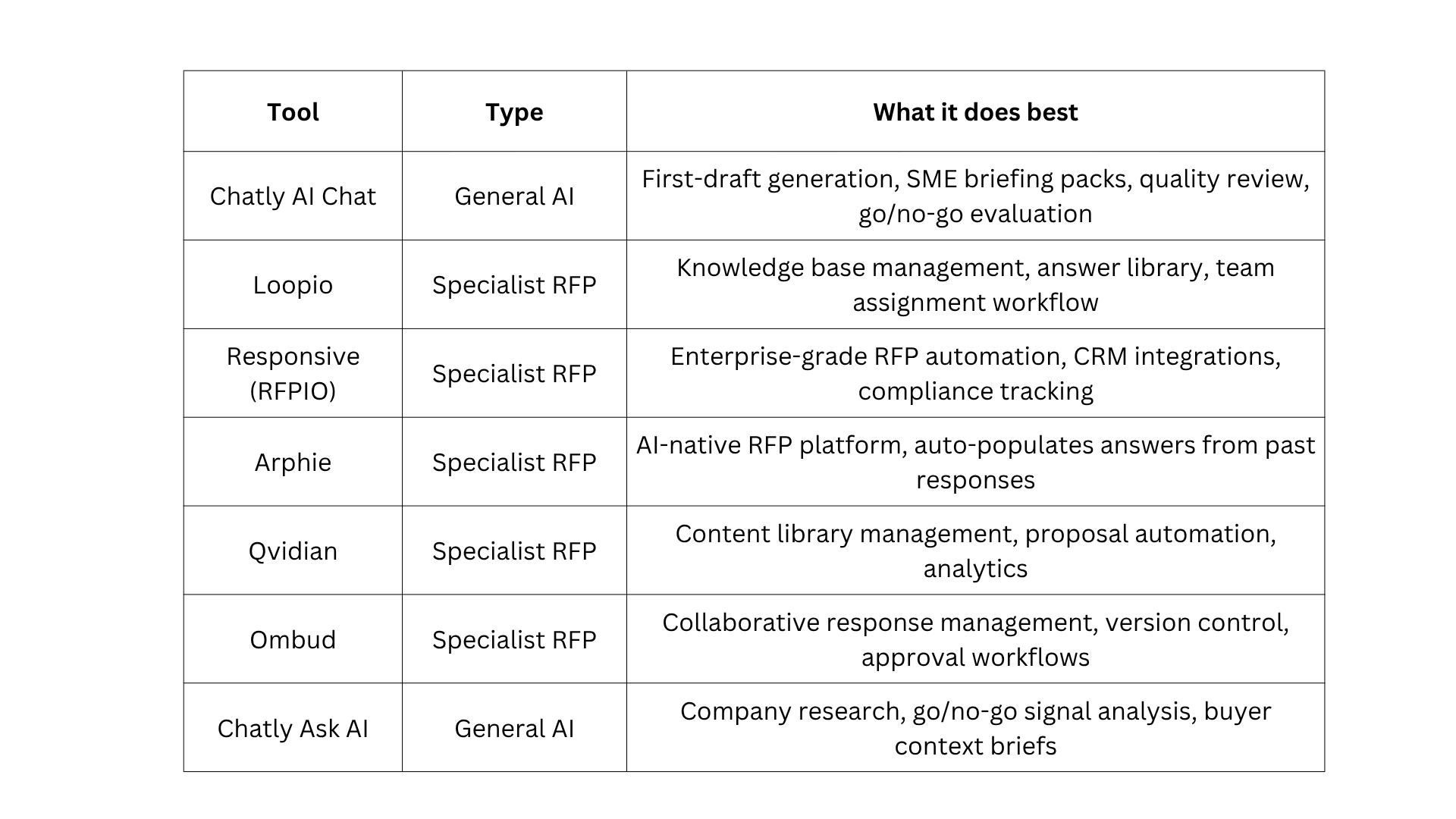
Specialist RFP tools work best when the knowledge base is well-maintained, and the team responds to a high volume of bids regularly. For teams that respond to fewer than 10 RFPs per month, Chatly AI Chat handles the full five-step workflow without a dedicated platform subscription.
Five Mistakes That Undermine AI for RFP Response Workflows
The most common failures in AI for RFP response are not about writing quality. They are about workflow decisions that waste time or reduce the relevance of the final submission.
Responding to Every RFP Received
Teams that skip the go/no-go evaluation spend hundreds of hours per year on bids they have little chance of winning. This reduces the quality of responses they submit to deals they should win. The 30-minute evaluation in Step 1 protects response capacity for high-probability opportunities.
Writing Answers Before Reading the Full Document
Starting to write before categorising the full question set means discovering late-stage compliance or technical requirements after the deadline has passed. The categorisation pass in Step 2 surfaces every specialist requirement at the start of the process.
Using a Generic Knowledge Base
An RFP from a regulated financial services firm requires different language, proof points, and compliance emphasis than one from a growth-stage SaaS company. Segment the knowledge base by buyer profile, so AI for RFP response retrieves the most relevant material for each bid type. The buyer profile and industry context research tool surfaces the industry-specific context that differentiates responses across buyer types.
Sending the full RFP to SMEs
Sending a 150-question document to a security engineer and asking them to identify their relevant questions produces a two-day delay. The SME briefing prompt in Step 4 sends each expert only their categorised questions with a pre-populated draft and a specific verification instruction.
Submitting without a structured quality review
Teams that review a completed RFP by reading it top to bottom under deadline pressure miss terminology inconsistencies, unanswered sub-questions, and differentiating answers that describe the product rather than proving it.
The quality review in Step 5 runs all five checks in under 60 seconds. For the framing patterns that produce consistent output across RFP types, the AI prompts guide for enterprise sales and proposal writing covers what works at every stage. For extracting content from product documentation and past proposals to feed the knowledge base, the document content extraction tool processes source documents without manual reading.
Start Responding to Enterprise RFPs Faster
The next RFP that lands in your inbox will take 23.8 hours to respond to manually. With the five-step workflow in this guide, the same response is first-draft ready in under five.
The only thing standing between your team and that outcome is running the prompts. Paste your next RFP summary into AI Chat and start with the go/no-go evaluation. Everything else follows from there.
Frequently Asked Questions
Frequently asked questions about AI for RFP response
More topics you may like
How to Write a Sales Prospecting Email That Gets Replies

Arooj Ishtiaq

How to Prepare for a Sales Call Using AI
Arooj Ishtiaq
AI for Sales Teams: Call Prep, Deal Summaries, and Pipeline Intelligence
Arooj Ishtiaq

How to Qualify Sales Leads with AI
Arooj Ishtiaq
B2B Sales Email Templates, Sequences, and Multi-Channel Outreach Guide
Arooj Ishtiaq

How to Make AI Cold Emails Sound Human
Arooj Ishtiaq