AI Presentation Maker vs PowerPoint: Why the Old Way Is Costing You More Than You Think
You opened PowerPoint an hour ago. You have one slide done. The idea in your head is clear, the argument is structured, and you know exactly what you want to say. But what is on screen looks nothing like what is in your head, and you still have nine slides to go.
Why does that happen? Because when you thought of all those ideas, you forgot one important thing: you have to do it yourself.
PowerPoint was built to produce slides. It was not built to help you think, structure your argument, develop your content, or source your visuals. It receives a finished idea and renders it. Everything that happens before that point, which is most of the actual work, is left entirely to you.
Frustrating, right?
Not anymore. AI presentation maker is a powerful tool that challenges the norms of slide generation and enables workflows that were once considered impossible.
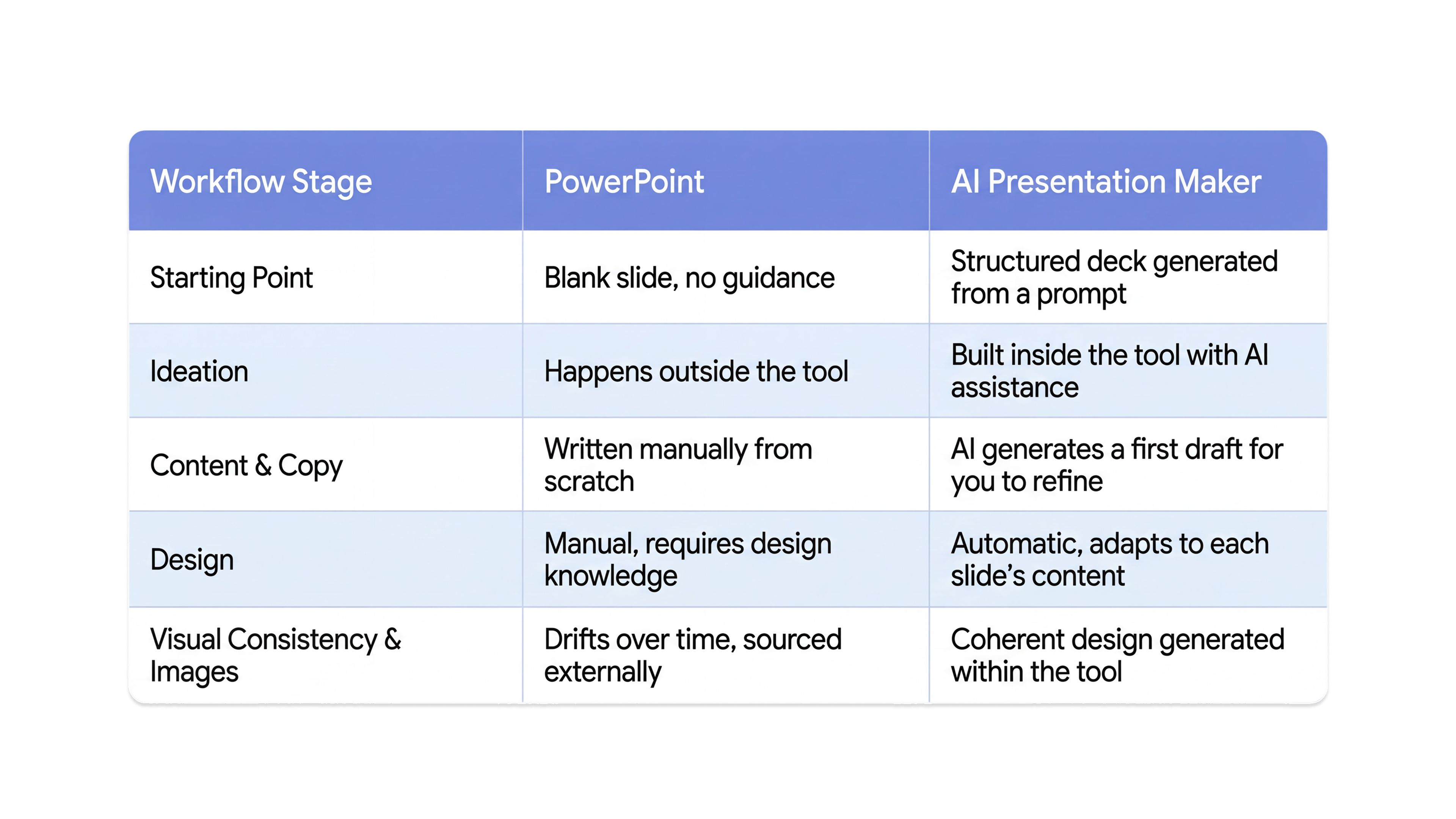
This blog walks through the exact workflow most professionals follow when building a presentation in PowerPoint, and shows what that same step looks like in an AI presentation maker.
Let’s dive into the details.
1. The Starting Point
How a tool greets you at the beginning of a project tells you a lot about what it was designed to do.
PowerPoint
In PowerPoint, you open to a blank slide and a blinking cursor.
- There is no structure, no starting point, and no guidance on where to begin.
- The entire cognitive burden of "where do I start" falls on you before a single word is written.
Most people deal with this by opening a separate document, sketching an outline, and then transferring it across. That is an extra step the tool created and does nothing to solve.
AI Presentation Maker
In an AI slides generator, you start with a prompt.
- You describe your topic, your audience, and your objective.
- A structured, designed deck is generated as your starting point.
- The blank slide problem does not exist because the tool eliminates it before it can become one.
The difference here is not just convenience. Starting with structure and momentum changes the quality of everything that follows. When you begin with something to react to, the thinking gets sharper faster.
2. Ideation and Structure
Most people do not realize how much time they spend outside of PowerPoint while building a presentation in it.
PowerPoint
Ideation happens somewhere else entirely.
- A notes app
- A whiteboard
- A conversation with a colleague
The tool plays no role in helping you develop the idea, sequence the argument, or figure out what belongs on each slide. It only receives the thinking once it is already done. That means PowerPoint adds zero value during the most important stage of the entire process.
AI Presentation Maker
Ideation and structure happen inside the tool. You bring a rough idea and the AI helps shape it into a logical narrative flow. It suggests:
- How to sequence information
- What each slide should carry
- How the argument should build from one point to the next
The thinking and the building happen in the same place, which removes an entire layer of the process that should not have existed separately.
The result is not just a faster workflow. It is a more coherent one. When structure is built collaboratively rather than transferred manually, the final narrative tends to be tighter.
3. Content and Copy
Writing slide copy is one of the most time-consuming parts of building a presentation, and it is one that PowerPoint does nothing to help with.
PowerPoint
Every word is written manually. There is no assistance, no way to test whether the copy on a slide is the right copy, and no structural suggestions about what a given slide actually needs to say.
You write, second-guess, rewrite, and move on. This happens across every slide, every time, with no support from the tool at any point.
AI Presentation Maker
In all the best AI slides generators, a working first draft of copy exists the moment the deck is generated. The user's role shifts from writing everything from scratch to refining what already exists. That shift is more significant than it sounds.
Writing from nothing and editing something are fundamentally different cognitive tasks. The second one is faster, lower friction, and produces better output because you are reacting rather than generating from a blank state.
For professionals who build presentations regularly, this single difference compounds into hours saved every week. And beyond time, it compounds into better quality. A first draft that exists immediately is one you can improve. A blank page you are still staring at twenty minutes in produces nothing.
4. Design
Design is where the PowerPoint workflow breaks down most visibly, and most expensively.
PowerPoint
Design is a completely separate job sitting inside the same tool with no guidance. All of it is manual.
- Font choices
- Layout decisions
- Color consistency
- Spacing
- Visual hierarchy
All of it requires either genuine design knowledge or a willingness to settle for something that looks approximately right. Most professionals fall into the second category. They are not designers, they were never meant to be, and yet PowerPoint hands them a blank canvas and expects them to produce something visually coherent.
AI Presentation Maker
Design is handled automatically and adapts to what each slide actually contains.
A data-heavy slide is treated differently from a conceptual one. A text-light visual slide gets a different layout treatment from one built around a detailed argument. The tool makes informed visual decisions without the user having to make them manually. The output is consistent, professional, and calibrated to the content, not just the template.
The practical implication is significant. Design fluency stops being a prerequisite for a polished presentation. The quality of your deck is no longer limited by the quality of your eye for layout.
There is also a consistency problem that PowerPoint creates and never solves.
When design decisions are made manually, slide by slide, they drift.
- The font on slide three does not quite match slide seven.
- The spacing on the title slide looks different from the section headers.
- Small inconsistencies accumulate into a deck that looks assembled rather than designed.
An AI presentation maker applies a coherent design system across the entire deck from the first generation, which means visual consistency is built in rather than something you have to manually maintain and audit before every presentation.
5. Visuals
Images in PowerPoint are a workflow tax that most people pay without noticing how much it costs them.
PowerPoint
Every image requires leaving the tool. A separate tab, a stock image site, a search, a download, an import, and a resize. Each image is a concentration break. Each one pulls you out of the flow of building and into a separate retrieval task.
On a ten-slide deck with one image per slide, that is ten separate interruptions, ten context switches, and a significant amount of cumulative time spent on something that has nothing to do with the strength of your argument.
AI Presentation Maker
Images are generated or sourced within the tool through AI image generation capabilities. There is no tab switching, no separate download process, and no interruption to the build. Visuals are part of the workflow from the beginning. They arrive with the deck, positioned and scaled, ready to edit rather than ready to import.
The time saving here is real, but the more valuable gain is uninterrupted focus. A workflow that keeps you inside one tool for the entire build produces sharper, more coherent work. Context switching has a cognitive cost that is easy to underestimate until you stop doing it.
6. Iteration
How a tool handles revision tells you whether it was built for real professional use or for ideal conditions.
PowerPoint
Going back is expensive. Changing the structure at slide ten means rebuilding layouts, realigning content blocks, and revisiting design decisions that were already difficult to make the first time.
The cost is high enough that most people simply do not do it. They lock in a version that is not quite right, tell themselves they will fix it next time, and move forward. The deck that gets presented is rarely the deck they wanted to build. It is the one they ran out of time to improve.
AI Presentation Maker
Iteration costs almost nothing. Restructuring a section, adjusting the narrative, or rebuilding a slide takes minutes rather than the better part of an hour.
This changes the revision from a dreaded task into a normal part of the process. The final version of the deck is actually final, not the version that survived because going back felt like too much work.
This matters more than most people account for. A presentation that went through three real rounds of revision is a fundamentally different product from one that was built once and locked in.
The willingness to revise is also a creative advantage. When iteration is cheap, people experiment more. They try a different opening, restructure the argument, cut a section that is not earning its place. That kind of editorial thinking is what separates a deck that communicates clearly from one that simply covers the topic.
PowerPoint's revision cost effectively suppresses this instinct. AI removes the barrier entirely.
Where Chatly Fits Into This
Chatly's AI Presentation Maker was built around exactly the workflow described above.
- The prompt-to-deck feature eliminates the blank slide problem from the first moment.
- Chatly generates a structured, designed starting point based on your topic, audience, and objective, so the build begins with momentum rather than friction.
- The content generation feature shifts your role from writing everything to refining what matters, which is a faster and more productive way to develop slide copy.
- The adaptive design system means every slide looks considered without requiring you to make a single layout decision manually.
Chatly is built for professionals who present regularly and cannot afford to spend three hours on a deck that should take forty-five minutes. Founders, sales teams, educators, consultants, and anyone who has ever closed PowerPoint frustrated and started over will recognize the problem it solves.
What makes Chatly's approach different from a basic AI tool is that it does not just generate a deck and hand it back. It produces output that is built for real-world editing.
- It generates outlines for you.
- Provides AI chat for ideation and customization
- Offers custom themes to suit your design needs
- Provides hundreds of templates for those who need quick slides
- Generate realistic AI images inside the same window
- The design holds together under customization, which is where most AI tools fall apart.
The end result is a presentation that feels like it was built deliberately, because it was.
Conclusion
PowerPoint is not a bad tool. For specific, design-precise use cases where granular visual control matters, it remains capable. Some teams have workflows built around it that function well. That is a real and legitimate use case.
But for the majority of professionals who use it as their primary presentation workflow, the honest question is not whether PowerPoint is good. It is whether the process it forces on you is one you would choose if a better option existed.
The blank slide, the external ideation, the manual copy, the design guesswork, the image search, the reluctance to revise. None of that is inherent to building a presentation. It is inherent to building one in PowerPoint. The friction is not a feature. It is a limitation that has been normalized through years of having no alternative.
That alternative now exists. The workflow described in this blog is not a future state. It is available today, and the professionals using it are not just saving time. They are showing up with better work, more consistently, with less of themselves spent in the process.
Frequently Asked Question
Get a grip on prenetation making skills and tools with this additional information.
More topics you may like
Best AI Slide Generators for Creating Presentations Faster

Daniel Mercer
How to Create a Presentation Using AI

Maya Collins
How to Create an Outstanding Resume Using AI Resume Builder (Secret Sauce = Chatly’s AI Docs)

Faisal Saeed
What are AI Presentation Makers? How Are They Making a Bigger Impact With Better Slides?
Maya Collins
Why Document Creation Is Still Broken in 2026 — How AI Document Generators Are Fixing It
Faisal Saeed