AI for Sales Teams: Call Prep, Deal Summaries, and Pipeline Intelligence
AI for sales teams targets the 72% of the working day that is not spent selling. Sales reps spend only 28% of their time in actual selling conversations, with the remaining 72% going to research, preparation, logging, and administrative work.
This guide covers where AI for sales teams delivers the highest return across call preparation, conversation intelligence, deal summaries, CRM automation, handoff documents, pipeline management, and a five-step implementation sequence.
Why AI for Sales Teams Solves a Time Problem, Not a Talent Problem
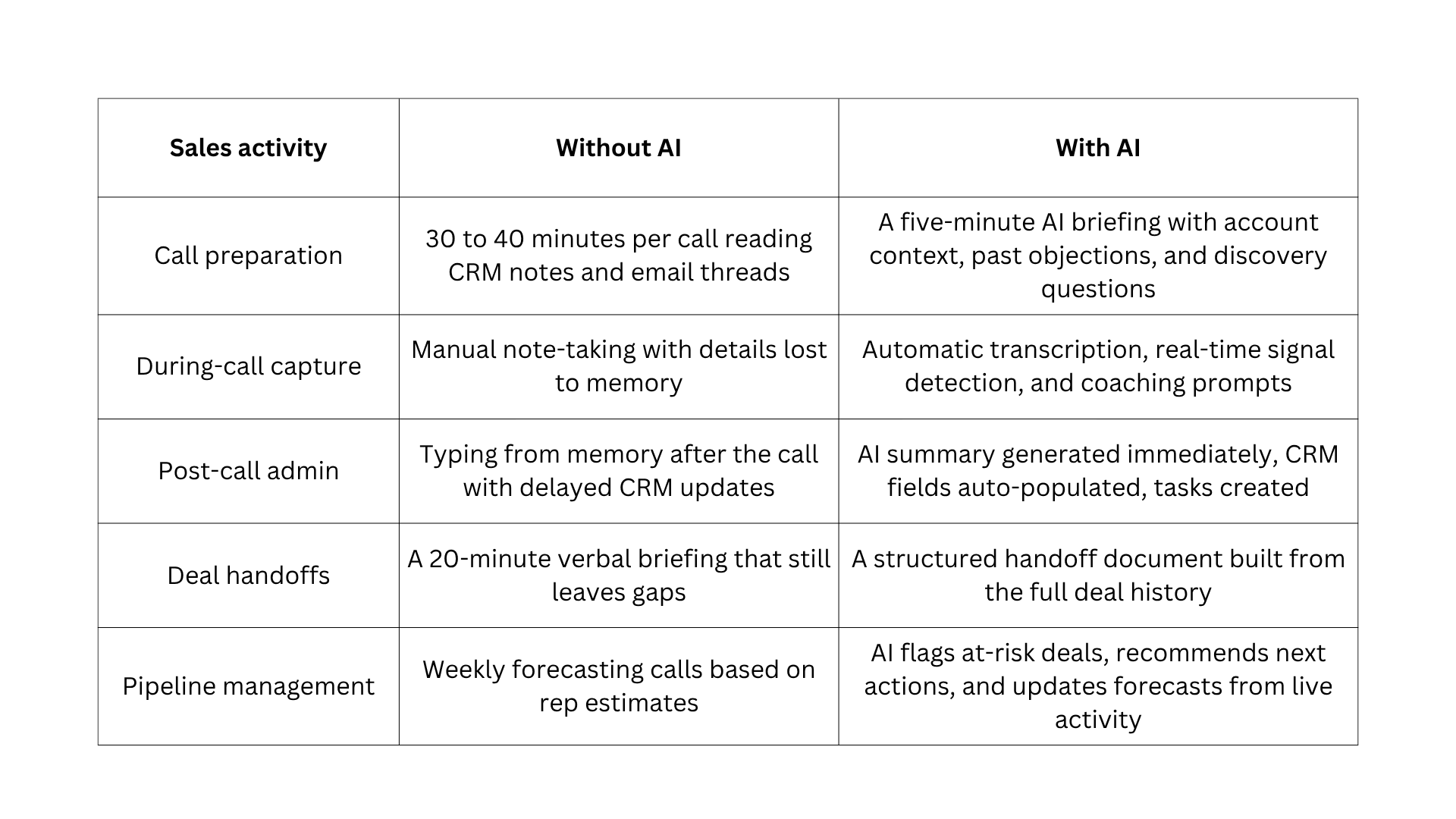
AI for sales teams targets the administrative layer at every workflow stage. 83% of sales teams using AI saw revenue growth compared to 66% of teams without it.
Here is what changes when AI for sales teams enters each workflow stage:
For follow-up sequences and email templates, see B2B sales email templates and sequences.
AI for Sales Call Preparation: From 40 Minutes to Under 5
Thorough call preparation is one of the highest-leverage uses of AI for sales teams because it compresses a 30 to 40-minute task into something a rep reads in under five minutes.
Most reps under-prepare because proper preparation requires pulling from five separate sources. Those sources are the CRM, recent email threads, the company's LinkedIn page, recent news, and the deal history. A rep running five calls per day cannot complete all of this for every account.
Teams using AI-generated pre-call briefings see 33% faster meeting prep. Enterprise teams reduce research time by 60 to 80% with AI.
A complete AI call brief contains six elements:
- An account summary covering company size, industry, recent news from the past 60 days, funding history, and current tech stack.
- A contact profile covering the recipient's current role, how long they have been in it, and any recent LinkedIn activity.
- Deal context covering where the opportunity stands, what has been discussed, and any commitments made on either side.
- Suggested discovery questions based on what is already known about the prospect's situation and deal stage.
- Competitive context covering any competitors that have come up and how they were addressed.
- A risk flag noting one thing to be aware of based on the prospect's current engagement level.
The prospect research and call briefing tool handles account intelligence and brief generation in one workspace, pulling from a company URL and LinkedIn profile without switching tabs.
AI prompt to use:
Generate a pre-call briefing for a [discovery/follow-up / closing] call with [contact name], [title] at [company].
Produce a structured brief with these sections.

- Account overview: what the company does, their size, any news from the past 60 days, funding history, and tech stack.
- Contact profile: current role, how long they have been in it, and any recent LinkedIn activity that is relevant.
- Deal context: [paste relevant CRM notes or email thread here].
- Discovery questions: three suggested questions based on what we know so far.
- Risk flag: one thing to be aware of based on their current stage and activity.
Keep the brief readable in under five minutes.
Conversation Intelligence: What AI for Sales Teams Does During and After the Call
Conversation intelligence tools run in the background during calls and represent one of the most consistent sources of value in AI for sales teams implementations because they remove post-call admin without requiring the rep to change how they sell.
What Conversation Intelligence Captures During a Sales Call
Three functions happen during every call, each addressing a different failure point in deal management.
- Transcription captures every word with timestamps. Specific moments, such as a pricing question, a competitor mention, or a commitment the prospect made, are searchable after the call, so nothing is lost to memory.
- Signal detection identifies buying signals in real time, including references to budget, timeline, or decision-makers, and flags risk signals like competitor mentions or unresolved objections.
- Real-time coaching surfaces prompts during the call itself, such as a suggested question when the prospect mentions a pain point or a reminder to confirm next steps before the call ends.
The most widely used conversation intelligence tools for AI for sales teams in 2026 are Gong, Chorus, Fireflies, Sybill, and Read AI.
What AI Generates Immediately After the Sales Call Ends
When a call ends, conversation intelligence tools generate four outputs that the rep reviews in under 60 seconds:
- A structured call summary covering what was discussed, where the prospect stands, and what was agreed.
- Key moments tagged by type, including objections raised, budget signals, and competitor mentions.
- Agreed, next steps attributed to the correct person with specific dates.
- Relevant CRM fields populated without the rep typing a word.
For teams without a dedicated conversation intelligence platform, the post-call summary and CRM logging tool generate the same outputs from a pasted transcript.
AI prompt to use:
Here is a transcript from my sales call with [name, title, company].

Generate a structured call summary with the following sections.

- Conversation overview: what was discussed, where the prospect stands, and what was agreed.
-  Objections raised: list each objection and how it was handled.
-  Budget and timeline signals: any numbers or timeframes mentioned.
-  Stakeholders identified: who is involved, their role, and any stated concerns.
-  Agreed next steps: specific actions, who owns each one, and by when.
-  Deal health signal: two positive indicators and one risk to flag.
-  Transcript: [paste transcript here]
AI for Deal Summaries and Automatic CRM Updates in Sales Teams
CRM data quality is one of the most persistent problems in AI for sales teams deployments because logging competes with the next calendar item and requires reps to reconstruct details from memory.
Without AI, four things consistently fail:
- Deal records are incomplete because reps log only what they remember.
- Context is lost between meetings when the specific objection or commitment made is not captured.
- Handoffs require the incoming rep to rebuild rapport from scratch.
- Managers forecast from stale data rather than what happened this week.
When a call ends, AI generates the summary, the rep reviews it in 60 seconds, the CRM updates automatically, and tasks are created with no typing required. The structured deal summary generator formats the summary output into a clean document ready for CRM upload or team sharing.
What a Complete AI Deal Summary Contains
A well-generated deal summary covers six areas that give the full picture of where the deal stands:
- A short overview of the conversation covering what was discussed, where the prospect stands, and what was agreed.
- Every objection raised during the call and the specific response given.
- Stakeholders identified, including their role, stated concerns, and level of influence.
- Budget and timeline signals, including any specific numbers or timeframes mentioned.
- Agreed on next steps with a specific date and the name of who owns each action.
- A deal health signal based on the tone and engagement level of the conversation.
The AI Handoff Summary for Sales Teams Moving Deals Between Reps
The handoff summary is one of the most underused applications of AI for sales teams because the problem it solves is invisible until it costs a deal.
When a deal moves from SDR to AE or AE to Customer Success, the incoming rep needs complete context. Without it, they ask questions the prospect already answered and lose the trust the previous rep built.
A verbal briefing leaves gaps because the handover cannot reconstruct every detail. With AI for sales teams, a structured handoff document is generated from every email, call transcript, and CRM note in the deal.
The incoming rep reads it in five minutes and enters the first call with the full context of a rep who has worked the account from the start. The AI document generator for sales handoff briefs formats the full deal history into a structured document ready for the incoming rep.
AI prompt to use:
Generate a complete sales handoff document for this deal.

- Use these inputs: [paste CRM notes, key email threads, and call summaries]. Produce a document with these sections.
- Deal overview: company, contact, stage, deal value, and target close date.
- Buying committee map: who is involved, their role, and their current stance.
- Key objections: each objection raised and where it stands today.
- Commitments made by our side: what was promised and when.
- Next steps: what needs to happen and who owns each action.
- What to know before the first call: any sensitivities the incoming rep
needs to be aware of.
Keep the document readable in under five minutes.`
AI for Sales Teams: Pipeline Management and Deal Risk Scoring
Pipeline management without AI for sales teams relies on weekly calls, manager intuition, and rep self-reporting that consistently skews optimistic.
Three things change when AI for sales teams enters pipeline management:
- Deal risk scoring identifies deals that look healthy in the CRM but show risk signals in actual activity, such as no contact in 14 days, a champion who went quiet, or a legal review that was supposed to happen two weeks ago.
- Next-action recommendations go beyond flagging a stuck deal. If the last two conversations have only involved the champion, AI suggests reaching out to the economic buyer directly before the next scheduled call.
- Forecast accuracy shifts from rep-submitted estimates to actual deal activity signals, weighting deals by behaviour rather than how confident the rep sounds on a forecasting call.
The most widely used platforms for pipeline intelligence in AI for sales teams deployments are Clari, Gong Forecast, Salesforce Einstein, and HubSpot's AI forecasting layer.
For the prompt structures that help analyse pipeline health from activity data, the guide to AI prompts for sales analysis and reporting covers the input formats that produce consistent pipeline intelligence output.
Common Concerns About AI for Sales Teams
Before rolling out AI for sales teams, most leaders hear the same objections from reps and managers. These concerns are worth addressing directly rather than dismissing them.
AI Will Replace Sales Reps
AI for sales teams removes administrative work and does not replace relationship building, objection handling, or judgment calls. 69% of sellers using AI said it helped them close more deals. The reps who feel most threatened are typically doing the most administrative work, which is exactly what should be automated.
Outputs Are Not Accurate Enough To Trust
AI is only as accurate as the data and context it is given. Generic prompts produce generic outputs, but when reps provide specific signal data, deal context, and role information, the outputs are specific and usable. Every AI output should be treated as a starting point that requires a human review before it is sent or logged.
CRM Data is Too Messy for AI to Work
This concern is valid but inverted. Messy CRM data is a reason to implement AI sooner, not later. AI-generated post-call summaries and automatic CRM field population improve data quality by removing the manual logging step where errors originate.
Too Expensive for Our Team Size
Most conversation intelligence and email drafting tools start at under $50 per user per month. The correct calculation is not the tool cost but the time cost of the work being replaced. A rep spending 20 minutes on manual post-call logging every day spends more than 80 hours per year on a task AI handles in 60 seconds.
Reps Will Stop Developing Their Skills
AI tools that generate call briefs and discovery questions work best as learning tools rather than crutches. When a rep reads an AI-generated brief and joins the call, they are learning what good preparation looks like. When a manager reviews AI coaching feedback, they develop a clearer sense of what differentiates strong calls from weak ones.
How to Implement AI for Sales Teams in Five Steps
Most failed AI for sales teams implementations result from trying to transform every workflow stage at once or choosing tools before identifying where the actual time cost lives.
Here are the five steps:
- Run the admin audit before choosing any tool
- Start with one workflow stage and get it working
- Choose tools that connect directly to your existing CRM
- Train reps on prompting and reviewing AI outputs
- Measure time spent selling, not just pipeline volume
Step 1: Run the Admin Audit Before Choosing Any AI Tool
Before making any AI for sales teams tool decision, find out where the team's time actually goes, rather than assuming you already know.
Ask reps to track one week of activity across five categories:
- Time spent on prospecting research and account preparation.
- Time spent on call preparation before each meeting.
- Time spent writing emails and outreach messages.
- Time spent on CRM logging and note updating after calls.
- Time spent on internal reporting and pipeline reviews.
The category with the highest total time cost is where AI for sales teams starts. Choosing a tool before running this audit produces a tool that the team uses once and quietly stops using. The PDF tool for reviewing sales process benchmark reports extracts relevant data from research documents to help compare team time allocation against industry baselines.
AI prompt to use:
Based on this activity log: [paste data], identify which category represents the highest total time cost per week across the team. Rank all five categories by time spent and identify which one an AI for sales teams implementation can reduce fastest with the least disruption to what already works.
Step 2: Start With One Workflow Stage and Get It Working
Sales teams that succeed with AI for sales teams pick the highest-cost workflow stage, implement one tool well, and let the results justify the next expansion.
Three common starting points based on the audit outcome:
- If the biggest drain is post-call admin, start with conversation intelligence and automatic CRM logging.
- If the biggest drain is pre-call research, start with AI-generated call briefings using the prompt in the call preparation section.
- If the biggest drain is email writing, start with AI-assisted outreach drafting using the workflow in how to write sales prospecting emails that get replies.
Step 3: Choose Tools That Connect Directly to Your CRM
A tool that does not connect to the existing CRM creates parallel data sets that nobody maintains and cancels out the time saving that AI for sales teams is supposed to deliver.
Three questions to ask before any tool decision:
- Whether the tool pushes data into the CRM automatically or requires the rep to copy it manually.
- Whether it pulls existing deal context from the CRM to personalise its outputs.
- Whether it creates tasks and updates deal stages automatically or only generates text.
Step 4: Train Reps on Prompting and Reviewing AI Outputs
Training is the step most AI for sales teams implementations skip, and the reason AI produces inconsistent results even when the right tool is in place.
Reps need to understand two things:
- Giving AI useful context means providing specific, relevant information rather than vague prompts. Generic input produces generic output regardless of the model.
- How to review AI output critically means treating every AI-generated email, summary, or brief as a starting point that requires a human judgment check before it goes out. For the editing system that turns AI email drafts into human-sounding output, see how to make AI cold emails sound human.
Step 5: Measure Time Spent Selling, Not Just Pipeline Volume
The most meaningful metric for any AI for sales teams rollout is the percentage of the working day reps spend in actual selling conversations.
Track this percentage before implementation and check it again at 30, 60, and 90 days. If the number is not moving after 30 days, the audit in Step 1 missed the real bottleneck, and the starting workflow stage needs to change.
The AI chat for analysing team performance and workflow data processes time-tracking data, and surfaces which workflow categories are still consuming disproportionate hours.
15 AI for Sales Teams Use Cases That Drive the Most Value
Key applications include lead prioritisation, content recommendation, conversation analysis, and automated task sequencing. Here is every meaningful use case across the full sales cycle, with enough context to understand what AI actually does at each stage.
1. Lead Research and Account Intelligence
AI reads a company URL, LinkedIn profile, and CRM history and produces a structured account brief in under 60 seconds. What used to require 15 minutes across five tabs is compressed into a single prompt. The brief covers what the company does, recent growth signals, likely challenges for their stage, and the best outreach angle. The prospect research and account intelligence tool runs this research pass in one workspace.
2. Predictive Lead Scoring
AI analyses hundreds of firmographic, behavioural, and signal-based data points to rank leads by conversion likelihood. Instead of reps deciding which accounts to prioritise based on gut feel, a scoring model surfaces the accounts most likely to close this week. Predictive lead scoring can raise lead-to-opportunity conversion rates by approximately 30%.
3. Signal-Based Outreach Triggers
AI monitors target accounts for buying signals such as a funding announcement, a hiring surge, a leadership change, or a tech migration, and alerts the rep when a high-probability window opens. Acting within 48 to 72 hours of a signal converts at 7x the rate of outreach without a trigger. The AI search engine for real-time prospect signals surfaces these signals across your target accounts continuously.
4. Personalised Email Drafting at Scale
AI generates first-draft prospecting emails from the research brief, the prospect's role, and a value claim. The signal and the judgment stay with the rep. AI handles the drafting. Teams using AI for email drafting report 28% higher response rates compared to manually written generic outreach. For the writing workflow, see how to write sales prospecting emails that get replies.
5. Pre-Call Briefing Generation
AI compresses pre-call preparation from 30 to 40 minutes to under five minutes by generating a structured brief from the CRM, recent email threads, LinkedIn, and news.
The brief includes an account overview, contact profile, deal context, discovery questions, competitive context, and a risk flag. Teams using AI-generated pre-call briefings see 33% faster meeting prep.
6. Call Transcription and Moment Capture
Conversation intelligence tools transcribe every sales call with timestamps and make specific moments searchable after the call ends. A pricing question raised in minute 14, a competitor mentioned by the prospect, or a specific commitment made by either side can be retrieved in seconds. Nothing is lost to memory, and nothing requires manual note-taking during the conversation.
7. Real-Time Coaching During Calls
AI surfaces in-call prompts based on what the prospect is saying right now. When a prospect mentions a pain point, a suggested discovery question appears. When the call approaches its end without a defined next step, a prompt reminds the rep to confirm the commitment before hanging up. Real-time coaching consistently raises the quality of discovery conversations without requiring additional training.
8. Objection Handling Preparation
Before a call, AI analyses the deal history and predicts which objections are most likely to surface based on the prospect's stage, role, and what has already been discussed. The rep reviews the three most likely objections and a prepared response to each before joining the call. This shifts objection handling from improvisation under pressure to a prepared response the rep has already rehearsed.
9. Post-Call Summary and CRM Auto-Population
When a call ends, AI generates a structured summary covering what was discussed, objections raised, stakeholders identified, budget and timeline signals, and agreed next steps. CRM fields populate automatically, and tasks are created without the rep typing a word. This eliminates the gap between what happened on the call and what the CRM reflects.
10. Deal Summary and Stakeholder Mapping
AI generates a full deal summary from every email, call transcript, and CRM note in the deal. The summary maps the buying committee, tracks every objection and where it stands, and logs commitments made by both sides.
It also surfaces deep health signals based on engagement patterns. This is the source document a manager needs for a deal review and the incoming rep needs for a handoff.
11. SDR-to-AE and AE-to-CS Handoff Documents
AI generates structured handoff documents from the full deal history, so the incoming rep enters the first call with complete context. Without AI, handoffs rely on a verbal briefing that misses details and requires the new rep to re-ask questions the prospect already answered, which erodes trust and delays deals.
12. Deal Risk Scoring and Pipeline Health Monitoring
AI flags deals that look healthy in the CRM but show risk signals in actual activity:
- No contact in 14 days
- A champion who stopped responding
- A legal review that was supposed to happen and did not.
These flags give managers accurate pipeline health without requiring every rep to self-report honestly on their own deals.
13. Forecasting from Activity Signals
AI builds forecasts from actual deal activity rather than rep self-reporting. Deals are weighted by engagement patterns, signal recency, and historical conversion data rather than how confident the rep sounded on the last forecasting call. Companies report up to 10x more accurate forecasts after replacing rep-submitted estimates with AI-generated activity-based forecasts.
14. Sales Coaching and Rep Performance Analysis
AI analyses call transcripts across the team and surfaces coaching insights at scale. Managers can see which reps ask the most effective discovery questions, which handle objections well, and which consistently lose deals at the same stage.
Sales managers leveraging AI to analyse their team's activities increased their coaching time by 30% because AI does the analysis that previously required managers to listen to recordings manually.
15. Content Recommendation and Enablement
AI analyses the buyer's stage, role, and stated concerns and recommends the most relevant content for that specific conversation: a case study, a competitive comparison, or a product overview.
Instead of reps searching a content library or sending generic collateral, AI matches the right asset to the right moment. This is most impactful in late-stage deals where the right proof point at the right time determines whether the deal advances.
16. Competitive Intelligence Monitoring
AI tracks competitor activity across public sources, including product launches, pricing changes, customer reviews, job postings, and press releases, and surfaces updates relevant to active deals. When a prospect mentions a competitor, the rep has current, accurate context rather than outdated information from the last all-hands.
17. RFP and Proposal Drafting
AI generates first-draft answers to RFP questions from a structured knowledge base of approved content, past proposals, product documentation, and customer case studies. This compresses a 23-hour manual process to 4 to 5 hours. For the full workflow, see how to answer enterprise RFPs faster with AI.
Three Mistakes That Slow Down AI for Sales Teams’ Implementations
Most AI for sales teams rollouts do not fail because of the technology. They fail because teams skip the foundations. These three mistakes appear consistently across implementations that stall or get quietly abandoned.
- Scaling email volume before targeting quality is established. The most common mistake in AI for sales teams deployments is using AI to send more emails before fixing the lead qualification layer. This produces more noise rather than more pipeline. The right sequence is to get signal-based research working first, then scale outreach to those qualified accounts. See how to research and qualify sales leads with AI for the research workflow.
- Treating AI output as a finished answer. AI surfaces information and generates drafts but does not make decisions. Teams that treat AI recommendations as finished outputs rather than informed starting points consistently make worse judgment calls than before. Every AI-generated email, summary, or brief needs a human review before it is sent or logged.
- Building a tool stack with overlapping jobs. Many AI for sales teams stacks end up paying for four tools that all claim to do AI-powered prospecting. This creates conflicting data and results in reps defaulting to whatever they knew before the tools arrived. A smaller number of tools with clearly defined and non-overlapping roles will consistently outperform a larger, redundant stack.
AI Sales Tools for Sales Teams in 2026
Most AI for sales teams’ stacks do not need all five categories. The admin audit in Step 1 identifies which category to start with. For the AI prompts that produce consistent output across these workflow categories, the guide to AI prompts for sales outreach and business writing covers framing patterns that work at every stage.
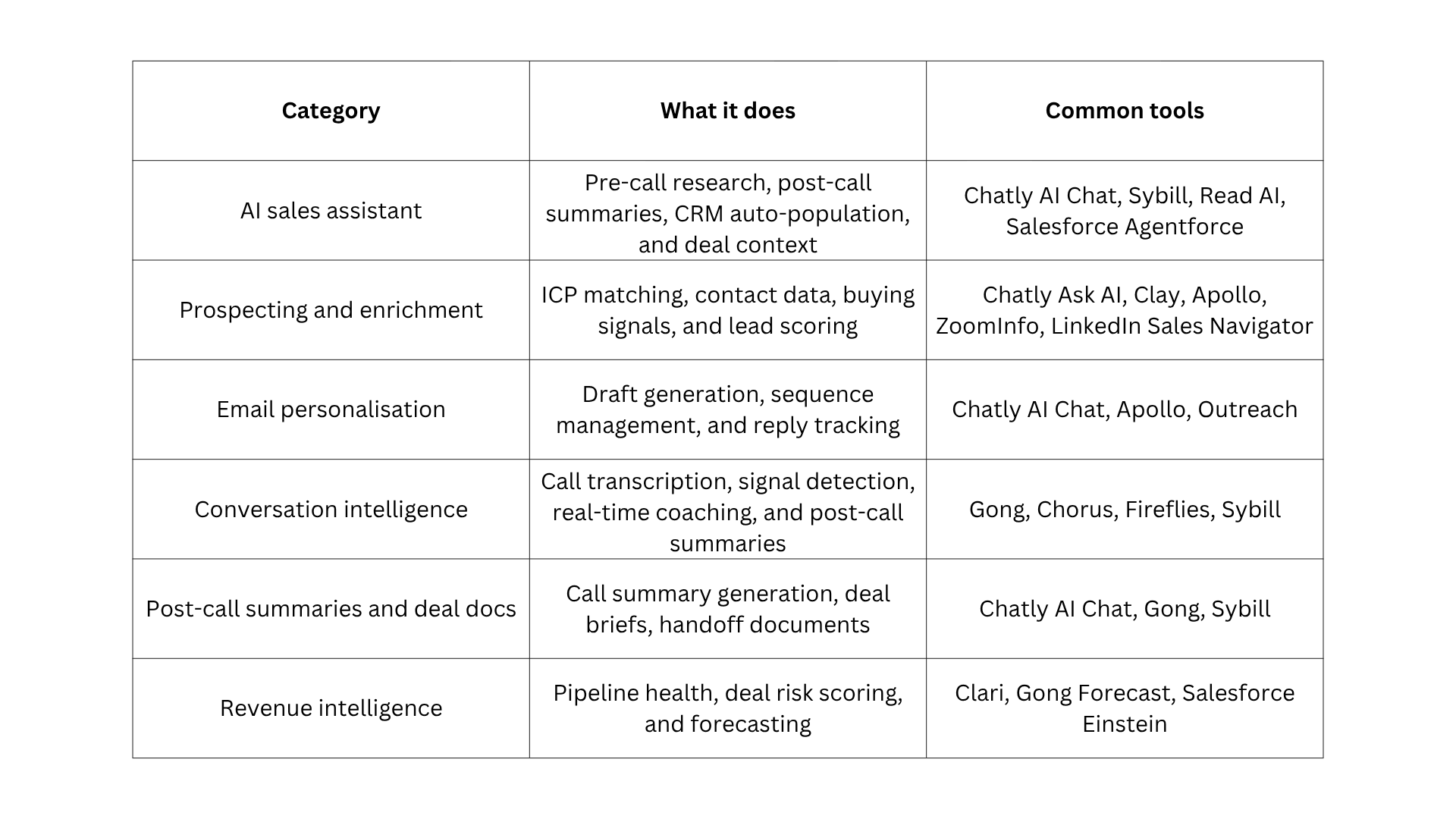
The email personalisation and outreach drafting tool handles call briefings, call summaries, deal summaries, and handoff documents without a dedicated platform. For teams starting with the email personalisation category, the AI search engine for real-time prospect signals surfaces the current company changes that make personalisation genuine.
For consistent output across these workflow categories, the guide to AI prompts for business writing and sales outreach covers the framing patterns that work at every stage.
Start Recovering the 72%
The 72% of the day your reps are not spending in actual selling conversations is not wasted because of effort. It is lost to tasks that AI can now handle in seconds.
Pick the one workflow stage where time loss is highest. Run the admin audit, identify that category, and implement one tool well before moving to the next. The compounding effect of fixing each stage is measurable at 30, 60, and 90 days.
The AI chat for sales teams handles call briefings, post-call summaries, deal documents, and outreach drafts in one workspace. Start there, measure the time recovered, and let the results determine what comes next.`
Frequently Asked Questions
Learn more about how to use AI for sales team.
More topics you may like