How to Make AI Cold Emails Sound Human
Making AI cold emails sound human is the problem every sales rep using AI for outreach runs into immediately. AI drafts fast, and it also produces output that sounds like every other email in your prospect's inbox.
This article is the editing system for fixing an AI-generated draft. What follows is a five-step editing process with a specific AI prompt at every step, a complete list of AI phrases to delete on sight, two full before-and-after rewrites, and the two prompts that produce cleaner first drafts before editing starts.
Why AI Cold Emails Sound Robotic to B2B Buyers
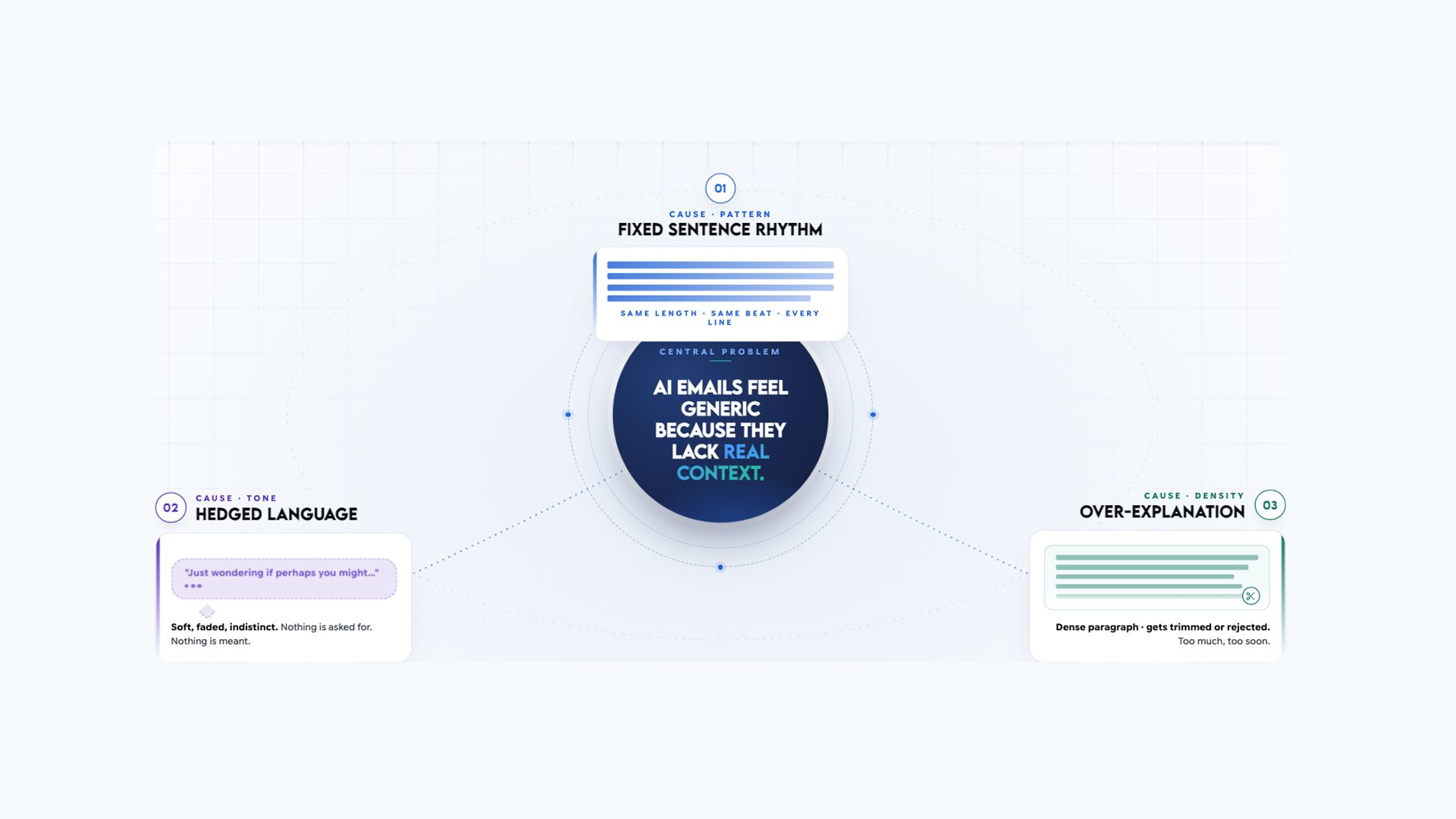
AI cold emails sound robotic because the model writes for the statistical average, not a specific person. Three patterns make this immediately recognisable: every sentence arrives at the same length, every claim is hedged to avoid being wrong, and the draft over-explains things a human would leave unsaid to create curiosity. Buyers can identify all three in under three seconds.
Pattern 1: Uniform Sentence Length
Every sentence in an AI-generated email arrives at roughly the same length, which is typically 15 to 22 words. Human writers vary their rhythm naturally without thinking about it. AI does not. AI-personalised outreach drives reply rates to 15 to 18% when done correctly, versus 1 to 2% for generic output.
The difference is in the editing, not the generation. The prospect research tool for finding buying signals produces the company intelligence brief that feeds the specific observation used in every prompt below.
How to spot it is by reading the email aloud. If every sentence ends at the same pace, it was generated, not written.
Here is a typical unedited AI paragraph with annotations:
"I wanted to reach out because I believe our platform could add significant value to your organisation." (17 words)
"We work with companies like yours that are experiencing challenges related to onboarding and ramp time." (16 words)
"Our solution has been proven to help sales teams reduce their time-to-quota across a variety of use cases." (18 words)
Sentence 1: 17 words. Sentence 2: 16 words. Sentence 3: 18 words. Metronomic.
What human rhythm looks like:
"Your team posted five AE roles last month." (8 words)
"That's a significant hiring push." (5 words)
"Teams at that stage usually start feeling the pressure on onboarding before the new reps even start." (17 words)
Pattern 2: Hedged Language In Email
AI hedges every claim to avoid being factually wrong. The result is language that reads as cautious, uncertain, and immediately identifiable as generated output. The delete reflex fires in milliseconds when buyers pattern-match these phrases.
The complete list of AI hedge phrases to delete on sight:
- "often tend to."
- "may be experiencing."
- "in some cases."
- "it could be argued."
- "potentially"
- "it is worth noting."
- "many organisations"
- "generally speaking"
- "typically" (unless data-backed)
- "might be relevant."
- "could be beneficial."
- "in today's fast-paced world."
- "in an ever-evolving landscape."
- "it's important to note."
The rule is that if a claim holds without the qualifier, it is stronger without it. If it does not hold without the qualifier, the claim should not be in the email.
Pattern 3: Over-Explanation: How AI Removes Curiosity
AI tries to be thorough. Cold emails that earn replies are deliberately incomplete. They say enough to create a question, not enough to answer it.
The test for every sentence in a draft: Does this sentence close a loop the reader should want to open? If yes, cut it.
Here is an over-explained AI email body:
"Our platform helps sales teams improve their onboarding process. It includes modules for training, performance tracking, and manager coaching. Most customers see results within 30 days of implementation. Our enterprise tier also includes dedicated support and custom reporting. I'd love to show you how it works."
Stripped version:
"We help SaaS teams cut new-rep ramp from 90 to 45 days. Worth a quick call this week?"
Two sentences. One question left open. The curiosity lives in what was not said.
Three Qualities That Make an AI Cold Email Sound Like a Human Wrote It
To write AI cold emails that sound human does not mean being casual. It does not require slang, typos, or deliberately imperfect grammar. Three qualities consistently separate AI cold emails that sound human from those that feel generated.
Quality 1: Specificity of the Email
The most reliable sign that AI cold emails sound human is one detail that could not have come from a template. Not a first name or company name in a bracket field, but something that required the sender to actually look at this company on this specific day.
Good example: "Your team posted 5 enterprise AE roles in the last 3 weeks." Specific. Dated. Verifiable. Requires research.
Bad example: "I noticed your company seems to be experiencing significant growth." Generic. Applies to any company. Requires no research.
Why it matters is that buyers in 2026 have developed a subconscious filter for cold email patterns. The delete reflex fires the moment an email lacks proof that the sender actually looked.
For the research workflow that surfaces this kind of specific, current observation, the AI search engine for finding real-time company signals surfaces hiring patterns, funding rounds, and leadership changes without opening multiple tabs.
Quality 2: Restraint In Writing
Human conversations do not try to resolve everything at once. An AI cold emails sound human should end before the reader is ready for it to end.
Over-explaining signals anxiety, and restraint signals confidence. An email that describes the product, the pricing, the implementation timeline, and the customer success process in 150 words signals that the sender is afraid of silence. A human who believes in what they sell says less because they expect the conversation to fill the rest.
Quality 3: Natural Rhythm In Writing
Humans use contractions. AI uses formal constructions. This single difference accounts for a significant portion of the robotic feel.
Complete swap list, apply to every draft:
- "we are able to" → "we can"
- "you may be experiencing" → "you might be dealing with"
- "I would like to" → "I'd like to"
- "it is possible that" → remove entirely
- "we are" → "we're"
- "you will" → "you'll"
- "I am" → "I'm"
- "do not" → "don't"
- "it is" → "it's"
- "they are" → "they're"
- "we have" → "we've"
- "I have" → "I've"
Time to apply: under 30 seconds per email using find-and-replace in any text editor.
The Five-Step System for Editing Any AI Cold Email Draft
This editing process is designed to take under two minutes per email. By running every AI-generated draft through these five steps before hitting send, your goal is not to completely rewrite the copy, but rather to systematically dismantle the telltale markers that make it sound machine-generated.
The ideal workflow utilizes a single AI chat session to handle all five prompts sequentially. This allows the conversational context to carry forward, enabling you to iterate on each step fluidly without constantly re-pasting the underlying draft.
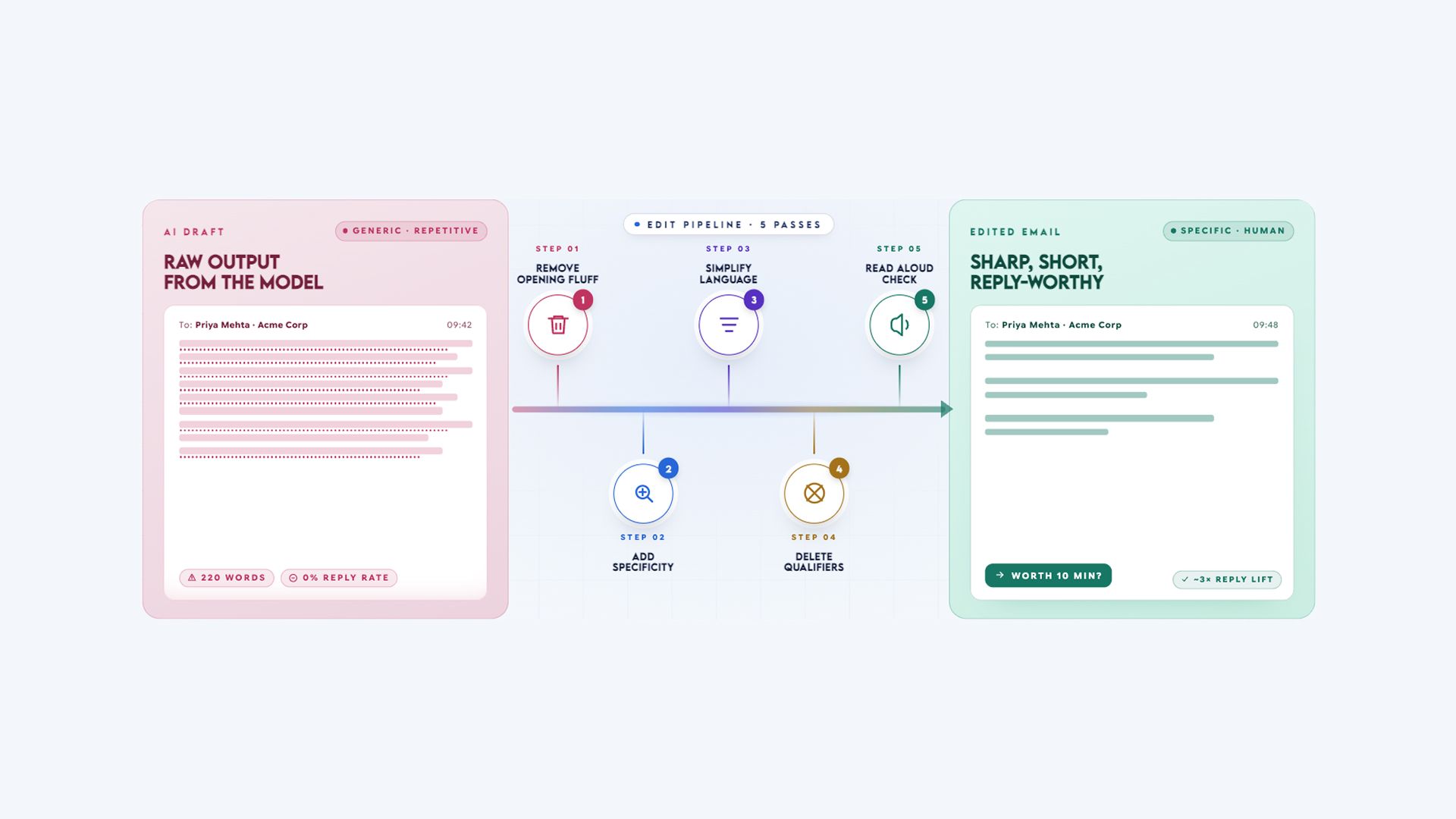
Here are the five steps to make sure AI cold emails sound human:
- Delete the first sentence
- Replace the generic claim with the specific signal
- Convert formal constructions to contractions
- Strip every qualifier from the draft
- Read it aloud before sending
Each step has one specific target. Here is how to apply each one.
Step 1: Delete the First Sentence and Map Onto Their World
Artificial intelligence almost always opens a cold draft with a generic context-setter, an insincere compliment, or a rigid statement about what the sender’s company does. Because these opening sentences exclusively serve the sender rather than the reader, you should delete them entirely.
The first sentence is the exact point where a prospect decides whether to engage or close the message, and an opener focused on yourself is the fastest path to the trash folder.
However, instead of simply shifting into a dry, robotic observation, you should frame your opening line strictly from their perspective or keep it refreshingly direct to project confidence.
- Before: "I hope this email finds you well. I am reaching out because I believe our platform could potentially be a great fit for your organisation, given that companies like yours often tend to experience challenges related to onboarding."
- After: "Your team posted five enterprise AE roles last month."
- With Nuance Applied: "Saw you're managing the growth team over at [Company] — wanted to put something brief in front of you regarding those five new enterprise AE roles."
By pivoting the very first line toward a real-world trigger, the email immediately focuses on the prospect's current situation.
AI Prompt
Read this email. Identify the first sentence. If it begins with a standard greeting, a statement about the sender's company, or an explanation of the sender's intent, delete it entirely.
Instead, open the email directly with the recipient's company situation or a refreshingly direct human opener—such as "Was just looking at [Company], thought I'd reach out directly" or "Saw you're over at [Company] — wanted to put something in front of you." Show me the updated email starting from this human opener. Email:
[paste draft]
Step 2: Replace Generic Claims with Frictionless Insights
Every AI-generated draft contains at least one placeholder sentence that is so vague it could be sent to any company within your target industry without changing a single word. You must find this generic sentence and aggressively replace it.
The ultimate test for any line in your email is whether it could seamlessly appear in a note to your prospect's closest competitor; if the answer is yes, it must be substituted with a specific observation derived from actual company intelligence.
When you replace this claim with a specific signal, ensure you are not simply dumping raw data or listing product features. Instead, frame the observation around a simple problem solved, eliminating dense corporate jargon that fatigues the reader.
- Before: "Companies like yours often struggle with lead qualification at scale."
- After: "Your team posted four BDR roles this week: fast hiring usually means lead volume is there, but qualification becomes the bottleneck."
This approach works because it requires genuine research, highlights a specific company event, and draws an intelligent implication that demonstrates a true understanding of their operational friction.
AI Prompt
Read this email draft. Find the single sentence that is most generic—the one that could apply to any competitor in this industry without changing a word. Replace it with the following specific observation:
[paste signal].
When rewriting this section, ensure you express a simple problem solved using natural, peer-to-peer language, while completely avoiding corporate jargon or product feature lists. Show me the full email with this replacement integrated. Email:
[paste draft]
Step 3: Convert Formal Constructions to Contractions
To make an email sound truly human, you must systematically replace stiff, formal language with conversational contractions. While artificial intelligence naturally defaults to an overly polite, rigid syntax, real people write with a smoother, more casual rhythm.
Beyond implementing a strict contraction swap list, you should look for subtle opportunities to inject a very small dose of dry, conversational personality or light, self-effacing humor to break through the recipient's defensive inbox fatigue.
- Before: "We can help sales teams that are experiencing challenges related to onboarding. It is possible that your team would benefit from seeing how we have helped similar organisations."
- After: "We help sales teams dealing with onboarding challenges. Here's a quick look at how we've smoothed out that process for similar teams: [result]."
AI Prompt
Edit this email by replacing every formal construction with its contracted equivalent using this swap list:
- “we are able to” → “we can”
- “you may be experiencing” → “you might be dealing with”
- “I would like to” → “I’d like to”
- “it is possible that” → remove entirely
- “we are” → “we’re”
- “you will” → “you’ll”
- “I am” → “I’m”
- “do not” → “don’t”
- “it is” → “it’s”
- “we have” → “we’ve” Additionally, look for opportunities to add a very small amount of casual, peer-level human personality, such as a short conversational parenthetical or natural aside, without changing the core business intent of the message. Do not make the email sound more “salesy” or overfriendly. The goal is to make it sound like it came from a real person writing quickly and confidently. Show the edited version. Email: [paste draft]
Step 4: Strip Every Qualifier and Enforce Punctuation Limits
You should delete every single qualifier on sight because if a business claim holds weight without them, it becomes significantly stronger, and if it relies on them to survive, the claim should be cut entirely.
Furthermore, AI drafts tend to over-interrogate the reader by stacking multiple questions or overhyping the copy with exclamation points. To prevent your email from looking like a high-pressure sales pitch or a chaotic wall of text, you must adhere to a strict layout rule: allow only one question mark and a maximum of one exclamation point per email.
Please review and remove the following qualifiers from your draft:
- "often tend to."
- "potentially"
- "in some cases."
- "somewhat"
- "it could be argued."
- "it is worth noting"
- "many organisations"
- "generally speaking"
- "typically" (unless backed by a specific stat)
- "might be relevant."
- "could be beneficial."
- "in certain situations."
- "as you may know."
- "as I'm sure you're aware."
Before: "Companies at your stage often tend to potentially benefit from improved onboarding processes."
After: "Companies at your stage cut ramp time by 40% when they systematise onboarding."
AI Prompt
Edit this email by removing every instance of the following qualifying phrases: "often tend to", "potentially", "in some cases", "somewhat", "it could be argued", "it is worth noting", "many organisations", "generally speaking", "might be relevant", "could be beneficial", "in certain situations", "as you may know", "as I'm sure you're aware". If removing a qualifier makes a sentence unclear, rewrite it to make a direct, confident claim instead.
Finally, enforce these formatting guardrails: ensure there is exactly one question mark in the entire email to avoid sounding like an interrogation, and restrict the layout to a maximum of one exclamation point. Show the edited version.
Email:
[paste draft]
Step 5: Read the Draft Aloud and Shrink the Call to Action
Any phrase you stumble over when reading your email aloud is a phrase your prospect will mentally stumble over as well, meaning you should rewrite anything you would not naturally say in a direct conversation. The final pass must specifically focus on optimizing your closing call to action.
AI drafts routinely ask for heavy, high-friction commitments like a 30-minute meeting or a calendar booking, which immediately feels like work to a busy professional. By reducing the friction of your final ask, you can secure a simple sign of life and build conversational momentum.
When executing this final pass, eliminate the following corporate clichés:
- "I hope this finds you well."
- "I'd love to connect."
- "Please don't hesitate to reach out."
- "Would love to learn more about your needs."
- "I wanted to touch base."
- "I'm reaching out because."
- "At your earliest convenience."
- "Looking forward to hearing from you."
- "Feel free to let me know."
- "I look forward to potentially."
Your target length after completing all five steps should sit between 60 and 100 words comfortably. If the draft still exceeds 125 words, delete the paragraph you feel most creatively attached to, as that is almost always the section doing the least amount of actual work for the reader.
AI Prompt
Read this email aloud to analyze its rhythm and execute a final human-centric pass based on these criteria:
- Identify and remove any remaining formal phrases or robotic sign-offs, specifically including: "I hope this finds you well", "I'd love to connect", "please don't hesitate", "at your earliest convenience", "I'm reaching out because", and "looking forward to hearing from you".
- Flag any sentence that spans over 25 words to keep the flow smooth and conversational.
- Optimize the closing call to action into a low-friction "small ask." If the goal is an introduction, use a line like: "Who might care about this on your team?" or "What do you guys use to [insert function] right now?" If the goal is to start a conversation, use a line like: "Hoping to be a brief part of your day. What's your schedule look like?" or "I suspect we'd be helpful — who do you think I should talk to?"
- Perform a final visual "squint test" to ensure the paragraphs are short, broken up, and entirely free of the dense formatting characteristic of automated sales templates.
Before and After: Two Full B2B Cold Email Rewrites
The pairs below show the full transformation. Each one is a realistic AI-generated draft. Each step is what the five-step edit produces. The only change is applying the system, not a complete rewrite.
Example 1: VP of Sales, Hiring Signal
Prospect: VP of Sales, Series B SaaS, 120 employees Signal: Hired 4 new enterprise AEs last month
Before (unedited AI output):
Subject: Exploring Growth Opportunities at [Company]

I hope this email finds you well. I am reaching out because I believe our platform could potentially be a great fit for your organisation, given that companies like yours often tend to experience challenges related to onboarding and ramp time as they scale their sales teams. We are able to help SaaS companies that are experiencing these issues to reduce their time-to-quota significantly. I would love to schedule a brief call at your earliest convenience to explore whether this could be relevant for your team.

Best regards,
After (five-step edit applied):
Subject: Your AE expansion last month

[Name],

[Company] added four enterprise AEs last month. That kind of expansion usually raises questions about onboarding consistency before the new reps hit the floor. We help SaaS teams cut new-rep ramp from 90 to 45 days. Worth a quick call this week?
What changed is that I deleted the opener, removed all qualifiers, replaced the generic challenge with the signal-based observation, converted formal constructions, and cut word count from 89 to 47. The after version could only have been written after looking at this company today.
The before version could have been sent to any company in the industry. For the full nine-step process for writing the initial email before this editing stage, see the four-part prospecting email writing framework.
Example 2: Head of Revenue Operations, CRM Migration Signal
Prospect: Head of Revenue Operations, Series C, 300 employees Signal: Migrated from Salesforce to HubSpot
Before (unedited AI output):
Subject: Streamlining Your Revenue Operations

Hi [Name], I hope you're doing well. I'm reaching out because I believe there could potentially be an opportunity to explore how our analytics platform might be relevant for revenue operations teams like yours, particularly given that many organisations in your space often tend to experience challenges with reporting accuracy and data visibility during technology transitions. We are able to provide comprehensive solutions that have helped similar companies improve their operational efficiency. I would love to connect for a brief demonstration at a time that works for you.
After (five-step edit applied):
Subject: [Company]'s Salesforce to HubSpot migration

[Name],

[Company] recently moved from Salesforce to HubSpot. Teams at that migration point usually find the reporting layer takes the longest to stabilise: the CRM's live but the dashboards don't yet reflect how leadership actually reviews pipeline. We help RevOps teams at Series C companies rebuild that reporting layer in under 30 days without touching the CRM setup. Open to a quick call?
What changed: deleted the opener, removed "potentially," "often tend to," "many organisations," and "might be relevant," replaced the generic challenge with the migration-specific observation, and converted formal constructions throughout. The bridge in the after version is framed through the RevOps lens: reporting accuracy and CRM hygiene, not generic efficiency.
For the complete RevOps role-specific framing guide with templates for every signal type, see copy-paste B2B cold email templates. The AI document generator for producing role-differentiated email sets converts the role-specific prompt output into a formatted set across all four buying committee roles.
Two AI Prompts That Produce Better First Drafts
Better input to AI produces better first drafts. When the draft starts closer to human, the five-step edit takes one minute instead of two. These two prompts produce drafts that require the minimum amount of editing.
Prompt 1: Trigger-Based Cold Email Prompt for B2B Sales
Use when you have a specific company signal and want a human-sounding first draft before applying the five-step edit.
Write a B2B cold email for a sales rep.

Signal observed: [paste signal].
Recipient: [First Name], [Title] at [Company].
Our value: [one-sentence outcome with metric].

Rules:
- Under 100 words total
- Open with the signal as a plain fact, not a compliment
- No "I hope this finds you well."
- No "I'd love to connect."
- No qualifiers: remove "often", "tend to", "potentially", "may be"
- Use contractions throughout
- End with one low-friction question
- Tone: direct, like a senior sales rep talking to a peer,
  not a platform communicating to a customer

Structure:
Sentence 1: the signal as a plain fact
Sentence 2: What this typically means for someone in their role
Sentence 3: what we help achieve (with metric)
Sentence 4: one question
The word limit prevents over-explanation, the tone instruction prevents formal constructions, the structure instruction prevents the generic opener, and the explicit exclusions prevent qualifiers from appearing in the first draft.
Prompt 2: Role-Specific Angle Prompt for Different B2B Personas
Use when the signal is the same, but you are writing to different roles on the buying committee and need the value claim adjusted per role.
Write a B2B cold email for a [job title: e.g., CFO / VP Sales / CTO / Head of RevOps].

Signal: [paste signal].
Company: [company name and stage].

Frame the relevance bridge through this lens:
- CFO: cost per outcome, ROI, payback period
- VP Sales: ramp time, pipeline velocity, quota attainment
- CTO: integration risk, security, implementation timeline
- Head of RevOps: CRM hygiene, process consistency, stack fit

Apply the same writing rules as Prompt 1 above.
Output the email only.
For applying this editing process across 50 emails at once, see how to apply this editing process across 50 emails at once. For building the complete email set across different roles from a single signal, the AI document generator for formatted sales email sets converts either prompt's output into a clean, formatted draft ready for the five-step edit.
The One-Signal Rule: Why More Personalisation Backfires
You need to send one signal per email, not three.
Using multiple signals does not compound the personalisation effect. It shifts the email from "this person did their homework" to "this person has been watching me." Buyers in 2026 have developed a subconscious filter for cold email patterns: excessive personalisation triggers the same delete reflex as generic templates.
What makes a signal strong enough to use as the single observation:
- Recent: within the last 30 days
- Public: verifiable from a publicly available source
- Connectable: you can draw a straight line from this signal to the problem you solve in one sentence
For the workflow to find strong, recent signals efficiently, see how to find the signal before writing. The AI search engine for researching current prospect signals surfaces recent hiring patterns, funding announcements, and leadership changes without manually checking multiple sources.
For copy-paste B2B email templates already built around the one-signal principle, see the B2B sales email templates and sequences guide.
Frequently Asked Questions
Learn more about how to personlise cold emails.
More topics you may like