B2B Sales Email Templates, Sequences, and Multi-Channel Outreach Guide
Most B2B sales emails fail before the prospect even finishes reading the first sentence. Not because the writing is bad, but because there is no specific reason for that person to care. A generic pitch sent to a list of 500 people looks exactly like what it is. A well-timed email built around a real signal, framed for the right role, and structured around a single ask looks like homework.
58% of replies come from the first email, and the remaining 42% come from follow-ups. Multi-channel sequences generate 40% higher engagement than single-channel email alone. This article covers B2B sales email templates, sequences, role personalisation, and multi-channel coordination.
What Makes a B2B Sales Email Template Actually Work
A B2B sales email template works when it provides structure, not personalisation. The signal, the company-specific implication, and the value claim must come from research. Templates fail when sent without replacing the observation with something specific to this company at this moment. The template is the frame. The research is what fills it.
Three things that effective B2B sales email templates contain:
- A signal-based opening: one specific, verifiable fact about this company that required research today
- A one-sentence relevance bridge connecting that fact to a business challenge the recipient owns
- One low-friction ask that makes it easy to say yes without implying a large commitment
You can customise any B2B sales email template in AI Chat for writing and iterating sales email drafts by pasting the signal, role, and value claim. Context carries forward across the session, so you can iterate without starting over.
14 B2B Sales Email Templates That Get Replies
Every B2B sales email template below follows the four-part framework above. Each one includes a subject line, a full email body, and a breakdown of why it works. Your subject line decides whether your email gets opened or ignored. Keep it 3 to 7 words, lead with specificity, and avoid clickbait.
1. The AIDA Template
AIDA walks a prospect through a natural buying journey: grab attention, build interest, create desire, and close with one clear action. Use it as your default all-purpose cold outreach template when you have a compelling customer story.
Subject: [Role] at [Company]—quick question
Hi [First Name],
If you are like most [role], you know how hard it is to [problem]. It compounds over time and becomes the thing that stops the team from hitting [metric].
Our [product/service] solves this by [one-sentence outcome claim]. Here is what [similar company] said after three months: "[specific testimonial with metric]."
Want [key benefit] without [common obstacle]? Reply with the best time to connect next week.
[Your name]
The email opens on the prospect's pain, not the product. The testimonial provides third-party proof before the ask. The CTA removes friction by making the reply the only required action.
2. The BAB (Before-After-Bridge) Template
BAB works by contrasting your prospect's current pain with a better future and presenting your product as the path between the two. Use it when you want to show a concrete, motivating transformation.
Subject: What would [Company] do with [benefit]?
Hi [First Name],
Right now, [company-type] teams like yours are spending [X hours/dollars] on [problem]. That is time and budget that is not going toward [strategic priority].
[Customer name], who operates in a similar space, reduced that by [specific percentage] in [timeframe] using [your product]. They now [what they do instead with the recovered resource].
I am confident we can get [Company] to a similar place. Are you free for a quick demo next week—15 minutes is enough to see if it is a fit?
[Your name]
The before paints a cost the prospect recognises. The after makes the outcome concrete and credible through a named customer. The bridge makes the transition feel achievable rather than aspirational.
3. The PAS (Problem-Agitate-Solution) Template
PAS focuses on pain avoidance, which is one of the strongest motivators in B2B decision-making. Name the problem, make the consequence feel real, then offer the resolution. Use it when your prospect feels a specific frustration strongly.
Subject: Does [Company] deal with [specific problem]?
Hi [First Name],
Does [Company] struggle with [problem]? Most [industry] teams face this, and left unaddressed, it can cost [specific stat or consequence—time, revenue, headcount].
The issue is that [reason the problem persists despite effort]. That is where most teams get stuck.
Our [product/service] helps you avoid that with [specific benefit]. We helped [company] go from [before state] to [after state] in [timeframe].
Are you open to a quick call on [date]? I can show you specifically how it applies to [Company].
[Your name]
The problem-agitate step builds genuine urgency before the solution is mentioned. The case study makes the solution concrete. The CTA connects the conversation to the prospect's specific situation.
4. The SAS (Star-Arch-Success) Template
SAS uses storytelling to create emotional engagement. Introduce a customer who faced the same problem, walk through their journey, and reveal how they won. Use it when you have a strong case study that maps closely to the prospect's situation.
Subject: How [Star Company] solved [problem] in [timeframe]
Hi [First Name],
In [year], [star company] was dealing with [problem] and needed [result] without adding headcount. They had tried [previous approach], and it had not worked.
Here is what changed: [one-sentence description of the solution and the shift it enabled]. Within [timeframe], they had [specific, measurable result].
[Your company] made that possible. We have delivered similar outcomes for [company 1] and [company 2], both of whom were at a similar stage to [Company] when they started.
Can I send you a personalised breakdown showing how this would apply to [Company's] current situation?
[Your name]
Narrative structure builds emotional investment before the value claim lands. Named outcomes and multiple proof points create credibility. The personalised breakdown offer is a lower-commitment CTA than a call.
5. The Relevant Question Template
Opening with a specific, well-researched question signals low commitment and pulls the prospect in naturally. Generic questions get ignored. A question that speaks directly to a known pain point earns a genuine response.
Subject: Quick question about [their specific focus area]
Hi [First Name],
Want to see how you can [key benefit] without [most common obstacle your ICP faces]?
I have been working with [company type] teams on this and spotted two things that consistently make a difference: [Tip 1] and [Tip 2].
You may not have the bandwidth to action these alone, and that is exactly where [your company] comes in. We help [ICP description] [outcome with metric].
Would a 15-minute call next week work for you? I can walk through how both of those ideas apply specifically to [Company].
[Your name]
Leading with tips creates genuine value before the pitch. The tips do the credibility work, so the company mentions landing as a natural next step rather than an interruption.
6. The Website Visit Template
When a prospect has already visited your site, they have shown interest without being asked. This template turns that signal into a conversation without feeling intrusive.
Subject: You visited [page]—one thought
Hi [First Name],
[Resource 1: title and one sentence on what it covers] [Resource 2: title and one sentence on what it covers]
Beyond those, [your company] helps [ICP] achieve [specific result]. We worked with [similar company] recently and [one-sentence outcome].
Are you free for a 10-minute call this week? I can answer any questions your research raised.
[Your name]
The visit signal gives the rep permission to reach out. Leading with resources instead of a pitch earns goodwill. The case study adds credibility without overwhelming the email.
7. The Better Way Template
This template works best when your prospect is stuck using an outdated process or a slow workaround. You name their specific bottleneck and show them a faster path forward.
Subject: A faster way to handle [bottleneck]
Hi [First Name],
Handling [bottleneck or inefficiency] the traditional way takes [X hours/dollars] your team does not have. Most [role] teams use [common workaround], which creates [downstream problem] over time.
We built [product/service] specifically to solve this. It lets you [specific improvement] without [the usual implementation cost or workflow disruption].
We helped [company name] go from [before] to [after] in [timeframe] using this approach.
Can I get 15 minutes with you this week to show you how it would work for [Company]?
[Your name]
Naming the workaround signals research and builds credibility before the product is mentioned. The before-and-after case study makes the outcome tangible. The time-bounded CTA respects the prospect's calendar.
8. The Competitor Satisfaction Template
If your prospect is already in the buying cycle, they are likely evaluating your competitors. This template opens the comparison conversation naturally, without badmouthing anyone, and lets your USP do the work.
Subject: How does [competitor] work for [Company]?
Hi [First Name],
I noticed [Company] is using [competitor product]. How has that been working for you?
I work at [your company], and we offer something similar with one key difference: [clear, specific USP or differentiator that addresses a known limitation of the competitor].
Teams that switched from [competitor] to [your product] typically see [specific outcome] within [timeframe]. [Company 1] and [Company 2] are two recent examples.
It may or may not be a better fit for [Company]. How does [date] look for a quick 10-minute call to compare?
[Your name]
The opening question is genuinely curious, not combative. The USP is specific and directly addresses a real competitor limitation. The examples reduce the risk of the comparison feeling like a sales pitch.
9. The Valuable Resource Template
Not every cold email should ask for a meeting. When a prospect is in research mode, leading with a useful resource builds trust and gets you on their radar before the pitch ever lands.
Subject: Thought this might be useful for you
Hi [First Name],
It covers [one-sentence summary of what makes it relevant to their role/challenge]. No pitch attached. Just thought the timing was right given what you are working on.
If you ever want to compare notes on [relevant topic], I am always happy to connect.
[Your name]
Why it works: The compliment is specific and earned. The resource is relevant rather than promotional. The email ends with a soft offer rather than a hard ask, which makes the prospect more likely to reply when they are ready.
10. The Gatekeeper Bypass Template
Generic "who should I speak to?" emails get deleted instantly. This template shows you have done your research, references specific contacts, and gives the recipient a real reason to redirect you.
Subject: [First Name]—right person to speak with?
Hi [First Name],
I am [your name], [role] at [your company]. We help [type of company] solve [problem] through [one-sentence pitch].
Based on your profile, you look like the right person to connect with. If not, could you point me toward whoever owns [relevant function] at [Company]?
Happy to keep this to 10 minutes. Does [date] work?
[Your name]
Naming other contacts signals that the rep is serious and organised. The outcome reference creates curiosity without requiring the gatekeeper to evaluate the product. The short time ask reduces the barrier to a warm redirect.
11. The Recent News Template
Reaching out after a notable win gives you a natural, timely reason to start a conversation. This template acknowledges the achievement without leading with a pitch.
Subject: Congrats on [recent news]
Hi [First Name],
Congratulations on [specific recent news or achievement]. What your team has built is clearly making an impact in [industry], and [specific detail that shows you read the announcement] stands out.
I work at [your company], and we work with [similar companies] on [relevant challenge that often follows this type of growth event].
I am not sure if the timing is right, but if [relevant challenge] becomes a priority as [Company] scales, we would love to be useful.
Either way, looking forward to seeing what you build next.
[Your name]
The specificity of the observation shows genuine attention. Closing without a hard ask creates goodwill rather than pressure. The email plants a seed for future outreach without demanding an immediate decision.
12. The Social Proof Template
Recognisable client names reduce perceived risk and build credibility instantly. If you have worked with companies your prospect knows and respects, let those results do the convincing.
Subject: How [well-known company] achieved [result]
Hi [First Name],
I recently helped [well-known company] achieve [specific result with metric], and it has become one of our strongest case studies. The situation they were in before we started looks a lot like what I see at [Company] based on [specific observation or signal].
We have delivered similar outcomes for [company 1] and [company 2]. Both were at roughly the same stage [Company] is at now.
[Your name]
The specific observation connecting the case study to the prospect makes the social proof feel targeted rather than generic. The stage match increases relevance. The 5-minute ask removes the commitment barrier.
13. The Genuine Compliment Template
A specific, research-backed compliment opens doors that a generic pitch never will. This template builds real rapport by showing you paid attention before you ever hit send.
Subject: Your piece on [topic]—genuinely useful
Hi [First Name],
I will keep this brief. We have put together a personalised look at how [Company] could [achieve a specific result relevant to their content] using the approach we used for [comparable company].
Would you be open to a 15-minute call to see if it is worth exploring?
[Your name]
The compliment is specific enough to prove the rep actually consumed the content. Connecting the outreach to the prospect's own thinking creates intellectual continuity. The outcome offer feels like a natural extension of the conversation they already started publicly.
14. The "Up to You" Template
Pushing too hard is the fastest way to lose a prospect. This template hands full control to the reader, removes sales pressure entirely, and earns replies through curiosity.
Subject: Two quick things for [Company]
Hi [First Name],
I came across [Company] while researching [relevant area] and noticed you are making solid progress with [specific observation].
I work with [role type] at similar-stage companies, and I spotted two things that could accelerate what you are already doing: [Tip 1] and [Tip 2].
There is a third, but I did not want to overwhelm you in one email.
If those two are useful, just reply, and I will send the third one over. No call required, no pitch attached. Completely up to you.
[Your name]
The open loop of a withheld third tip creates genuine curiosity without pressure. The "no call required" removes the most common objection before it can be raised. The control handed to the reader makes the reply feel like their idea.
Knowing which B2B sales email template to send is only half the equation. The next section covers when to send it, who to send it to, and how to follow up in a way that keeps getting replies rather than burning the relationship.
Trigger-Based Sales Email Templates
Each trigger-based B2B sales email template opens with a signal placeholder. Replace the placeholder with the real, current observation before sending. For how to find that signal efficiently, see how to research and qualify sales leads with AI. The AI search engine for finding real-time company signals surfaces hiring patterns, funding announcements, and leadership changes across your prospect list without opening multiple tabs.
Hiring Surge Template
When to use: Prospect is rapidly hiring in the team that uses or influences your product Role: VP of Sales
Subject: [X] new [role] hires: quick question
Body: [Company] posted [X] [role] roles in the last [timeframe]. That kind of expansion usually raises questions around [specific challenge]. We help [ICP companies] [outcome in measurable terms]. Worth a quick call this week?
Why it works: The opening is verifiable and current. The bridge names the challenge without mentioning the product. The CTA asks for one specific small thing.
AI customisation prompt:
Using this template as a structure, write a prospecting email for [First Name], [Title] at [Company]. Signal: [paste signal]. Our outcome: [paste value claim with metric]. Keep under 80 words. No qualifiers. Use contractions. No "I noticed". No "I hope this finds you well".
Funding Round Template
When to use: Prospect recently raised capital with stated GTM use Role: Head of Revenue Operations
Subject: Saw the [round]: one question
Body: [Company] closed a [round size] [round] [X] days ago with stated use for GTM expansion. At that stage, teams usually feel pressure around [specific bottleneck] before headcount or tooling catches up. We help [ICP] [outcome]. Open to a 10-minute call this week?
Why it works: The signal is dated and specific. The bridge names a pattern GTM leaders recognise. The CTA includes a time-specific ask.
AI customisation prompt:
Write a cold email for [First Name], [Title] at [Company]. Signal: they closed a [round size] [round] [X] days ago. Bridge: frame around the operational challenge that follows GTM expansion. Value claim: [paste your outcome with metric]. Keep under 90 words. Use contractions. No qualifiers.
Leadership Change Template
When to use: New executive in the buying role within the last 90 days Role: New VP or Director
Subject: [Company] + new [role]: relevant?
Body: Congrats on stepping into the [role] position at [Company]. New [roles] typically evaluate the current [tool/process] setup within the first 90 days, especially if [specific inherited pain] was not designed for your current stage. We help [ICP] [outcome]. Would you have a few minutes to chat this week?
Why it works: The bridge frames an inherited problem without assuming. The timing acknowledges the 90-day evaluation window every new executive runs.
AI customisation prompt:
Write a cold email for [First Name], who recently joined [Company] as [Title]. Signal: they started in this role [X] weeks ago. Bridge: frame around the stack evaluation new executives run in their first 90 days. Value claim: [paste outcome]. Keep under 90 words. Use contractions.
Technology Migration Template
When to use: Company switching from a legacy platform or adopting a new tool in your category Role: CTO or Head of RevOps
Subject: [Company]'s [tool] migration
Body: [Company] recently migrated from [old tool] to [new tool]. That usually means the rest of the stack gets evaluated for fit at the same time. We work with [ICP] teams at that transition point to [outcome]. Worth a quick conversation?
Why it works: Technology change signals that buying discussions are already in motion. The bridge positions the rep as someone who understands the evaluation context.
AI customisation prompt:
Write a cold email for [First Name], [Title] at [Company]. Signal: they recently migrated from [old tool] to [new tool]. Bridge: frame around the adjacent needs that emerge during a technology transition. Value claim: [paste outcome]. Keep under 80 words. No qualifiers.
Product Launch or Market Expansion Template
When to use: Company announced a new product, market entry, or strategic partnership Role: VP of Sales or CMO
Subject: Saw the [announcement]
Body: [Company] just [launched/expanded into / announced]. That kind of growth move typically surfaces [specific operational challenge] quickly. We help [ICP] [outcome]. Open to a short call?
AI customisation prompt:
Write a cold email for [First Name], [Title] at [Company]. Signal: they recently [announcement]. Bridge: connect the growth move to the operational challenge that typically follows expansion. Value claim: [paste outcome]. Keep under 80 words.
Role-Based B2B Email Templates: Same Signal, Different Lens
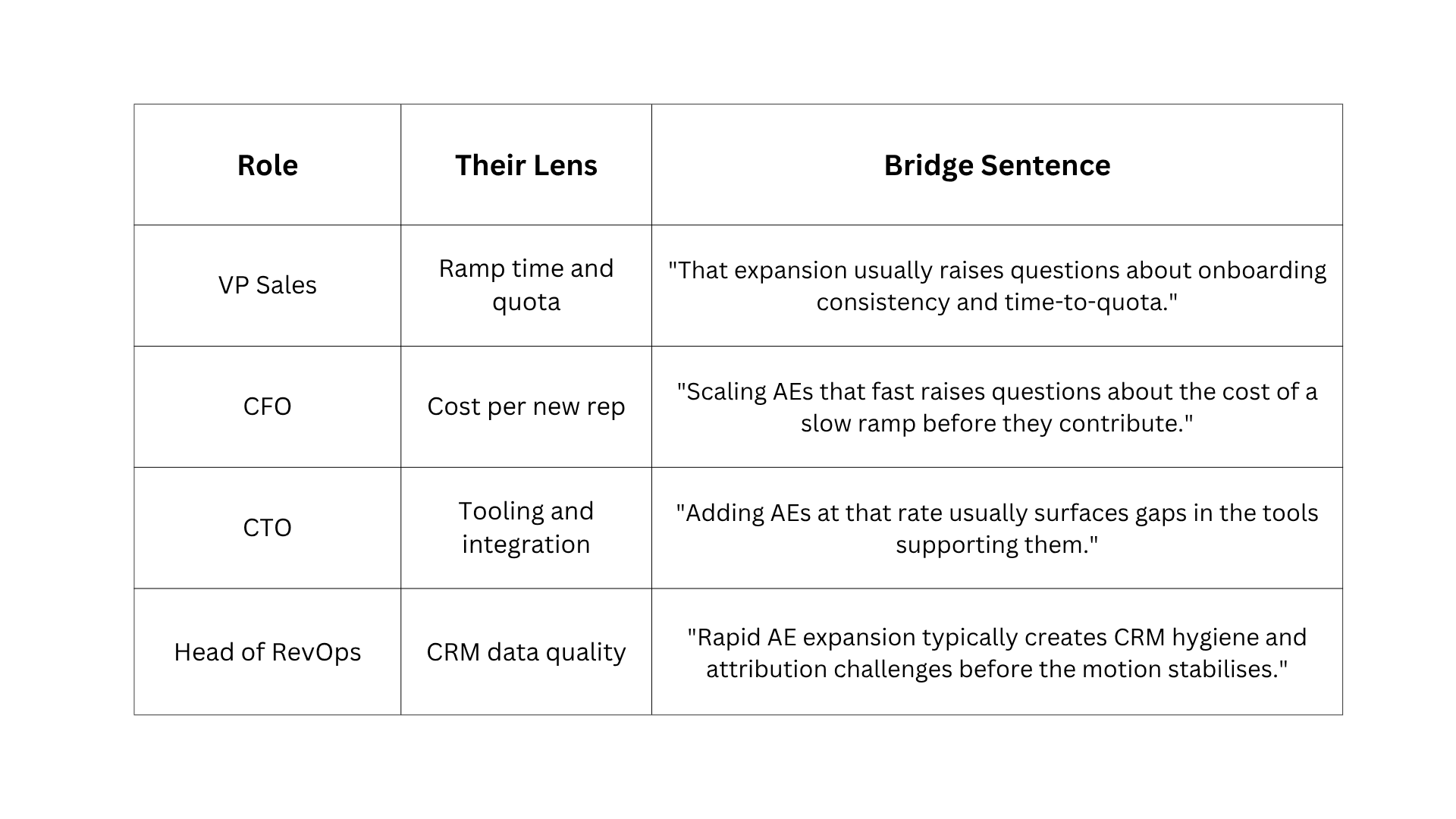
The average B2B buying committee includes 11 to 13 stakeholders. A single B2B sales email template sent to the whole committee rarely works. The same signal means ramp time to a VP of Sales, cost to a CFO, integration risk to a CTO, and CRM quality to a Head of RevOps. Role-based personalisation is not different templates. It is the same template framed through each role's specific lens.
Signal used in examples below: company hires five enterprise AEs
AI prompt for all four versions at once:
Given this signal: [paste signal], write four one-sentence bridge sentences: one for a VP of Sales, one for a CFO, one for a CTO, and one for a Head of Revenue Operations. Connect the signal to the specific challenge most relevant to that role. No product mentions. No qualifiers.
For generating all four role versions from a single signal in one session, the prospect research and drafting tool handles both the research brief and the role-differentiated email set in one workspace.
Email Template for CFOs
CFOs care about ROI, cost per outcome, payback period, and risk exposure. Do not include features, productivity language without numbers, or vague efficiency claims.
Subject: Cost of slow ramp: quick question
Body: Your team hired [X] enterprise AEs last month. A 90-day ramp versus a 45-day ramp on [X] new reps adds up to [calculated cost gap] in delayed quota attainment. We help SaaS CFOs recover that cost through structured onboarding that cuts new-rep ramp in half. Worth a quick call?
AI prompt:
Write a cold email for a CFO at [Company] based on this signal: [signal]. Frame the bridge as a cost story: what is the financial consequence if this signal goes unaddressed? Include one specific dollar amount or percentage in the value claim. Keep under 90 words. Use contractions.
Email Template for VPs of Sales
VPs of Sales care about pipeline velocity, ramp time, quota attainment, and meeting volume.
Subject: [X] new AEs: ramp question
Body: Your team hired [X] enterprise AEs last month. That pace usually raises one question fast: how long before they are at quota, and how consistent is the answer across the cohort? We help SaaS sales teams cut new-rep ramp from 90 to 45 days. Worth a quick call this week?
AI prompt:
Write a cold email for a VP of Sales at [Company] based on this signal: [signal]. Frame the bridge around the pipeline and quota impact. Use ramp time or meeting volume as the value metric. Keep under 90 words. Use contractions.
Email Template for CTOs and VPs of Engineering
CTOs care about integration complexity, security, implementation timeline, engineering overhead, and build versus buy.
Subject: [New tool adoption]: integration question
Body: Noticed [Company] recently adopted [new tool]. Integrating that into an existing stack at your stage usually creates questions about maintenance overhead and API reliability. We help engineering teams at Series B companies implement [product category] with under four hours of engineering time. Open to a 10-minute call?
AI prompt:
Write a cold email for a CTO at [Company] based on this signal: [signal]. Frame the bridge around integration risk and engineering overhead. Keep the value claim focused on implementation simplicity and reliability. Keep under 90 words.
Email Template for Heads of Revenue Operations
Heads of RevOps care about process consistency, CRM hygiene, data quality, reporting accuracy, and stack fit without new maintenance.
Subject: [Signal]: RevOps question
Body: Your team recently [signal]. At [company stage], that usually surfaces data quality and reporting issues: the operations are moving faster than the systems tracking them. We help RevOps leaders at Series B companies get consistent pipeline reporting without adding a new tool to maintain. Worth a 10-minute call?
AI prompt:
Write a cold email for a Head of Revenue Operations at [Company] based on this signal: [signal]. Frame the bridge around process consistency and reporting accuracy. Keep under 90 words. Use contractions.
For how to apply these role-specific templates across a full prospect list efficiently, see how to do cold email personalization at scale.
For building and reviewing the full role-differentiated email set from a single input brief, the AI chat for batch drafting role-specific emails handles all four versions in one session.
The 5-Touch Cold Email Follow-Up Sequence
4 to 6 touch sequences achieve 3x the response rate of standalone emails. Follow-ups generate 42% of all campaign replies. 48% of reps never send a second message, which means they abandon the sequence at exactly the point where most replies are still to come.
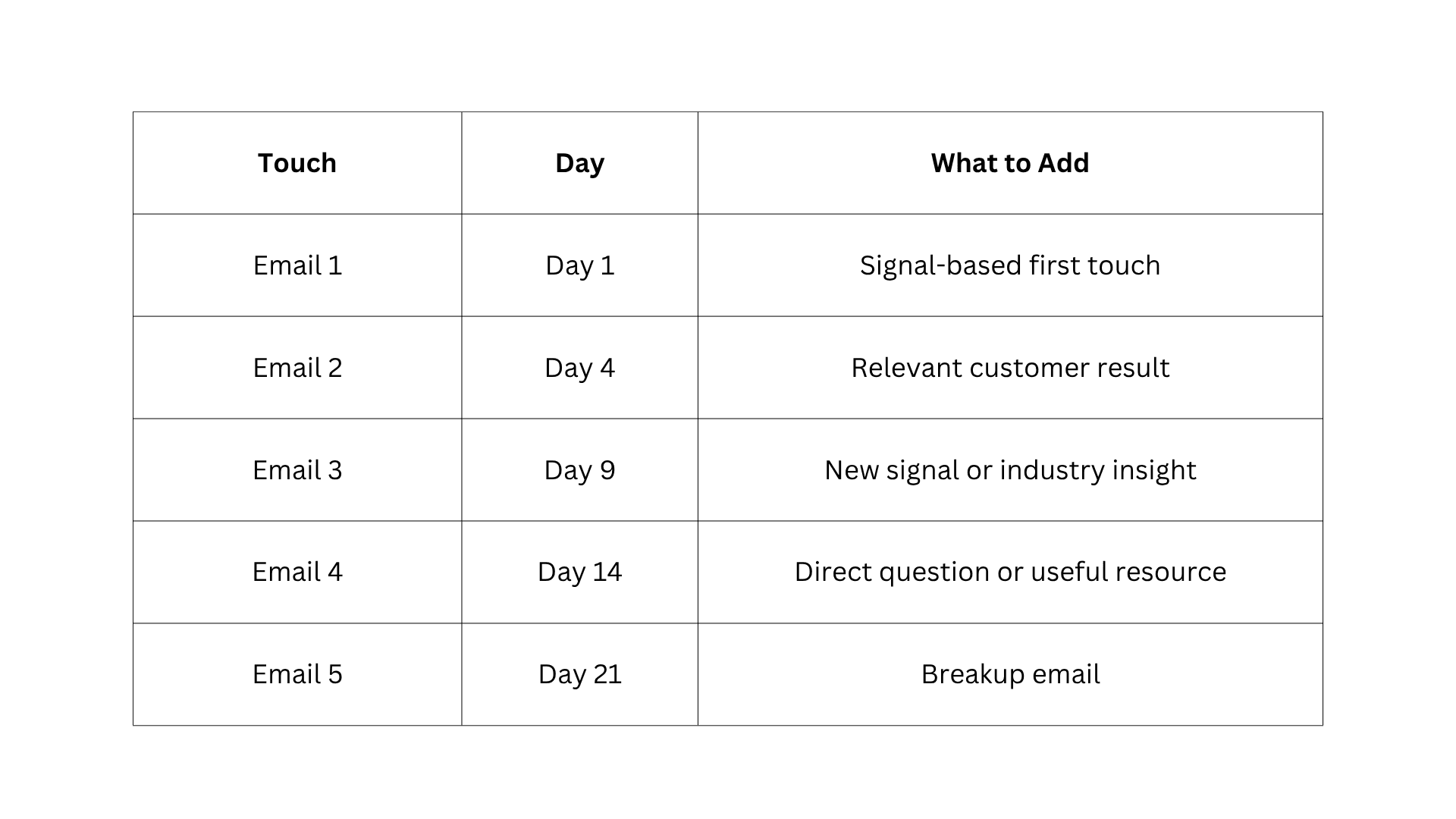
The rule is that each follow-up adds one new piece of context. What counts as new context includes a customer result tied to the original signal, a new development at their company since email 1, a different framing of the original challenge, or a direct question that surfaces a blocker. "Just checking in," "Following up on my previous email," and "Wanted to resurface this" do not count.
Follow-Up 1: The Customer Result Touch (Day 4)
Subject: How [similar company] handled [challenge from email 1]
AI prompt:
I sent this prospecting email: [paste email 1]. This is follow-up 2, Day 4. New context: this customer result: [paste result]. Do not repeat the opening observation from the first email. Keep under 70 words. End with the same low-friction question. No qualifiers. No formal constructions.
Follow-Up 2: The New Signal Touch (Day 9)
Subject: Noticed something else at [Company]
Body: Saw that [Company] also [new signal or development]. That plus the [original signal] typically means [compounding challenge]. Still think there is a conversation worth having. Open to 10 minutes?
AI prompt:
I sent this prospecting email: [paste email 1]. This is follow-up 3, Day 9. New context: [paste new signal or industry insight]. Connect the new context to the original challenge in one sentence. Keep under 70 words. End with the same question.
Follow-Up 3: The Direct Question Touch (Day 14)
Subject: One question, [First Name]
AI prompt:
I sent this prospecting email: [paste email 1]. This is follow-up 4, Day 14. Write a follow-up that asks one direct question, surfacing whether The challenge is active or deferred. Keep under 60 words. No pitch. No repeat of the value claim.
The Breakup Email: Final Touch That Gets Replies (Day 21)
Breakup emails generate 10 to 30% reply rates on sequences that had gone completely cold. Finality creates urgency through implied loss. State this is the final message. Leave a clear path to re-engage.
Version 1: Direct
Subject: Closing the loop
This will be my last message about [topic]. If the timing is wrong, I completely understand. If [challenge] becomes a priority later, feel free to reach out. Either way, good luck with the [signal they announced].
Version 2: Lighter
Subject: Should I?
Master AI prompt for any follow-up:
I sent this prospecting email: [paste email 1]. This is follow-up number [2/3/4/5]. New context to add: [paste context]. Write a follow-up that references the original signal, adds the new context, and ends with a low-friction question. Under 60 words. No "just checking in". No repeat of the value claim. If this is the breakup (touch 5): state this is the last message, leave a path to re-engage, keep tone neutral.
What Great B2B Sales Emails Look Like in Practice
Before the templates, it is worth seeing how high-performing companies do this in the real world. The principles are the same whether you are a startup or a household name: specificity, a clear value claim, and a single ask.
Salesforce
Salesforce's outreach emails to enterprise prospects consistently open with a reference to the prospect's current CRM challenges or a recent company announcement, frame the bridge around revenue impact, and close with a single, low-commitment question. They avoid feature lists entirely in the first email.
The opening line is always about the prospect's situation, not Salesforce's product. The value claim uses the prospect's industry language rather than Salesforce's internal terminology.
HubSpot
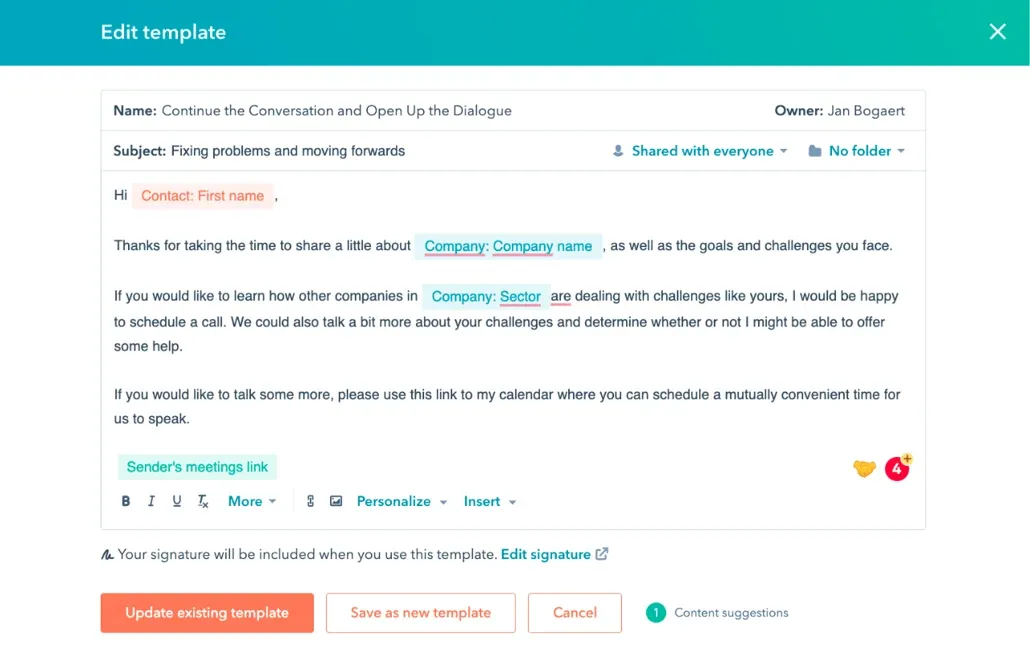
HubSpot's sales emails are known for leading with a piece of content or data relevant to the prospect's role, then offering a quick call to discuss the implications. The subject lines are short, often four to five words, and tied to a specific observation.
By leading with value (a resource or insight) before the pitch, HubSpot emails feel like the start of a relationship rather than a sales attempt.
LinkedIn Sales Solutions
Using a signal that the prospect generated themselves creates instant relevance. The prospect already knows the fact is true, which makes the bridge feel earned rather than fabricated.
The consistent pattern across all three is that they never pitch in the first email. They demonstrate they paid attention, connect that observation to a real business consequence, and make one ask.
The Multi-Channel Outreach Sequence: Email, LinkedIn, and Phone
Multi-channel sequences generate 40% higher engagement than single-channel approaches. The rule across every channel: same signal, same message. Not different pitches on different platforms. The AI search engine for researching current prospect activity across channels surfaces the signal that anchors every channel touch to the same verifiable observation.
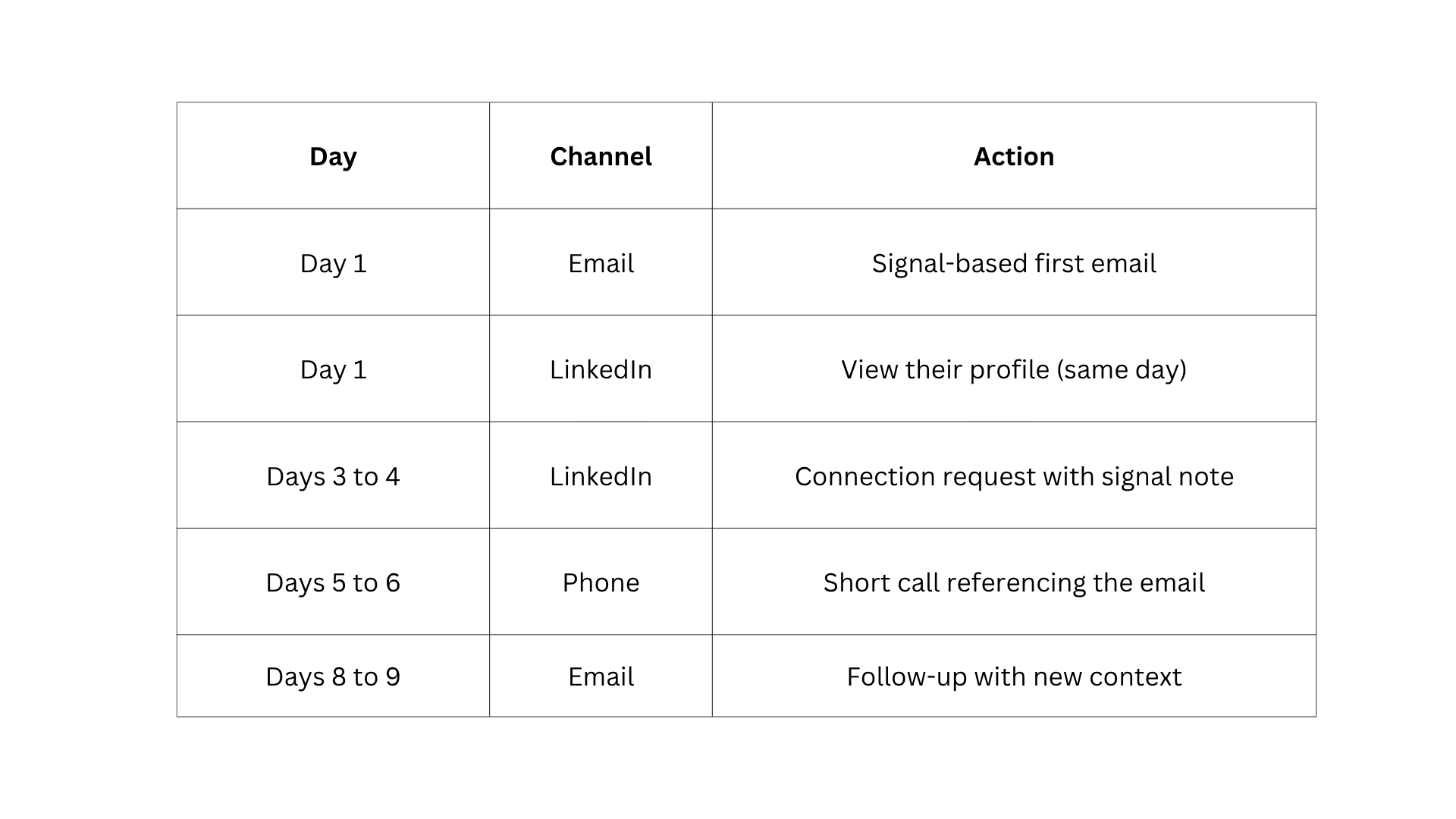
Day 1: Email and LinkedIn Profile View
Send the email first and view the LinkedIn profile the same day. The profile view shows up in the prospect's notifications, creating ambient awareness before any reply or connection. Do not send a LinkedIn message the same day as the email. Two direct outreach messages on day one from a stranger read as pressure, not research.
Days 3 to 4: LinkedIn Connection Request With Signal Note
Make sure you do not send a blank connection request. Tie the note to the same signal from the email and keep it under 50 words.
Example note: "Saw [Company] is expanding the enterprise team: wanted to connect. Sent you a quick note about it via email as well."
Connection requests with a contextual note convert at 3 to 5x the rate of blank requests.
AI prompt for the LinkedIn note:
Write a LinkedIn connection note for [First Name] at [Company].
Signal: [paste signal].
Keep under 40 words. Reference that you also sent an email.
No pitch. No formal language.
Days 5 to 6: The Phone Call With Signal Context
Open with the signal, not the pitch.
30-second call script:
"Hi [Name], this is [your name] from [company]. I sent you a note earlier this week about [signal]. I have a quick thought on [challenge]: do you have 2 minutes?"
If voicemail: reference the email, state the signal in one sentence, and ask a direct question. Do not pitch.
Days 8 to 9: Second Email With New Context
Not a repeat. One new piece of information, like a new company signal, a relevant customer result, or a useful resource.
If the phone call happened: "Tried calling [day]: missed you. Wanted to add one more data point..."
Use the AI Chat tool for drafting signal-based follow-up emails with the master follow-up prompt above to generate this touch in under 60 seconds.
Common Outreach Mistakes That Kill Template Performance
Even the best B2B sales email templates fail when the execution is off. The mistakes below are the most common reasons well-written emails get ignored, sequences lose momentum, and prospects go cold before they ever had a real chance to engage.
- Using a template without swapping in a real signal
The opening observation must come from actual research about this company today. A template sent without a real signal is a generic email with the appearance of personalisation.
- Repeating the same value claim across every follow-up
Each touch must add one new piece of context. Repeating the value claim from email 1 signals the rep has nothing new to say.
- Messaging on every channel the same day
Email plus LinkedIn message plus phone call on day one reads as automated volume-based outreach. Follow the sequence timing.
- Using different messages on different channels
- Stopping after 1 to 2 touches.
48% of reps never send a second message. Follow-ups generate 42% of all campaign replies. Stopping at two touches means abandoning the sequence before most replies arrive.
- Sending the breakup email too early
Day 21 for a 5-touch sequence. A breakup at day 7 closes the conversation before the prospect has had enough touchpoints to engage.
For editing any AI-drafted email in this workflow so it sounds like a human wrote it, see how to make AI cold emails sound human. For the AI prompts that produce cleaner first drafts across all template types, the guide to best system prompts for sales and outreach writing covers the input formats that consistently reduce editing work.
Conclusion
The difference between a cold email that gets a reply and one that gets deleted rarely comes down to the B2B sales email templates. It comes down to the research behind it. Use these templates as a starting point, treat every signal as an opportunity, and keep testing what works for your specific audience.
The reps who consistently book meetings are not the ones with the best scripts. They are the ones who show up prepared.
Frequently Asked Questions
Learn more about how these B2B sales templates work.
More topics you may like