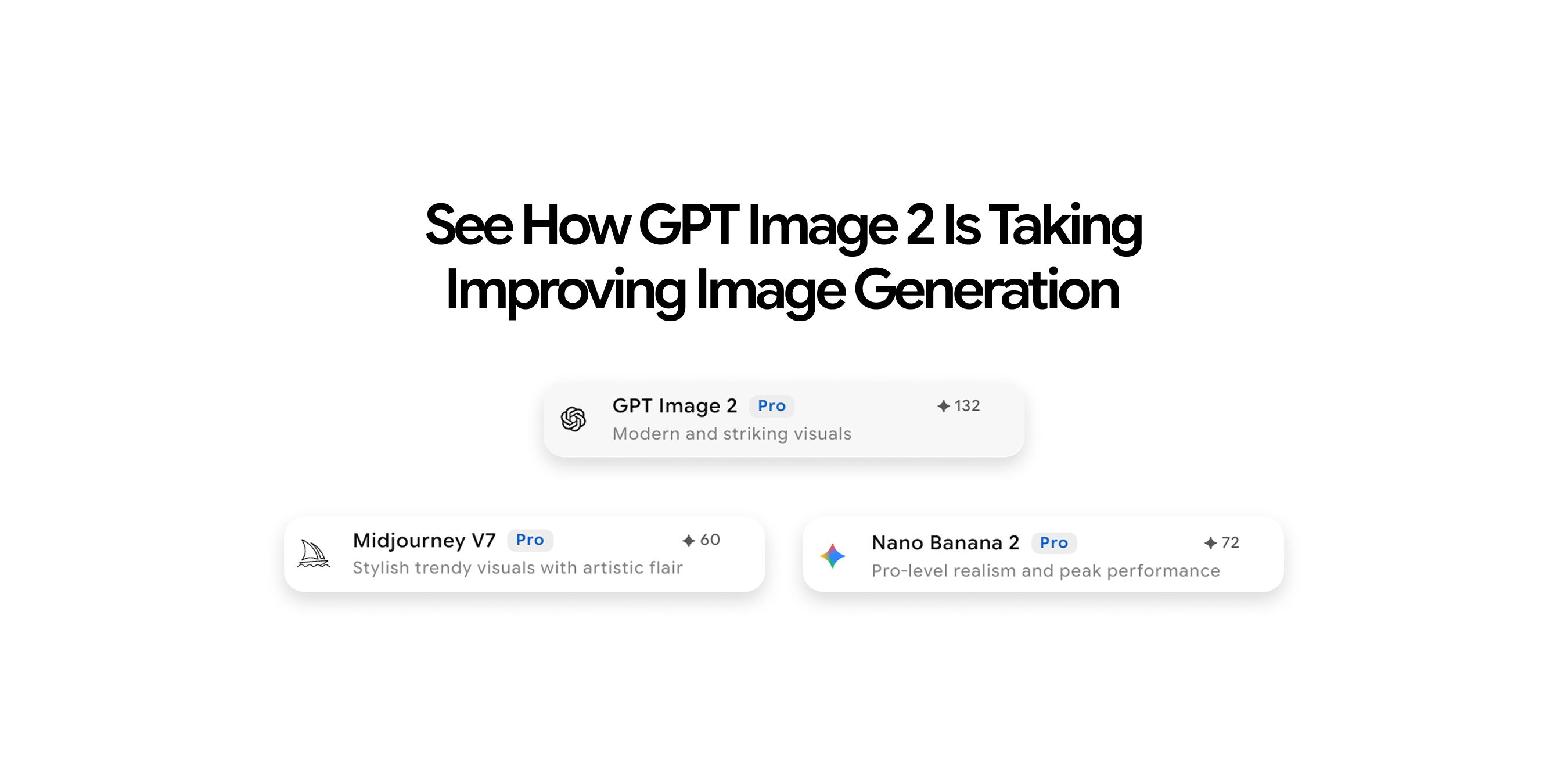
GPT Image 2 vs Midjourney: Which AI Image Generation Model Is Better in 2026?
GPT Image 2 and Midjourney are the two most-discussed AI image generation models in 2026, and the debate between them comes up for good reason. Both produce impressive results. Both have genuine professional followings. But they are not the same kind of tool, and using the wrong one for a given workflow costs time and output quality. This comparison covers output quality, text accuracy, prompt control, editing, speed, resolution, and pricing so you can make the right call based on what your work actually requires.
GPT Image 2 vs Midjourney: Features, Quality, Pricing & Use Cases
Understanding what each tool was designed to do makes every other comparison in this article easier to interpret.
GPT Image 2 is a utility-first model built around:
- Reasoning about prompts before generating
- Following complex instructions precisely
- Rendering text inside images with near-perfect accuracy
- Scaling through a developer API
Midjourney V8 is an aesthetic-first model built around:
- Generating visually striking, artistically elevated output
- Maintaining a distinctive visual signature
- Giving experienced users stylistic control through its parameter system
Both models represent major steps forward from their predecessors. Here is how they compare across the dimensions that matter most for production workflows.
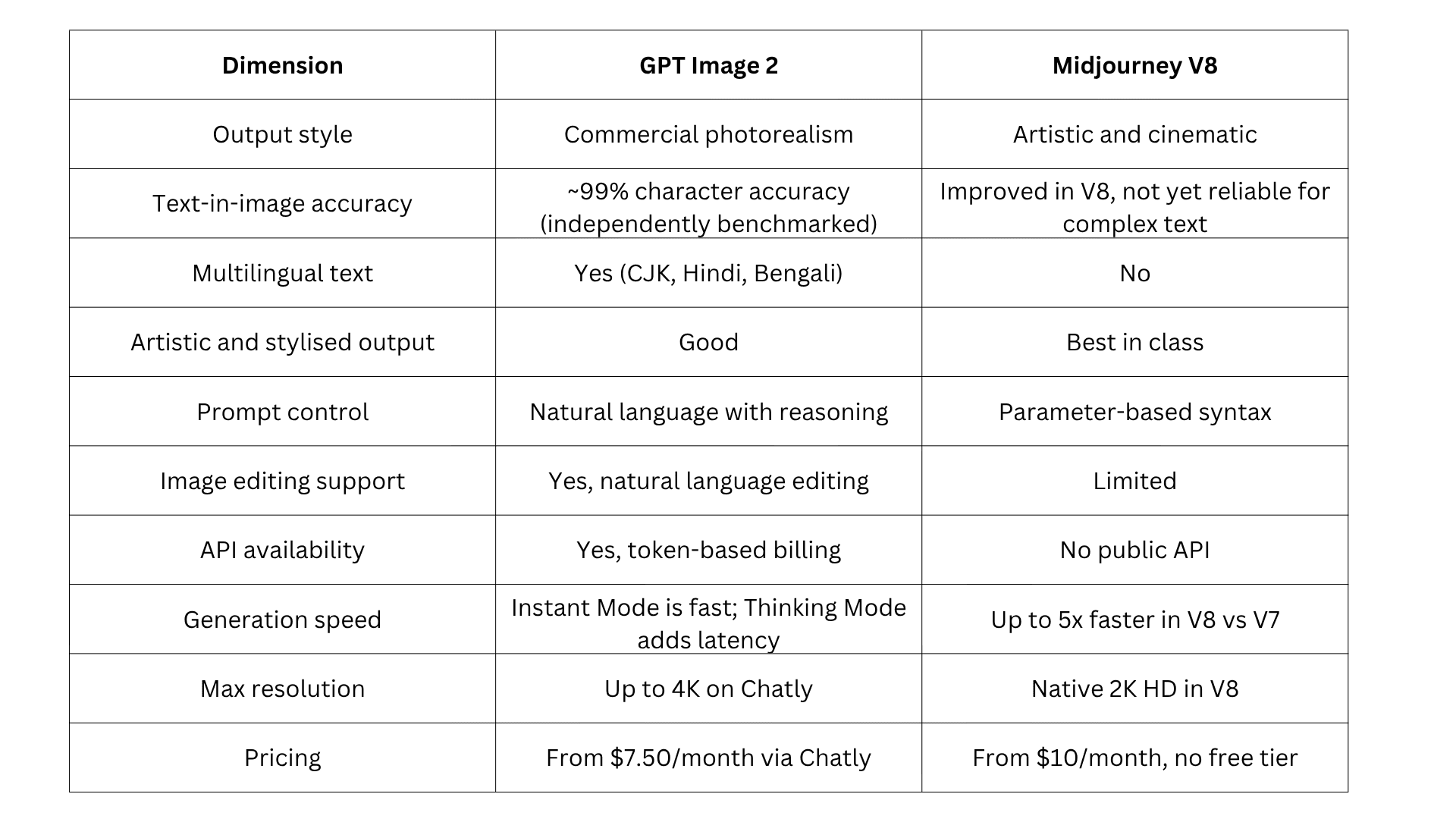
For a broader comparison of where these models sit in the full landscape of AI image generation, the guide to the best AI image generation models covers every major model currently available.
We compared GPT Image 2 and Midjourney across image quality, prompt accuracy, editing capabilities, pricing, and overall workflow to help you choose the right AI image generation model for your needs.
Output Quality of GPT Image 2 vs Midjourney
Output quality is the most important dimension and also the most misunderstood, because the two tools are optimising for completely different things.
What GPT Image 2 Outputs Look Like
GPT Image 2 produces images that are clean, well-composed, and commercially ready. The output is photorealistic in a purposeful, controlled way:
- Correct lighting and accurate material rendering
- Consistent colour across a scene with neutral, accurate colour rendering
- Compositions that match the brief precisely, enabled by the model's reasoning step
- Production-ready results for product catalogues, editorials, UI presentations, and marketing campaigns
If you are new to AI image generation and want to understand how models like GPT Image 2 actually work before choosing one, the complete guide to AI image generation covers the fundamentals from the ground up.
What Midjourney V8 Outputs Look Like
Midjourney images carry a visual signature that is distinctive and difficult to replicate. V8 builds on this with:
- Rich textures, painterly depth, and cinematic lighting
- 5x faster generation compared to V7
- Improved prompt understanding for complex multi-element compositions
- Native 2K HD resolution and a new quality mode for enhanced scene coherence
Midjourney interprets prompts rather than following them literally. You describe a direction, and Midjourney produces something compelling in that direction, but not always exactly as specified. This is a feature for creative work and a limitation for precision work.
Matching the Right Tool to the Right Output
- GPT Image 2 leads on commercial product assets, UI mockups, text-in-image graphics, multilingual content, editorial content with specific compositional requirements, and any output where accuracy to the prompt is the primary success criterion
- Midjourney V8 leads on concept art, environmental illustration, character art with high visual sophistication, fashion-forward editorial aesthetics, brand identity exploration, and any output where the image needs to carry independent visual impact
Text Inside Images of GPT Image 2 vs Midjourney
Text rendering is where the gap between these two models is most significant for commercial workflows.
GPT Image 2 Text Accuracy
GPT Image 2 achieves approximately 99% character-level text accuracy across Latin, CJK, Hindi, and Bengali scripts, based on independent benchmarking by third-party reviewers. Multi-word phrases, varied font styles, different weights, and complex text placement all render reliably. For workflows that depend on text inside images at a production standard, GPT Image 2 is the clear choice.
For writing prompts that get the most out of GPT Image 2's text rendering capabilities, the guide to best system prompts for AI workflows covers prompt structures that produce consistent, high-quality output across complex multi-element generation tasks.
Midjourney V8 Text Rendering
Midjourney V8 has made meaningful improvements to text rendering compared to V7. Simple text, short labels, and stylised typographic elements now render more reliably. For complex multi-element text, multilingual scripts, dense information layouts, and production-grade text accuracy, the gap with GPT Image 2 remains significant.
Prompt Control of GPT Image 2 vs Midjourney
How you communicate with each tool differs in ways that matter practically, especially for new users and developers.
How GPT Image 2 Processes Prompts
GPT Image 2's reasoning architecture processes prompts with full language understanding before generating. You write what you want the same way you would describe it to a photographer or designer. No special syntax, no parameter flags, no model-specific grammar to learn.
For complex multi-element scenes, the model reasons about the prompt and plans the image structure before generating. This produces more accurate first-attempt results and reduces the number of iterations needed to reach a usable output.
How Midjourney V8 Processes Prompts
Midjourney uses its own parameter-based syntax. Experienced users specify aspect ratio, stylisation level, chaos, and style references using flags. V8 adds a quality mode for complex scenes and has improved prompt understanding for multi-element compositions compared to V7.
Midjourney interprets prompts more freely, which produces unexpectedly strong results in creative contexts but also unpredictable ones when precise compositional control is the goal. The parameter system rewards experienced users and creates a learning curve for new ones.
Image Editing of GPT Image 2 vs Midjourney
Editing capability is one of the clearest practical differences between these two models. One is built for refinement; the other is built for regeneration.
GPT Image 2 Editing
GPT Image 2 supports native image editing using natural language instructions. You can change backgrounds, objects, lighting, clothing, and specific regions precisely. It supports multi-turn editing with full context retention across refinements, which makes it practical for product edits, marketing creatives, and iterative design workflows.
Midjourney V8 Editing
Midjourney V8 offers limited editing through Vary Region, remix, and upscaling tools. It does not support natural language or context-aware editing the way GPT Image 2 does. Precise edits often require regenerating images or using external tools.
GPT Image 2 is stronger for detailed editing and refinement workflows. Midjourney is better suited to generating new variations than to refining specific elements of an existing image.
For teams whose work requires portrait-specific editing with mask controls and expression adjustments, the GPT Image 2 vs ImagineArt 2.0 comparison covers how ImagineArt's dedicated editing suite compares to GPT Image 2 for that specific use case.
Generation Speed and Resolution of GPT Image 2 vs Midjourney
Speed and resolution sit at opposite ends of the priority list for these two models. Where Midjourney V8 optimises for fast iteration, GPT Image 2 trades some speed for reasoning accuracy.
Generation Speed
Speed varies by mode and quality setting for both models:
- Midjourney V8 produces images in approximately 5 to 15 seconds in Fast mode. It suits rapid ideation and high-volume generation
- GPT Image 2 Instant Mode is moderately fast. Thinking Mode takes longer, around 15 to 60 seconds per image, because the reasoning step runs before generation begins
- The slower speed in GPT Image 2 Thinking Mode directly improves output accuracy for complex scenes
Resolution
- GPT Image 2 reaches up to 4K resolution on Chatly
- Midjourney V8 offers native 2K HD output with quality modes for enhanced scene coherence
- For most commercial and marketing use cases, resolution is not the deciding factor between the two models
For a full breakdown of how GPT Image 2 performs across different output types and resolution settings, see the AI image generation complete guide.
Pricing of GPT Image 2 vs Midjourney
Pricing models differ significantly between the two tools, which affects how cost scales with usage.
Midjourney Pricing
Midjourney bills based on GPU hours, not a simple image count:
- Basic at $10/month — approximately 3.3 fast GPU hours, roughly 200 images, no Relax Mode
- Standard at $30/month — approximately 15 fast GPU hours plus unlimited Relax Mode generations
- Pro at $60/month — 30 fast GPU hours, unlimited Relax Mode, Stealth Mode for private generations
- Mega at $120/month — 60 fast GPU hours, unlimited Relax Mode, Stealth Mode
Annual billing reduces all plans by 20%. There is no free tier. Companies with over $1 million in annual gross revenue must use the Pro or Mega plan under Midjourney's terms of service.
GPT Image 2 Pricing
GPT Image 2 is available through multiple access points:
- Via Chatly: Chatly's Standard plan starts at $7.50/month on the yearly plan. Chatly's free plan includes access to GPT Image 2 with no payment required to start
- Via ChatGPT: ChatGPT Plus at $20/month unlocks Thinking Mode
- Via API: Token-based billing at $8/1M input tokens and $30/1M output tokens, competitive at high volume for content pipelines
Chatly gives you access to GPT Image 2 alongside ImagineArt 2.0 under one subscription, which makes it practical for teams whose workflows span both text-heavy commercial assets and photorealistic portrait content. For a full breakdown of GPT Image 2 access options, see the GPT Image 2 access and pricing guide.
Best Use Cases: Which Model Should You Use When?
The real value of any AI image tool lies in knowing exactly when to pick it. Here’s a practical guide to help you decide based on real-world workflows in 2026:
When to use GPT Image 2
Text-heavy commercial assets
- Banners, posters, packaging designs, product labels, social media ads, signage, and UI/UX mockups. Near-perfect text rendering (≈99% accuracy) and multilingual support make it the only reliable choice for production-grade text inside images.
High-precision branded content
- Product photography, catalog images, and marketing collateral where strict brand guidelines, consistent colors, and compositional accuracy are non-negotiable.
Complex, detailed prompts
- Multi-object scenes with specific spatial relationships, conditional logic, or technical requirements that need to be followed precisely rather than interpreted.
Production-scale workflows
- API integrations, automated pipelines, and high-volume asset generation where reliability and throughput matter as much as output quality.
Professional client deliverables
- Pitch decks, sales materials, and e-commerce visuals where accuracy and consistency carry more weight than artistic flair.
When to use Midjourney V8
Cinematic and emotional hero images
- Lifestyle photography, fashion editorials, film-like portraits, and atmospheric scenes where the image needs to carry independent visual impact.
Creative exploration and concept art
- Mood boards, character design, world-building, and advertising concepts where the goal is generating strong creative direction rather than a precise output.
Stylized and artistic visuals
- Illustrations, surreal art, and images with a distinctive visual identity that standard photorealism cannot achieve.
High-end brand storytelling
- Campaigns where beauty, mood, lighting, and artistic quality are the primary success criteria.
The hybrid approach
Many top-performing teams run both models in parallel. GPT Image 2 handles precise, text-heavy, and on-brand production assets. Midjourney handles hero visuals and creative concepts. This combination delivers both reliability and visual impact without compromise.
Conclusion
In 2026, the question is no longer whether AI image generation is production-ready. It is whether you are using the right model for the right output.
The model you default to shapes the quality ceiling of everything you ship. Choose accordingly.
Frequently Asked Questions
More topics you may like
Anthropic Launches Claude AI Agent Inside Chrome

Muhammad Bin Habib
Anthropic Launches Ten AI Agent Templates for Financial Services

Arooj Ishtiaq
Anthropic's Mythos AI Model Triggers Global Security Alarm After Finding Unpatched Vulnerabilities
Arooj Ishtiaq
Anthropic Launches Claude Design for Teams to Create Prototypes, Decks, and Landing Pages
Arooj Ishtiaq
Anthropic Tests Higher Pricing for Claude Code as Usage Surges
Muhammad Bin Habib