GPT Image 2 vs ImagineArt 2.0: Textual Accuracy vs. Realism
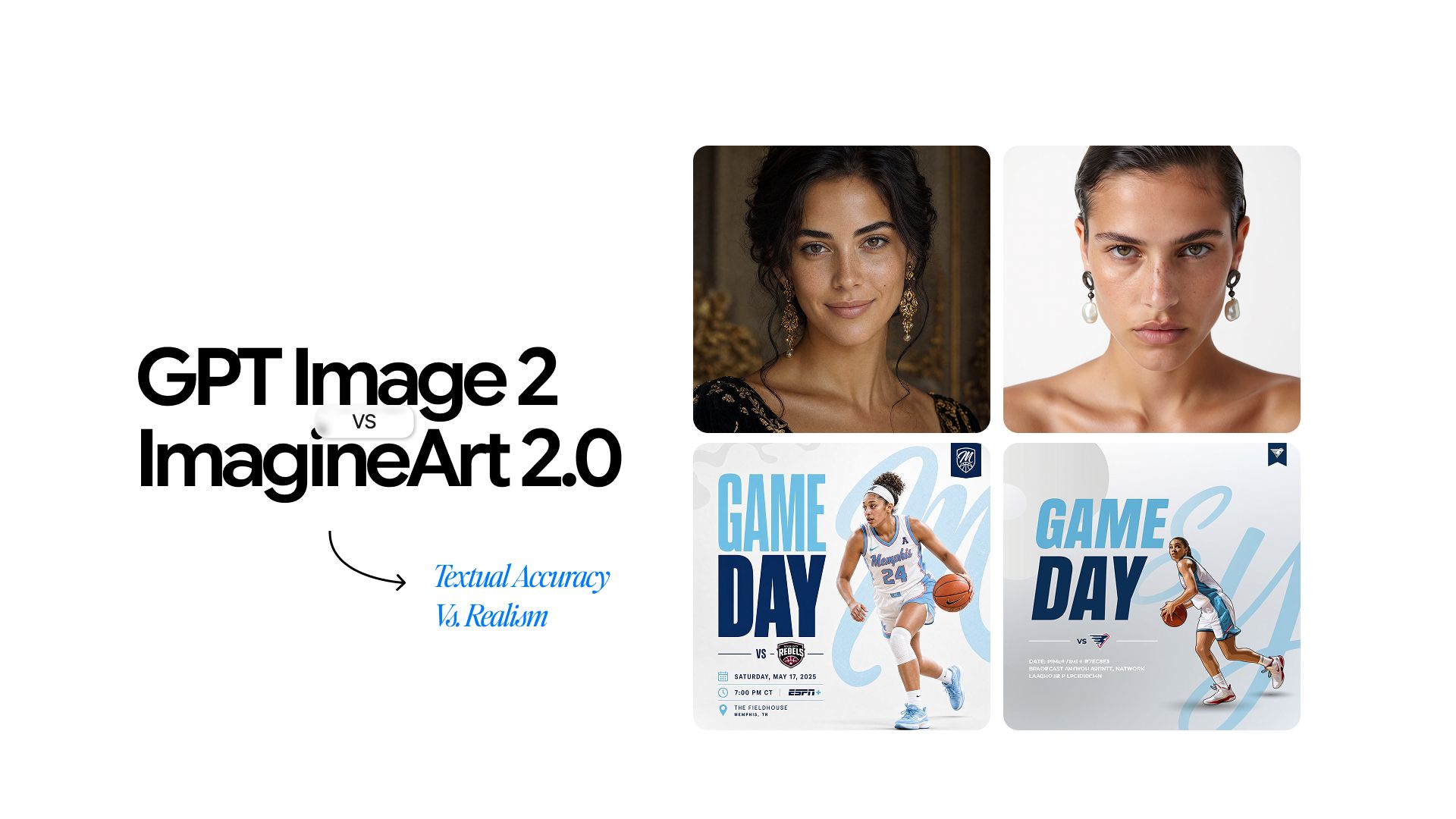
GPT Image 2 and ImagineArt 2.0 are both capable models built with genuinely different priorities. Picking the wrong one for your workflow wastes time and budget.
This comparison covers text accuracy, photorealism, character consistency, prompt following, cinematic lighting, editing, and pricing so you can make the right call. Both models are accessible through Chatly, where your Chatly credits also work on ImagineArt.
Overview of GPT Image 2 vs ImagineArt 2.0
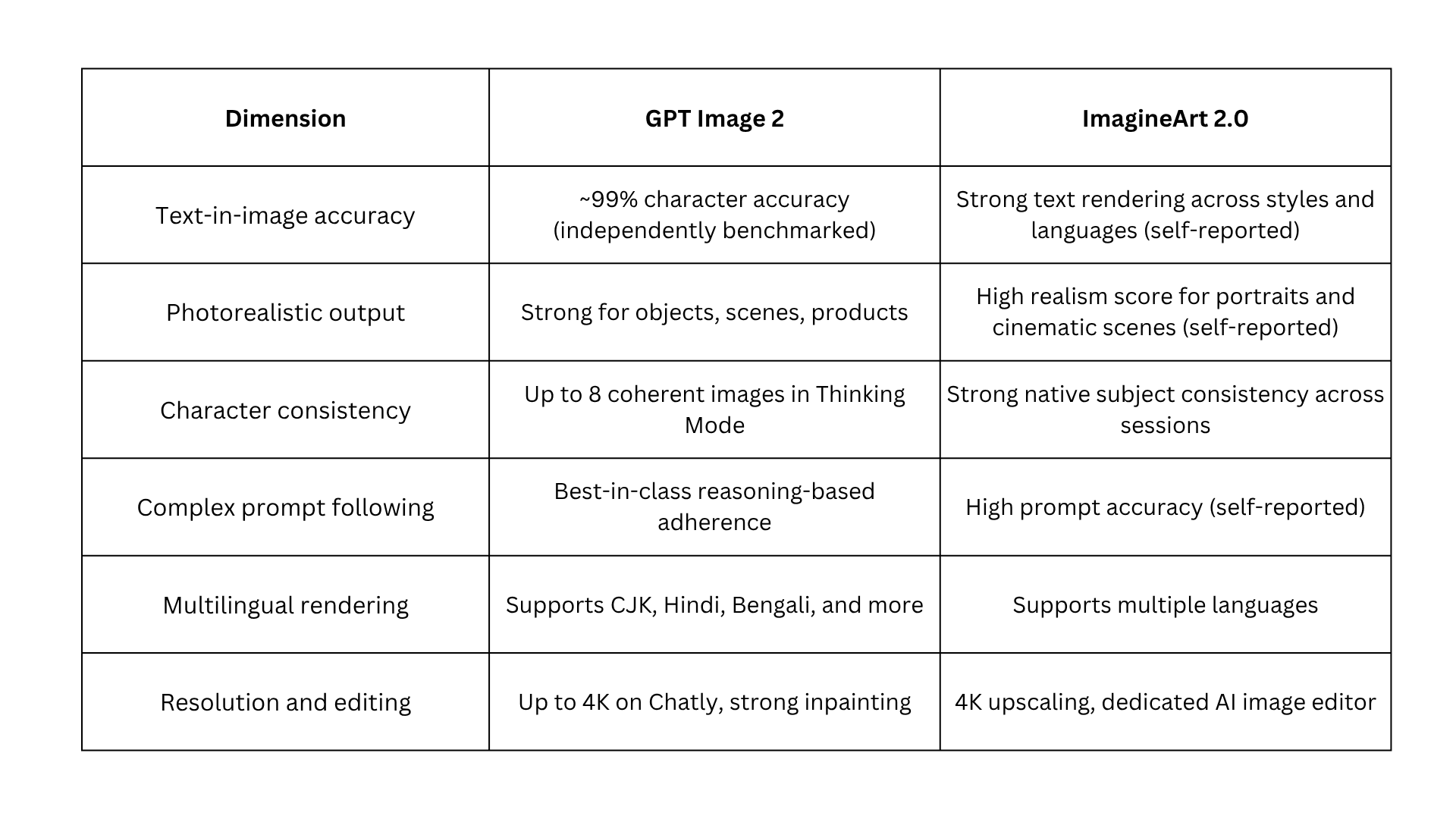
Both models represent a meaningful step forward from their predecessors. Here is how they compare across the dimensions that matter most for production workflows.
Text-in-Image Accuracy of GPT Image 2 vs ImagineArt 2.0
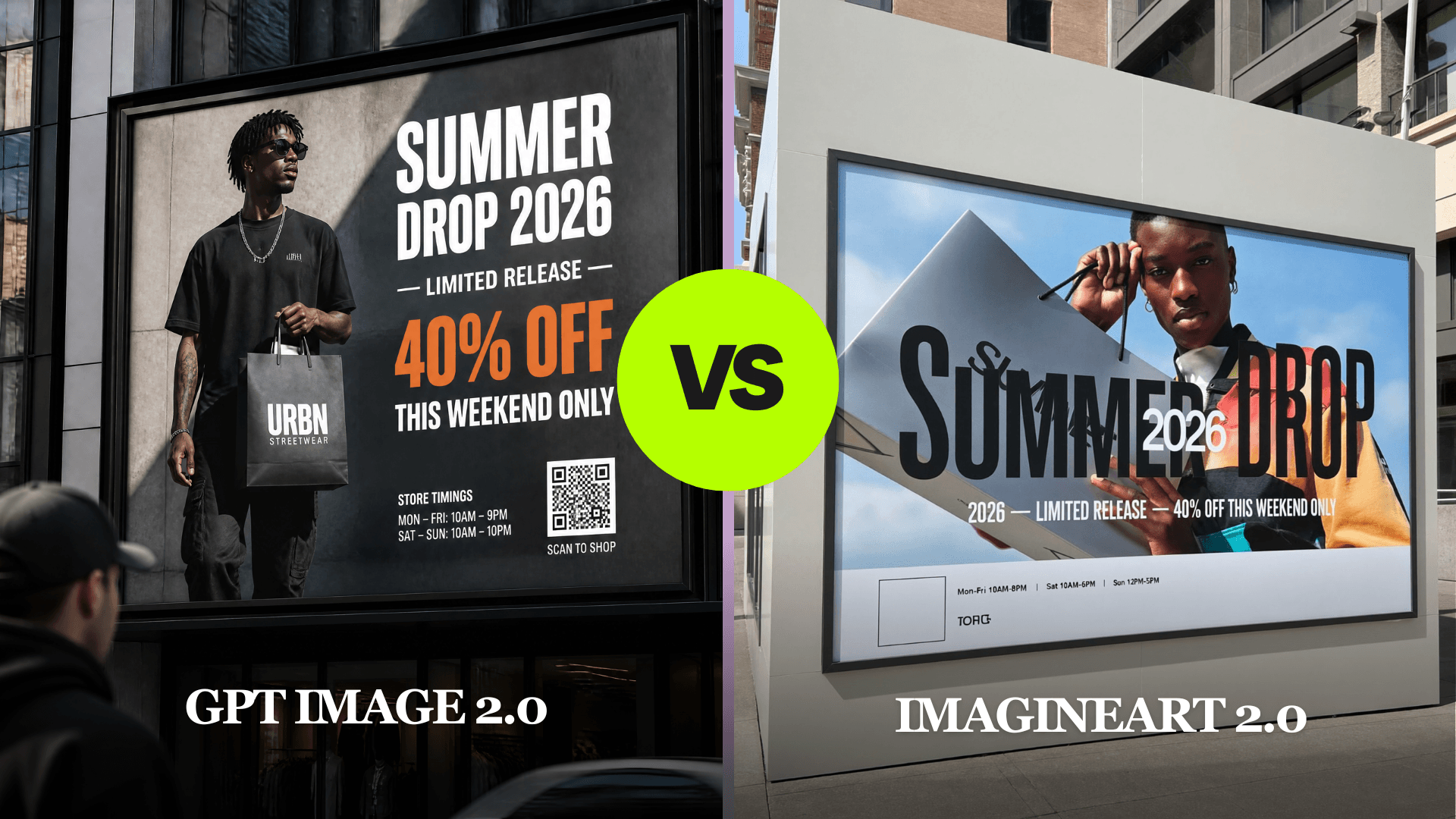
Text-in-image accuracy is one of the most practically important differences between these two models. The workflows where it matters most are also the ones where getting it wrong is most expensive to fix.
GPT Image 2 vs ImagineArt 2.0 on Text
GPT Image 2 achieves approximately 99% character-level text accuracy across Latin, CJK, Hindi, and Bengali scripts, based on independent benchmarking by third-party reviewers. Multi-word phrases, varied font styles, different weights, and complex text placement all render reliably. Real-world accuracy varies by prompt complexity and language, but GPT Image 2 consistently outperforms other models in this category.
ImagineArt 2.0 lists precise text generation as one of its eight core breakthroughs. According to ImagineArt, the model delivers crisp, legible text across languages, font styles, and layouts, with a self-reported improvement of 20 points in text rendering over ImagineArt 1.5. It handles design-forward and stylised text well, but independent benchmarks for this claim are not yet widely available.
For a comparison of how GPT Image 2 sits among other leading models on text accuracy, the guide to the best AI image generation models covers the full landscape. For access and pricing details specific to GPT Image 2, see the GPT Image 2 access and pricing guide.
Which Workflows Depend on It Most
Text inside an image fails when it is garbled, misspelled, or illegibly placed. For these workflows, that failure means the asset is unusable without post-production work:
- Banners, posters, and signage with embedded words
- Product labels and packaging designs
- UI interface mockups and wireframes
- Menus, infographics, and data-heavy layouts
Photorealistic Output of GPT Image 2 vs ImagineArt 2.0
Photorealism is where the two models diverge most significantly. One was purpose-built for it; the other handles it competently without it being a core design goal.
Where ImagineArt 2.0 Leads
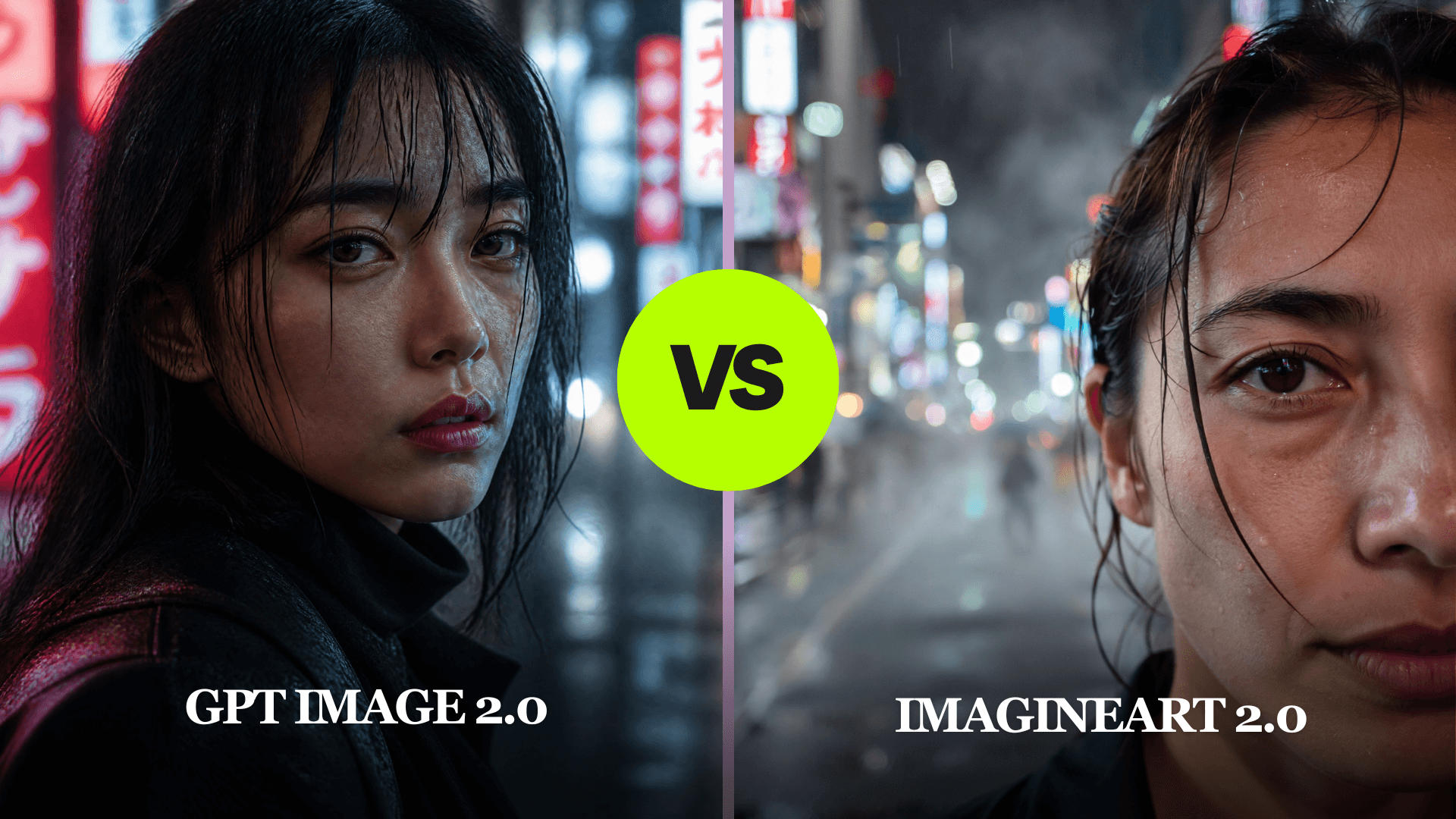
ImagineArt 2.0 is purpose-built for photorealistic generation. The model achieves a 97% realism score for faces, skin texture, fabric, lighting, and architectural detail. Real-world results vary by prompt and subject matter, but the model consistently performs at a high level for portrait and lifestyle content. It renders:
- Skin pores, subsurface scattering, and facial expression detail
- Fabric weave, tactile surface texture, and material fidelity
- Water refraction, cinematic lighting, and atmospheric depth
- Camera-accurate depth of field and bokeh
It also offers composition guides, depth of field control, and custom colour grades for precise portrait direction.
Example Prompt: Ultra-realistic cinematic close-up portrait of a woman standing near a rainy neon-lit Tokyo street at night. Visible skin pores, wet hair strands, shallow depth of field, realistic reflections, cinematic bokeh, soft atmospheric fog, DSLR photography look.
What GPT Image 2 Delivers on Realism
GPT Image 2 produces strong photorealistic output for objects, environments, scenes, and product photography. Its human-subject generation improves meaningfully over previous OpenAI models, but for portrait-centric work where facial accuracy and lighting are the primary criteria, ImagineArt 2.0 holds a clear edge.
- ImagineArt 2.0 leads on brand ambassador portraits, fashion editorial, human-centred advertising visuals, and product photography requiring tactile surface detail
- GPT Image 2 suits product photography with incidental human context, general scene photography, and imagery where compositional precision or text matters more than photographic realism
If photorealism is your primary requirement across multiple models, the guide to the best AI image generation models includes a full breakdown of which models lead on realism-specific benchmarks.
Character Consistency of GPT Image 2 vs ImagineArt 2.0
Both models support character consistency, but they work differently and suit different workflows.
GPT Image 2 in Thinking Mode
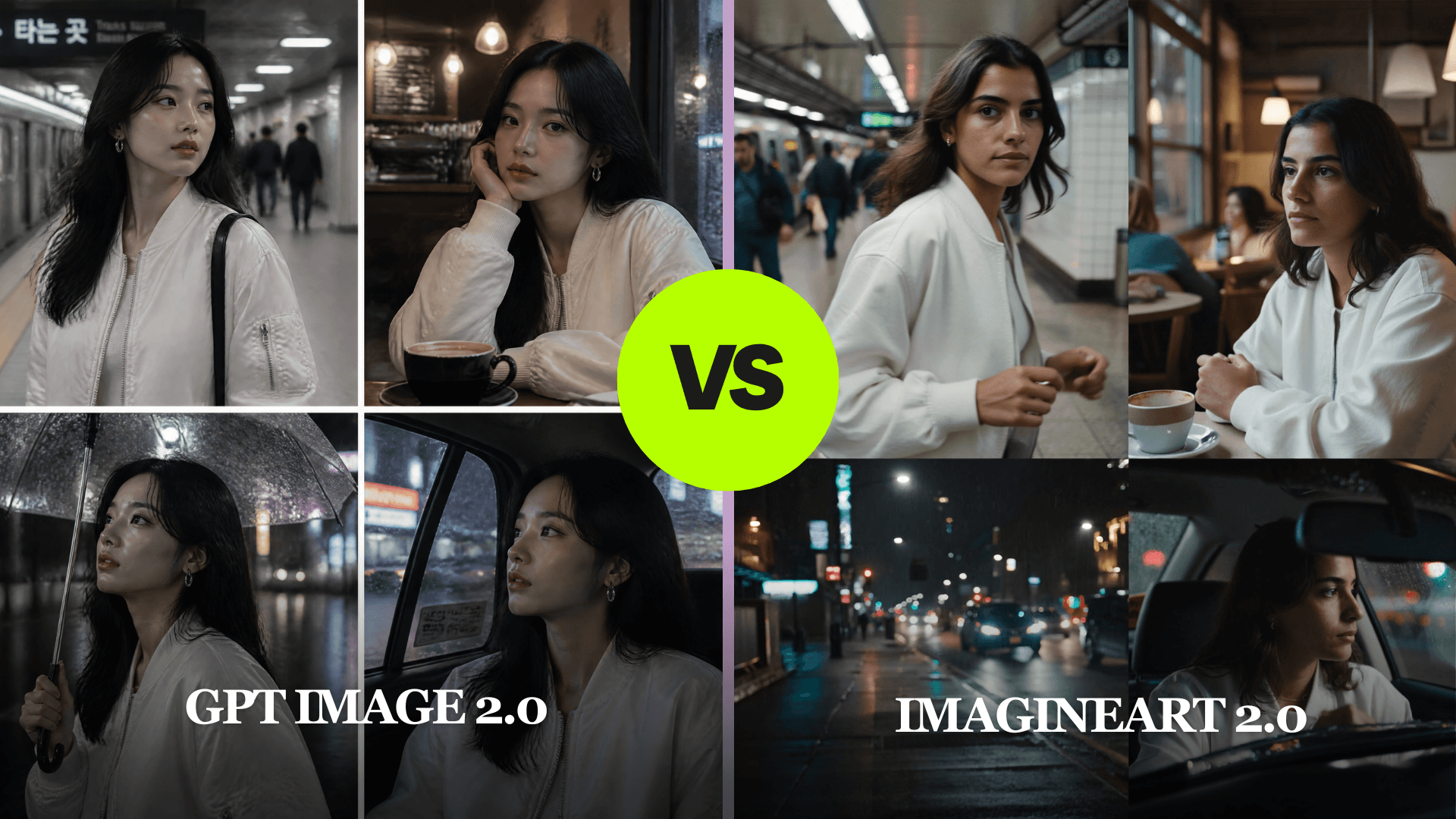
GPT Image 2 in Thinking Mode generates up to eight coherent images from a single prompt, with characters, objects, and styles staying consistent across all frames in that batch. This operates within a single generation session, not across independent prompts over time. It builds on the character handling introduced in GPT Image 1.5, extending it with reasoning-layer planning that makes batch consistency more reliable.
ImagineArt 2.0 Across Sessions
ImagineArt 2.0 lists subject consistency as one of its core native capabilities. The platform maintains character identity across different scenes, poses, and contexts, making it purpose-built for ongoing session-independent workflows.
The practical difference:
- Use GPT Image 2 Thinking Mode when you need a single prompt to produce multiple consistent variations in one session, such as eight outfit variations on the same model
- Use ImagineArt 2.0 when you need the same character to appear across a body of work generated in separate sessions over time, such as a brand mascot running across a full campaign
For single-session multi-image consistency, GPT Image 2's Thinking Mode is strong. For ongoing character-consistent content across separate sessions, ImagineArt 2.0 is the purpose-built choice.
Example Prompt: Generate four frames of the same female character wearing a white bomber jacket and silver earrings in different scenarios: walking through a subway station, sitting in a cafe, standing in rain at night, and riding inside a taxi. Keep facial identity, hairstyle, outfit, and accessories consistent across all frames.
Complex Prompt Following of GPT Image 2 vs ImagineArt 2.0
How well a model follows a detailed prompt determines how much iteration you need before reaching a usable output. Understanding how reasoning-based generation works before prompting either model saves significant time.
The AI image generation guide covers how different model architectures interpret prompts and what that means for how you write them.
GPT Image 2 Reasoning Architecture
GPT Image 2's defining architectural feature is its reasoning step. Before generating, the model plans the image composition, checks spatial relationships, and verifies text accuracy. In practice, this delivers:
- Spatial instructions and conditional scene elements that execute precisely
- Multi-element prompts with independently specified components that are handled reliably
- UI layouts, branded assets, and complex design requirements that succeed on the first attempt in most cases
- Web search during generation (Thinking Mode only) that allows real-time reference grounding
ImagineArt 2.0 Prompt Accuracy
ImagineArt 2.0 reports a 96% prompt accuracy score according to its own platform documentation, with a self-reported improvement of 30 points over ImagineArt 1.5. Its visual reasoning handles scene logic and spatial understanding, which is new in the 2.0 version.
For photorealistic and style-specific prompts, it translates intent into output accurately in most cases. As with all self-reported figures, real-world performance will vary depending on prompt structure and complexity.
For highly structured compositional prompts involving multiple non-human elements with specific positional logic, GPT Image 2's reasoning architecture gives it a more reliable first-attempt success rate.
GPT Image 2 wins for compositional complexity and multi-element instruction following. For photorealistic style-focused prompts, ImagineArt 2.0 is fully competitive.
Cinematic Lighting and Style Range of GPT Image 2 vs ImagineArt 2.0
Cinematic lighting and style range separates models built for atmosphere from models built for accuracy. This category is where ImagineArt 2.0 has the clearest advantage.
ImagineArt 2.0 Cinematic Capabilities
ImagineArt 2.0 was built with cinematic output as a design priority. According to ImagineArt, the model delivers a 60-point improvement in cinematic effects over ImagineArt 1.5. Its lighting and style capabilities include:
- Long-exposure light painting and neon motion trails
- Studio key lighting, golden hour, and blue hour atmosphere
- Subsurface scattering and natural available light rendering
- Oil painting, ink wash, claymation, and film grain across a full spectrum of artistic styles
Where GPT Image 2 Falls Short on Style
GPT Image 2 handles lighting and style competently and produces aesthetically strong outputs. It understands abstract aesthetic prompts and can produce stylised imagery across a wide range of directions. For workflows where precise atmospheric direction is the primary goal, ImagineArt 2.0 delivers more consistent results.
For teams evaluating multiple models specifically for cinematic and atmospheric output, the best AI image generation models guide compares how ImagineArt 2.0 sits alongside other realism-focused models in the current landscape.
Image Editing and Inpainting of GPT Image 2 vs ImagineArt 2.0
Both models support image editing workflows, but they approach it differently. The right choice depends on whether you are editing compositions or portraits.
GPT Image 2 Inpainting
GPT Image 2 supports targeted inpainting through both the ChatGPT interface and the API. You can upload an existing image, describe a change to a specific region, and the model modifies that region using precision inpainting and region-specific editing while preserving the visual consistency of the rest. It accepts up to 16 reference images for context-aware editing, which makes it practical for multi-reference composition work.
ImagineArt 2.0 Editing Suite
ImagineArt 2.0 integrates with ImagineArt's dedicated AI Image Editor, which adds:
- Inpainting with mask controls
- Outpainting
- Batch object removal
- Portrait-specific editing for clothing changes, background swaps, and expression adjustments
For portrait-specific editing, ImagineArt 2.0's editing suite aligns directly with its generation strengths. For compositional and environmental edits, GPT Image 2's inpainting is strong and reliable.
Pricing of GPT Image 2 vs ImagineArt 2.0
Pricing varies by platform and access method. Here is the practical breakdown for each route.
- GPT Image 2 via ChatGPT: Available on paid plans. Thinking Mode requires ChatGPT Plus at $20/month or above
- GPT Image 2 via Chatly: Chatly's Standard plan starts at $7.50/month on the yearly plan. A Chatly subscription also covers ImagineArt, giving you access to both models without switching platforms
- ImagineArt 2.0: Available on ImagineArt's paid plans. See ImagineArt's pricing page for current plan details and credit allocations
One practical advantage of accessing both models through Chatly is the ability to compare outputs in the same workspace, which helps you make routing decisions based on actual output rather than abstract comparisons.
For a full breakdown of GPT Image 2 access options across platforms, see the GPT Image 2 access and pricing guide.
Conclusion
The clearest way to choose between these two models is to run the same prompt through both and compare the output directly. No comparison article replaces that test.
Chatly gives you access to both GPT Image 2 and ImagineArt 2.0 under one subscription, so you can switch between them based on what each project actually needs rather than committing to one tool for everything. The workspace stays the same. The model changes.
Start there and let the output make the decision for you.
Frequently Asked Questions
See how Image generation is different for both AI models
More topics you may like

GPT-5.1 Pricing Explained: How Much Does It Cost?

Faisal Saeed
GPT Image 2 vs DALL-E 3: What Changed and Is It Worth the Upgrade?

Arooj Ishtiaq
GPT Image 2 Free: How to Use It Without Paying (2026)
Arooj Ishtiaq
GPT Image 1.5: OpenAI's Production-Ready Vision Model for the Enterprise Era
Faisal Saeed
What Is ChatGPT Images 2.0? Features, Capabilities, and How to Get Started
Arooj Ishtiaq