GPT Image 2 vs DALL-E 3: What Changed and Is It Worth the Upgrade?
If you built a workflow around DALL-E 3, the question of whether to switch to GPT Image 2 is no longer optional. DALL-E 3 was deprecated and removed from the OpenAI API on May 12, 2026. Migration is required for any developer with an existing DALL-E 3 integration.
This article covers what specifically changed, where the improvements are meaningful, where they are marginal, and what switching actually involves for developers with existing integrations.
Overview of GPT Image 2 vs DALL-E 3
OpenAI replaced DALL-E 3 with GPT Image 2, and the two models work quite differently. Text rendering, complex scene accuracy, resolution, and multilingual support all changed in ways that affect real workflows. This article covers what those changes are, where they matter most, and what moving from DALL-E 3 to GPT Image 2 actually looks like in practice.
GPT Image 2 is now OpenAI's main image generation model. It renders text inside images accurately, supports multiple languages, handles complex scene descriptions more reliably, and outputs at 2K resolution with upscaling available in some interfaces. These are things DALL-E 3 could not do, no matter how carefully the prompt was written.
How GPT Image 2 Differs From DALL-E 3
DALL-E 3 and GPT Image 2 are not just different versions of the same thing. They work differently at a fundamental level, and that shows up in the results.
DALL-E 3 read a prompt and turned it into an image. GPT Image 2 reads the prompt, thinks about what is being asked, and plans the composition before generating anything. That change in approach is why the two models produce such different results on the same prompt.
Here is how they compare across the areas that matter most:
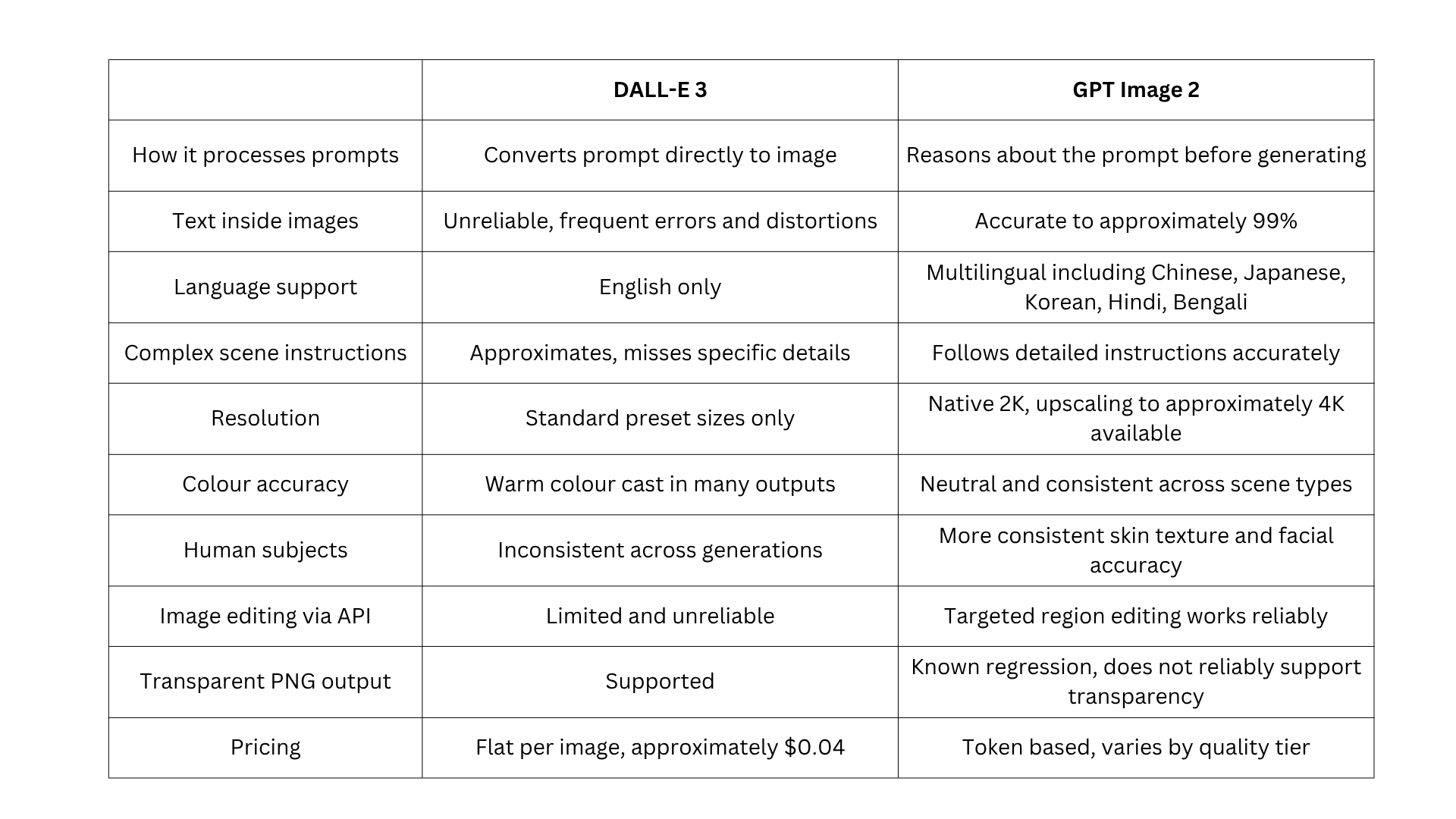
The gap between the two models is most visible in text rendering and complex prompt accuracy. For simple image generation with no text requirements, DALL-E 3 produced decent results. For anything more demanding, GPT Image 2 is in a different category.
What DALL-E 3 Was Actually Good At
Before covering what changed, DALL-E 3 deserves fair credit for what it delivered.
- It improved substantially on DALL-E 2 for general compositional accuracy. Scenes had better spatial coherence, objects related to each other more realistically, and overall image quality for straightforward prompts was reliable
- It integrated cleanly with ChatGPT and the OpenAI API, making it easy to adopt for anyone already in the OpenAI ecosystem
- For creative visual prompts without complex text requirements, DALL-E 3 produced output that served most general use cases well
- For teams that built stable workflows around it, the predictability was a genuine operational advantage
The weaknesses only became clearly limiting as demands grew and as alternative models raised the standard for specific capabilities.
Shortcomings that DALL-E 3 Never Solved
Understanding what was genuinely broken in DALL-E 3 makes the GPT Image 2 improvements more concrete. These are structural limitations that affected real workflows.
Text Inside Images Was Unreliable
DALL-E 3's most widely reported limitation was its inability to generate legible text within images. Asking it to produce a poster reading "Grand Opening Sale" would produce distorted characters, partial words, misspellings, or text that looked correct from a distance but dissolved into nonsense under any scrutiny.
This made DALL-E 3 unsuitable for any workflow involving labels, captions, banners, signage, product packaging, or any image where text was a functional element rather than decoration.
Complex Prompts Got Approximated, Not Executed
DALL-E 3 handled moderate, straightforward prompts well. For complex, multi-element compositional instructions, it produced approximations. Specifying exact positions for multiple objects, consistent colour palettes across independent elements, or conditional spatial relationships produced outputs that captured the general direction of the prompt but not the specific details.
For users writing detailed production briefs, this created iteration overhead that added real cost in both time and API usage. GPT Image 2's reasoning architecture addresses this directly, and the guide to best system prompts for image generation covers how to write prompts that get precise first-attempt results from the new model.
Human Subject Output Was Inconsistent
DALL-E 3's human subject output varied significantly between generations from the same or similar prompts. Skin texture accuracy, facial proportion, and expression naturalness were unpredictable. For portrait-adjacent use cases, the inconsistency made it unreliable as a production tool.
No Reasoning or Contextual Grounding
DALL-E 3 could not reason about a prompt before generating. It did not research real-world context, verify factual details, or plan image structure. For prompts requiring current knowledge, accurate brand representation, or contextually grounded visual detail, DALL-E 3 produced generic approximations.
What GPT Image 2 Actually Fixed
These are documented improvements that change what is achievable with a text prompt.
Text Rendering Is Now Near-Perfect and Multilingual
GPT Image 2 achieves approximately 99% text accuracy inside images. Multi-word phrases, specific font style descriptions, and precise text placement all render reliably and consistently. This extends to multilingual scripts, including Chinese, Japanese, Korean, Hindi, and Bengali, which DALL-E 3 could not render at all.
The workflow impact is direct: tasks that previously required generating a base image in an AI image generation tool and then adding text manually in a design application can now be completed in a single GPT Image 2 generation. For teams producing text-bearing assets at volume, this is not a marginal improvement. It changes what the model can be used for.
For a full breakdown of where GPT Image 2 sits among other models on text rendering, the guide to the best AI image generation models covers each model's strengths on this specific capability.
Instruction Following Is Now Governed by Reasoning
GPT Image 2 reasons about the full intent of a prompt before generating. Rather than converting instructions into weighted visual tokens, the model plans the composition and reasons about what is being requested using GPT-4o's native multimodal architecture.
Spatial instructions, conditional scene elements, and layered compositional briefs land with much higher accuracy. For teams writing detailed production prompts, this consistency difference translates directly into fewer iterations and lower per-usable-output cost.
For prompt structures that get the most from this improvement, the guide to best system prompts for AI workflows covers structures that produce consistent, first-attempt results.
Photorealism and Colour Accuracy Are More Consistent
GPT Image 2 produces more consistent photorealistic output across object types, material textures, lighting conditions, and environmental scenes. It eliminates the persistent warm colour cast that affected GPT Image 1.5, producing neutral and accurate colour rendering across all scene types. This makes it significantly more reliable for commercial production where colour accuracy matters.
Human subject generation is also improved compared to DALL-E 3. For dedicated portrait work requiring character-consistent facial rendering, specialised tools like ImagineArt 2.0 still lead in that specific category.
The full comparison is covered in the GPT Image 2 vs ImagineArt 2.0.
Resolution and Flexible Custom Dimensions
GPT Image 2 generates images at native 2K resolution, with upscaling available to approximately 4K in some interfaces, including the AI image generator. It supports custom dimensions with edges as multiples of 16 up to a 3840px maximum. DALL-E 3 was limited to standard preset sizes. This flexibility matters for teams producing assets across multiple formats from a single generation workflow.
One limitation worth noting is that GPT Image 2 does not reliably support true transparent PNG output. This is a known regression compared to GPT Image 1.5. Workflows that depend on transparent backgrounds for compositing should account for this before migrating and plan for a manual masking step where transparency is required.
Contextual Knowledge Grounding
GPT Image 2 carries a December 2025 knowledge cutoff and uses its reasoning capabilities to ground contextual outputs accurately. For prompts requiring real-world factual detail, accurate brand representation, or current category conventions, GPT Image 2 produces more accurate contextual detail than DALL-E 3 could.
Image Editing Through the API Is Now Genuinely Functional
GPT Image 2 supports targeted image editing through the API. Developers can upload an existing image and modify specific regions using a natural language prompt, with the model preserving the visual consistency of the rest of the image.
DALL-E 3 had limited and less reliable editing support by comparison. For a full comparison of how GPT Image 2 editing holds up against other leading models, the GPT Image 2 vs Midjourney comparison covers editing capabilities side by side.
What Did Not Change
A balanced comparison requires acknowledging where the two models are broadly similar.
The general workflow of writing a prompt, receiving an image, and iterating is the same. For teams evaluating the full range of AI image tools currently available, the best AI image generation models guide covers how GPT Image 2 sits alongside every major model in 2026.
- Basic image generation without text or complex composition: DALL-E 3 was capable here, and GPT Image 2 is better, but the gap is less dramatic than in text-heavy workflows
- Text-in-image and complex prompts: the performance gap is most significant here, and upgrade urgency is highest for these use cases
- Simple creative workflows with no text or compositional precision requirements: improvement is noticeable, but the business case for migrating is weaker than for production workflows
For Developers: What Switching from DALL-E 3 Actually Looks Like
DALL-E 3 is being shut down on May 12, 2026. For any developer with an existing DALL-E 3 integration, migration is no longer optional. Calls to the DALL-E-3 model endpoint will fail from that date.
Key differences to address in migration:
- GPT Image 2 uses token-based billing rather than DALL-E 3's flat per-image pricing. DALL-E 3 charged approximately $0.04 per image. GPT Image 2 bills at $8 per million input tokens and $30 per million output tokens, with cost varying by quality tier (low, medium, high)
- Prompt libraries written for DALL-E 3 behaviour may produce different results under GPT Image 2's reasoning architecture. Test before deploying to production
- GPT Image 2 outputs at native 2K resolution, with upscaling available to approximately 4K in some interfaces. This may affect downstream asset handling, depending on your pipeline
- GPT Image 2 does not reliably support true transparent PNG output, which is a known regression versus GPT Image 1.5. If your workflow depends on transparent backgrounds for compositing, plan for a manual masking step
Chatly provides access to GPT Image 2 with no API credentials or payment required, which makes it practical to test GPT Image 2 outputs against your existing DALL-E 3 output before committing to a full production migration. For a full breakdown of what each quality tier costs, see the GPT Image 2 access and pricing guide.
Is the Upgrade Worth It for Your Use Case?
For developers with existing DALL-E 3 integrations, the question of whether to upgrade is now answered. DALL-E 3 is no longer available. The practical question is how to migrate and what to expect from the new model.
For teams evaluating GPT Image 2 as a new addition to their workflow:
- Text-in-image workflows: The improvement is categorical. If your workflow involves any text-bearing or multilingual image generation, GPT Image 2 is the clear choice with no meaningful alternative in the same ecosystem
- Complex compositional prompts: Meaningfully better. The reasoning step reduces iteration cycles and produces more accurate first-attempt results
- Casual image generation with no text requirements: Improvement is noticeable but not essential. GPT Image 2 is better across the board, but the urgency is lower if text and precision are not requirements
- Portrait and character-focused workflows: Use GPT Image 2 for general tasks, but evaluate ImagineArt 2.0 for specialised portrait work where consistency and facial detail are the primary criteria
For the complete guide to what GPT Image 2 can do before committing to a workflow change, which covers the full feature set alongside how the model compares to alternatives.
Conclusion
Most people switching from DALL-E 3 to GPT Image 2 will notice the difference immediately. Prompts that used to need three or four attempts to get right often land on the first try. Text inside images actually reads correctly. Complex scenes come out closer to what was described.
The migration is not complicated. The bigger question is how you want to use the extra capability. Start with your existing prompts, see where GPT Image 2 outperforms what you were getting before, and build from there. You can test it on Chatly for free before touching your production setup.
Frequently Asked Questions
Learn more about GPT Image 2
More topics you may like

GPT-5.1 Pricing Explained: How Much Does It Cost?

Faisal Saeed
GPT Image 2 Free: How to Use It Without Paying (2026)

Arooj Ishtiaq
GPT Image 1.5: OpenAI's Production-Ready Vision Model for the Enterprise Era
Faisal Saeed
11 Best ChatGPT Alternatives in 2026 (Tested, Compared & Priced)

Muhammad Bin Habib

GPT-5.2 Is Here: What Changed, Why It Matters, and Who Should Care
Faisal Saeed