Why Agentic AI Workflows Outperform Standard AI Tools on Multi-Step Tasks
We're at a point where nearly every team has tried AI for something serious, and nearly every team has run into the same wall.
- You give the tool a task that involves more than a few steps.
- Somewhere in the middle, it starts losing the plot. Not dramatically. Gradually.
- The context shifts, the output drifts from the original instruction.
By the time you reach the final step, you're manually stitching together pieces that should have connected on their own.
Take Claude, for example. Even with latest models like Claude Opus 4.7, the best AI tool at the moment runs into the same problem. It is well documented that as the conversation gets longer, Claude loses context and starts providing irrelevant and vague answers. And no, context caching does not help either.
That's not a model quality problem. The models are genuinely capable. The failure is architectural, and it's been there since the beginning.
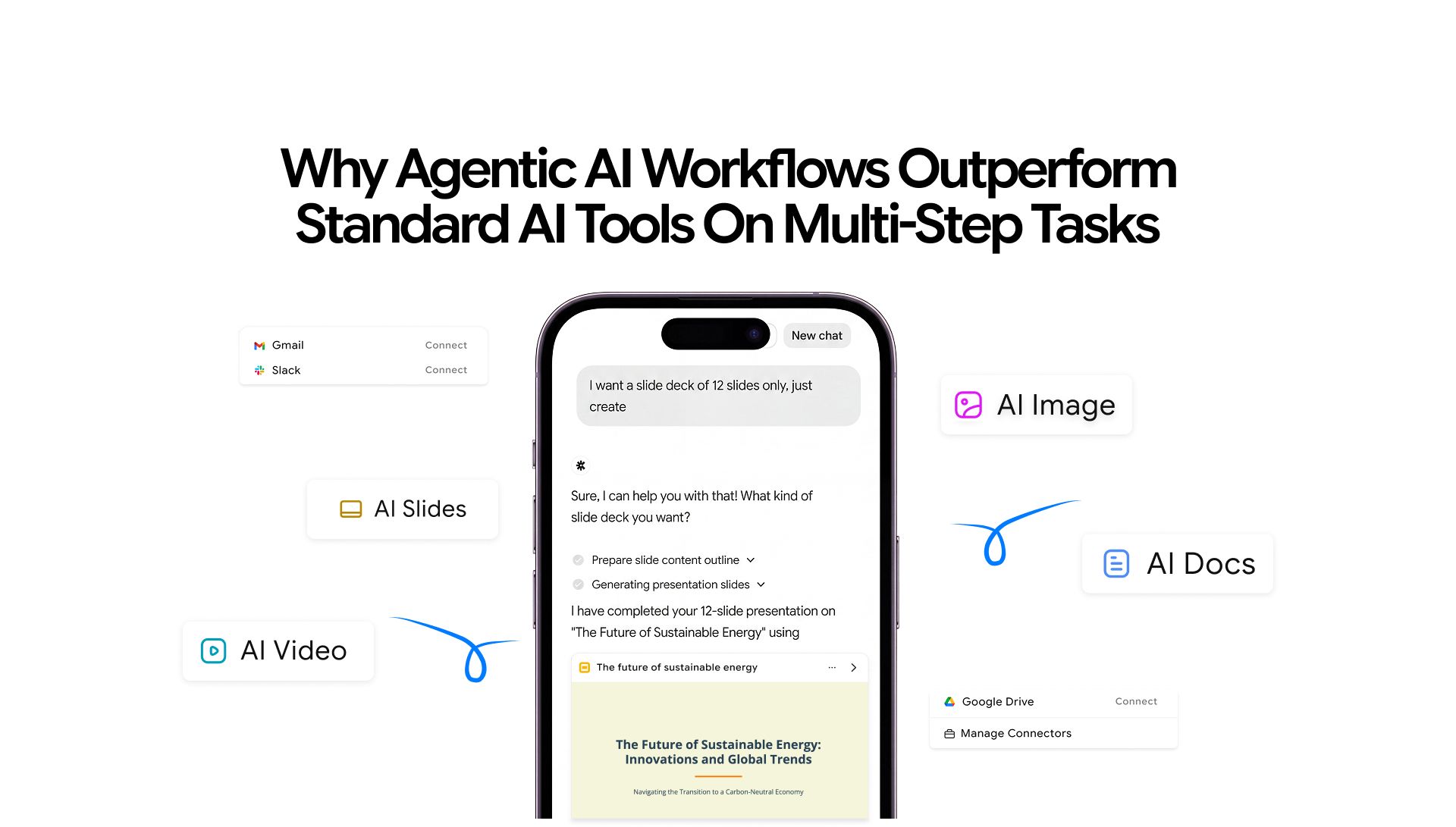
Agentic AI workflows, enabled by tools like Chatly’s OmniAgent, represent a different architecture entirely. Not a smarter chatbot, not a better prompt template. A fundamentally different way of executing tasks that span multiple steps, tools, and outputs.
This guide explores what holds standard AI tools back and how Agentic AI workflows are solving removing those barriers to enable longer, simultaneous sessions.
Why Standard AI Tools Fail at Multi-step Tasks
The problem is not a single component or process. It's an amalgamation of multiple factors that make standard AI tools next to useless in multi-step scenarios.
1. The Memory Problem Standard AI Tools Can't Escape
Every time you send a message to a standard AI tool, it starts fresh. Technically, most tools pass your recent conversation history back into the model with each request, but that window is limited; the model has no persistent state.
There's no record of what it decided three steps ago, no awareness of how step two's output affects step five, and no mechanism for maintaining intent across a long sequence of actions.
Ask a standard AI tool to run this four-step chain:
- Research a competitor's product positioning
- Extract the five most repeated customer complaints from that research
- Rewrite your own product report page to address those complaints directly
- Generate ad headlines based on the rewritten page
Each step is individually achievable. As a connected chain, most tools will have lost the thread by step three (step 5 at max). The ad headlines won't reflect the rewrite. The rewrite won't accurately reflect the complaints. The whole chain degrades.
While you can solve some of your problems by creating a handoff.md file and pasting it in a new chat to retain context, it is still not fully effective.
This is the context window problem in practice. Standard AI tools don't carry forward a working model of the task. They respond to what's in front of them and then forget.
Agentic AI workflows and tools like Chatly's OmniAgent addresses this directly by maintaining task context across steps rather than treating each prompt as a fresh conversation. You can guide the output mid-session, switch modes, iterate on results, and the agent holds the thread throughout.
2. Single-Shot Responses vs. Sequential Reasoning
Standard AI tools are trained to produce a response to a prompt. That's the unit of work: one input, one output.
It works well for drafting an email, explaining a concept, or generating a quick summary. The moment a task requires sequential reasoning, where the output of step one informs step two, which depends on step three's constraints, the single-shot model isn't just slow. It's the wrong tool.
Agentic AI workflows operate differently.
Instead of responding to a prompt, an agent reasons about what the task requires, constructs a plan, and executes that plan step by step; checking outputs at each stage before passing them forward.
This is closer to how a person actually approaches a complex project than how a chatbot handles a question.
The distinction matters practically.
A product manager who needs to synthesize user research, reframe it as a product brief, and then generate a set of feature hypotheses is running a three-step reasoning chain.
- A standard AI tool will give three decent individual outputs if prompted correctly.
- An agentic AI workflow will actually complete the chain with coherence between the steps,
The distinction matters for anyone who's spent time trying to use AI tools for work that goes beyond simple tasks. A single-shot tool will give you a good answer to one question. An agentic workflow will actually complete the job.
Generative AI, in its standard form, is reactive. It responds to what you give it. An agentic AI is proactive; it plans, acts, evaluates, and adjusts.
3. Why Errors Compound in Chained Tasks
There's a specific failure pattern that shows up constantly in multi-step AI work, and it's more damaging than losing context.
- When step two depends on step one's output, any error in step one gets carried forward.
- The agent (or the user, in the case of manual chaining) treats the broken output as valid input for the next stage.
- By step four, you're dealing with four compounded errors.
Imagine asking a standard AI tool to pull together a deep research report across four sequential steps:
- Gather sources across a topic
- Identify recurring arguments across those sources
- Spot the gaps in the existing literature
- Write a structured analysis based on the above
If the source-gathering step returns something vague or slightly off-target, every downstream step gets built on that shaky foundation. The gap analysis misses the real gaps. The final report addresses a slightly different question than the one you asked.
This is why standard AI tools aren't just unreliable at multi-step tasks. They're structurally unreliable. The architecture doesn't include a feedback loop. There's no mechanism to catch an error in step one before it becomes the input for step two. The model processes what it receives, regardless of whether it should.
A genuine agentic AI workflow includes self-correction at each stage. The agent evaluates whether an output meets the requirements of the next step before passing it forward. That single difference changes the error profile of complex tasks entirely.
4. Poor Branching and Backtracking
Memory loss and error compounding are problems with the forward direction of a task. Branching and backtracking expose a different weakness: standard AI tools have no concept of reversing course.
Real workflows rarely run in a straight line.
You reach step four, realize the approach taken in step two was wrong, and need to back up, revise that decision, and rerun everything that came after it.
For a person managing a project, that's a normal part of the process. For a standard AI tool, it's effectively impossible without starting over entirely.
The reason is structural.
Standard AI tools have no internal representation of the decision tree they've been working through. They can't identify which earlier decision caused the current problem, selectively revise it, and propagate that change forward through the steps that depended on it.
The only option is to re-prompt from scratch, manually carrying forward whatever context you want to preserve.
This creates several specific failure patterns that show up in real workflows:
- No selective rollback: If step six produces a bad output because of a flawed assumption in step two, a standard tool can't go back to step two, fix the assumption, and intelligently re-derive steps three through six. You start the whole chain again, with no guarantee the new run won't introduce a different problem.
- No conditional branching: A task that needs to take different paths depending on what it finds mid-execution (say, a research workflow that should go deeper on source A if it finds conflicting data, or pivot to source B if the first angle yields nothing) can't be handled dynamically. Standard tools follow the path you specified at the start. They don't adapt the plan in response to what they discover.
- No mid-task course correction without full restarts: Changing the goal, adding a constraint, or redirecting the approach after a few steps have already run means losing all the work done so far. The tool has no mechanism to incorporate a new instruction into an existing execution thread.
Agentic AI workflows handle this because they maintain the decision state of the task, not just the output history.
When something needs to change, the agent can identify which decision is being revised, assess what downstream steps are affected, and re-execute only those parts. The rest of the work stays intact. Chatly's OmniAgent uses this same principle: you can redirect, iterate, and guide the output through natural conversation at any point in the session, without scrapping what's already been done.
How Agentic AI Workflows Are Built Differently
Just reverse every flaw we discussed for standard AI tools. The reason an agentic AI workflow handles multi-step tasks where standard tools fail comes down to four structural differences:
1. Persistent Memory Across Steps
The agent maintains a working representation of the task state throughout execution. It knows what it decided in step one when it reaches step seven. That's not a feature. It's the basic requirement for completing any task that has dependencies between steps.
2. Specialized Resource Deployment
Different steps need different capabilities. A step that requires web search needs different tools than a step that requires image generation or document formatting. An agentic AI workflow identifies what each step requires and deploys the right resource for it automatically. The user describes the goal; the agent figures out the toolset.
3. Iterative Self-correction
Before passing an output from one step to the next, the agent checks whether it meets the requirements of what comes next. If it doesn't, it corrects before moving forward. Standard tools don't do this because there's no concept of "what comes next" in a single-shot response.
While running multiple tasks, the sandbox environment ensures mistakes in one workflow do not affect output of the other.
4. Coordination Across Sub-agents
Some tasks are too large or varied for a single agent to execute alone. A multi-agent system assigns different specialized agents to different parts of the task; one plans, others execute specific functions, one consolidates. The user gets a single coherent output without needing to orchestrate the coordination themselves.
This is how OmniAgent operates at the infrastructure level, spinning up a full sandbox environment with access to whatever specialized capabilities the current step requires, rather than applying one general-purpose model to every step regardless of fit.
The Business Cost Nobody Talks About
Most conversations about AI limitations focus on quality. The more immediate problem for teams that have actually tried to build AI into their workflows is time; specifically, the time spent patching the gaps that AI tools leave behind.
A content team running a standard AI tool for their production pipeline get imperfect outputs at every stage, which means someone has to review and fix each transition:
- The AI writes the brief. A human checks it.
- The AI writes the first draft. A human corrects the drift from the brief.
- The AI generates social posts. A human rewrites three of the five because they don't match the article.
The productivity gain from using AI tools for business evaporates when every automated step generates a manual correction step behind it.
Agentic AI workflows change this because the correction loop is internal.
- The agent catches its own errors before they require human intervention.
- Teams get outputs they can act on rather than outputs they have to fix first.
For operations teams, product teams, and anyone running repeated multi-step processes, that's not a marginal improvement. It's a different working model entirely.
There's also a compounding cost that's harder to measure: the mental load of babysitting AI outputs. Every time a team member has to re-read an AI output, compare it against the original brief, catch the drift, and manually redirect, that's cognitive overhead that adds up across dozens of tasks per day.
Agentic workflows reduce this because the system is oriented toward the original goal throughout, not just the most recent prompt.
The Larger Shift Happening Right Now
Agentic AI is not a niche concept anymore. As more teams hit the ceiling of what standard AI tools can do, they start looking for something built differently.
The architectural limits of single-shot AI are real, and they're permanent. You can't fix statelessness by making the model smarter. A more capable model that still operates on the prompt-response loop still can't maintain a plan across twenty sequential steps; it just produces better individual responses.
GPT-5.2's improvements in long-context understanding and tool-calling accuracy illustrate this well. These are genuine advances in model capability. But model capability and agentic architecture are different things.
What's changed is the availability of tools built on a genuinely different architecture.
Agentic AI workflows have moved from research concept to production-ready product. Teams don't need to build custom orchestration layers or chain API calls manually. Tools like Chatly's OmniAgent bring this capability into a product anyone can use, across every major output format, from a single interface.
What to Look For in an Agentic Tool
Not everything marketed as an AI agent actually operates on an agentic architecture. A few questions worth asking before adopting any tool for serious multi-step work:
- Does it maintain context across the entire session, or does each prompt effectively start a new conversation?
- Does it deploy different tools for different task types, or apply the same model to everything?
- Does it evaluate its own outputs before passing them to the next stage?
- Can it handle tasks that span multiple formats (text, image, audio, document) without requiring you to switch platforms?
If the answer to any of those is no, you're working with a more sophisticated chatbot, not a genuine agentic workflow system.
The format question is particularly telling. A tool that handles text but requires you to switch to a separate product for image generation and a third product for audio isn't running an agentic workflow; you're running one manually, with AI assistance at each step.
The coordination cost is still yours. True agentic AI tools absorb that coordination into the system itself, which is why unified multi-format tools represent the most practical version of this architecture for everyday work.
Stop Patching AI Outputs. Try Chatly OmniAgent.
Standard AI tools fail at multi-step tasks because they weren't built to sustain a plan. Memory loss, compounding errors, broken branching: these aren't bugs to wait out. They're the architecture.
Chatly's OmniAgent is built differently: persistent context, specialized resource deployment, and mid-task course correction built in. For any work that spans more than one step, that difference is the whole game.
Frequently Asked Question
Learn more about how AI agentic workflows differ from standard AI.
More topics you may like

GPT Image 2 Free: How to Use It Without Paying (2026)

Arooj Ishtiaq
AI for Frontend Engineers: Component Generation, Refactoring, and Accessibility
Arooj Ishtiaq

GPT Image 2 Prompt Guide: Examples That Get the Best Results
Arooj Ishtiaq

Lead Magnet Ideas That Attract the Right People

Faisal Saeed
AI Sycophancy: Your AI Is Agreeing With You (And That Is A Problem)

Daniel Mercer