AI for Frontend Engineers: Workflows, Tools, and Best Practices
82% of frontend developers have experimented with AI tools, but only 36% use them consistently in their daily workflow. The gap is not enthusiasm. It is the absence of a structured approach that treats AI as part of the development process rather than a shortcut for isolated tasks.
This guide covers how AI for frontend engineers works in practice: component generation, refactoring, accessibility enforcement, code review, and the tools worth using at each stage.
What AI Actually Does for Frontend Engineers
AI accelerates component scaffolding, refactoring, accessibility checks, and code review for frontend engineers. It cannot make architectural decisions, enforce UX quality, or guarantee production-safe output without engineering review. Every AI-generated component and suggestion requires a human judgment pass before it enters a production codebase.
The Role of AI in Modern Frontend Engineering
What AI accelerates:
- Scaffolding components from descriptions rather than writing boilerplate from scratch
- Refactoring and modernising legacy patterns incrementally
- Enforcing accessibility standards during development rather than after deployment
- Navigating unfamiliar component trees and understanding existing UI systems faster
What it does not replace is architectural judgment, UX decisions, or the engineering review that confirms output is correct for the system it will live in. For a broader look at how AI is reshaping developer workflows, the **guide to vibe coding and AI-assisted development** covers the shift across the full development process.
AI Component Generation
Generating components from a description rather than writing them from scratch is one of the most direct productivity gains AI offers frontend engineers. The output is a structured starting point, not a finished component. Engineering work shifts from scaffolding boilerplate to reviewing and refining something that already has the right shape.
Generating UI from Intent
Building UI manually is slow by nature. Before writing a single line of business logic, a developer translating a design into code must make dozens of micro-decisions per component: spacing, states, responsiveness, accessibility attributes, and conditional rendering logic all demand attention upfront.
A button alone is not just a <button>. It needs:
- Hover, focus, disabled, and loading states
- Size variants for different contexts
- Icon support on either side
- Full-width and destructive styling options
AI compresses this significantly. Describe a data table with sortable columns, sticky headers, row selection, and an empty state, and get a working scaffold in seconds. The same applies to components like:
- Forms with inline validation and error recovery
- Modals with focus trapping and scroll locking
- Sidebars with nested, collapsible navigation
- Filtering UIs with dynamic query building
- Multi-step wizards with shared state across steps
- Dashboard stat cards with embedded sparklines
- Drag-and-drop list builders with reorder logic
Where AI matters most is in the mid-complexity layer: components too custom for a library but too common to reinvent thoughtfully under deadline. These are exactly the components that consume disproportionate engineering time when built manually.
The gap AI closes is not typing speed. It is the cognitive overhead of translating intent into structure, deciding the component tree, wiring up state, and anticipating edge cases that only surface when real users interact with the interface.
Integration with Design Systems
As teams grow and components multiply, small divergences accumulate. A button built by one engineer uses a different spacing token than one built by another. Together, these create a UI that feels uneven and a codebase that resists refactoring.
When given the right context, AI generates components that slot into the existing system rather than diverge from it. That context includes:
- Design tokens and theme values
- Naming conventions the team follows
- The component library in use
- How state and props are typically structured
The engineer still makes the architectural decisions. AI handles the repetitive work of executing them consistently. AI Chat for generating multiple related components in one session is useful here because context from earlier in the conversation carries forward, so you do not need to re-specify the system for each component.
Practical Constraints in Production Use
Every AI-generated component requires a review pass before it enters production. Common gaps to check:
- Responsiveness logic that only works at the viewport width implied by the prompt
- Prop structures that will not scale to future variants
- Missing or incorrectly applied accessibility attributes
- State logic that works in isolation but creates conflicts when composed with other components
What AI catches reliably is the judgment about whether a component's structure is right for the system, which belongs to the reviewer, not the prompt.
AI in Component Evolution and Refactoring
Component codebases accumulate complexity over time. A component that started as a straightforward card ends up handling data fetching, multiple layout variants, and business logic that belongs in a service layer. AI makes addressing this faster without requiring a dedicated refactoring sprint.
Improving Component Structure
The real challenge with monolithic components is knowing where to draw the boundaries before touching any code. AI is well-suited to this because identifying the separation of concerns in a tangled component is pattern recognition work.
Given enough context, it can:
- Identify where boundaries should be drawn in an overgrown component
- Propose a structure of composable, single-responsibility pieces
- Ensure each unit can be tested, replaced, or reused independently
The AI Coder for targeted component refactoring and structure suggestions provides concrete recommendations focused on a given file rather than producing a broad overview.
Modernising Frontend Patterns
Frontend code ages in ways specific to the ecosystem. A codebase from two or three years ago might use class components, untyped props, or state management patterns that have since been replaced.
Common migrations that produce accurate results with AI:
- Class components converted to functional components with hooks
- Untyped props updated with TypeScript interfaces
- Redux slices migrated to lighter modern alternatives
Every migration needs testing afterward. AI can restructure code correctly and still introduce a subtle behavioural change in an edge case. Running the existing test suite after migration confirms equivalence.
Maintaining Long-Term Maintainability
- Structural inconsistencies across similar components
- Naming convention drift between features or teams
- Prop pattern variations across the component library
For engineers joining a codebase who need to understand existing component patterns before refactoring, the guide to onboarding an unfamiliar frontend codebase using AI covers how to build that picture efficiently.
AI Accessibility Enforcement Frontend
Accessibility issues found during development cost a fraction of what they cost to fix post-deployment. Using AI as a first-pass reviewer during component development shifts enforcement earlier, when fixes take minutes rather than hours.
Identifying Accessibility Issues
Before a component enters the pull request queue, an AI accessibility review catches structural problems that human reviewers tend to overlook under a deadline.
- Missing or incorrect semantic HTML, such as div elements where button, nav, or section should be used
- Absent or misused ARIA attributes, including missing role on interactive elements
- Images with missing or non-descriptive alt text
- Interactive elements without keyboard event handlers
- Heading levels that skip ranks or are applied to non-heading content
A prompt that produces useful output: "Review this React component for accessibility issues. Check for missing semantic HTML, incorrect ARIA attributes, keyboard navigation problems, and elements that would not be announced correctly by a screen reader."
For researching specific WCAG criteria and correct ARIA patterns, AI Search for researching WCAG criteria and ARIA patterns retrieves answers grounded in current accessibility documentation.
Interaction and Navigation Validation
Structural issues are the easiest to catch from code review. Interaction issues depend on runtime behaviour and need more targeted review.
For custom interactive components, check:
- Keyboard navigation: Can the component be fully operated without a mouse?
- Focus management: Is focus trapped inside a modal while open, and returned to the trigger on close?
- ARIA state: Do attributes like aria-expanded and aria-selected reflect the current state accurately?
AI flags where these patterns are missing. Confirming correct behaviour requires manual keyboard testing and screen reader testing for complex interactions.
Accessibility as a Continuous Process
Treating accessibility as a post-production audit creates debt that compounds. The alternative:
- Every new component gets an AI accessibility pass before the pull request opens
- Every refactored component gets the same check on the updated output
- Issues caught here are fixed in minutes rather than hours after deployment
AI in Your Frontend Development Workflow
The individual use cases are each valuable. The more significant gain comes from treating them as a connected sequence where AI participates at each stage rather than in isolation.
IDE-Level Assistance
The most immediate integration point for AI in the frontend workflow is inside the editor itself. IDE-level tools provide real-time suggestions, inline refactoring hints, and accessibility feedback at the point of writing rather than after the fact, which is where catching issues is cheapest.
For teams using an AI-native editor, Cursor extends this further by offering:
- Real-time component suggestions and context-aware code completion
- Inline refactoring tied to the component currently being edited
- Structural and accessibility issues were flagged while writing rather than in a later review pass
Claude Code extends this to repository-level tasks, handling analysis that requires understanding how a component is referenced across multiple files. For a practical look at how developers integrate AI tools across daily tasks, different ways developers use Chatly across daily workflows cover the patterns that stick in practice.
Code Review Augmentation
AI-assisted code review extends beyond IDE-level help into full pull request analysis. Before a human reviews the code, AI can scan the diff and surface structured issues such as:
- UI inconsistencies across components
- Missing accessibility attributes
- Deviations from team conventions
- Structural patterns that may cause scaling or maintenance issues
- Logic that looks correct but breaks under extension
This helps reviewers quickly understand risk areas without manually parsing every change.
The human reviewer then focuses on higher-level judgment that AI cannot reliably make:
- Fit with the broader design system
- Quality of the user experience
- Soundness of architectural decisions
- Product alignment and long-term direction
The human reviewer then focuses on what AI cannot assess:
Fit with the design system, UX quality, architectural soundness, and product alignment.
For a full breakdown of layered review workflows and prompt strategies, the AI code review and debugging workflow guide for frontend teams covers the end-to-end process.
Using AI to Navigate Existing Frontend Codebases
Navigating Unfamiliar UI Systems
AI shortens the orientation process by explaining what a component does, what it receives as props, what state it manages or reads, and what side effects it triggers, from a single paste.
For hooks or context providers the component uses, but you have not yet traced, asking for an explanation before reading the implementation builds a working model of the component tree significantly faster than sequential file reading.
Questions worth asking AI when navigating an unfamiliar frontend codebase:
- What does this component do, and what are its key dependencies?
- How does state flow between this component and its parent or children?
- Where is the business logic for this user-facing feature actually implemented?
- Which components are shared across routes and which are route-specific?
- What would break if this component were removed or significantly changed?
For understanding the broader architecture of the UI system, tracing a single user-facing feature from the UI component through to wherever it resolves is the most efficient approach. AI explains the unclear pieces as you go, and you verify the explanations against the actual code rather than accepting them as given.
For complex interactive components such as modals, dropdowns, and tab systems, frontend teams increasingly rely on Playwright or Cypress to automate interaction testing.
AI as a Codebase Interpreter
Pasting a folder structure or a set of component files and asking AI to explain what each directory contains and what architectural patterns the codebase follows gives a working hypothesis before reading individual files.
Use AI Coder for code explanation to walk through rendering conditions and state logic in plain language rather than producing more code output. The goal at this stage is orientation, not generation.
Documentation as a Byproduct
Components are among the most under-documented parts of any frontend codebase. A component can exist for two years without a written record of its props, variants, or edge cases.
Documentation worth generating for every component:
- Props table with types, defaults, and descriptions
- Usage examples for each supported variant
- Known edge cases or constraints
- When to use this component versus a similar one in the system
You can use AI Docs for structured documentation to convert raw notes and component code into readable documentation worth sharing with the team. For the full process of turning source material into documentation, you can read the guide to writing technical documentation your team will actually read.
Best AI Tools for Frontend Engineers
Every top-ranking result for this topic includes tool recommendations because frontend engineers evaluating AI workflows are also deciding which tools to adopt. Here is how the main options compare.
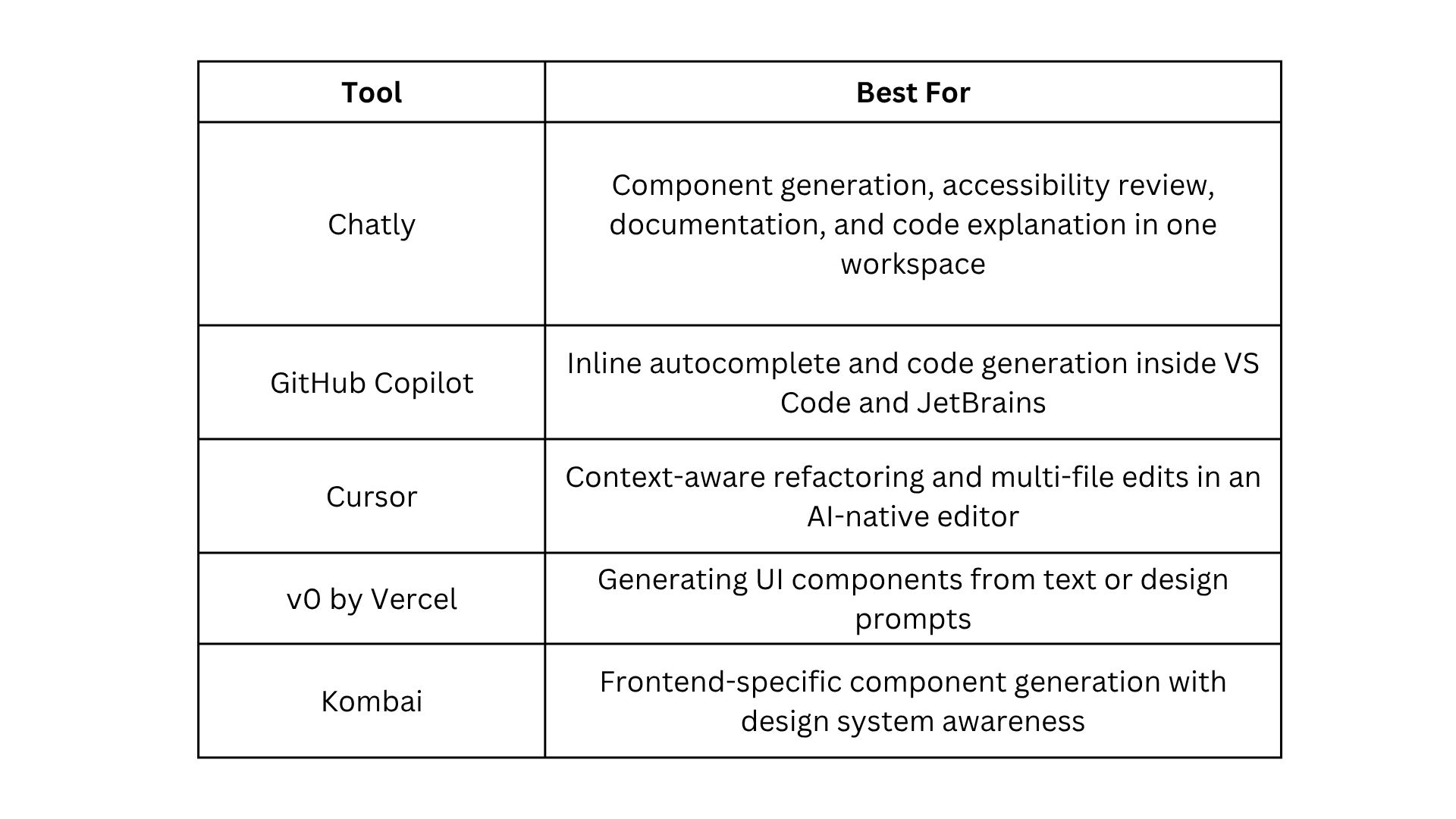
For a detailed look at how Chatly differs from single-purpose AI tools across the full development workflow, see how Chatly differs from single-purpose AI tools.
Limitations and Engineering Oversight
AI-generated frontend code has a specific failure profile. Output often looks polished in isolation but has gaps that only appear in context, under composition, or when extended for an unanticipated use case.
Where human oversight is non-negotiable:
- Generated components may lack architectural coherence when the prompt did not reflect the broader system
- Refactored code can introduce subtle behavioural changes that look correct but break edge cases
- Accessibility suggestions flag structural problems, but cannot confirm the runtime experience with assistive technology
- AI solves the problem as described in the prompt, not the constraints the system will face in six months
Treat AI output as a strong first draft. Every generated component, refactoring suggestion, and accessibility review requires engineering judgment before it enters the codebase.
How Do Frontend Engineers Integrate AI Into Their Workflow?
The most effective approach is layered:
- IDE-level tools during writing
- PR-level review before merge
- Periodic consistency checks across the component library.
The four-layer AI code review workflow guide covers the full structure that applies directly to frontend teams.
AI makes the structural, repetitive, and compliance-bound parts of frontend development significantly faster. More engineering time goes toward architecture, UX, and the decisions that require genuine judgment.
Frequently Asked Questions
Learn more about how front engineers can use AI in their process.
More topics you may like

Master Technical Writing & Documentation: An AI Guide

Arooj Ishtiaq
AI for Developers: Code Review, Debugging, Documentation, and Integrated Workflows
Arooj Ishtiaq
How to Use Chatly AI Search: A Detailed Guide for AI Search Engine

Faisal Saeed
How to Onboard onto an Unfamiliar Codebase Using AI?
Arooj Ishtiaq