How to Onboard an Unfamiliar Codebase Using AI

Developers spend roughly 58% of their time on code comprehension, not writing code. When you land in an unfamiliar codebase, that time goes toward decoding folder structures, tracing flows through undocumented systems, and figuring out where the business logic actually lives. Getting up to speed is not a side activity. It is most of the job.
This guide covers how to onboard an unfamiliar codebase using AI at every stage, from mapping the structure on day one to building a continuous learning workflow that keeps compounding as you contribute.
What Does It Mean to Onboard a New Codebase
Codebase onboarding is the process of building a working mental model of a system you did not write. It is not just reading code. It is understanding why the code is structured the way it is, what the application does when it runs, where the business logic lives, and how the pieces fit together well enough to contribute without breaking things.
For most developers, this involves several overlapping challenges:
- Understanding an unfamiliar folder structure and architectural pattern
- Identifying the tech stack and how the major dependencies relate to each other
- Tracing how the application behaves end-to-end for a real user action
- Locating business logic that is rarely where you expect it to be
- Getting the environment running locally without complete setup documentation
- Decoding internal naming conventions and abbreviations nobody has written down
Cortex's 2024 State of Developer Productivity survey found that 72% of developers take more than a month to submit their first three meaningful pull requests in a new codebase. The problem is not a lack of effort. It is the absence of a structured approach that covers all of these layers in the right order.
How to Onboard an Unfamiliar Codebase with AI
Understanding a codebase is gradual. The steps below follow the natural order of that process, starting with the big picture and working inward. At each stage, AI helps you move faster without skipping the work.
Here are the phases to onboarding a new codebase using AI:
- Phase 1: Getting Oriented
- Phase 2: Going Deeper Into the System
- Phase 3: Configuration, Dependencies, and Data
- Phase 4: Learning While You Work
- Always Verify Against Real Code
Phase 1: Getting Oriented
The first phase is about establishing the big picture before you touch any individual file in depth. Move through these three steps in order, and you arrive at Phase 2 with a working hypothesis about the architecture, the tech stack, and how the application behaves under a real user action.
Map the Folder Structure and Entry Points
The first thing to do when you land in an unfamiliar repository is to understand what you are looking at before trying to understand how any of it works. Start with the top-level folder structure and the obvious configuration files.
Paste the folder structure and any config files into prompt box and ask AI to explain what each directory likely contains and how the pieces relate to each other. You get a working hypothesis about the architecture before reading a single file.
What to look at first:
- Package manifest files like package.json, go.mod, requirements.txt, or Cargo.toml for dependencies and build scripts
- Entry points like main., index., app., or server. for where the application starts
- Config files like docker-compose.yml, vite.config.*, or angular.json for how the project runs
For researching unfamiliar framework conventions or architectural patterns you spot in the folder structure, an AI Search Engine for framework conventions and architectural patterns gives you a direct answer without trawling through documentation.
Identify the Full Tech Stack from Dependency Files
Once you know the structure, identify exactly what the project is built with. This is more than just the programming language. It includes the frameworks, databases, build tools, testing libraries, and any major third-party services.
- Paste the dependency files and the imports from the main entry-point files into AI and ask for a plain-English summary of the tech stack.
- Ask what each major dependency is for and how the pieces fit together.
A useful prompt to run here:
"Based on these dependency files, summarise the tech stack in plain English. What is each major library responsible for, and are there any patterns or conventions I should know before reading the application code?"
For quickly summarising dense setup docs, changelogs, or README files that describe the stack, the summary generator for condensing long technical documents into the key points you actually need condenses long text into the key points without you reading everything line by line.
Trace One Simple Application Flow End to End
Understanding the structure is different from understanding what the application actually does when it runs. Application flow means tracing how a request or user action moves through the system from start to finish: through the frontend, the backend, the service layer, and down to the database.
Pick one simple flow to trace first. A login, a page load, or a basic API call are good starting points because they touch most of the layers without being too complex.
How to use AI here:
- Find the relevant route, controller, or handler for your chosen flow
- Paste the files involved and ask AI to explain the sequence of what happens when that request comes in
- Ask it to identify what each layer does and what it passes on to the next
The AI Chat for tracing application flow step by step with full context carried across the conversation is particularly useful at this stage because you can continue the same conversation as you paste additional files, without re-explaining the context you have already established.
Phase 2: Going Deeper Into the System
With a working picture of the structure, stack, and one traced flow, Phase 2 goes deeper. The goal here is understanding the system at the level of individual files, features, naming conventions, and business logic.
Summarise Large or Complex Files Before Reading Them
Every codebase has genuinely intimidating files:
- A 2,000-line service class
- A utility module with 40 functions
- A database abstraction layer that has grown for years.
Reading these before you understand the broader context is slow and rarely productive.
Paste a large file into AI and ask for a summary before reading it in detail. A good summary tells you what the file is responsible for, which parts are most important to understand first, and whether there are any patterns it relies on that are not obvious from reading it.
What to ask when summarising a complex file:
- What are this file's main responsibilities?
- Which functions are called most frequently from elsewhere?
- Are there any non-obvious patterns or conventions being used here?
- What would break if this file were removed or significantly changed?
The summary generator for breaking down large, complex files into readable overviews before diving into the detail and handles this without requiring you to read everything before you know where to focus.
Trace Key Features Through the Full Stack
Once you have a broad picture of the system, trace specific features all the way through the stack. Pick the features that matter most to the product: login, payments, notifications, and the main user action the product is built around.
How AI helps here:
- Paste the files involved in a feature and ask AI to map the data flow from entry to exit
- Ask it to identify where one layer hands off to the next and what each function is responsible for
- Ask what could go wrong at each point in the chain
The AI Coder for tracing features across multiple files and services during codebase exploration handles multi-file context well and is designed for exactly this kind of code analysis work.
Decode Naming Conventions and Internal Vocabulary
Every codebase has an internal vocabulary that is invisible to outsiders. Folders called handlers, resolvers, presenters, or facades mean different things in different projects. Abbreviations like txn, ctx, svc, or repo are used consistently within a team but never explained anywhere.
When you encounter naming or patterns you do not recognise, paste examples into AI and ask:
- What the naming convention likely means in this context
- What design pattern is being applied
- Whether there are well-known conventions that the codebase seems to be following
Keep a running note of the terms and patterns you decode as you go. This personal glossary makes the second week significantly easier than the first. An AI Chat tool for asking quick convention and pattern questions without breaking your workflow handles these targeted lookups without switching tools.
Locate Where the Business Logic Lives
Business logic rarely lives where you expect it to. What started as a validation in the controller migrates over time to a service, then to a utility, and then gets split across both. Finding where the critical rules, calculations, and workflows actually live is one of the most important things to do early.
Useful prompts for locating business logic:
- "Based on the code I have shared, where is the validation logic for user permissions likely to live?"
- "Is this implementation the authoritative business rule, or does it look like a wrapper around something else?"
- "Explain this rule in plain English: what business decision does this code encode?"
For targeted questions like these during exploration, use the Ask AI app for quick, focused queries about business logic and code behaviour. The Ask AI app is well-suited to fast, specific questions without needing to set up a longer session.
Phase 3: Configuration, Dependencies, and Data
Phase 3 covers the parts of the codebase that are the most project-specific and least documented: environment setup, third-party integrations, and the database schema.
Make Sense of Environment Setup and Config Files
Getting the application running locally rarely goes smoothly. Environment files, secrets management, build configuration, and local setup scripts are among the most project-specific and least documented parts of any codebase.
Paste the .env example, docker-compose.yml, Makefile, or setup README and ask for a plain-English explanation of what each variable or step does.
What to ask during environment setup:
- What does each environment variable control, and what happens if it is missing?
- What does this Docker or build configuration set up, and in what order?
- What are the most common setup failures for a project like this?
If the setup documentation lives in a PDF, an internal wiki export, or any uploaded document, Chat PDF for asking direct questions about setup documentation in uploaded files lets you find the relevant section without reading the whole document.
For researching common environment configuration errors and build tool behaviour, an AI Search Engine for build tools, environment configuration, and common setup failures pulls answers from current documentation rather than relying on training data that may be outdated.
Understand Third-Party Integrations
Modern applications are as much a collection of integrations as they are original code. Payment providers, notification services, analytics platforms, message queues, feature flags, and external APIs all need to be understood to have a complete picture of how the system works.
Paste the integration files, wrapper classes, or SDK configuration into AI and ask:
- What does this service do, and why is it used here rather than an alternative?
- What data is being sent to this service, and what comes back?
- What would break if this integration were temporarily unavailable?
For researching the services themselves, an AI Search Engine for looking up third-party service documentation and integration patterns pulls current documentation rather than relying on what the model already knows.
Read the Database Schema
The database schema is one of the most information-dense parts of any application. Models, migrations, relationships, and indexes together tell you what data the application works with, how it is structured, and how different entities relate to each other.
Start with the migration files or model definitions and ask AI to produce a plain-English summary of the data model. Ask what each table contains, how the key relationships work, and which entities are central to the product's core functionality. You can use the AI summary generator for producing plain-English overviews of complex database schemas and migration files when the schema is large enough that reading it in full before understanding the relationships would slow you down.
Useful prompts for schema understanding:
- "Summarise this data model. What are the core entities and how do they relate?"
- "What does this migration do, and why would it have been needed?"
- "Are there any non-obvious schema patterns here, such as soft deletes, polymorphic relationships, or denormalised fields?"
Phase 4: Learning While You Work
Phase 4 is not a stage you complete and move on from. It is the ongoing loop that runs in parallel with everything else. The goal is to use the work itself: debugging, contributing, asking questions, as a structured learning exercise.
Use Debugging as a Learning Exercise
One of the best ways to learn how a system actually behaves is to debug something in it. Reading code tells you what the system is supposed to do. Debugging tells you what it actually does, where assumptions break down, and what the real data flow looks like under live conditions.
When you encounter an error, do not just try to fix it immediately. Use the debugging process as a learning exercise. Paste the stack trace, the relevant code, and a description of what you were doing, then ask AI:
- What the error means and where in the system it is coming from
- What it reveals about how that part of the codebase works
- Whether this type of error is likely to appear elsewhere, given the same pattern
Always ask for the cause before the fix. Using an AI Coder for debugging and code explanation gives you both the diagnosis and the fix in the same place, which is more useful during onboarding than a fix suggestion alone. Understanding the cause is the actual goal.
For more on using AI throughout the development workflow, Chatly's guide to AI for developers, covering code review, debugging, documentation, and integrated workflows, covers how to build these habits into a full development cycle.
Generate Personal Documentation as You Go
Most codebases are underdocumented, and the documentation that does exist is written by people who already know the system well enough to skip the parts that seem obvious. The most useful documentation you can create early in onboarding is documentation written for yourself.
As you work through the codebase, use AI to help generate personal notes:
- An architecture overview in plain language with your own annotations
- A glossary of internal terms, abbreviations, and patterns
- A map of two or three key features traced end to end
- A personal setup guide with the actual steps that worked, not the ones in the README
The AI document generator for converting raw notes and code explanations into structured onboarding documentation converts raw notes and code explanations into structured, readable documentation that is also worth sharing with the team.
For a full walkthrough of turning source material into documentation, Chatly's guide to using AI to write technical documentation your team will actually read covers the process end to end.
Always Verify Against Real Code
This is the most important principle in this guide and the one most likely to be skipped when AI explanations feel confident and clear. AI works from what you paste into it and can produce plausible-sounding explanations that are subtly wrong, especially for complex business logic, custom framework behaviour, or code that behaves counterintuitively.
Every explanation AI gives you should be treated as a hypothesis, not a conclusion. Verify it against the actual code, follow the logic yourself, run the code locally, and confirm the behaviour matches what AI described.
Common AI Errors in Codebase Explanation
AI errors in codebase explanation do not look like obvious mistakes. They appear as:
- Descriptions that are accurate for the code shown but miss the behaviour introduced by a function called elsewhere
- Explanations of business logic that are plausible but wrong because AI does not know the business rule the code is supposed to implement
- References to patterns or conventions that apply in other frameworks but not the one this codebase uses
- Confident summaries that skip edge cases or special handling because they were not visible in what was pasted
- Descriptions of what a migration or schema change does that are technically correct but miss the operational reason it was introduced
The most dangerous category is explanations that are correct at the code level but wrong at the product level. A function can be accurately described and still implement the wrong business rule.
How to Verify Without Starting Over
Verification does not mean re-reading everything from scratch. It means checking the specific claim AI made against the specific place in the codebase where it would be true or false.
Practical verification steps:
- Run the code locally and observe whether the behaviour matches what AI described
- Follow the logic in the function yourself, step by step, rather than relying on the summary
- Check any edge cases AI did not mention by searching for them in the tests
- If AI described a pattern or convention, check whether it appears consistently across the codebase or only in the file you pasted
- For business logic explanations, confirm with a teammate or with product documentation that the rule is correct, not just that the code is consistent
The combination of AI for fast orientation and manual verification for accuracy is more effective than either approach alone. For a structured approach to this across the full development cycle, Chatly's guide to AI for developers, covering code review, debugging, and integrated workflows**,** covers how verification fits into every stage of the process.
What AI Can and Cannot Do When Onboarding a Codebase
AI accelerates codebase onboarding in specific, well-defined ways. It is equally important to know where it stops being reliable before you build a workflow around it.
What AI does well:
- Explaining folder structure and architectural patterns from what you paste
- Summarising large files before you read them in detail
- Tracing how a request or feature moves through the layers you share with it
- Answering specific questions about code, naming conventions, and dependencies
What AI cannot do:
- Understand your business rules or whether the logic is correct for your product
- Hold a full production codebase in context at once
- Know about files, functions, or behaviours you did not paste into it
- Replace running the system yourself to observe how it actually behaves
Why Context Windows Are the Core Limitation
Every AI model has a context window of the maximum amount of text it can process in a single conversation. A typical source code file ranges from 200 to 2,000 tokens. A real-world codebase can contain hundreds of thousands of lines across hundreds of files. No model can hold all of that simultaneously.
The practical consequence:
- AI sees only what you paste into it
- It has no knowledge of files you did not share
- It cannot see functions called from elsewhere in the system
- It cannot observe behaviour that only emerges when multiple services interact
Every explanation AI gives is based on a partial view. This is not a problem if you know it going in. The workflow in this guide is built around it: work one section at a time, paste focused context, and verify what AI tells you against the actual code.
The Difference Between AI Explaining Code and Understanding It
When you paste a function and ask what it does, AI produces a plausible, often accurate description of the logic it can see. That is not the same as understanding the code.
What AI cannot tell you from an explanation alone:
- Whether the logic is correct for your specific business rules
- Whether this is the authoritative implementation or a wrapper around something else
- Whether the behaviour you observe in production matches what the explanation describes
Expert developers understand large codebases by recognising patterns, following execution paths, and building a mental model piece by piece. AI accelerates each of those steps. It does not replace any of them.
AI Tools That Help With Codebase Onboarding
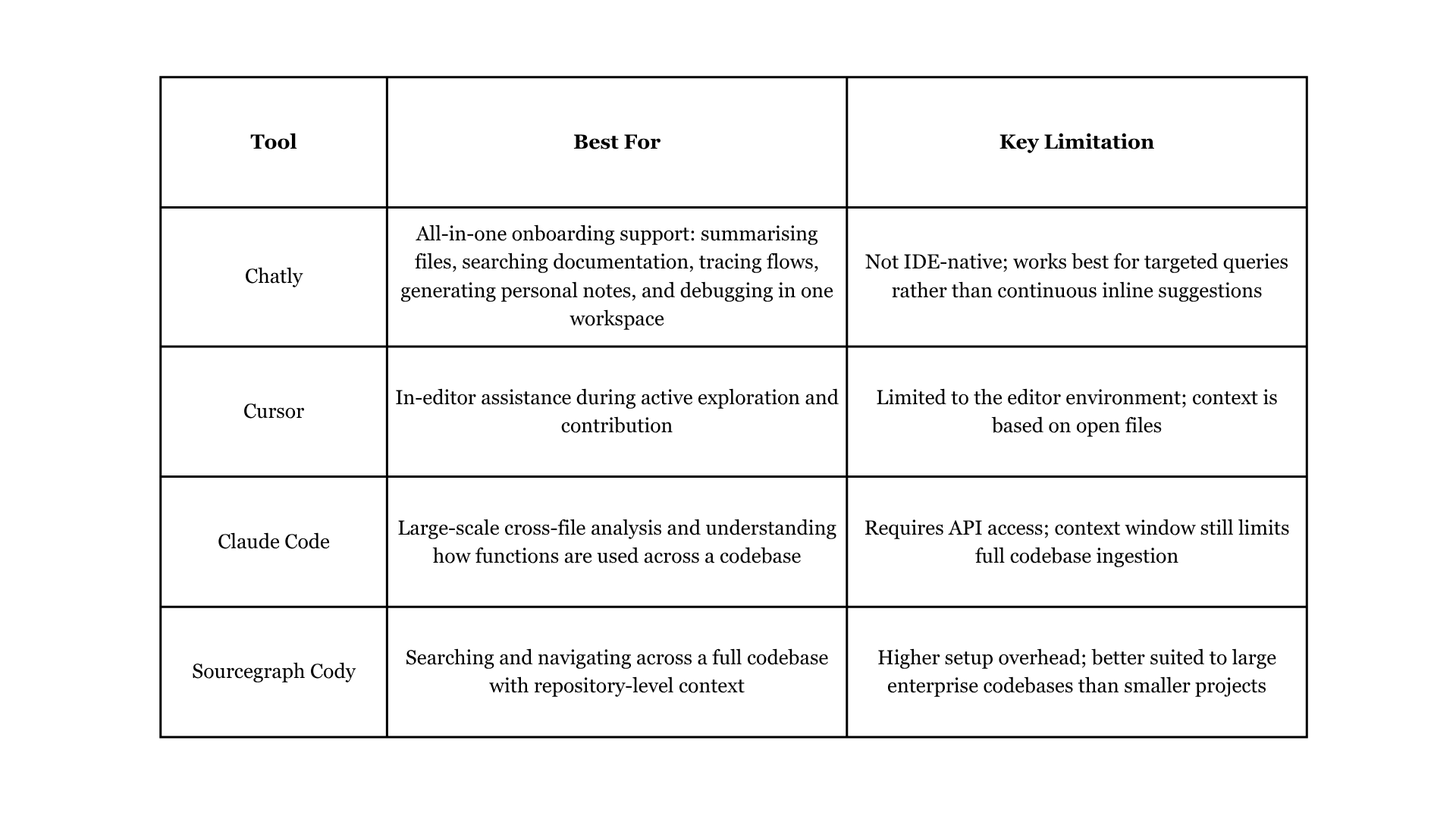
Different tools serve different stages of codebase onboarding. Here is how the main options compare.
For a broader look at how AI is changing the day-to-day experience of development work, Chatly's vibe coding overview covering how developers are using AI-assisted development covers the shift in how teams are approaching the entire development process.
Conclusion
Getting up to speed on an unfamiliar codebase is hard in proportion to how large and old the system is. AI does not make it trivial, but it compresses every individual step: understanding the structure, tracing features, decoding logic, finding where things live, and building the mental model that lets you contribute confidently.
The key is using AI to amplify your own exploration rather than replace it. Read the code yourself, use AI to explain what you find, verify what AI tells you, and document what you learn. Run that loop consistently, and the codebase stops feeling foreign faster than you would expect.
Frequently Asked Questions
Learn more about onboarding an unfamililar codebase
More topics you may like