Master Technical Writing & Documentation: An AI Guide
Technical writing and documentation has always been one of those things teams know they should do well, but rarely have the bandwidth to get right. Writers lack context, engineers lack time, and documentation ends up either outdated before it ships or too dense to be useful.
AI changes the equation. Teams can now draft, structure, and maintain technical writing and documentation in a fraction of the time, without pulling engineers away from the work that actually moves the product forward. This guide walks through each step, from scope definition and first draft to accuracy review and keeping documentation current.
What Is Technical Writing and Documentation
Technical writing is the process of turning complex information into clear, structured content for a specific audience. The goal is not to simplify things to the point of losing accuracy — it is to present accurate information in a format that the right reader can actually use.
Technical documentation becomes difficult when teams have to manage several things at once while the product keeps changing.
Common challenges include:
- Understanding the product deeply enough to explain it clearly
- Writing for users with different levels of technical knowledge
- Keeping documentation consistent across multiple pages and systems
- Updating content whenever features or workflows change
- Balancing documentation work with development, support, or other responsibilities
Because documentation is rarely someone’s only job, it often becomes outdated or incomplete over time.
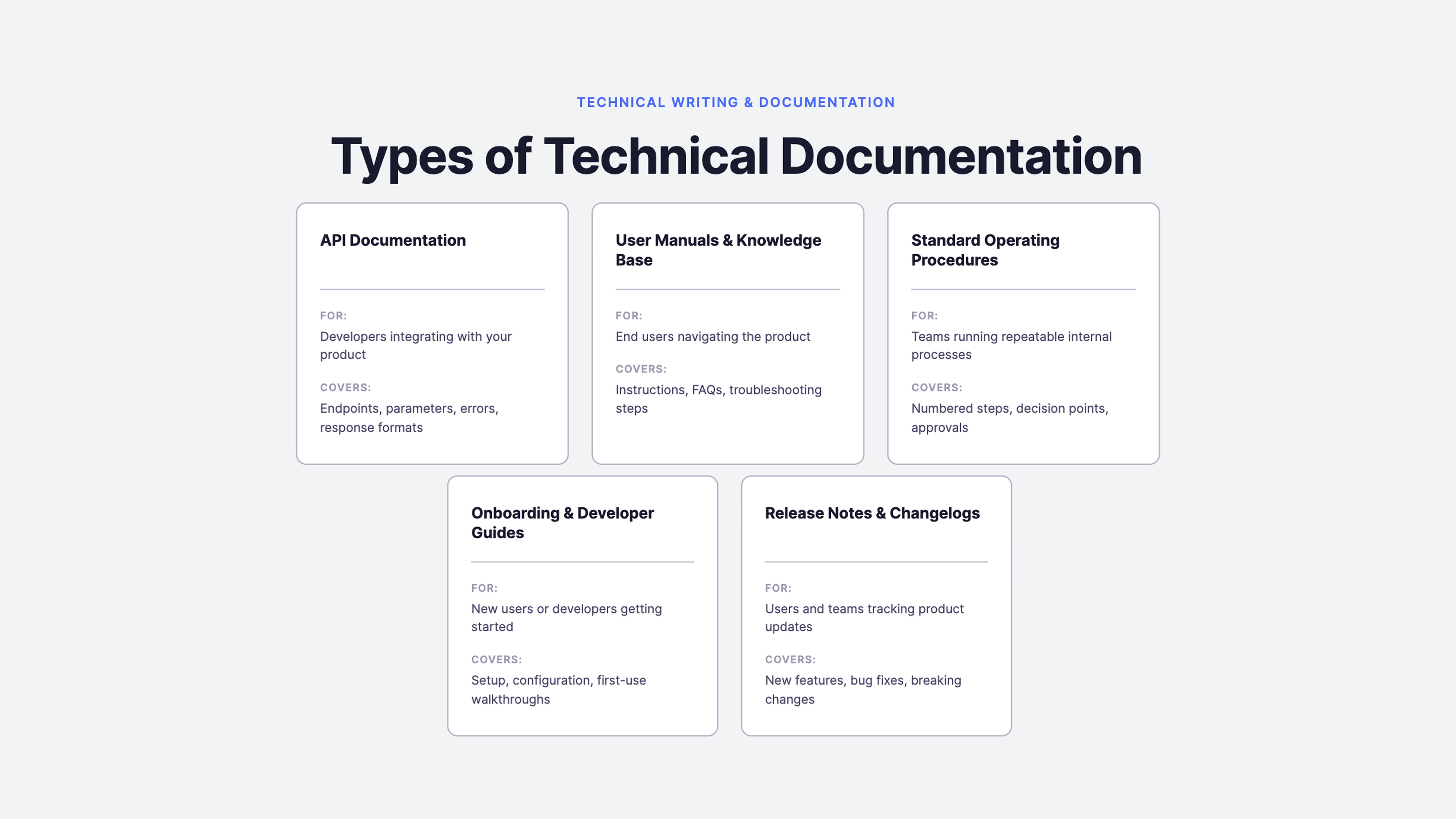
Types of Technical Documentation You Can Create with AI
AI works across every major documentation type, but the approach shifts depending on what you are writing and who it is for. Understanding which type fits your use case is the first step to getting useful output from AI rather than a generic draft that needs rebuilding from scratch.
How to Use AI for Technical Documentation
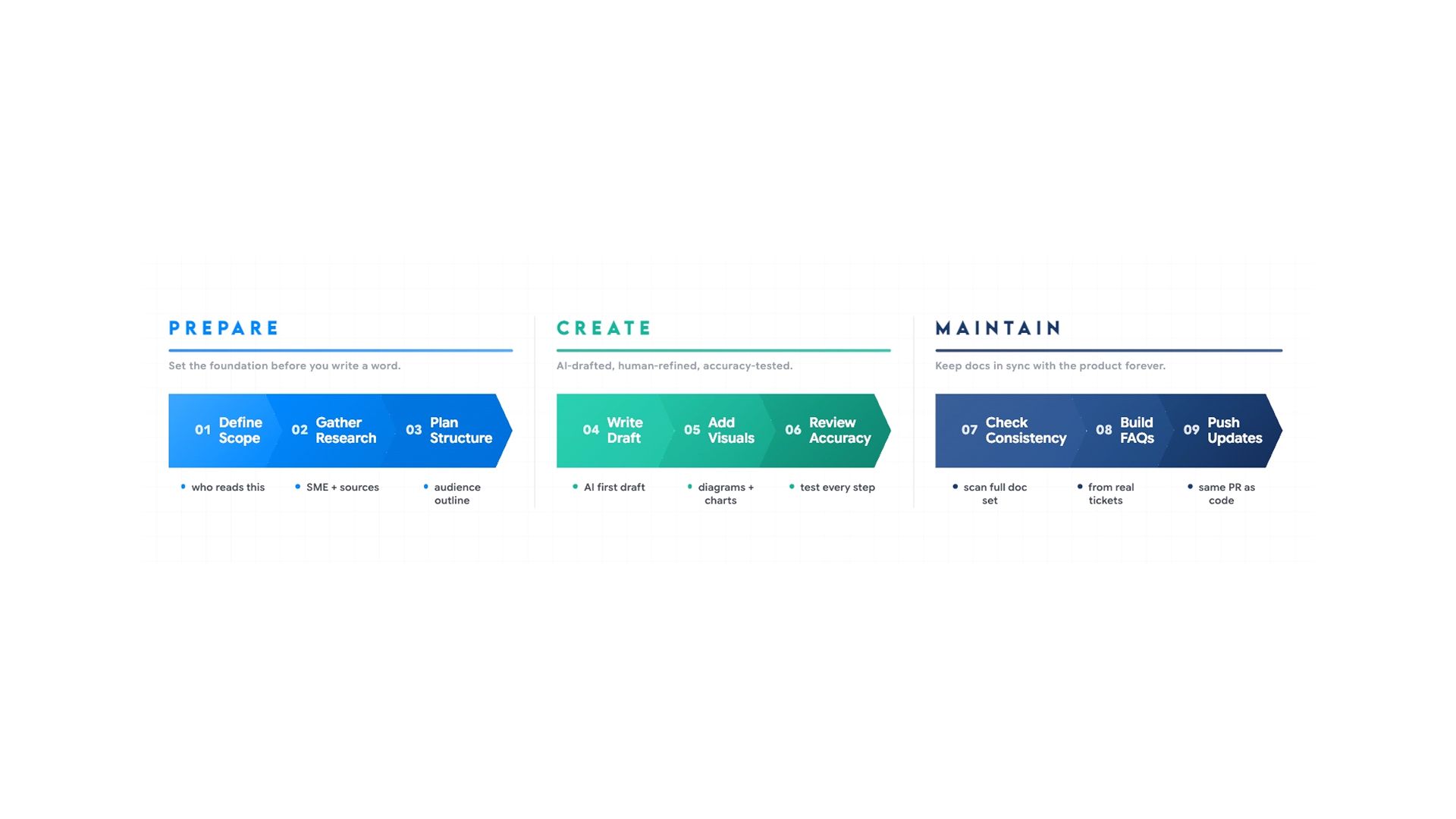
Each stage of the AI-assisted documentation process and what comes out, so you can see where to focus and where AI carries the load.
Step 1: Define Scope and Audience Before Writing Anything
Most technical documentation fails because teams never clearly define what the documentation should cover or who it is meant for before writing begins.
Before writing anything, three questions need clear answers:
- Who is reading this?
- What should they be able to do after reading it?
- What does this document not cover?
Your intended audience determines the tone, the level of background information needed, how often to define terminology, and what to include or leave out. A guide on connecting a React app to a database needs a SQL primer if the audience is frontend developers, and a React primer if the audience is backend engineers. Same topic, two completely different documents.
Define the goal from two angles. The producer's goal is why the document is being written:
- To reduce support tickets
- Onboard users faster
- Document a new release
The reader's goal is what they are trying to accomplish when they open it. When both are aligned before drafting begins, every section has a clear purpose, and anything that does not serve either goal is easy to cut.
Write the audience definition, both goals, and the scope boundary into a brief before any drafting begins. Getting this wrong means the draft is wrong from the first sentence.
Step 2: Research and Information Gathering
Documentation stalls before it starts when source material is scattered. A developer documenting a new feature might need to pull context from a Slack thread, a Jira ticket, internal notes, and code comments before writing a single sentence.
Before AI can produce anything useful, it needs accurate raw material. Subject matter experts — engineers, product managers, support leads — hold the context that never makes it into tickets:
- Why was a decision made?
- What edge cases exist?
- How are users likely to misuse a feature?
Before drafting, follow this sequence:
- Schedule a short interview or async walkthrough with the relevant SME
- Record the session, take detailed notes, or have the SME complete a structured brief
- Compile SME input alongside supporting specs, tickets, or reference material
- Provide the consolidated input to AI as the context for drafting
The quality of the AI output is directly limited by the quality of what goes in. SME input is the most valuable source in that stack.
For background research at this stage — understanding how a specific API pattern works, what a framework convention means, or how a technical term translates into plain language, the AI Search pulls accurate, sourced answers without switching tools. The summary feature also compresses long internal threads or dense documents into a workable brief without you reading everything line by line.
Step 3: Planning Structure
With source material gathered and the audience defined, the next step is building the outline. Structure determines whether the right information reaches the right reader in the right order — it is not a formatting decision.
AI builds the outline from the context already established in Step 2. You do not need to re-explain the product. A prompt that produces a reliable structure:
"You are a senior technical documentation strategist. I am writing documentation for [feature name]. The target audience is [first-time developers / experienced developers / API consumers]. Based on the following context — SME notes, feature description, and reference material — create a structured documentation outline tailored to this audience's level of expertise and real-world usage needs."
AI Chat is well-suited to this planning stage — you can paste your SME notes and source material directly into the conversation, ask it to propose an outline for the defined audience, and carry that context forward into drafting without starting over.
Before committing to a structure, upload existing API docs, competitor documentation, or internal reference material and ask where the gaps are. That review informs where your outline should match the standard and where it should go further.
Step 4: Writing the First Draft
With a clear structure and source material in place, AI produces a first draft that covers the right sections in the right format. Your job shifts from writing to editing and verifying, significantly faster and more accurate than drafting from scratch.
- Before generating the draft, set the AI up with the right context. A prompt that includes the audience, the format, the source material, and the expected output length will produce a draft that needs editing, not a complete rewrite.
- Paste the source material directly into the prompt rather than describing it
- Specify the reader's experience level so the draft does not over-explain basics to experts or skip context for beginners
- Ask for one section at a time on complex documents; the output is more focused and easier to verify
- Ask AI to flag anything it could not confidently complete based on the source material. This surfaces gaps before the review pass rather than during it
The AI document generator is built specifically for this workflow, generating structured, formatted documents from prompts, templates, or uploaded source files so the output is ready for an accuracy pass rather than a rebuild from scratch.
Here are prompts that produce usable first drafts:
For API documentation: "Write API documentation for this endpoint based on the spec below. Include a one-sentence description, required and optional parameters with data types, a sample request and response, common errors with explanations, and one practical use case."
For a setup guide: "Write an installation guide for [product] for developers setting it up for the first time on macOS. Include prerequisites, exact steps with commands, how to verify the setup worked, and three common errors with fixes."
For release notes: "Write release notes for version 2.4 based on the notes below. Include a one-sentence summary, new features with brief descriptions, bug fixes, and breaking changes with migration steps."
For a troubleshooting guide: "Write a troubleshooting guide for [problem] aimed at Tier 1 support agents. Structure it as a symptom-first decision tree with yes or no diagnostic questions. End each branch with a resolution step or an escalation instruction."
For an internal SOP: "Write a standard operating procedure for [process] based on the notes below. Use numbered steps, include decision points, mark any step requiring approval, and assume the reader is performing this task for the first time."
One final check before moving to review: read the draft against the source material to confirm every major point is covered and no section was generated without a corresponding source to back it up.
Step 5: Creating Visuals and Diagrams
Text alone rarely makes technical documentation clear enough. Architecture diagrams, workflow charts, annotated screenshots, and concept illustrations carry information that paragraphs cannot — especially for multi-step processes where the reader needs to see how the parts fit together before the steps make sense.
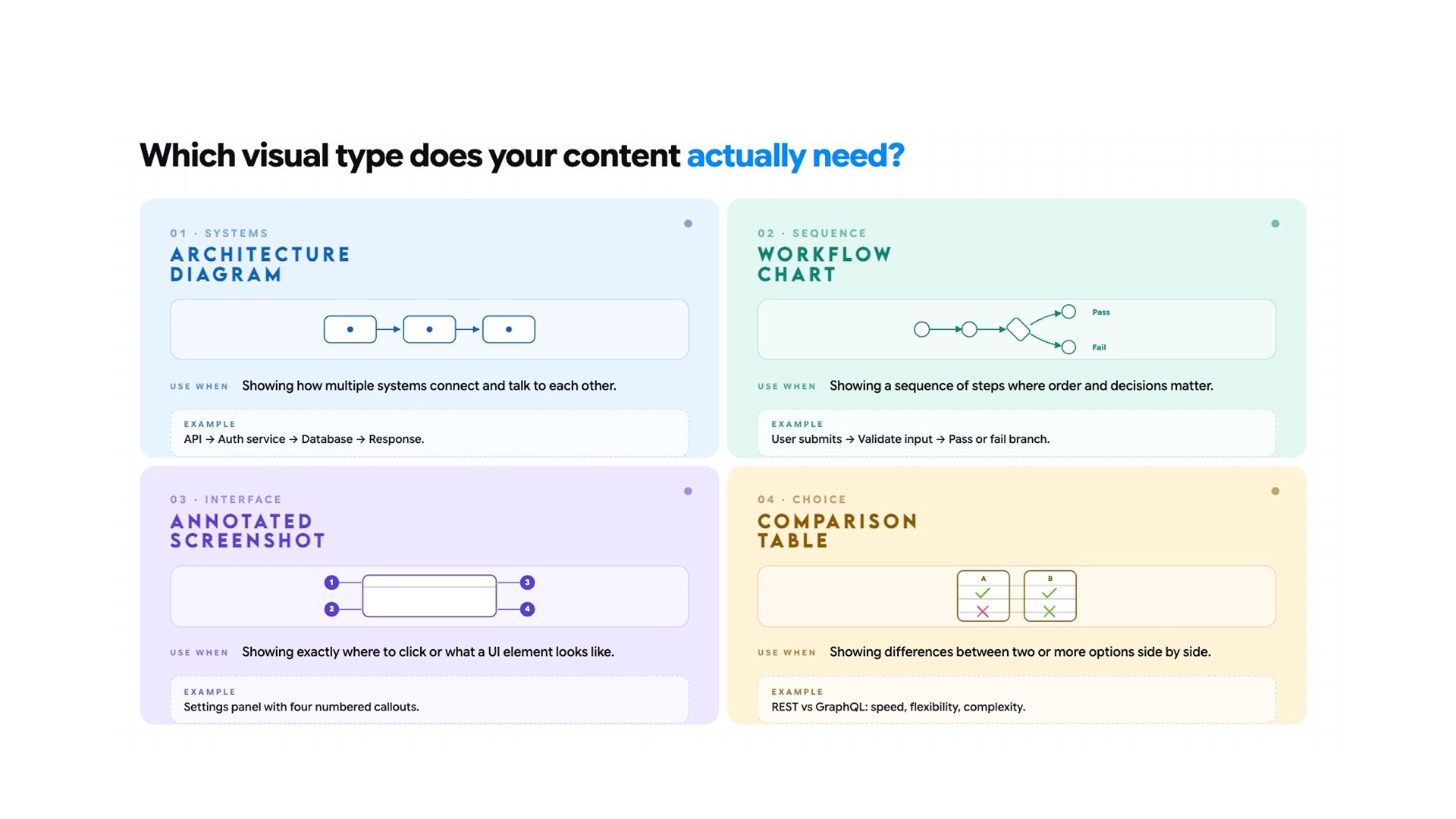
The four diagram types used most often in technical documentation are:
- Architecture diagrams for showing how system components relate and communicate
- Workflow charts for documenting sequential processes and decision points
- Annotated UI screenshots for step-by-step interface walkthroughs
- Concept illustrations for explaining abstract relationships or data models visually
Describe the diagram you need:
- A data flow between two services
- A deployment architecture
- A user journey through an onboarding sequence
The AI image generation tool handles concept illustrations, workflow visuals, and explainer graphics directly from a written description. Always place visuals immediately after the section of text they support.
Step 6: Reviewing and Editing for Accuracy
The draft is a starting point, not a finished document. Every procedural step needs to be tested against the actual product, every code example needs to run, and every label needs to match what is visible in the interface. AI writes from what it is given and cannot verify what it produces.
AI writes from what it is given and cannot verify what it produces.
- Walk through every step in execution order, the same sequence a real user would follow
- Click the button, run the command, and confirm the path exists before signing off on any step
- Run code samples in a clean environment against the actual system and confirm the output matches what the document claims before publishing
- Check every UI label, button name, and menu path against the live interface because products rename things constantly, and AI has no way of knowing
- Bring in a subject matter expert to confirm technical accuracy once the content is factually sound
- Have someone who matches your actual audience attempt the task using only the document, and note where they pause or re-read
- Use Hemingway Editor to flag overly dense sentences and passive constructions quickly
- Use Vale, a command-line prose linter, to enforce house style automatically across large documentation sets and catch inconsistencies that no manual review catches at scale
Beyond accuracy, AI handles the editing pass well. Common edits that improve usability most:
- Breaking long feature descriptions into numbered steps
- Adding a short expected outcome at the end of each procedural step
- Replacing passive constructions with direct instructions
- Pulling a quick-start section out of a longer reference document for readers who need fast answers
- Moving prerequisite information to the top so readers know what they need before they begin, not halfway through
- Flagging decision points explicitly where the reader's path branches depending on their role or setup
- Replacing vague quantifiers like "several" or "a few" with exact numbers wherever the source material supports it
- Checking that every term is defined before it is used and not assumed as shared knowledge
Be specific in the editing prompt. "Rewrite this for a developer who has never used this API" produces a better result than "make this clearer."
Step 7: Troubleshooting Sections and FAQs
Troubleshooting content and FAQs are what users reach for first when something breaks. The most useful answers come from real support data, not from the writer's assumptions about what users will ask.
AI can work through a batch of support tickets, identify the most common problems, and structure each one as a clear problem-cause-fix entry. For developer-facing troubleshooting, provide both the error message and the code that produced it as context. That combination produces entries specific to the actual failure, not a generic fix wrapped in technical language.
Step 8: Updating Documentation When the Product Changes
Documentation falls out of date almost immediately after publishing. A label changes, an endpoint gets renamed, and a setup step no longer matches the interface. Most teams discover this only when a new team member gets stuck, or a support ticket arrives pointing at stale instructions.
AI makes updates fast enough to handle in the same pull request as the code change:
- Paste the affected documentation section alongside a note describing what changed
- Ask AI to update that section only
- It also flags other places in the document that reference the same element, so nothing gets missed
Because Chatly keeps chat, docs, search, and summarisation in one workspace, documentation updates can happen in the same session as the code review — not weeks later when someone notices the docs are wrong.
AI Prompts for Technical Documentation
The difference between generic output and a usable draft comes down to how specific the prompt is. Every prompt should include the documentation type, the target audience, the expected format, and the source material. Here are the most commonly needed prompts across documentation types:
SOP from process notes: "Write a standard operating procedure for [process] based on the notes below. Use numbered steps, include decision points, and flag any steps that require sign-off."
Onboarding guide: "Write a first-week onboarding guide for a [job title] joining the [team name] team at a [company type, e.g., B2B SaaS company]. Structure it as Day 1, Days 2–3, and Days 4–5. For each day, list: accounts to set up (with the responsible person), tools to learn (with a one-line description of each), tasks to complete, and one person to meet. Assume the reader has no prior context about internal systems."
Knowledge base article: "Write a knowledge base article answering: '[exact question, e.g., Why did my export fail?]'. The audience is non-technical end users. Lead with a one-sentence direct answer. Follow with a 2–3 sentence explanation of the cause. Then list numbered steps to resolve it. End with a 'Still stuck?' section that tells them exactly who to contact and what information to include."
Changelog entry: "Write a changelog entry for version [X.X.X] released on [date]. Audience: [developers/end users]. Group changes under these exact headers: New Features, Improvements, Bug Fixes, Deprecations. For each item, write one sentence stating what changed and one sentence stating why it matters to the user. Base it on the commit messages below."
API endpoint documentation: "Write reference documentation for the [endpoint name] API endpoint. Include: a one-sentence description of what it does, the HTTP method and full URL, all required and optional parameters in a table (name, type, required/optional, description), an example request in [language/curl], an example success response with field explanations, and a table of possible error codes with their meaning." Runbook for incident response: "Write a runbook for [incident type, e.g., 'database connection spike']. The audience is an on-call engineer who may not own this system. Structure it as: 1) Symptoms — what they will observe, 2) Likely Causes — ranked by frequency, 3) Diagnostic Steps — numbered, with exact commands or links, 4) Resolution Steps — numbered and sequential, 5) Escalation — who to page and when. Avoid assumptions; spell out every command." Release notes for a non-technical audience: "Write release notes for [product name] version [X] aimed at business users, not developers. For each change, explain what it does in plain language, then add a 'Why it matters' sentence describing the business or workflow benefit. Avoid all technical jargon. If a change requires the user to take action, open that item with ACTION REQUIRED in bold."
For building reusable prompt templates across documentation types, the system prompts guide covers how to structure them for consistent results.
For more details, read: Why you need AI document generators
Best AI Tools for Technical Documentation in 2026
Not every tool handles the full documentation workflow. Some are built for code-level documentation, others for knowledge base management, and others for end-to-end productivity across documentation types. Here is how the main options compare.
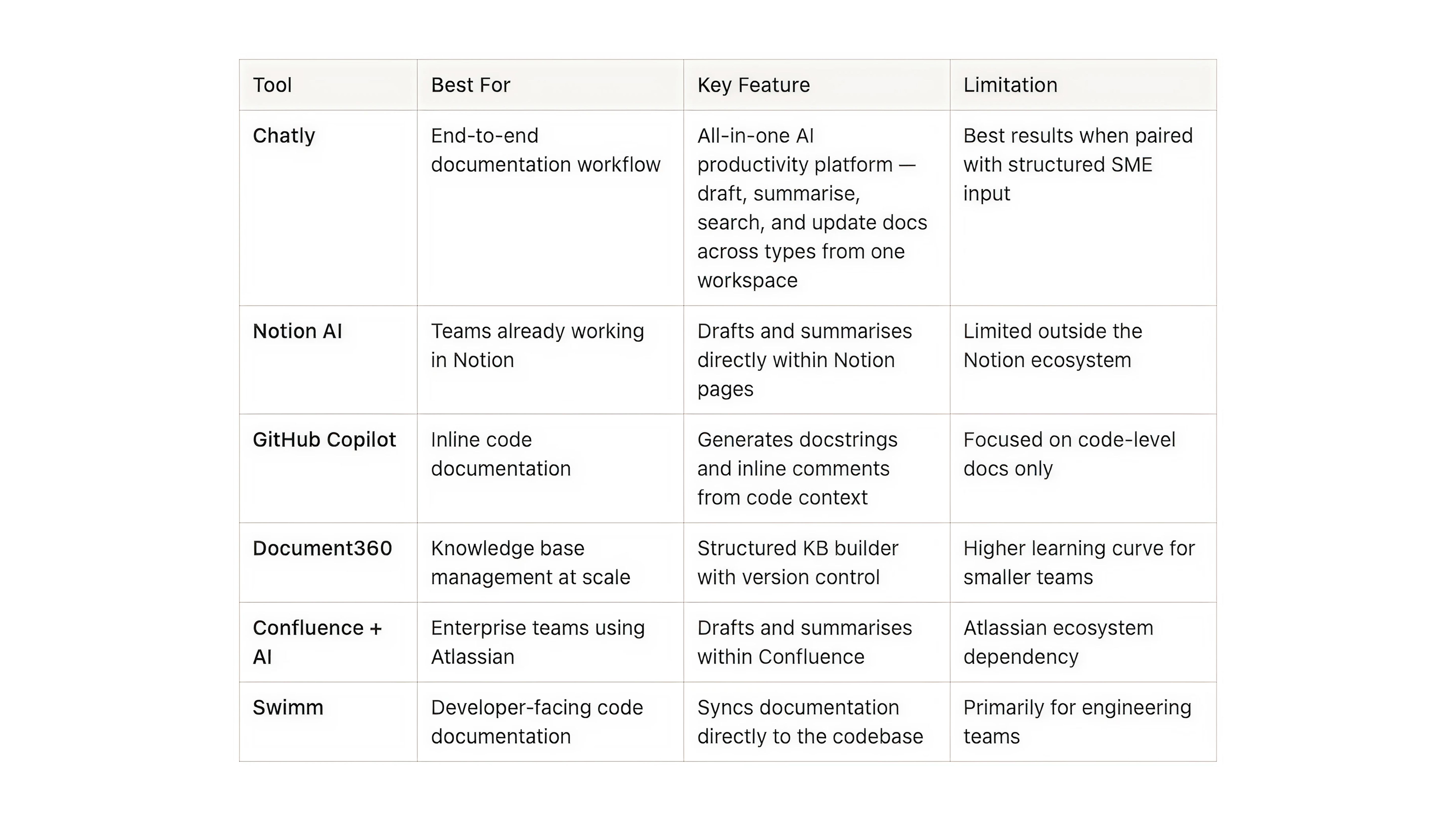
To know more about which tools can help in your writing process, read: Best AI Tools for writing
Limitations of AI in Technical Writing and How to Manage Them
AI accelerates documentation significantly, but it introduces specific failure points teams need to account for.
- AI cannot verify what it produces. It writes from the input it receives and has no way to test whether a step works, a code example runs, or a UI label matches the current product. Every draft needs a human accuracy pass before it goes out — no exceptions.
- Output quality is limited by input quality. Teams that get poor results from AI documentation tools are almost always under-specifying their prompts and under-providing source material. The fix is upstream: better input, not more editing.
- AI does not know your product. It works from what you give it. If the SME interview did not cover an edge case, the documentation will not cover it either. AI amplifies the quality of the information it receives; it does not compensate for gaps in it.
- Terminology drifts without oversight. When multiple people use AI to draft documentation over time, inconsistencies accumulate. Establish a shared glossary, include it in every documentation prompt, and audit the full set periodically.
- First drafts require editing, not just review. AI produces a strong starting point — it establishes structure and covers the relevant ground. The editing pass is where clarity, accuracy, and usability actually get built in.
Conclusion
Good technical writing and documentation do not have to be the thing that always gets deprioritised. With AI handling what consumes the most time — gathering and synthesising input, drafting, formatting, flagging updates — what remains is the work that requires human judgment:
- Verifying accuracy
- Applying product knowledge
- Making sure the documentation reflects how real users think about the product.
Start with one document your team has been meaning to fix, apply the process here, and build the habit from there.
Frequently Asked Questions
What People Are Asking About Using AI for Technical Documentation
More topics you may like
21 Journaling Techniques That Actually Work in 2025

Muhammad Bin Habib
How AI Chat Helps with Survey & Feedback Collection
Muhammad Bin Habib

How to Create a Presentation Using AI

Maya Collins
Best AI Writing Tools That You Can Use in 2025 (Free & Paid)
Muhammad Bin Habib

How to Generate an Essay Outline in Minutes
Muhammad Bin Habib