AI for Code Review and Debugging: Developer's Practical Guide
AI-generated code now makes up 41% of everything written in 2025, and it introduces 1.7 times more issues per pull request than human-written code alone. Review queues are growing, bugs are slipping through, and the tools developers rely on are generating more code than any team can manually verify.
AI for code review and debugging is how engineering teams are staying ahead of that. This guide covers the tools, workflow, and best practices you need to make it work in practice.
What Is AI for Code Review and Debugging
AI for code review and debugging refers to the use of machine learning and large language models to automatically analyse code for bugs, quality issues, security vulnerabilities, and logical errors. It operates both during active development and before code is merged into production. It combines static analysis, pattern recognition, and natural language understanding to deliver feedback at a speed and scale no human reviewer can match.
How AI Is Improving the Productivity of Developers
The adoption numbers are significant, but the reasons behind them matter more than the percentages.
84% of developers are now using or planning to use AI tools, up from 76% in 2024, with 51% using them every single day. That is not experimentation. That is infrastructure-level adoption. The practical drivers are measurable:
- Teams report 40% reduction in code review time and 62% fewer production bugs after implementing AI review workflows
- AI debugging problem-solving rates on the SWE-bench benchmark improved from 33% in August 2024 to consistently above 70% by late 2025
- 41% of all code is now AI-generated or AI-assisted, which means review pipelines need to handle a larger and faster-moving volume than before.
Key Components of AI Code Review
AI code review relies on four main components:
- Static code analysis
- Dynamic code analysis
- Rule-based systems
- Natural Language Processing (NLP) and large language models (LLMs)
Static Code Analysis
Static code analysis checks the source code before the program runs. It helps developers catch bugs, security risks, and maintenance issues early in the development process.
These tools scan code at the programming language level, making them useful for large and complex codebases. They can review thousands of lines of code in seconds, saving time and reducing manual effort. AI systems then use these results to suggest fixes and improvements.
Dynamic Code Analysis
Dynamic code analysis tests code while the application is running. It helps detect runtime issues, performance problems, and security vulnerabilities that static analysis may miss.
Also known as Dynamic Application Security Testing (DAST), these tools compare application behavior against known vulnerabilities. They analyze responses, identify risks, and record issues before the software goes live.
Rule-based Systems
Rule-based systems review code using predefined rules and best practices. They help teams maintain coding standards and follow company guidelines.
Tools like linters check for syntax errors, formatting issues, and style inconsistencies. This creates a consistent review process and improves overall code quality.
Natural Language Processing (NLP) and Large Language Models (LLMs)
NLP models trained on large code datasets help AI tools recognize patterns, inefficiencies, and possible errors in code. Over time, these models improve their recommendations and detect issues more accurately.
LLMs such as GPT-4 take this further by understanding code structure and logic in greater detail. They can identify more complex issues and provide deeper code review insights than traditional machine learning methods.
How to Build an AI Code Review Workflow?
Most developers only reach for AI when something has already gone wrong. The bigger shift is using it at every stage before problems appear — from the first line of code to the moment it ships.
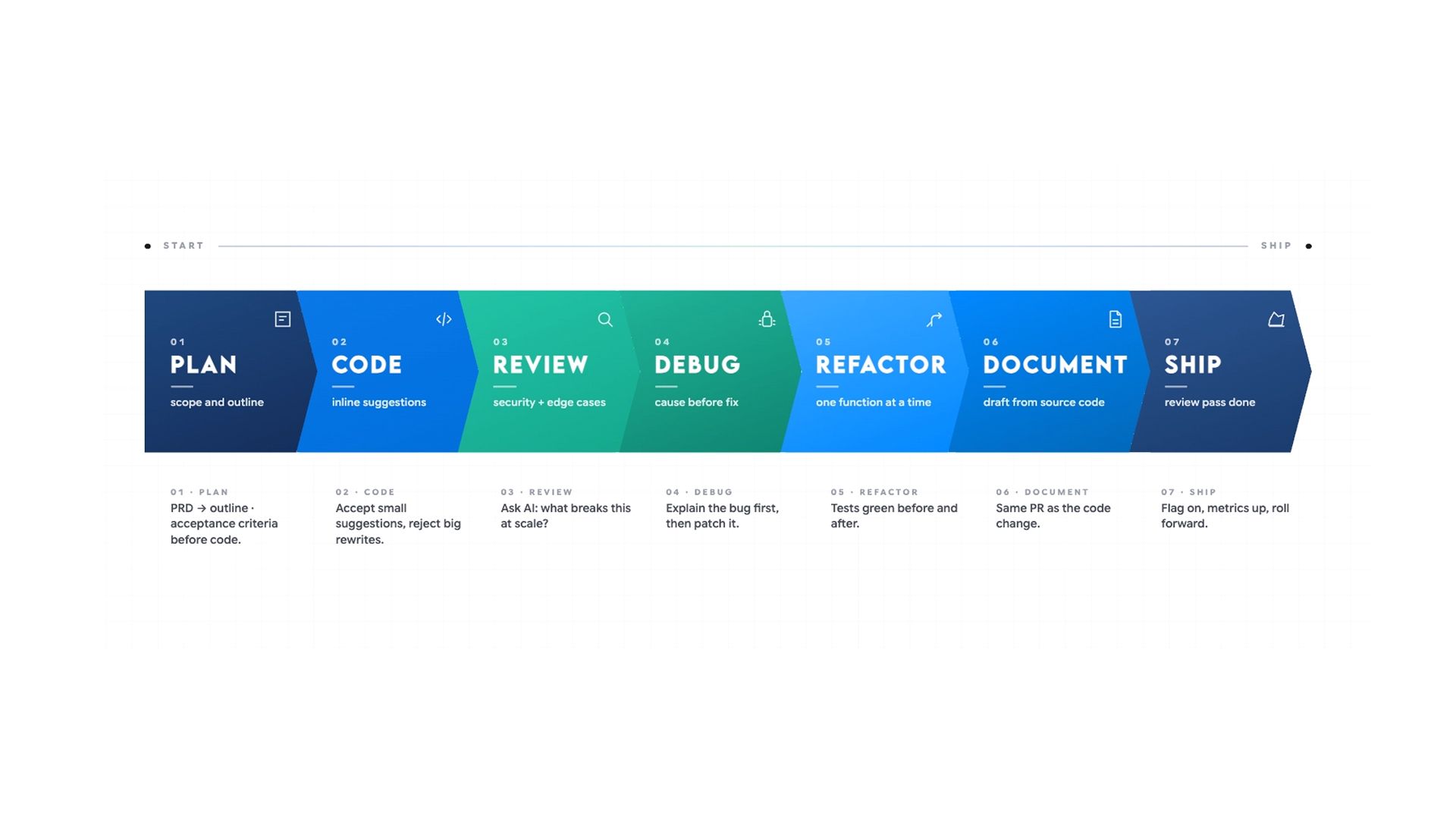
The reason most teams still get poor results is not the tools. It is the absence of a structured workflow. An AI review dropped into an existing process without clear layers produces noise. Built into a layered architecture with defined responsibilities at each stage, it produces measurably better outcomes.
The workflow is built across four layers, each covering a distinct stage of the development process:
- Layer 1: IDE-Level AI Assistance During Writing — catching issues at the line level before code is committed
- Layer 2: PR-Level Automated Review Before Merge — security scanning, style enforcement, and inline PR analysis before any human reviewer sees the code
- Layer 3: Periodic Architectural and Security Review — cadence-based review for drift, debt, and cross-file structural issues
- Layer 4: Pre-Release Regression and Integration Review — regression checks, integration testing guidance, and release note verification before anything ships
Layer 1: IDE-Level AI Assistance During Writing
The first layer operates during active development, before any code is committed. This is where AI catches issues that are cheapest to fix, before they enter the review queue at all. Problems caught here cost nothing to fix. Problems caught after the merge cost significantly more.
What AI Catches at the IDE Level
At this stage, AI handles two things reliably:
- Bug and logic error detection
- Performance identification.
For bugs and logic errors, it identifies:
- Logic errors and incorrect assumptions about data types
- Unhandled edge cases and conditions where a function can fail silently
- Missing null checks, off-by-one errors, and incorrect conditional logic
- Functions that behave correctly on the happy path but fail under unexpected inputs
For performance, it flags:
- Inefficient queries and unnecessary re-renders
- Blocking async operations and redundant loops
- Memory allocation patterns likely to cause problems at scale
- N+1 query problems and synchronous operations inside loops
For mid-sprint questions that do not warrant a full review cycle, the AI Coder for inline code explanation, quick debugging passes, and targeted review during active development fits directly into this layer without requiring a new tool or environment setup.
How to Configure Your IDE Tool for Consistent Results
Most teams skip one configuration step that makes the biggest difference:
- Storing your coding standards
- Naming conventions
- Preferred patterns in a project-level configuration file that your IDE tool reads on every session.
This removes the need to re-specify standards in every prompt and ensures inline suggestions match your actual codebase rather than generic best practices.
The workflow at this layer:
- Use an IDE-integrated tool such as Cursor to get inline suggestions tied to the specific line being written. Cursor carries codebase context, so its suggestions are grounded in how the rest of the code is structured rather than generic patterns
- For complex logic, ask AI to walk through what the function does step by step before asking what is wrong. These surfaces, where logic diverges from the intended path, are where a reviewer has to find it
- When AI flags a performance anti-pattern, ask it to suggest a cleaner version and explain what changed and why. Read the explanation before applying anything. AI-generated refactoring can improve readability while introducing a subtle behavioural change
- Write missing tests in the same session when AI flags a coverage gap. Tests written with full context in the same session are more accurate than tests written later by someone with less context
The goal at Layer 1 is not a comprehensive review. It removes obvious problems, so the review queue contains only decisions that actually need a human.
Layer 2: PR-Level Automated Review Before Merge
The second layer runs when a pull request is opened, before any human reviewer sees the code. This is where AI delivers its most consistent and measurable value across three areas:
- Security vulnerability scanning
- Code style enforcement
- Automated pull request analysis.
Security Vulnerability Scanning
For security, AI reliably flags:
- SQL injection risks and unsafe input handling
- Hardcoded credentials and API keys
- Cross-site scripting exposure
- Insecure authentication patterns and missing authorisation checks
- Missing input sanitisation and improper error handling that expose stack traces
45% of AI-generated code still contains security flaws, which makes this scan non-negotiable before any PR is merged. Pull requests containing AI-generated code have roughly 1.7 times more issues than human-written code. Teams that reduce review rigour because AI wrote the code are building verification debt that surfaces as production vulnerabilities.
For researching specific vulnerability patterns, framework-specific security issues, or CVEs relevant to your stack, the AI search engine for developers researching security vulnerabilities and framework-specific documentation retrieves answers grounded in current documentation and community discussion rather than relying on internal model knowledge alone.
Code Style and Standards Enforcement
Paste your style guide into the prompt, and AI enforces it across the full diff:
- Naming inconsistencies
- Mixed conventions
- Structural patterns that differ from the rest of the codebase
- Deviations from agreed formatting rules
What it cannot do is evaluate whether a convention makes sense. It can only tell you whether it has been followed.
Configure your AI review tool with project-specific context at the tool level, not just the prompt level. Tools configured without a style guide and naming conventions generate high false-positive rates, and developers stop reading the warnings within days. That configuration step is what separates a useful automated review from noise that gets ignored.
Pull Request Analysis and Automated Inline Comments
Modern AI review tools analyse the full pull request diff, generate inline comments mapped to specific lines, summarise what changed, and flag the issues most likely to cause failures before merge.
Approximately 50% of flagged issues are fixed before merge in Teams using PR-level AI review. That means the human reviewer arrives at code that has already been through one pass and can direct their attention to what AI cannot assess.
Before opening a pull request, run the diff through an AI review tool with a specific brief. Without context, the output is generic. With context, it is actionable. A prompt that works consistently:
"Review this [language] function for security vulnerabilities and edge cases not covered by the existing tests. It handles [what it does] and runs on every [trigger]."
Running a Dedicated Failure-Mode Review
After the general review pass, run a dedicated failure-mode review as a separate step. This catches bugs that are missed by both authors and reviewers in standard review cycles.
- Ask AI to identify inputs that are not handled
- Surface edge cases that could cause unexpected behaviour
- Check conditions where the function might fail silently
- Flag any place where the function assumes something about the caller that is not enforced
- Focus specifically on failure paths, not just intended behaviour
Once a gap in test coverage is flagged, write the missing tests in the same session before the PR is opened.
Layer 3: Periodic Architectural and Security Review
The third layer runs on a cadence, not per commit. Its purpose is to catch drift, debt, and structural problems that only become visible across a larger surface area than any single PR reveals.
Teams that only run AI review at the PR level miss the class of problems that accumulate gradually across dozens of seemingly clean commits.
What to Look For in a Periodic Review
This layer covers:
- Full codebase security scans for vulnerabilities accumulated across multiple merges, including patterns that only become exploitable in combination
- Architectural consistency checks for functions that have grown beyond a single responsibility, modules that have become tightly coupled, or abstractions that have been bypassed over time
- Dependency audits for outdated packages, known CVEs in current dependencies, and libraries that have drifted out of active maintenance
- Naming and terminology drift across the codebase and documentation set, which creates ambiguity for both developers and the AI tools reading the code
- Test coverage gaps that have developed over time as features have been shipped faster than tests were written
For this layer, an AI coder is the strongest option because it handles cross-file analysis and can reason about how a function is used across the entire codebase before suggesting changes. It provides stronger context handling for changes spanning multiple files or requiring insight into call chains than single-file tools can offer.
How to Structure the Architectural Review Prompt
Paste your architectural principles, security requirements, and style rules directly into the prompt. Ask it to identify violations across the full codebase, not just the most recent diff. A prompt that works consistently:
"Review this codebase for architectural consistency issues, functions with too many responsibilities, tight coupling between modules, and deviations from the following principles: [paste your architectural guidelines]. Identify the three most significant issues and explain why each one matters for long-term maintainability."
What it returns is a list of issues to fix, not automatic changes, because context still requires human judgment before anything is applied.
Run this review quarterly at a minimum. For codebases where security is a priority or where multiple developers are contributing AI-generated code daily, monthly is more appropriate.
Layer 4: Pre-Release Regression and Integration Review
Before any significant release, a dedicated regression pass adds a fourth layer of protection. AI-generated code specifically requires extra scrutiny here because the errors tend to be subtle:
- Plausible-looking logic that fails under specific inputs
- Correct syntax wrapping incorrect behaviour
- Confident-sounding output that is technically valid but wrong for the specific context it runs in.
Regression and Integration Checks
This layer is also where documentation and release notes need a review pass. For teams using the AI Docs for generating and reviewing technical documentation and release notes before shipping, this step fits naturally into the same workflow: paste the diff, generate the release notes, then verify that breaking changes are documented accurately before anything ships.
The workflow at this layer:
- Paste the full changelog or commit log for the release into AI and ask it to identify changes that could introduce regressions in related functionality that was not directly modified
- Ask for a checklist of integration points that should be manually tested, based on what actually changed, not based on what the team assumes changed
- For each area flagged, ask AI to describe the specific failure scenario rather than just naming the risk. Specific failure scenarios produce testable QA cases
- Run the release notes through a review pass to verify that breaking changes are documented, migration steps are accurate, and nothing that affects existing integrations was omitted
Debugging What Surfaces at the Release Stage
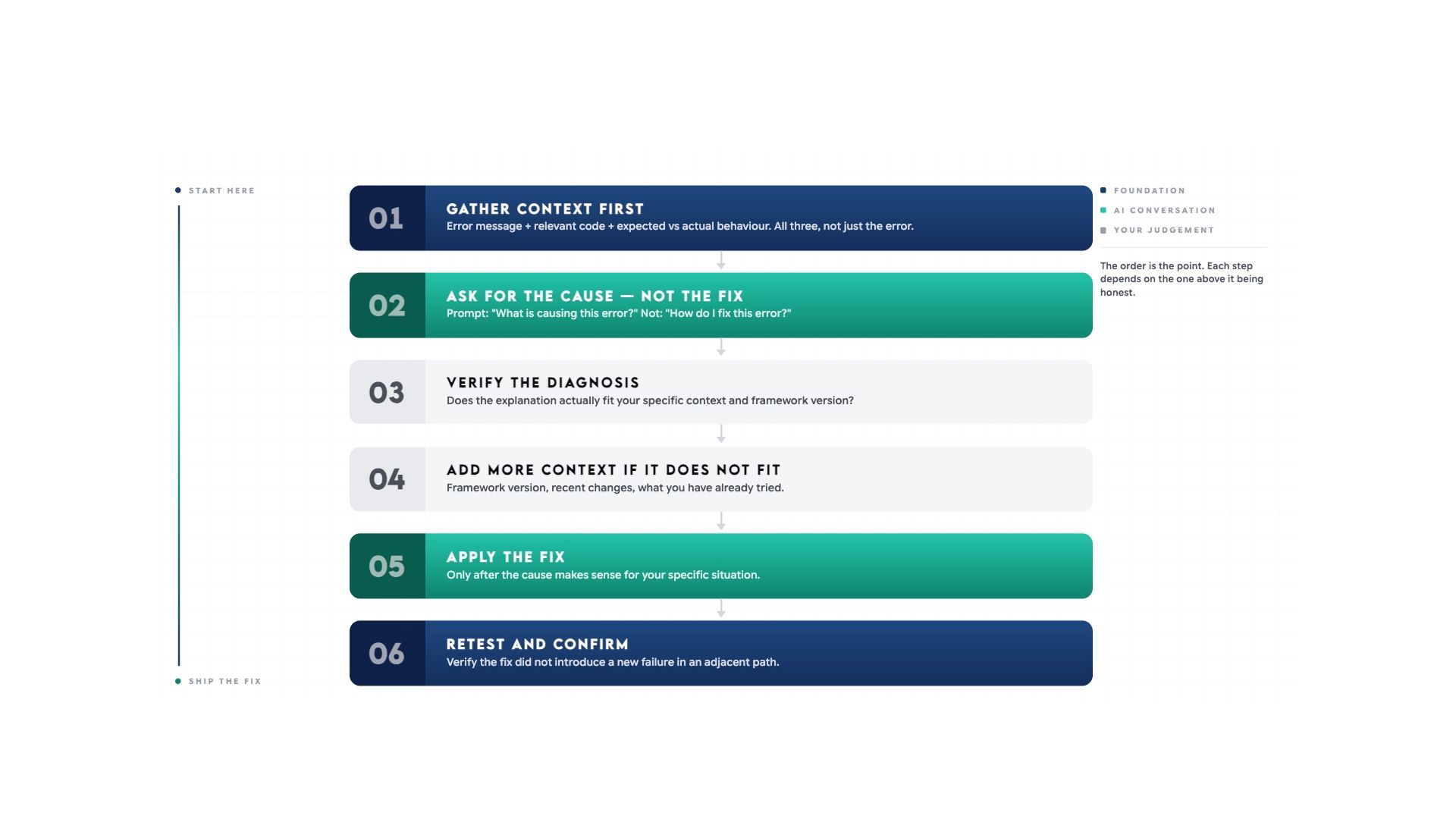
When debugging anything that surfaces at this stage, always ask for the cause before the fix. Verify the diagnosis makes sense before applying anything. If the initial diagnosis does not fit, enrich the context:
- Add the framework version
- Exact inputs that triggered the issue
- Recent changes to the system
- What you have already tried
- Any relevant logs
A fix based on a wrong diagnosis introduces new problems that are harder to trace than the original.
This layer does not replace QA. It surfaces where QA effort should be concentrated, based on what changed rather than what the team assumes changed.
Where Human Review Remains Non-Negotiable
AI handles the pattern layer well. Human review is irreplaceable everywhere else. AI adoption is associated with a 9% increase in bugs per developer and a 154% increase in average PR size in teams without the right review structure around it.
Do not remove human review from any of the following:
- Business logic and domain decisions. AI cannot tell you whether the behaviour is correct for your users. A technically clean function implementing the wrong business rule is a bug no automated tool will catch.
- Architectural decisions. Choosing whether to refactor now, carry the debt, or restructure the surrounding system requires knowledge of the roadmap and constraints that AI does not have.
- Security-critical paths. AI misses business-logic-level authorisation flaws, race conditions, and novel attack vectors that fall outside its training patterns.
- Regulatory compliance. Financial, healthcare, and legal domains require someone who understands the compliance obligation, not just the code pattern.
- Knowledge transfer. Removing human review removes the feedback loop that builds junior developer judgment over time. AI dependency increases; team capability does not.
Use AI for 40 to 60% of the review load. Keep humans on everything that involves judgment, context, or consequence.
Best AI Tools for Code Review and Debugging in 2026
Not every tool handles the full review workflow. Some are built for in-editor assistance, others for PR automation, and others for large-scale codebase analysis. Here is how the main options compare.
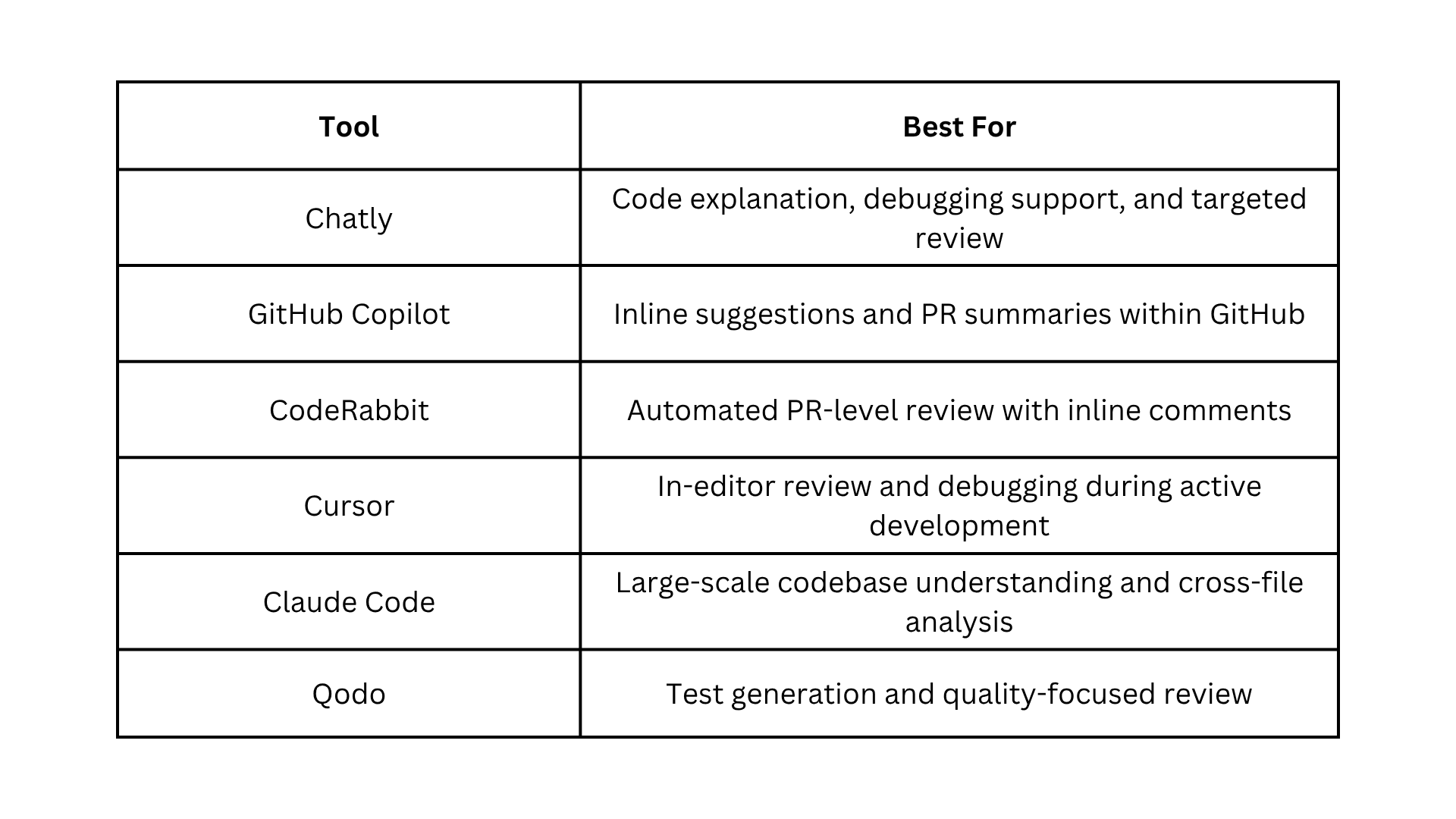
For a broader look at how AI tools are reshaping development workflows beyond code review, Chatly's guide to vibe coding and how developers are using AI-assisted development in 2025 covers the shift in how teams are approaching the entire development process.
AI Code Review and Debugging Best Practices
Most teams that struggle with AI code review are not using the wrong tools. They are missing the habits that make those tools reliable. These practices address the failure patterns that show up most consistently once AI review is part of the workflow.
- Define your coding standards before prompting. AI enforces what you give it, not what you assume. Paste your style guide, naming conventions, and preferred patterns into every review prompt.
- Ask for the cause before the fix. Always request the diagnosis first. A fix based on a wrong diagnosis introduces new problems, harder to trace than the original.
- Give AI everything at once. Error message, relevant code, what you expected, and what happened. Fragmented input produces fragmented output.
- Run a dedicated failure-mode pass as a separate step. A prompt focused specifically on failure paths and unhandled inputs catches what the general review pass misses.
- Enrich context when the initial diagnosis does not fit. Add the framework version, exact inputs, recent system changes, and what you have already tried. Do not repeat the same question.
- Treat AI-generated code as requiring more scrutiny, not less. PRs containing AI-generated code have roughly 1.7 times more issues than human-written code.
- Configure project-specific context at the tool level. Store your architectural principles, security requirements, and style rules in the configuration file your AI review tool reads.
- Write missing tests in the same session as the review. Tests written immediately with full context are more accurate than tests written later.
- Never skip the accuracy pass before the merge. AI cannot test whether a query performs under load or a UI label matches the current product.
- Establish a shared glossary for consistent entity naming. Inconsistent naming creates ambiguity in both the codebase and the review tools reading it.
Conclusion
AI code review and debugging work when it is treated as a workflow decision, not a tooling decision. The teams getting measurable results are not using better tools. They are using the same tools with clearer structure, better prompts, and human review exactly where it belongs.
Start with one layer. Get it right. Then build from there.
Frequently Asked Questions
Questions about how developers can use AI in development
More topics you may like

Best AI Search Engines for 2026: A Comprehensive Guide

Faisal Saeed
Claude Opus 4.6: New Features, Improvements, and Benchmark Performance

Elena Foster

Master Technical Writing & Documentation: An AI Guide

Arooj Ishtiaq
How to Use AI Chat for Real-Time Event Registration with Chatly

Muhammad Bin Habib

Why Document Creation Is Still Broken in 2026 — How AI Document Generators Are Fixing It
Faisal Saeed