Best AI Search Engines for 2026: A Comprehensive Guide
Search once meant keeping manual lists and hunting through pages. Then in the 1990s, the first search engines changed everything, and today we’re standing at another major shift in how information is found known as AI search engines.
Traditional search engines feel heavier, slower, and cluttered after the advent of AI and chat to answer tools. Users now expect answers, not endless links that are often out of context as well.
AI search engines deliver that by intelligently interpreting intent, synthesizing results, and responding conversationally, reducing friction across work, study, and everyday decision making. They:
-
Provide direct, distilled answers that eliminate the need to sift through bloated pages.
-
Cut out noise and reduce irrelevant results that slow down traditional search
-
Retrieve information in real time from multiple sources, not just a ranked list.
-
Refine outputs conversationally, improving accuracy with every follow-up query.
-
Accelerate decision making by synthesizing complex information into usable insights.
-
Reduce tab overload and context switching, keeping the entire search journey unified.
10 Best AI Search Engines Based on My Detailed Analysis and Testing
After extensive research across Reddit, tech forums, and hands-on testing, here are the 10 best AI search engines at the end of 2025 and for 2026, ranked based on performance, user satisfaction, and unique capabilities.
1. ChatGPT Search (OpenAI)
ChatGPT Search is OpenAI's response to the AI search market. It combines the conversational abilities of top AI models like GPT-5 or GPT-5.1, with real-time web access, creating a powerful hybrid tool that can both answer questions from its training data and fetch current information from the web.
My Experience with ChatGPT for Search
For my testing, I threw at the model a complex query: "What are the latest semiconductor export restrictions and how might they affect tech investments?" ChatGPT Search immediately recognized this required current information and activated web search automatically.
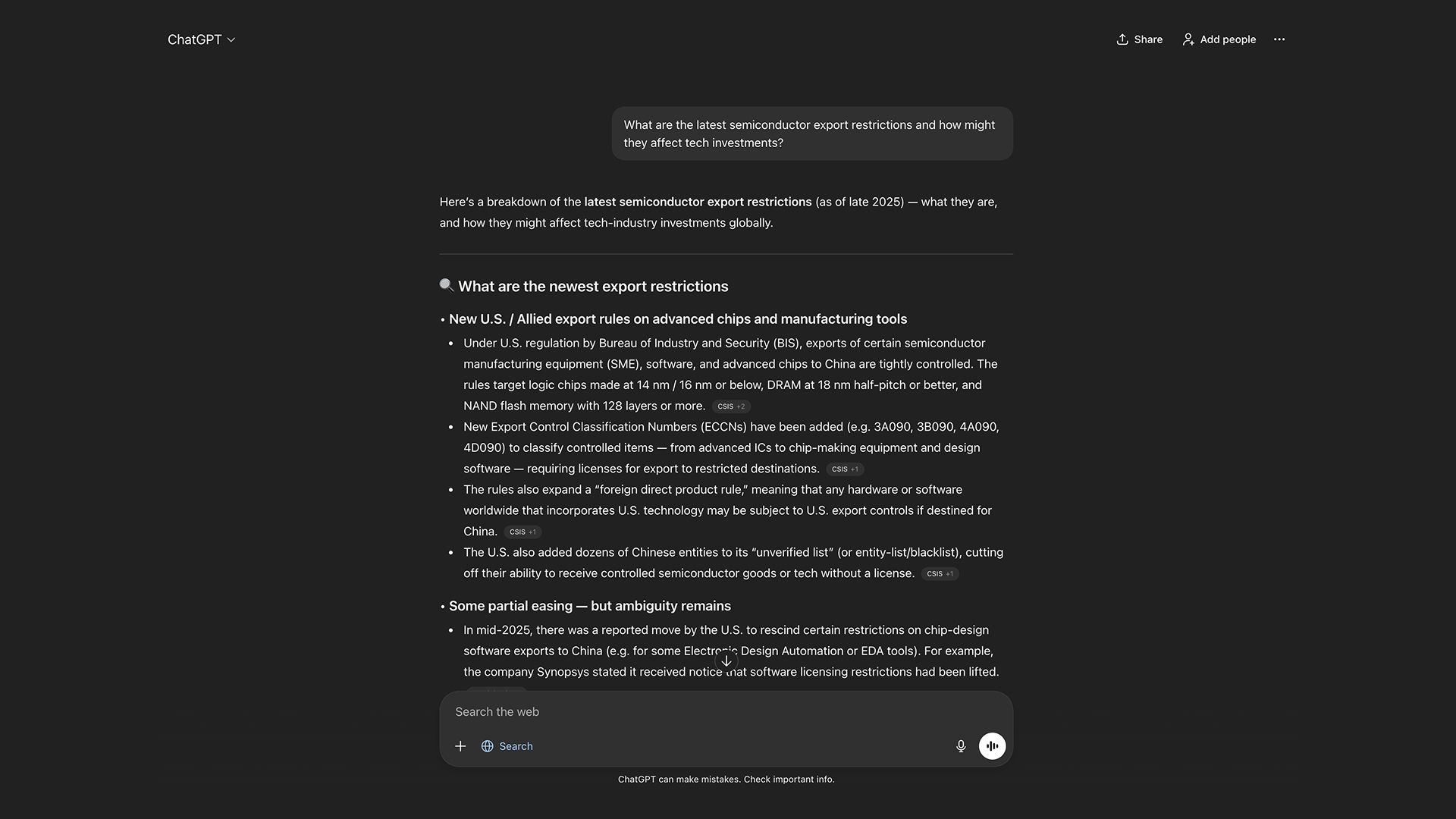
Within about 4 seconds, it provided a comprehensive response covering recent U.S. export controls on AI chips to China, explained the policy implications for global tech investment, and investment strategies.
The response included direct citations to Reuters, Guardian, and other reputable sources. When I followed up with "What about impact on European chipmakers?" it maintained perfect context and provided targeted information without me needing to repeat the semiconductor restrictions context.
However, it was also noticed that the sources that it cited weren’t always recent. Sometimes, it cited sources that were from 2-3 years ago, while making statements that reflected recent world events.
What I Noticed When Using ChatGPT Search
-
The transition between using trained knowledge and web search is seamless. You often don't notice when it's searching
-
Citations appear as inline references that are clickable and well-integrated
-
The conversational flow feels natural, with excellent context retention
-
It excels at synthesizing information from multiple sources into cohesive narratives
-
Response quality varies based on which GPT model you're using (GPT-5 vs. GPT-5-mini)
Pros
-
Allows access to multiple AI models even on free plan
-
Exceptional natural language understanding and conversational ability
-
Seamless integration with ChatGPT's existing capabilities (coding, analysis, creative writing)
-
Strong citation practices with links to reputable sources
-
Maintains context extremely well across multiple follow-up questions
-
Access to advanced reasoning with o1 models for complex queries
-
Chrome extension available for quick access
Cons
-
Requires ChatGPT Plus subscription ($20/month) for full access
-
Can be slower than specialized search engines when handling simple queries
-
Sometimes provides overly lengthy responses when a concise answer would suffice
-
Sources can be outdated at times
-
Web search isn't available for all query types or in all conversation modes
-
Free tier users have limited access
Best For
Users who want an all-in-one AI assistant that can handle both traditional ChatGPT tasks and web search, professionals needing detailed analysis with current data, and those who value conversational depth.
2. Chatly
Chatly is a modern-day emerging platform that enables multi-model access inside one platform, allowing access to multiple conversational and AI image generation AI models. Chatly also has a specialized AI search engine that allows users to search the web and find contextual outcomes.
The platform provides access to multiple AI Chat models including OpenAI GPT-5, Claude Opus 4.5, Google Gemini 3 Pro, and xAI’s Grok 4.1 Fast, all within a single subscription.
My Experience with Chatly for AI Search
I tested Chatly with a technical coding question: "How do I implement rate limiting in a Node.js Express API with Redis?" I selected Web Mode and entered my query.
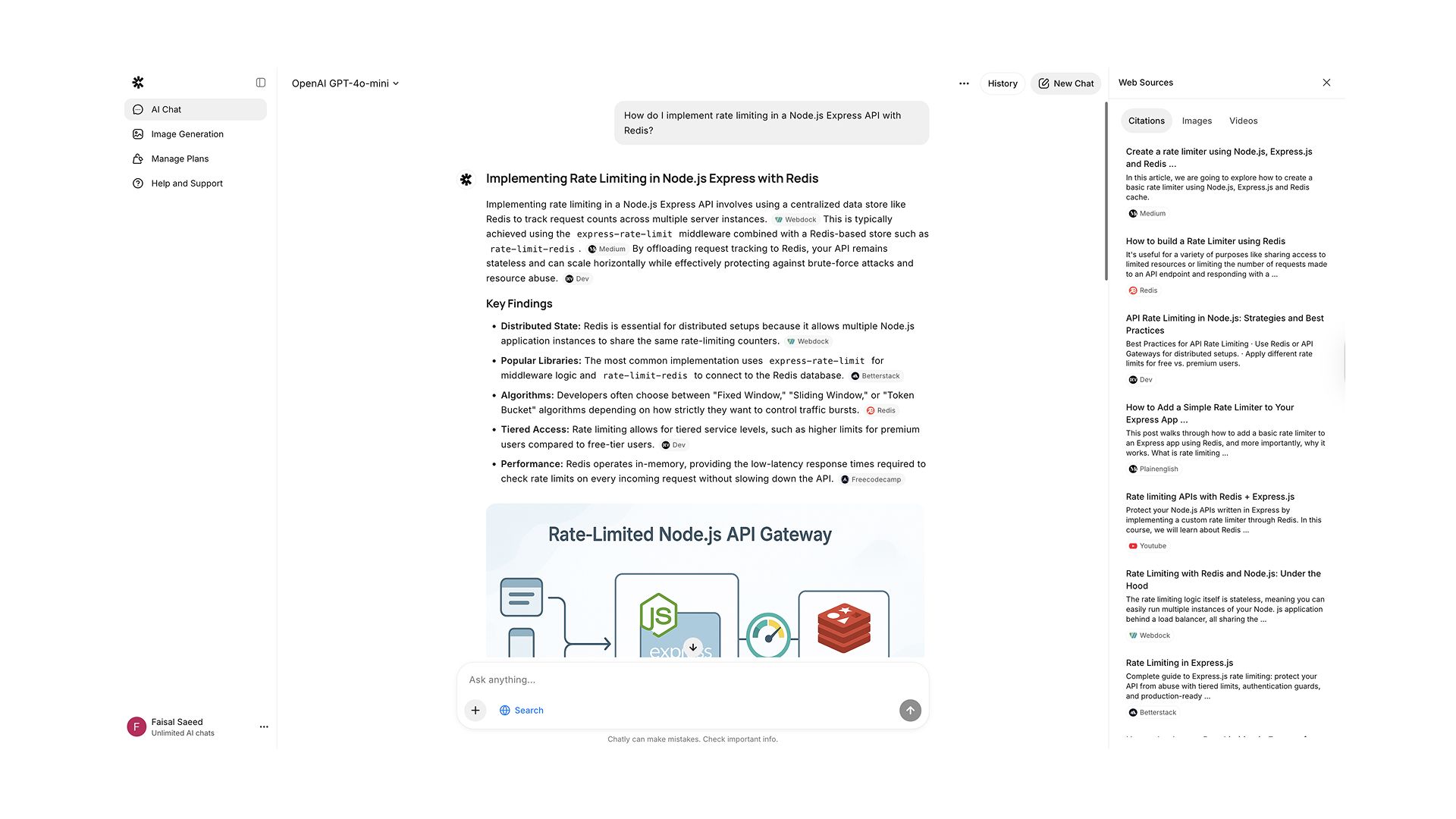
Chatly returned a structured response within 3-4 seconds, providing a clear explanation of rate limiting concepts, step-by-step implementation code using the express-rate-limit and rate-limit-redis packages, configuration examples, and links to official documentation.
I then tried to test its ability to stick to a predefined forum or website. I asked: "What do developers think about Supabase vs. Firebase on forums like Reddit?"
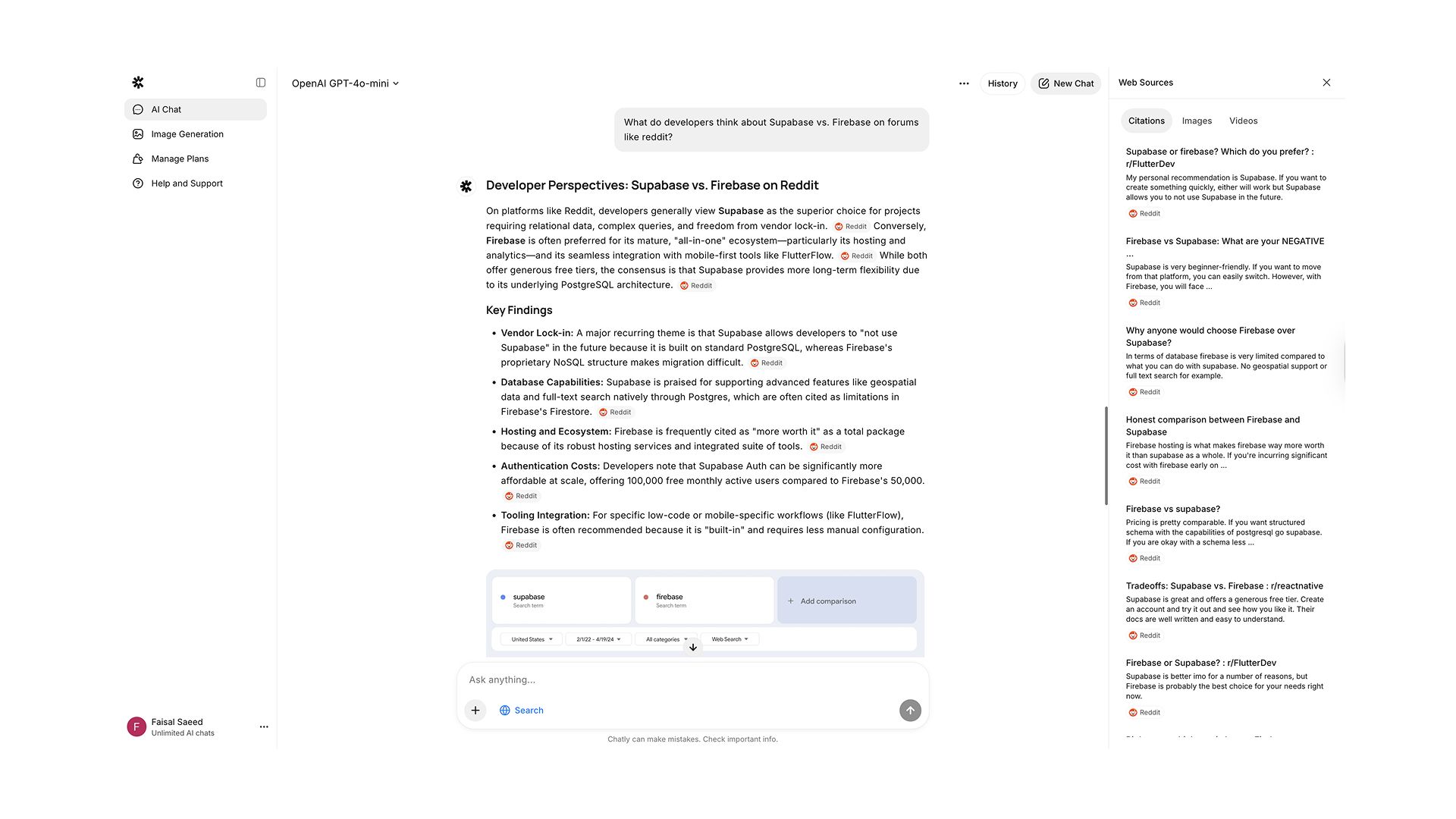
This mode scraped Reddit discussions and provided a community-driven perspective, highlighting common praise points (Supabase's PostgreSQL backend) and criticisms (Firebase's pricing at scale), with direct links to the Reddit threads.
What I Noticed When Using Chatly for AI Search
-
Genuinely changes the search behavior and source prioritization
-
Excels at breaking down complex equations step-by-step
-
Pulls from scholarly sources and research papers effectively when specifically mentioned
-
The interface is clean and well-organized with citation management
Pros
-
Access to various leading AI models (OpenAI GPT-5, Claude Opus 4.5, Google Gemini 3 Pro, xAI Grok 4.1 Fast and more) in one platform
-
Affordable pricing ( starting at $7.5/month) for AI chat, AI search, and AI image generation compared to subscribing to multiple AI services separately
-
Strong citation system with source links prominently displayed
-
PDF and document analysis capabilities
-
Image generation capabilities included
-
Clean, modern interface
Cons
-
Lesser known than competitors, so fewer community resources
-
Limited query allowances without subscription
-
Response quality varies depending on which underlying AI model is selected
-
Lacks the enterprise features of more established platforms
-
Mobile app experience could be more refined
Best For
Users who want access to multiple AI models without multiple subscriptions, students and researchers who benefit from specialized modes, developers needing both coding help and community insights, and budget-conscious users seeking comprehensive AI capabilities.
3. Perplexity AI
Perplexity AI has positioned itself as the "answer engine" rather than a search engine but it essentially functions as an AI search engine. It's one of the pioneers in AI-powered search, offering a Wikipedia-like experience where users can explore topics through structured answers with extensive citations.
Perplexity emphasizes research capabilities with features like Pro Search for deeper analysis and specialized modes for academic papers, financial data, and social discussions.
My Experience with Perplexity AI
I asked Perplexity: "What are the main differences between the James Webb and Hubble Space Telescopes?"
I kept the question basic and used the Deep research feature to ensure it answers in detail. As expected, Perplexity spent barely a second analyzing this simple query before providing a comprehensive response.
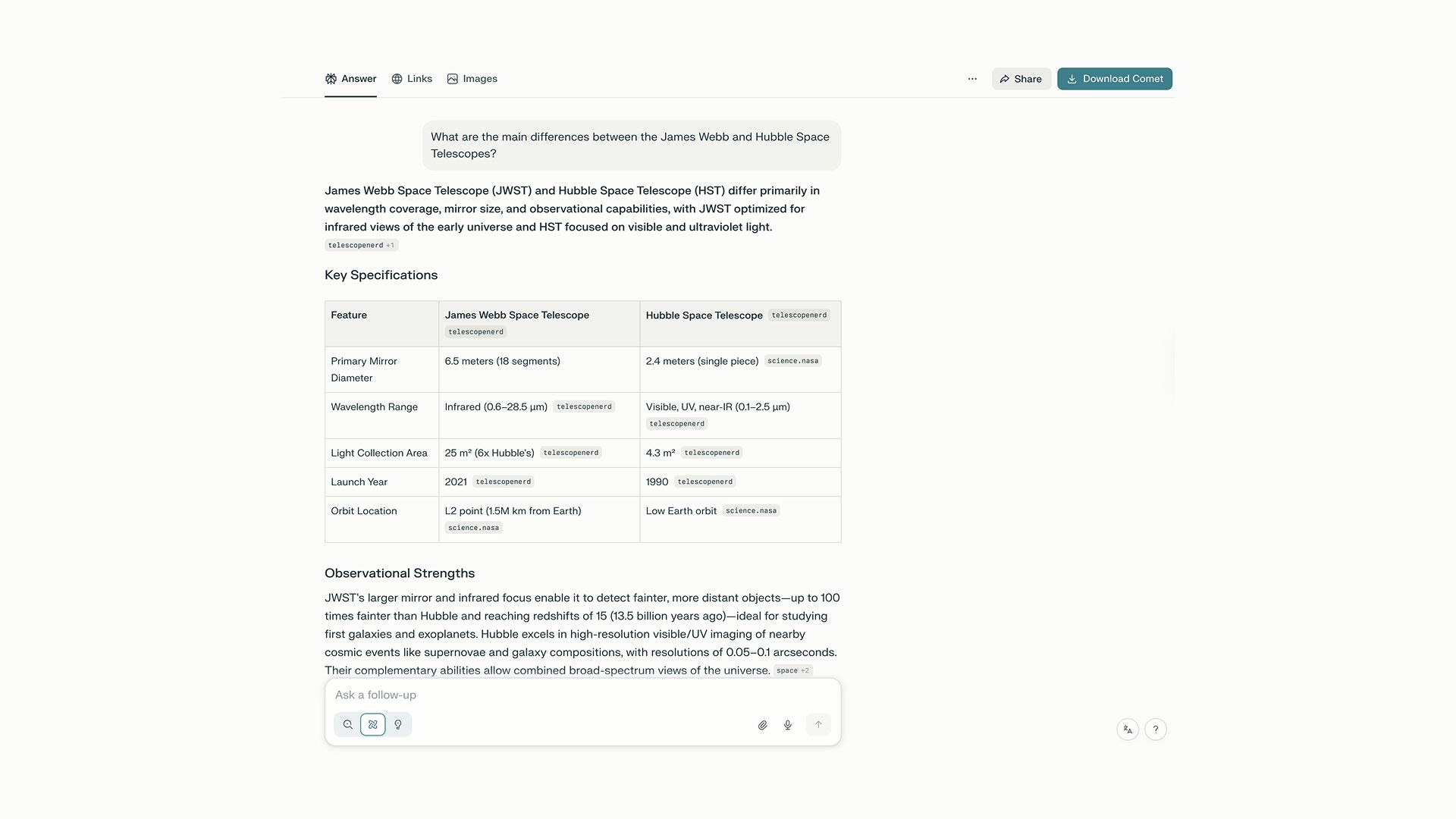
When I clicked to explore news about James Webb, Perplexity pulled recent articles about its latest discoveries, with publication dates and source credibility indicators.
What I Noticed When Using Perplexity AI
-
Excels at summarizing complex topics from multiple authoritative sources
-
The citation system is robust, with numbered references throughout the text
-
Pro Search takes longer but provides noticeably more comprehensive answers
-
Related questions feature helps with discovery and follow-up exploration
-
The interface feels clean and focused on content over ads
Pros
-
Excellent for research and information synthesis
-
Robust citation system with clear source attribution
-
Specialized search modes (academic, financial, social) provide targeted results
-
Related questions feature aids topic exploration
-
Pro Search offers deeper analysis for complex queries
-
Clean, distraction-free interface
-
Mobile app is well-designed and functional
Cons
-
Can sometimes prioritize synthesis over primary source access
-
Pro Search queries are limited on free tier (only 5 per day)
-
Responses can often feel generic or Wikipedia-like rather than conversational
-
Sometimes, it may include inaccurate information despite citations
-
Not ideal for coding or technical implementation questions
-
Can be slower than competitors for simple queries
Best For
Researchers and students conducting literature reviews, users exploring unfamiliar topics who need comprehensive overviews, journalists fact-checking information, and anyone prioritizing source quality and citation transparency.
4. Google AI Overviews
Google's AI Overviews represent the tech giant's integration of AI into its traditional search engine. Rather than creating a separate AI search product, Google embeds AI-generated answers directly into search results pages.
AI Overviews appear at the top of results for certain queries, providing synthesized answers while maintaining the familiar link-based results below.
My Experience with Google AI Overviews
I searched for: "How do I fix a leaky faucet in my kitchen?" Google triggered an AI Overview that appeared at the top of the search results.
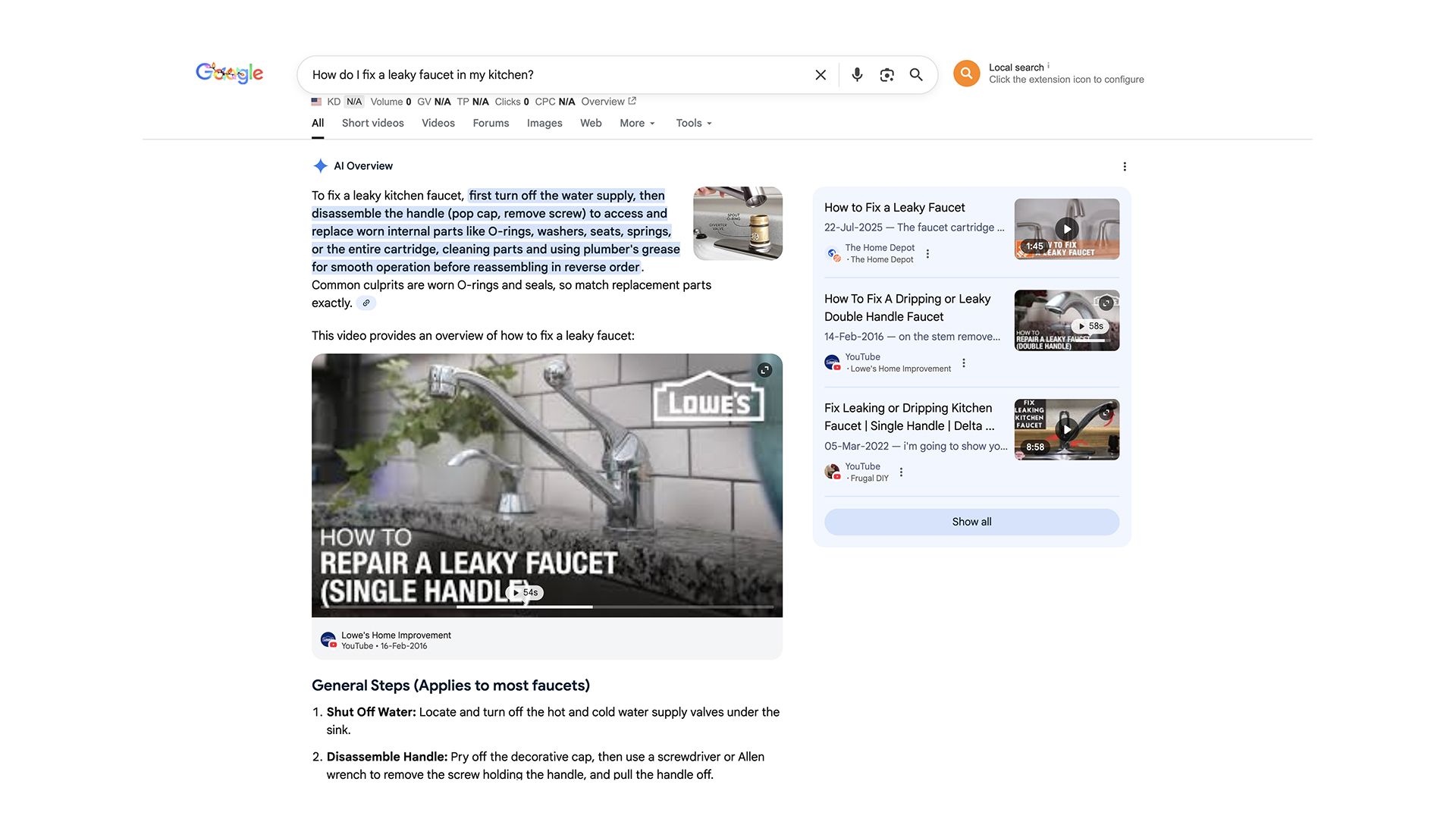
However, it felt somewhat like an enhanced Featured Snippet rather than a true conversational AI experience. There was no option to ask follow-up questions within the AI Overview itself. It is just a feature that provides an answer for your question but does not allow in-depth exploration of ideas.
I noticed AI Overviews triggered for about 15-20% of my queries, primarily for informational, how-to, and definition-prone questions. For commercial searches like "best laptops under $1000," the AI Overview was less prominent, with traditional shopping carousels and product listings taking priority.
What I Noticed When I Encountered Google AI Overviews
-
AI Overviews feel like evolved Featured Snippets rather than conversational AI
-
Integration with Google's ecosystem (YouTube videos, images, maps) is seamless
-
No conversational interface. It's a one-shot answer without follow-up capability
-
Triggers more frequently for informational queries than commercial ones
-
Sometimes duplicates information from Featured Snippets directly below
-
Reddit appears heavily in both AI Overviews and organic results
Pros
-
Integrated into the familiar Google Search experience
-
Leverages Google's massive index and data resources
-
Excellent for commercial and transactional searches (shopping, local businesses)
-
Strong integration with YouTube for video content
-
Map integration for local queries is unmatched
-
No separate subscription required—available to all Google users
-
Mobile integration is seamless
Cons
-
AI Overviews trigger inconsistently (only ~15% of queries)
-
Can feel cluttered with ads, Reddit links, and duplicate information
-
No way to choose when AI Overviews appear
-
Privacy concerns inherent to Google's business model
-
Less useful for deep research or complex analytical queries
Best For
Users comfortable with Google's ecosystem who want AI enhancements without changing platforms, commercial searches and product research, local business and service queries, and casual users who don't want to learn a new interface.
5. Phind
Phind is a specialized AI search engine built specifically for developers and programmers.
Unlike general-purpose AI search tools, Phind understands coding contexts, programming languages, and technical documentation. It's powered by custom-trained models optimized for code generation and technical problem-solving, achieving impressive accuracy rates on coding benchmarks.
My Experience of Analysing Phind
I posed a challenging coding query: "I'm getting a CORS error when trying to fetch data from my Express.js backend in my React frontend. How do I fix this?"
Phind responded within 3 seconds with a highly targeted answer.
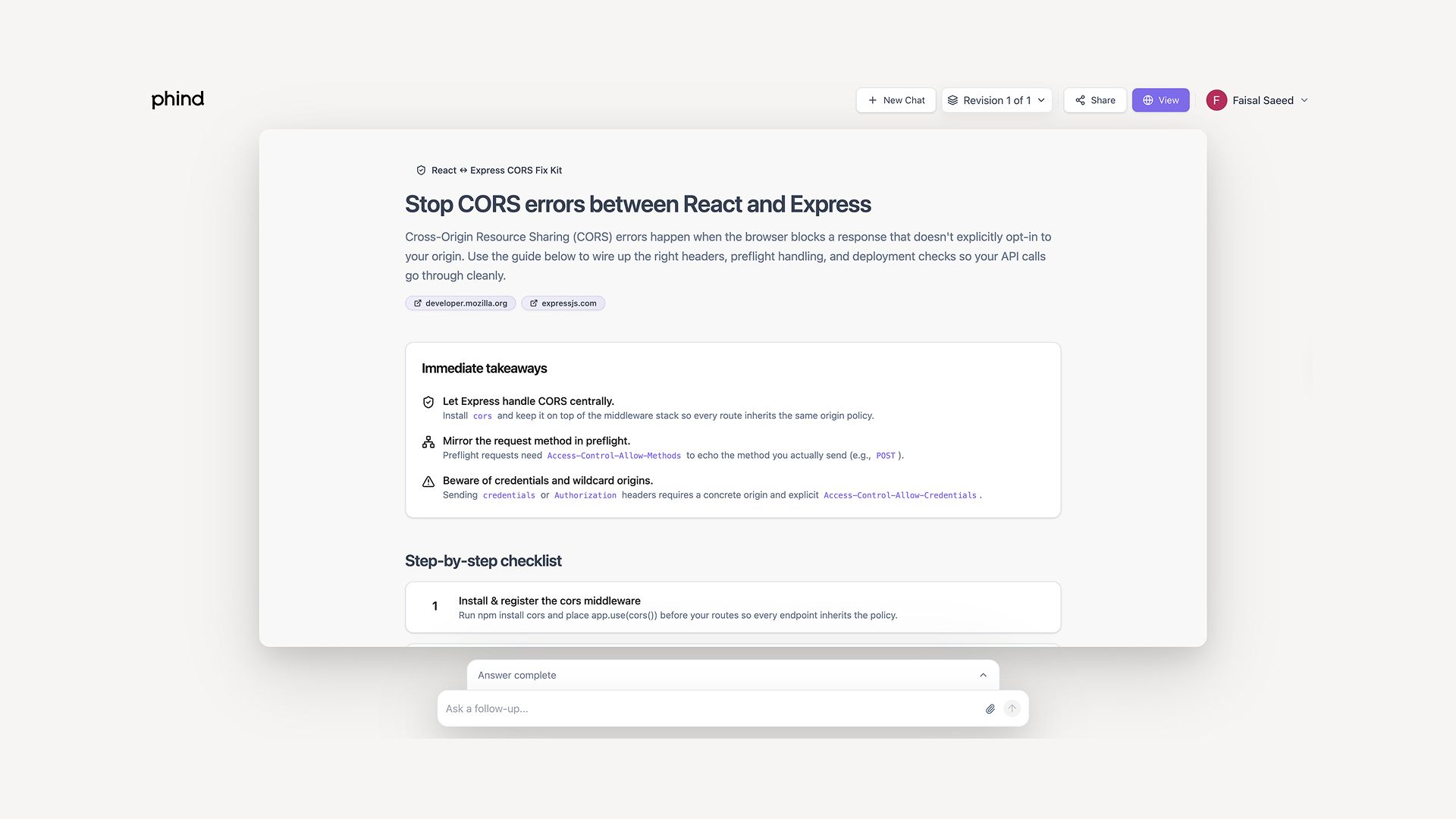
It explained what CORS is and why the error occurs, provided specific code to add to my Express server (using the cors middleware), showed exactly where to place the code, and included configuration options for production environments.
The response also included links to MDN documentation and Stack Overflow discussions.
The "Pair Programmer" feature asked clarifying questions: "Are you deploying to production or testing locally?" and "Do you need to allow credentials?" This conversational refinement helped tailor the solution to my specific scenario.
What I Noticed in Phind
-
Code snippets are properly formatted with syntax highlighting
-
Explanations are technical but clear, assuming developer-level knowledge
-
Includes "Run in Replit" buttons for testing code directly
-
Sources include Stack Overflow, GitHub issues, and official documentation
-
Advanced search allows pasting entire code blocks for context
-
Pair Programmer mode makes it genuinely conversational for coding problems
Pros
-
Purpose-built for developers with excellent code understanding
-
Fast response times (often under 3 seconds)
-
Code execution capabilities integrated
-
Pair Programmer feature provides interactive problem-solving
-
Understands technical jargon and programming concepts
-
High accuracy on coding benchmarks (75% PASS 1 rate)
-
Free tier is generous for basic use
-
VSCode extension available
Cons
-
Limited utility outside of programming and technical queries
-
Free version has limited access to advanced models (GPT-5.1)
-
Not suitable for general knowledge or non-technical questions
-
Can sometimes provide outdated framework information
-
Context window is smaller than some competitors
-
Requires signup for full functionality
Best For
Software developers debugging issues, programmers learning new languages or frameworks, coding students working through problems, and technical teams researching implementation approaches.
6. You.com
You.com has evolved from a consumer search engine into an enterprise-focused AI platform, though it still offers robust search capabilities for individual users. The platform provides multiple "AI Agents" for different tasks:
-
Smart (Express) for quick answers
-
Genius for complex problem-solving
-
Research (ARI) for deep analysis
Users can also customize source controls and integrate private data.
My Experience with You.com
I tested You.com's Research Agent (ARI) with this query: "Compare the investment strategies of Warren Buffett and Ray Dalio, and explain which might be better for a 30-year-old beginning to invest."
ARI spent approximately 2 minutes conducting deep research across multiple sources.
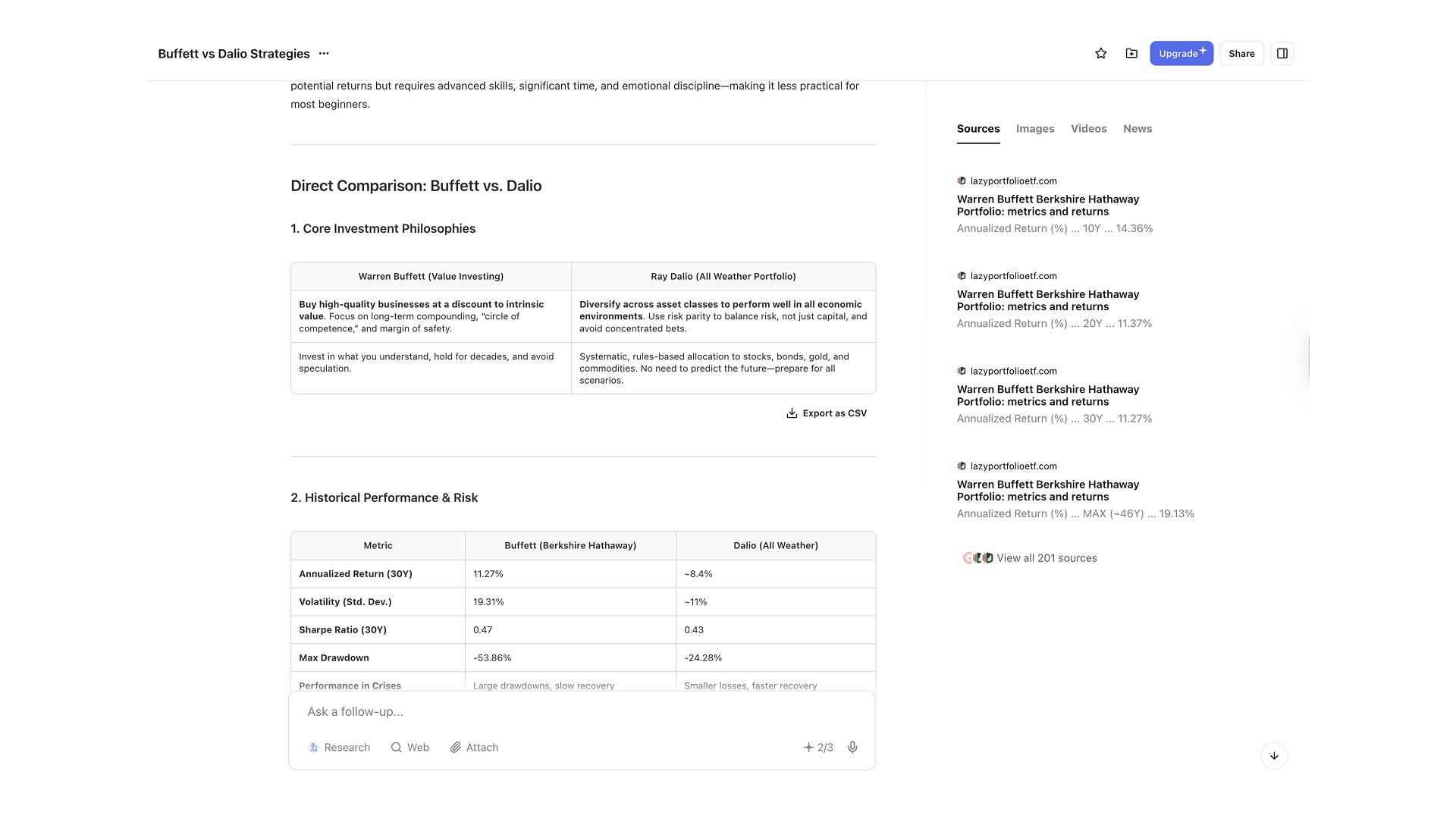
The result was truly impressive at a glance. A comprehensive report with sections on Buffett's value investing philosophy, Dalio's All Weather Portfolio approach, a comparison table highlighting key differences, and age-appropriate recommendations with reasoning.
The report included inline citations, data visualizations, and links to primary sources like Berkshire Hathaway letters and Bridgewater research papers.
For a simpler query using the Smart Agent about current weather, results were near-instantaneous with accurate, cited information.
What I Noticed While Testing You.com
-
The Research Agent (ARI) is genuinely impressive for complex analysis
-
Clear differentiation between agent types serves different use cases well
-
Custom source controls allow filtering to trusted domains
-
Advanced Source Controls enable uploading private documents for context
-
The "Auto" mode intelligently selects the appropriate agent for queries
-
Multiple AI model options (GPT-4o, Claude 3.5 Sonnet, Gemini 1.5 Pro) provide flexibility
Pros
-
Exceptional Research Agent for deep, comprehensive analysis
-
Multiple specialized agents for different query types
-
Can integrate private data and custom sources
-
Strong privacy focus with advanced controls
-
API access available for developers
-
Multimodal capabilities (chat, image generation, code execution)
-
Natural language processing excels at understanding intent
Cons
-
Can feel complex with multiple modes and agents
-
Research Agent is slow compared to quick search alternatives
-
Interface can seem cluttered with many options
-
Lesser known than major competitors, smaller user community
-
Some features require steep learning curve
Best For
Power users who need both quick answers and deep research capabilities, professionals and businesses requiring customized AI search with private data integration, researchers conducting comprehensive literature reviews, and users who want granular control over sources and AI models.
7. Bing AI (Microsoft Copilot)
Microsoft Copilot (formerly Bing Chat) represents Microsoft's integration of AI into Bing Search, powered by OpenAI's GPT-4.
As one of the earliest mainstream AI search implementations, Copilot offers conversational search alongside traditional Bing results. It's deeply integrated into the Microsoft ecosystem, appearing in Edge browser, Windows 11, and Microsoft 365 applications.
My Experience with Bing AI
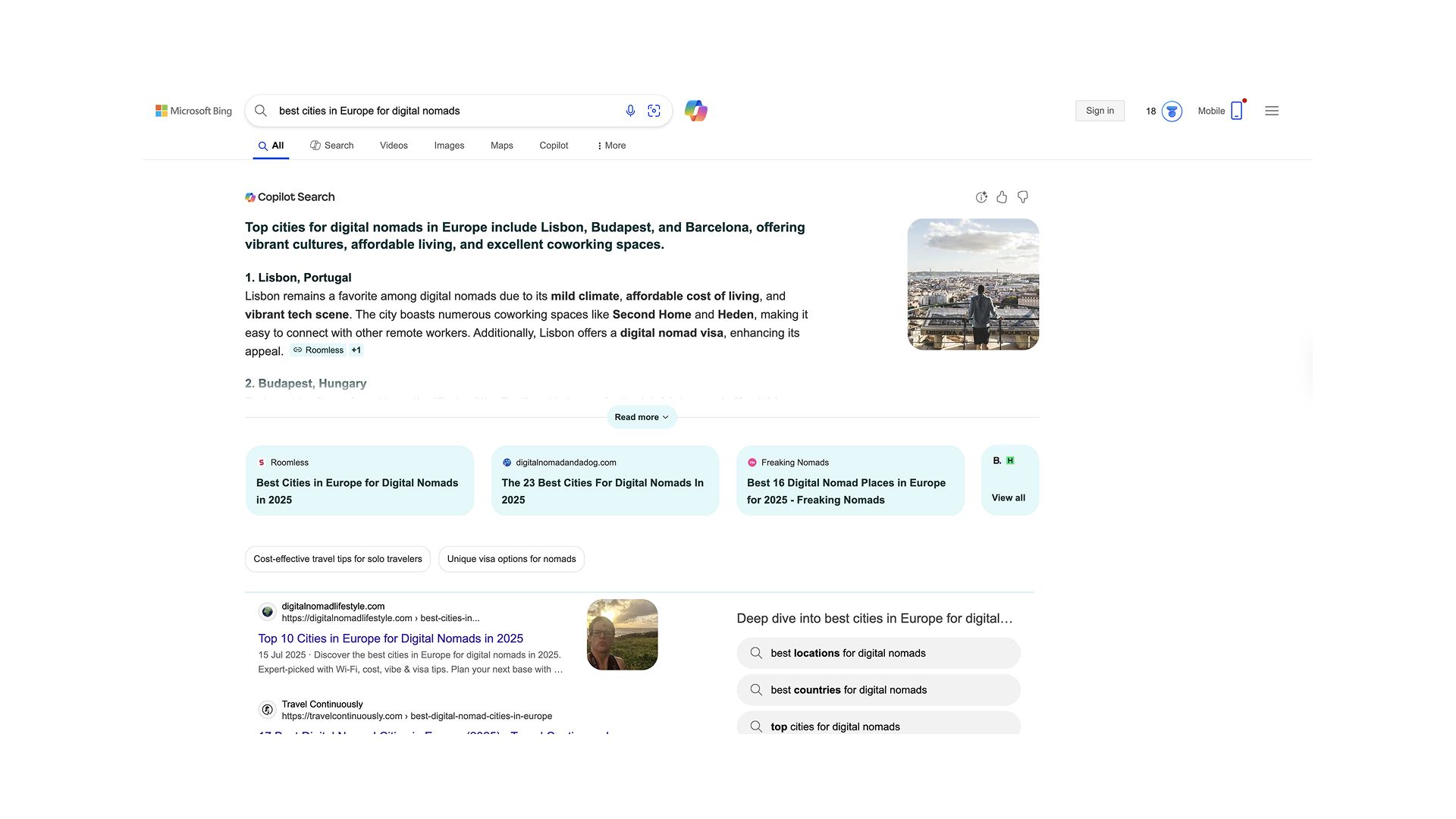
I asked Copilot: "best cities in Europe for digital nomads" The response came quickly, within 5 seconds, providing a numbered list of cities (Lisbon, Barcelona, Berlin, Prague, Tallinn) with brief explanations for each.
What I Noticed While Testing Bing AI
-
Strong integration with Microsoft ecosystem makes it convenient for Windows/Edge users
-
Tends to be more conservative and formal in tone compared to ChatGPT
-
Citations often include a mix of Reddit, business sources, and traditional media
-
Response formatting favors structured lists and tables
-
Supports high-quality image generation using OpenAI’s DALL·E models
Pros
-
Free to use without subscription (with some limitations)
-
Deep integration into Microsoft products and services
-
Access to GPT-4 at no cost (with daily limits)
-
Conversation styles offer flexibility
-
Good balance of Reddit community insights with professional sources
-
Edge browser integration is seamless
Cons
-
Less conversational and personable than ChatGPT
-
No follow-up capability just like Google AI Overview
-
Daily query limits can be restrictive for heavy users
-
Feels like it's trying to promote Microsoft services
-
Not as specialized as purpose-built AI search engines
-
UI can feel cluttered with Bing's traditional search elements
-
Privacy concerns tied to Microsoft's data practices
-
Less innovative than newer competitors
Best For
Microsoft ecosystem users (Windows, Edge, Microsoft 365), users wanting free access to GPT-4-powered search, casual users who don't need specialized features, and those who prefer structured, formal responses.
8. Andi Search
Andi Search brands itself as "search for the next generation," emphasizing privacy, ad-free experiences, and generative AI. Founded by Angela Hoover and Jed White, Andi uses its own search index combined with language models to provide direct answers rather than links.
The platform has won recognition for factual accuracy in independent benchmarks and maintains a strong privacy-first philosophy.
My Experience with Testing Andi Search
I asked Andi: "Explain the Kendrick Lamar and Drake rivalry and why they made so many diss songs about each other?"
One unique thing about Andi is that it does not provide an answer right away. It provides you with the articles which provide the information you are looking for on the right side of the screen.
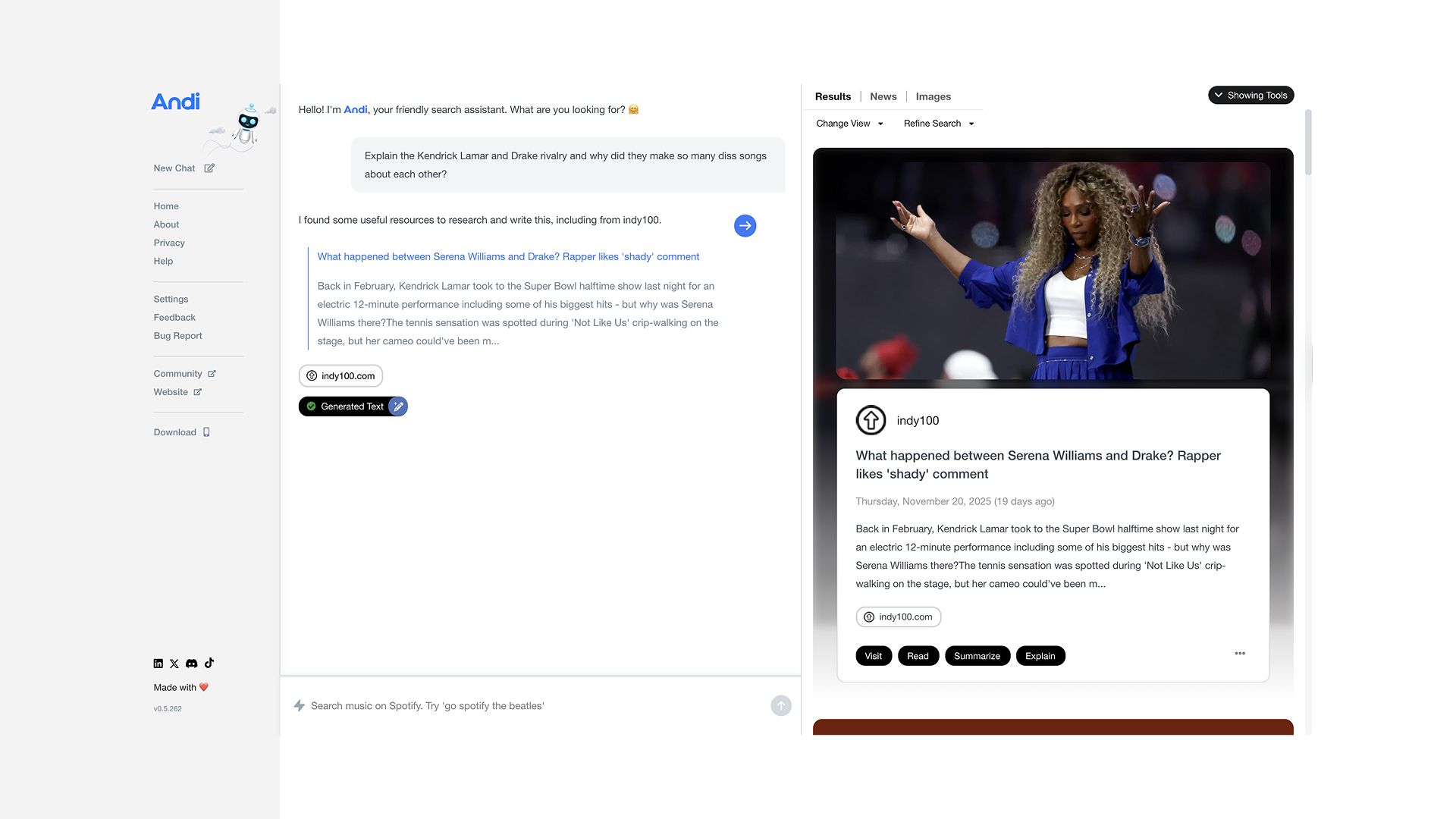
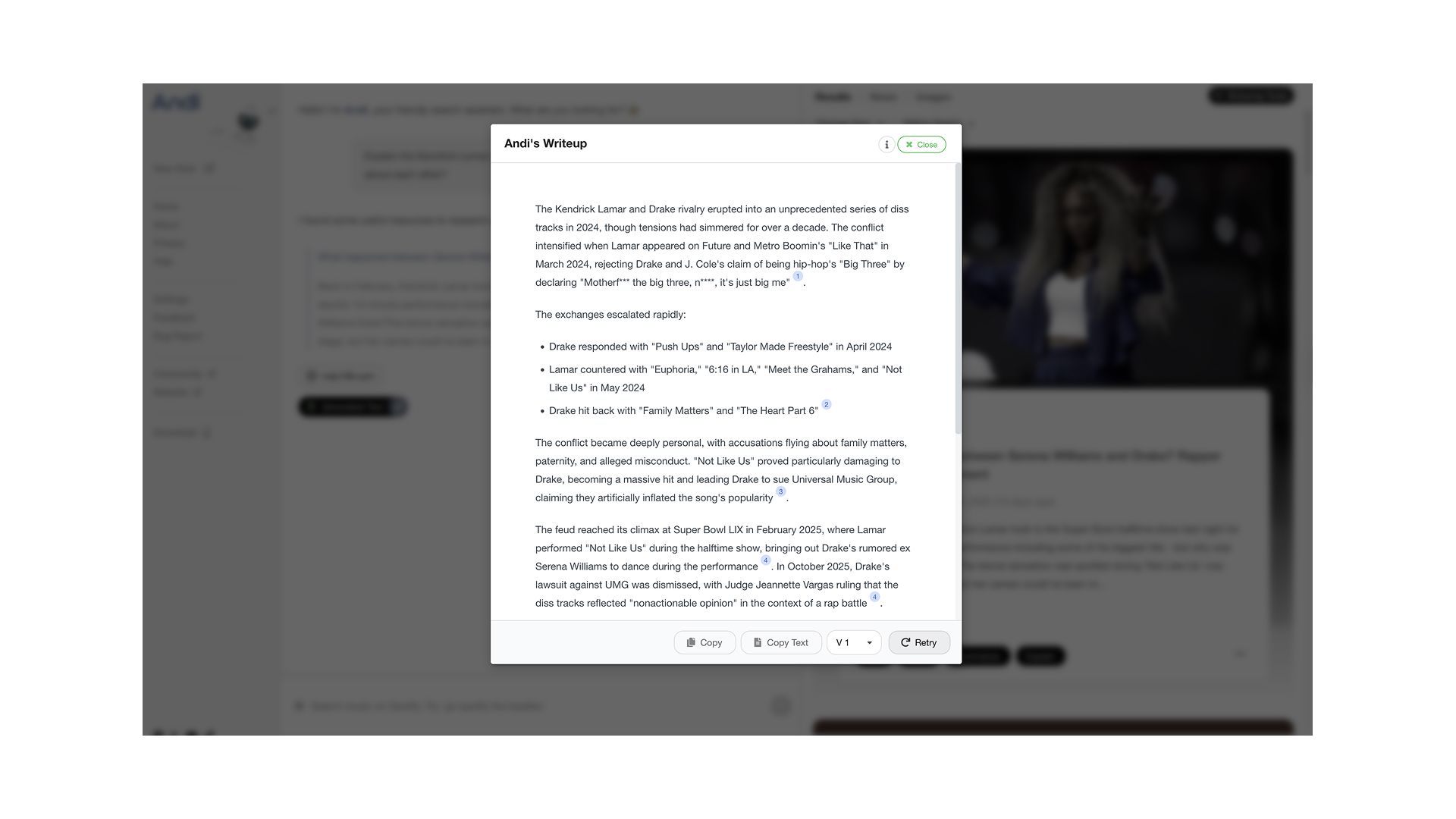
The response included a "Summarize" or “Generate Text” button that condensed the explanation. It explained everything very clearly and in a friendly tone.
For a current events query about recent tech layoffs, Andi pulled data from news sources published within the past week, showing strong real-time data integration.
What I Noticed When Testing Andi Search
-
The conversational tone is notably friendly and accessible
-
Completely ad-free experience with no promotional content
-
Summarize/Explain features add helpful flexibility
-
Response formatting is clean and visual
-
Focuses on credibility by analyzing full page content, not just snippets
-
Claims of no tracking or data collection apparent
Pros
-
Truly ad-free with strong privacy protections
-
Conversational, friendly tone that's more accessible than formal AI
-
Free to use with no subscription required
-
Summarize and explain features add versatility
-
Clean, uncluttered interface focused on answers
-
Ranked #1 in independent accuracy benchmarks
-
Progressive Web App available for mobile
-
Chrome extension for easy access
Cons
-
Smaller index than Google or Bing means some queries return limited results
-
Less suitable for commercial searches or product research
-
Can struggle with very niche or technical queries
-
Limited conversational depth compared to ChatGPT
-
No specialized modes for different use cases
-
Smaller development team means slower feature rollout
-
Sometimes oversimplifies complex topics
Best For
Privacy-conscious users who want an ad-free experience, general knowledge seekers who value conversational explanations, students researching topics who need accessible language, and users frustrated with ad-cluttered traditional search.
9. Komo AI
Komo AI distinguishes itself with visual, community-driven search experiences. Founded by Angela Wu, Komo focuses on exploration and discovery, pulling insights from Reddit, YouTube, TikTok, Quora, Medium, and Twitter.
The platform offers Chat, Search, and Explore modes, with a unique Research Mode for deep dives that provides structured reports with diagrams and visualizations.
My Experience of Trying Komo AI
I activated Research Mode in Komo and asked: "What are the emerging trends in renewable energy technology for 2025?"
Komo AI spent about 5 seconds processing before delivering a structured research report. The report included sections on solar panel efficiency breakthroughs, grid-scale battery storage advances, green hydrogen developments, and offshore wind innovations.
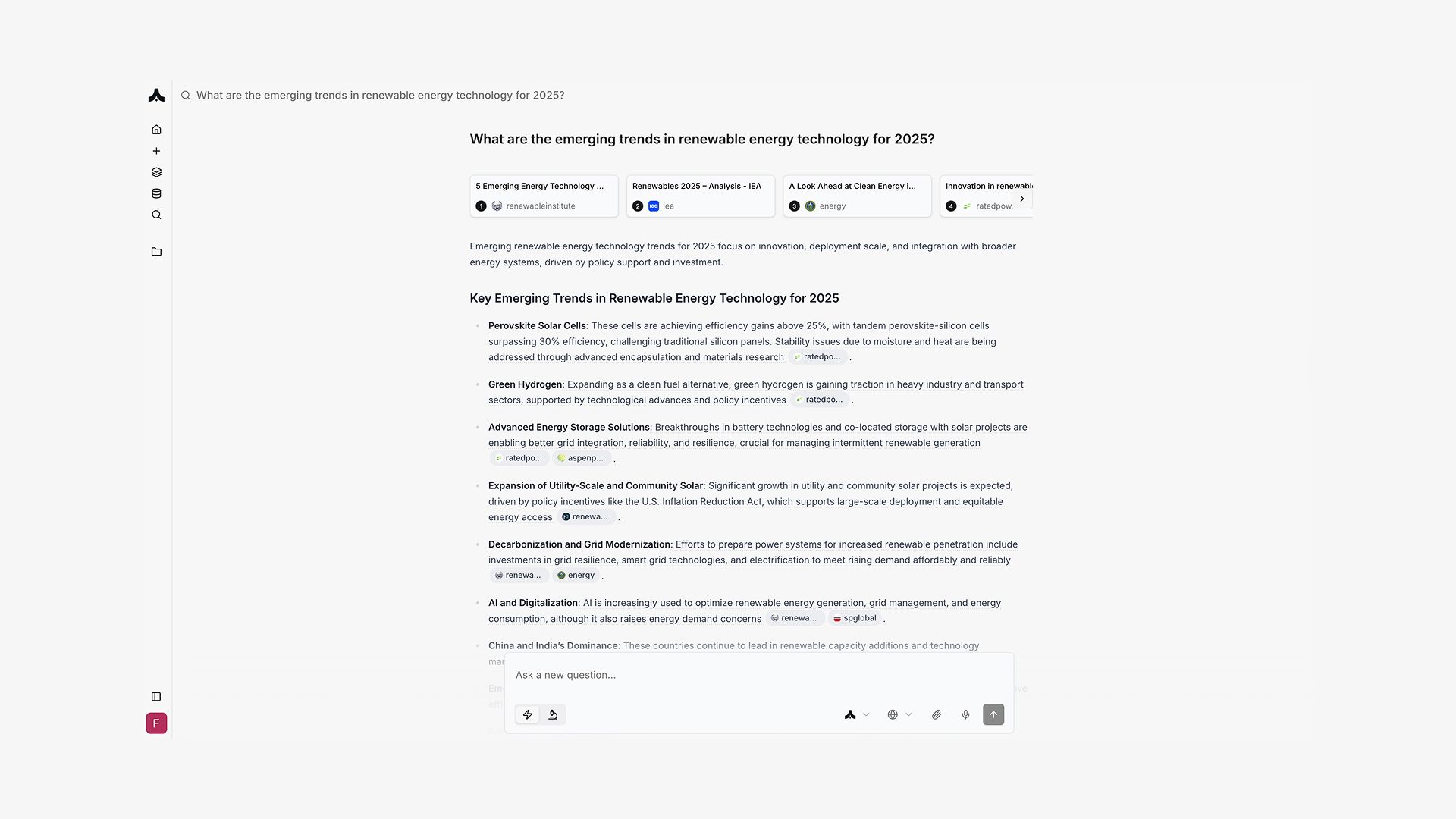
To me, Komo felt like a mix of multiple search engines. It had features like Chatly (multiple modes) and an interface that resembled Perplexity.
What I Noticed While Testing Komo AI
-
Research Mode generates genuinely useful structured reports with visuals
-
Community integration (Reddit, Twitter, YouTube) provides diverse perspectives
-
The Explore feature excels at finding trending discussions
-
Bibliography-style references make academic use viable
-
Visual presentation of information aids comprehension
-
Three distinct modes (Chat, Search, Explore) serve different discovery needs
Pros
-
Unique community-driven insights from multiple social platforms
-
Research Mode produces comprehensive, structured reports
-
Visual and diagram integration enhances understanding
-
Bibliography-style citations excellent for academic use
-
Trending topic discovery through Explore feature
-
Free tier includes basic functionality
-
Clean, modern interface
-
Strong for discovering what communities are discussing
Cons
-
Accuracy concerns raised by some users
-
Limited free tier (daily query limits)
-
Research Mode is slow compared to quick search alternatives
-
Premium pricing ($15-30/month) may not justify features for casual users
-
Interface can require learning curve for new users
-
Less polished than major competitors
-
Community sources may include misinformation
Best For
Researchers wanting community perspectives alongside traditional sources, users exploring emerging trends and discussions, students conducting multifaceted research, and social media managers tracking conversations, brand mentions, and public sentiment.
10. Google Gemini
Google Gemini is Google's standalone AI assistant and chatbot, separate from Google Search. Powered by Google's Gemini models, it offers conversational AI capabilities with access to Google's services, real-time search, and multimodal understanding (text, images, audio).
While not exclusively a search engine, Gemini can search the web and synthesize information conversationally.
My Experience of Using Google Gemini
I asked Gemini to "Help me plan a 3-day itinerary for Tokyo focusing on food and culture."
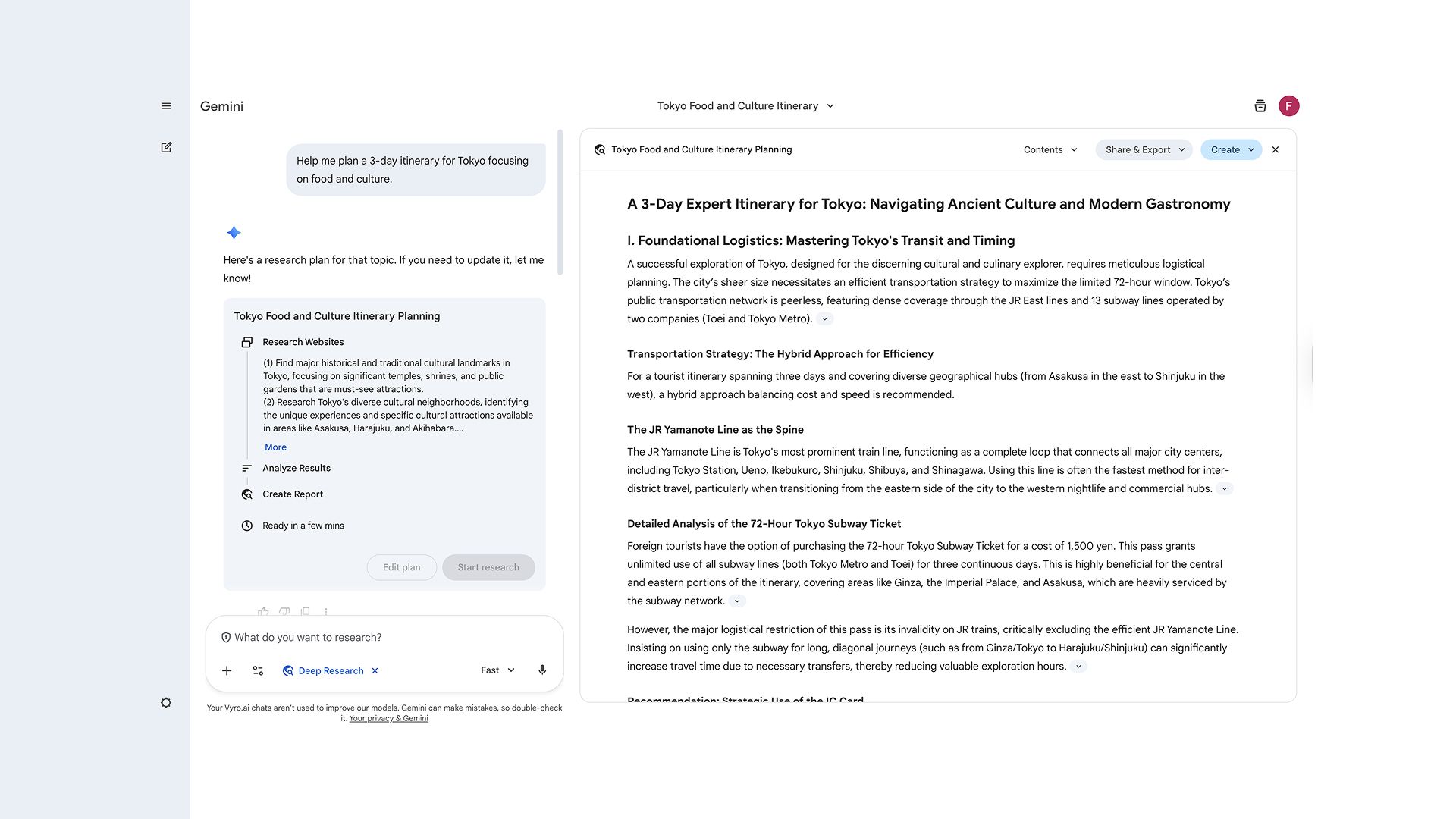
Gemini provided a detailed day-by-day itinerary within 6-7 seconds. Day 1 included morning visits to Tsukiji Market, afternoon exploration of Senso-ji Temple, and evening dining in Shibuya with specific restaurant suggestions. Days 2 and 3 followed a similar structure with varied neighborhoods and experiences.
When I asked "What about budget-friendly options?" it revised the recommendations with cost-conscious alternatives while maintaining the cultural focus.
What I Noticed While Testing Google Gemini
-
Deep integration with Google services (Maps, YouTube, Gmail) is a major advantage
-
Multimodal capabilities allow analyzing uploaded images
-
Can access and summarize information from your Google account (with permission)
-
Conversational abilities are strong, rivaling ChatGPT
-
Response formatting is clear with good use of structure
-
Free tier is generous with daily usage limits
Pros
-
Free access with generous daily limits
-
Excellent integration with Google ecosystem
-
Multimodal capabilities (analyze images, understand context)
-
Can access personal Google data for personalized responses
-
Strong conversational abilities
-
Real-time web search integrated seamlessly
-
Mobile app is polished and functional
-
Multiple model sizes available (Gemini Pro, Ultra)
Cons
-
Privacy concerns inherent to Google products
-
Not as specialized as purpose-built search engines
-
Can be overly promotional of Google services
-
Daily usage limits on free tier
-
Advanced features require Google One AI Premium subscription
-
Less transparent citation than specialized search tools
-
Not as technically proficient for coding as Phind
Best For
Google ecosystem users who want AI integrated with their existing services, users planning trips, events, or projects requiring Google Maps integration, people who benefit from multimodal AI (image analysis), and casual users wanting free conversational AI with search capabilities.
How Do AI Search Engines Differ from Traditional Search Engines?
Traditional search engines like Google, Bing, and DuckDuckGo operate on a relatively straightforward principle:
-
they crawl the web
-
index content
-
rank pages based on algorithms
The algorithm considers factors like keyword relevance, backlinks, page authority, user engagement metrics, and loading speed. When you search for something, you receive a list of blue links. These are the websites that the algorithm believes are most relevant to your query.
The user experience follows a predictable pattern:
-
You enter keywords
-
Scan through results (often skipping ads at the top)
-
Click on a promising link
-
Read through the content to find what you need
-
Repeat this process multiple times until you find a satisfactory answer
This approach puts the burden of information synthesis squarely on the user's shoulders.
AI Search Engines change all that.
Instead of providing a list of links, they use large language models and generative AI to understand your question, search through relevant sources, synthesize information from multiple websites, and present a direct answer, while providing citations to source material.
The key differentiators include:
-
Natural Language Understanding: AI search engines excel at interpreting conversational queries. You can ask "What's the best way to prepare for a marathon if I'm a beginner?" instead of searching for "beginner marathon training plan."
-
Information Synthesis: Rather than forcing you to visit multiple websites and piece together information yourself, AI search engines aggregate data from numerous sources and present a coherent, summarized answer.
-
Contextual Awareness: Many AI search engines maintain conversation context, allowing you to ask follow-up questions without repeating yourself. If you ask about iPhone camera specs, you can follow up with "what about battery life?" and the engine understands you're still talking about the iPhone.
-
Real-Time Data Access: Unlike traditional chatbots with knowledge cutoffs, AI search engines access current web information, making them suitable for queries about recent events, breaking news, or rapidly changing data like stock prices.
-
Cited Sources: Quality AI search engines provide links to their sources, allowing users to verify information and dive deeper into topics of interest.
What Makes a Good AI Search Engine?
Not all AI search engines are created equal. Through extensive testing and user feedback analysis, several key factors separate exceptional AI search tools from mediocre ones:
1. Accuracy and Factual Reliability
The most critical attribute of any search engine is accuracy. A good AI search engine must provide correct, verified information with no hallucinations (AI-generated false information). It should cite credible sources and allow users to trace information back to its origin.
Independent benchmarks have shown significant variance in accuracy rates across different platforms, with some achieving over 70% factual accuracy while others struggle below 50%.
2. Speed and Response Time
Users expect fast results. The best AI search engines are those which do not keep users waiting once they press enter. The acceptable response time is 3-5 seconds. Any longer and it will push the user away.
Metrics like "time to first token" (how quickly the first word appears) and "tokens per second" (how fast the complete answer generates) are crucial performance indicators.
3. Source Quality and Citation
Transparent sourcing is essential. Top-tier AI search engines prominently display their sources, link directly to original content, and clearly indicate when information comes from multiple sources. This transparency allows users to verify information and explore topics more deeply through trusted channels.
4. User Interface and Experience
The interface should be clean, intuitive, and free from excessive clutter or advertising. The best AI search engines offer conversational interfaces that feel natural, support multimodal inputs (text, images, documents), and present information in easily digestible formats.
5. Privacy and Data Protection
With growing concerns about data privacy, leading AI search engines prioritize user anonymity, avoid tracking browsing habits, don't store personal search history, and operate without surveillance capitalism business models.
6. Versatility and Specialized Modes
Different queries require different approaches. Excellent AI search engines offer multiple search modes (quick search, deep research, academic focus), support various content types (code, academic papers, news, social discussions), and allow customization based on user needs.
7. Context Retention and Conversational Ability
The ability to maintain context throughout a conversation distinguishes great AI search engines from basic ones. Users should be able to ask follow-up questions without repeating context, refine searches through natural dialogue, and build on previous queries seamlessly.
How to Choose the Right AI Search Engine for Your Needs
With so many quality AI search engines available, selecting the right one depends on your specific use case, priorities, and workflow. Here's a framework to help you decide:
1. For Daily, General-Purpose Searching
If you're looking for an all-around AI search engine for everyday queries, Chatly or Perplexity AI are excellent choices.
Chatly excels at conversational depth and context retention, making it ideal if you often ask follow-up questions. Perplexity AI provides cleaner, more structured answers with excellent citations, better suited if you prefer Wikipedia-style information presentation.
Consider your primary device and ecosystem. If you're deeply embedded in Google services, Google Gemini might offer the best integration. Microsoft users may find Bing AI (Copilot) more convenient.
2. For Technical and Coding Queries
Developers should prioritize Phind, which is purpose-built for programming questions. Its code-specific training, syntax highlighting, and execution capabilities make it unmatched for debugging, learning frameworks, or finding implementation examples.
ChatGPT Search with coding-focused prompts can also work well, especially if you need both technical and non-technical research in the same tool.
3. For Academic Research and Deep Analysis
Researchers should consider Perplexity AI (especially with Pro Search) or Chatly’s Academic mode. Both excel at synthesizing information from multiple academic sources and provide robust citation systems.
Consider Komo AI if you want to include community discussions and emerging trends alongside traditional research, or You.com's Research Agent (ARI) for a specialized research focus.
4. For Privacy-Conscious Users
If privacy is your top priority, Andi Search offers the strongest privacy protections with no tracking, no ads, and no data collection. It's completely free and provides a clean, focused search experience.
You.com also emphasizes privacy and gives you granular control over sources and data.
5. For Multi-Model Access
6. For Community Insights and Social Trends
To understand what communities are saying about topics, Komo AI leads with its Reddit, YouTube, TikTok, and Twitter integration. Chatly's Reddit Mode also provides strong community-focused search.
Consider Perplexity AI and Bing AI which also surface Reddit content, though less comprehensively.
7. For Business and Professional Use
Enterprise users should evaluate You.com for its API access, custom source controls, and ability to integrate private company data. The Research Agent is particularly valuable for market analysis and competitive intelligence.
ChatGPT Enterprise offers team collaboration features and enhanced privacy for business contexts.
8. Using the Mixed Approach
Many power users employ a multi-tool approach:
-
Primary tool (Chatly or Perplexity AI) for 80% of queries
-
Specialized tool (Phind for coding, Komo for community insights) for specific needs
-
Verification tool (Andi or traditional Google) for fact-checking critical information
This strategy leverages each tool's strengths while mitigating individual weaknesses.
Conclusion
The transition from traditional search engines to AI-driven alternatives marks one of the most significant shifts in how people access, interpret, and apply information online. AI platforms synthesize insights, reduce friction, and fundamentally reshape digital discovery.
Each platform in this guide brings distinct advantages. ChatGPT Search offers conversational depth, Chatly provides multi-model versatility and often better control, Perplexity excels at research synthesis, and Phind specializes in technical and coding queries. The right choice depends on your goals, your budget, and how you prefer to consume information.
That said, here are some key developments that are shaping this evolution include:
-
stronger accuracy and improved attribution across AI search systems
-
deeper reasoning and context-awareness for complex queries
As 2025 advances, the familiar era of blue links continues to fade, replaced by direct, contextual answers that save time and enhance productivity. Explore multiple tools from this list to see which integrates most naturally into your daily workflow.

Frequently Asked Question
Learn more about AI Search Engines through most commonly asked question online.
More topics you may like
11 Best ChatGPT Alternatives in 2026 (Tested, Compared & Priced)

Muhammad Bin Habib
Gemini 3 Flash vs Gemini 3 Pro: Key Performance Differences

Faisal Saeed
Gemini 3 Pro Overview: Features, Pricing, and Use Cases
Faisal Saeed

GPT-5.2 Is Here: What Changed, Why It Matters, and Who Should Care
Faisal Saeed

GPT-5.1 vs GPT-5: Key Differences and Improvements
Faisal Saeed