Use AI Content Repurposing Workflow to Turn Any Blog Post into 10 Pieces (With Chatly AI Extension)
As marketers, we are often obsessed with creating and perfecting blogs. As long as it does well and brings traffic, we rarely touch them again.
Meanwhile, your LinkedIn feed needs content. Your email list hasn't heard from you. Your Twitter audience has no idea the post exists. You start planning new strategies and content while your best performing content sits in isolation.
You know you should repurpose it. You just never do.
And while some people might attribute this to laziness, those of us who know the ins and outs of this business know the problem goes much deeper.
Because the process is a nightmare.
Most marketers who try to repurpose content end up doing this:
- copy the article
- paste it into ChatGPT
- switch to Notion to store the outputs
- open their scheduler
- realize the tone is off
- go back to ChatGPT
- lose track of what they've already done
An hour later, they have two LinkedIn posts and a vague sense of dread.
This article gives you a better system. One that lives where your content already lives, runs inside your browser, and turns one post into ten pieces of content without a single tab switch.
Why Most Repurposing Workflows Fall Apart
Context switching is the real enemy here. If you're not sure which model fits which job, that's another decision layer stacking on top of an already broken workflow.
Every time you leave the article to fire up another tool, you break your focus and add friction to a task that should be effortless. The more steps involved, the easier it is to deprioritize.
There are three specific costs most people don't account for:
- Time lost per piece due to re-explaining the article context to a separate AI tool
- Creative fatigue from managing multiple apps in a single session
- Inconsistent output because there's no repeatable process anchoring the work
The fix isn't a new standalone app. It's doing the repurposing work directly on the page where the content already lives.
Enter Chatly’s AI-powered extension.
How to Repurpose Content Without Leaving the Article Page
The workflow is the part most tools get wrong.
Most AI tools require you to bring the content to them. You copy, paste, describe, prompt, then copy the output back into wherever you're working. That's four unnecessary steps on every single format.
Chatly works the other way. It reads what's already on your screen.
Step 1: Get the Extension
Simply get the extension on Chrome Web Store and pin it on your browser. Login with your account and the extension is ready to use.
Step 2: Open the Published Blog Post in Your Browser
No copying. No pasting into a separate interface. The article you want to repurpose is already your workspace. Just click on the extension and select the AI model you want to work with.
You get a choice of top AI models including GPT-5.4, Claude Opus 4.6, Gemini 3 Pro etc.
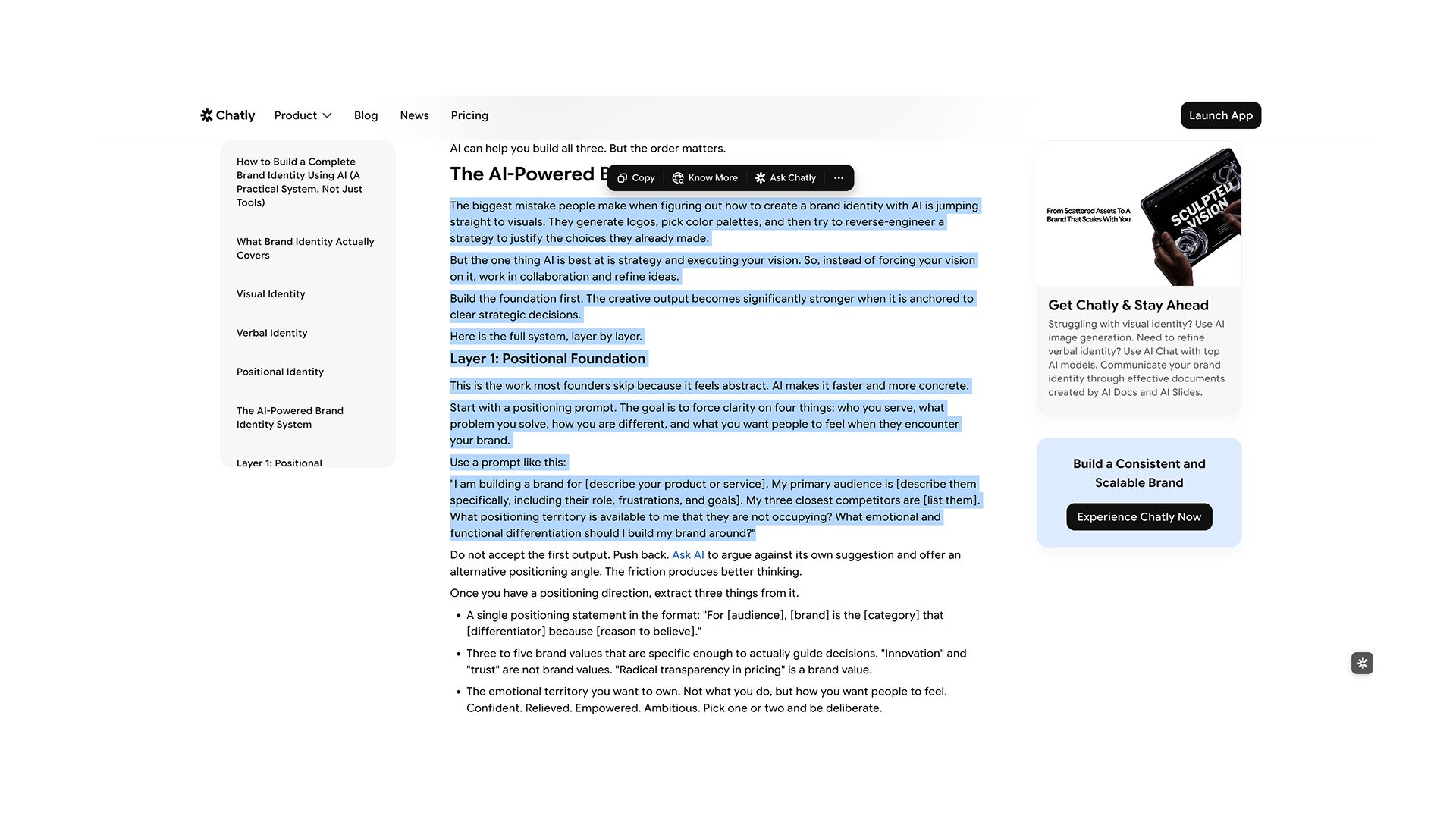
Step 3: Highlight the Section You Want to Work With
Select any text or image on the page and Chatly surfaces a set of quick actions instantly. You can summarize it, rewrite it, or reference it directly in the chat panel that opens right there on the page. Nothing leaves your screen.
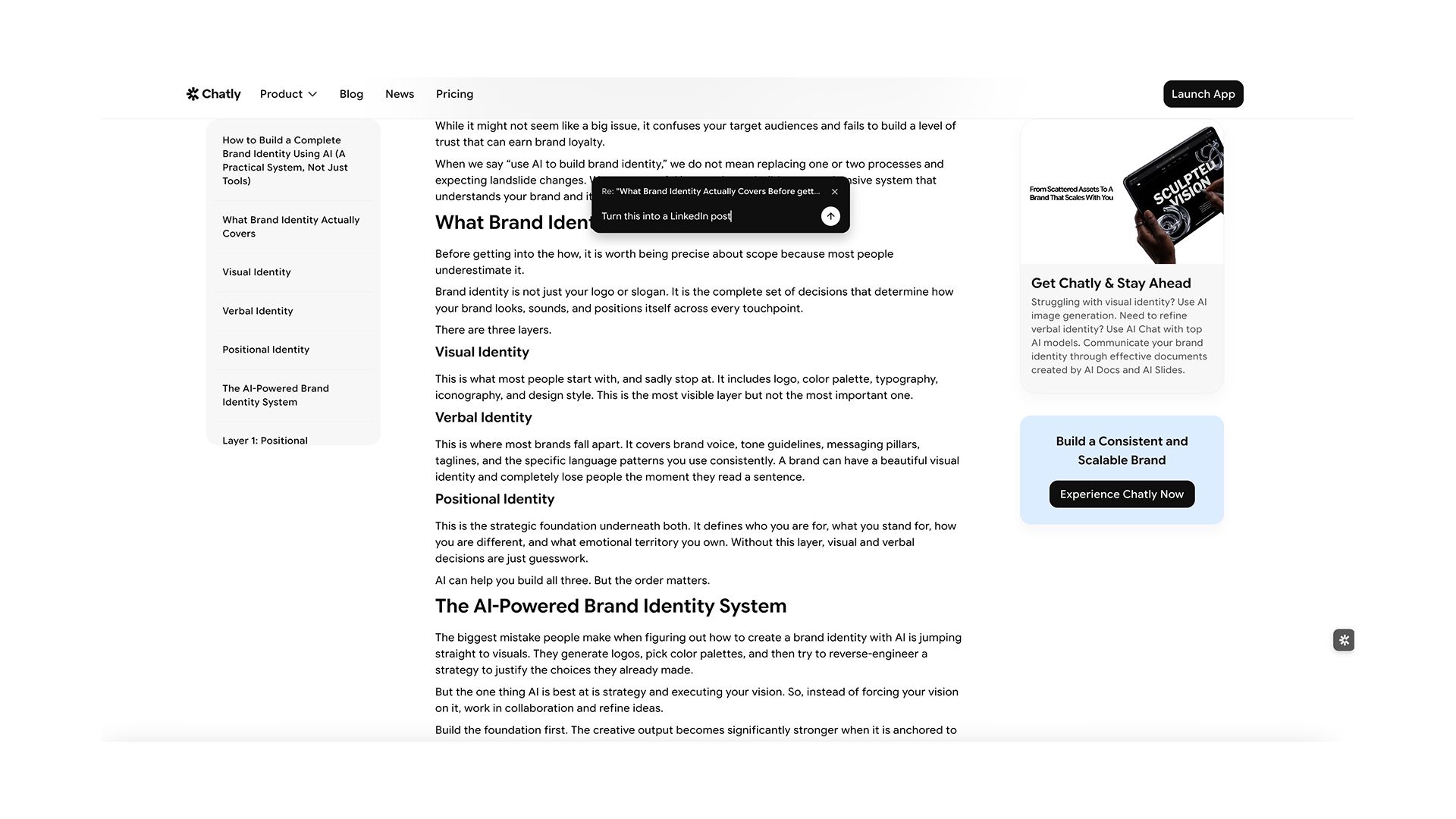
Step 4: Tell Chatly What You Need in the Chat
The highlighted text is already referenced in the conversation. Type your instruction: "Turn this into a LinkedIn post" or "Rewrite this as a 45-second video script." Chatly responds in context, using the exact content you selected as its source.
Step 5: Copy the Output Where it Needs to Go
Paste directly into your scheduler, email tool, or doc. The source article is still open. Pick the next section, highlight it, and repeat.
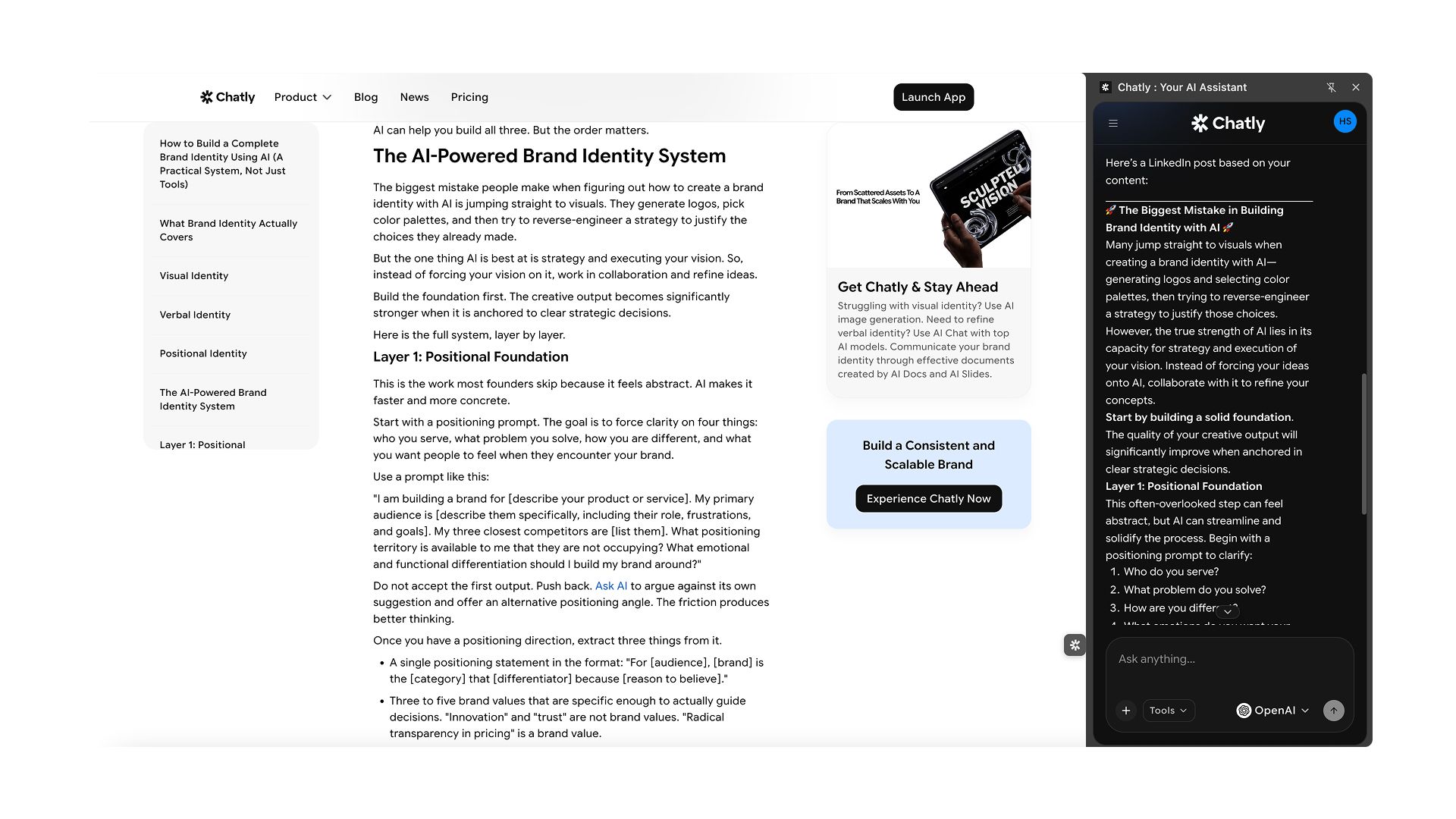
That's the entire workflow. The page is your workspace and the chat is your creative partner, both running without a single tab switch.
One additional advantage worth noting is that different formats benefit from different models.
- Email newsletters and long-form rewrites work best with Claude Sonnet 4.6..
- FAQ blocks and carousel captions are where GPT-5.4 earns its place, delivering clean structure.
- Video scripts and quote cards come out strongest through Gemini 3 Pro.
- Podcast talking points and reframed long-form pieces benefit from Claude Opus 4.6.
- Twitter threads and LinkedIn posts move fastest through GPT-5.4.
Chatly lets you switch models mid-session without losing your place or your context.
The 10 Content Formats You Can Pull From One Blog Post
Here's what one well-written article can produce. Each format below takes a different angle on the same source material, which means your audience gets variety without you starting from scratch.
Work through these in order or pick the ones that fit your current distribution priorities.
1. LinkedIn post
Pull the article's central insight and frame it as a standalone observation. You're not summarizing the post. You're sharing the one idea that would make someone stop scrolling. Chatly lets you highlight the key section and generate a LinkedIn-optimized version in seconds, on the same page.
2. Twitter/X thread
Your article's subheadings are already a thread structure. Each section becomes a tweet. Chatly converts the full outline into a numbered thread with a strong opening hook, without you having to manually strip it down.
3. Email Newsletter Snippet
Not every subscriber reads your blog. A newsletter snippet gives them the core takeaway in two to three sentences. Highlight the conclusion or summary section and prompt Chatly’s AI email generator to write it in a conversational tone that fits your email voice.
4. Short Video Script
Your introduction paragraph is already a hook. With minor adjustments, it becomes a 45-second script for a Reel, TikTok, or YouTube Short. Chatly reformats it for spoken delivery, including pacing cues if you need them.
5. Quote Card
Every article has one sentence sharper than the rest. Surface it, isolate it, and turn it into a visual post. This format takes thirty seconds to produce and performs consistently well on Instagram and LinkedIn.
6. FAQ Block
Convert your article's main sections into question-and-answer format. This is useful both as standalone content and as SEO-supporting copy you can add to the bottom of the original post. Chatly structures the Q&A directly from whatever section you highlight.
7. Carousel Caption Set
8. Podcast Talking Points
If you run a podcast or appear as a guest, the article compresses naturally into five discussion bullets. These aren't a script. They're anchor points that keep the conversation structured without making it sound rehearsed.
9. Slack or Internal Update
Your team and stakeholders often need context on what you're publishing and why. A three-sentence internal summary takes sixty seconds to produce and builds content visibility inside your organization.
10. Reframed Long-form for a Different Audience
The same core argument often applies to multiple audiences with different contexts. A post written for B2B marketing teams can be reframed for solopreneurs, agency owners, or a different industry vertical. Chatly rewrites the angle while keeping the substance intact. Just ensure to follow the best system prompts to make your content sound as human as possible.
Building a Repurposing Habit That Actually Sticks
A perfect system you use twice is worse than a simple one you use every week.
The goal here isn't to produce all ten formats in a single sitting. That's still a content marathon. The goal is to make repurposing feel like a natural extension of publishing.
Here's a sustainable weekly structure:
- Monday: Publish the article
- Tuesday: LinkedIn post and quote card
- Wednesday: Twitter thread
- Thursday: Email newsletter snippet
- Friday: Video script or carousel captions
Five days, one format per day, all sourced from the same post. Your content calendar fills itself without a dedicated repurposing session eating your Wednesday afternoon.
The habit forms when you anchor it to something you already do. Open Chatly the moment you hit publish. The article is in front of you. The tool is already on the page. Start with one format and let the momentum carry you.
Conclusion
Repurposing doesn't fail because marketers don't care about distribution. It fails because the process costs more energy than most people can sustain alongside everything else they're managing.
When the tool lives on the page, the decision to repurpose stops being a separate task. It becomes part of the publishing moment.
One post. Ten formats. No tab switching.
Open your last published article, install Chatly, and work through three formats today. You'll have a week of content before you close the tab.
Frequently Asked Question
Still need more? Here is some additional information to answer all your queries.
More topics you may like
AI Sycophancy: Your AI Is Agreeing With You (And That Is A Problem)

Daniel Mercer

Chat PDF vs ChatGPT for Document Analysis: Which One Works Better for PDFs?

Maya Collins

What Is AI Image Generation? The Complete Practical Guide for 2025

Muhammad Bin Habib

How to Build a Complete Brand Identity Using AI (A Practical System, Not Just Tools)

Faisal Saeed
How to Create an Outstanding Resume Using AI Resume Builder (Secret Sauce = Chatly’s AI Docs)
Faisal Saeed