GPT Image 2 Cost Breakdown
GPT Image 2 pricing works differently depending on how you access it, and the cheapest option for a content creator is not the same as the cheapest option for a developer running a pipeline. There are two completely different cost structures: token-based API billing and subscription-based platform access.
This GPT Image 2 pricing article breaks down every cost scenario clearly so you can make an informed decision before committing. For a full overview of what the model can do before evaluating cost, see the complete GPT Image 2 overview and capabilities guide.
How GPT Image 2 Pricing Works
GPT Image 2 uses token-based billing, not the flat per-image pricing that earlier OpenAI image models used. Higher-resolution outputs, more complex prompts, and reference image inputs all affect the actual cost per generation:
- Simple, low-complexity prompts cost less
- High-resolution outputs with detailed prompts and reference images cost more
There are two main ways to access and pay for GPT Image 2: a ChatGPT subscription plan or direct API access. These serve different needs with completely different cost structures.
GPT Image 2 API Pricing
The API uses the model identifier gpt-image-2 and bills across two components: token consumption for text prompts and reference image inputs, and approximate per-image costs based on quality and resolution calculated using OpenAI's image generation calculator.
Official Token Rates
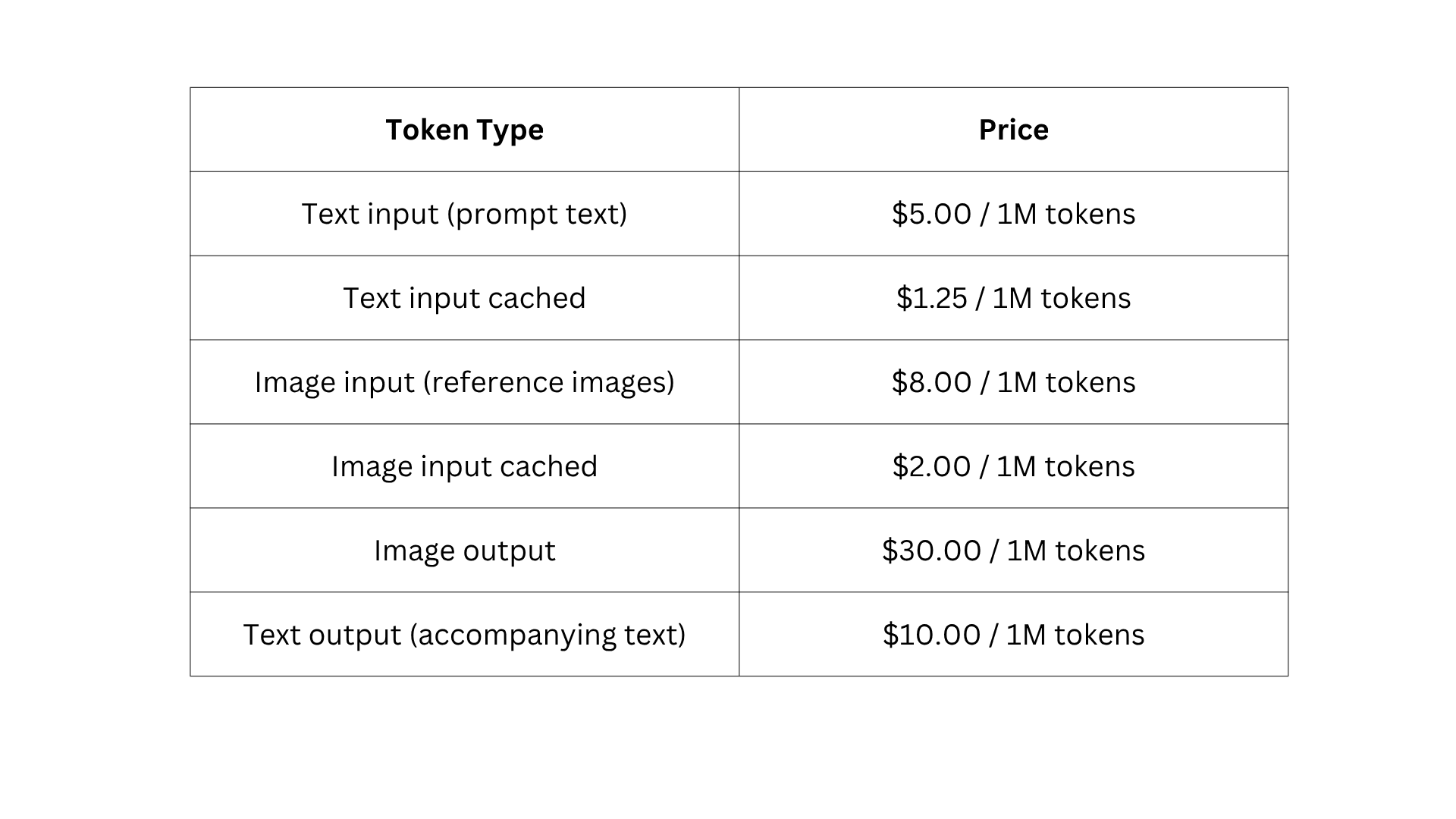
These rates come from the official OpenAI API pricing page. Verify current rates there before finalising any budget, as OpenAI updates pricing periodically.
Approximate Per-Image Costs by Quality and Resolution
GPT Image 2 uses pure token-based billing. The figures below are calculator estimates from OpenAI's image generation cost tool, not fixed flat rates. Actual costs vary based on prompt complexity, image size, and whether reference images are included.
Low quality (approximate):
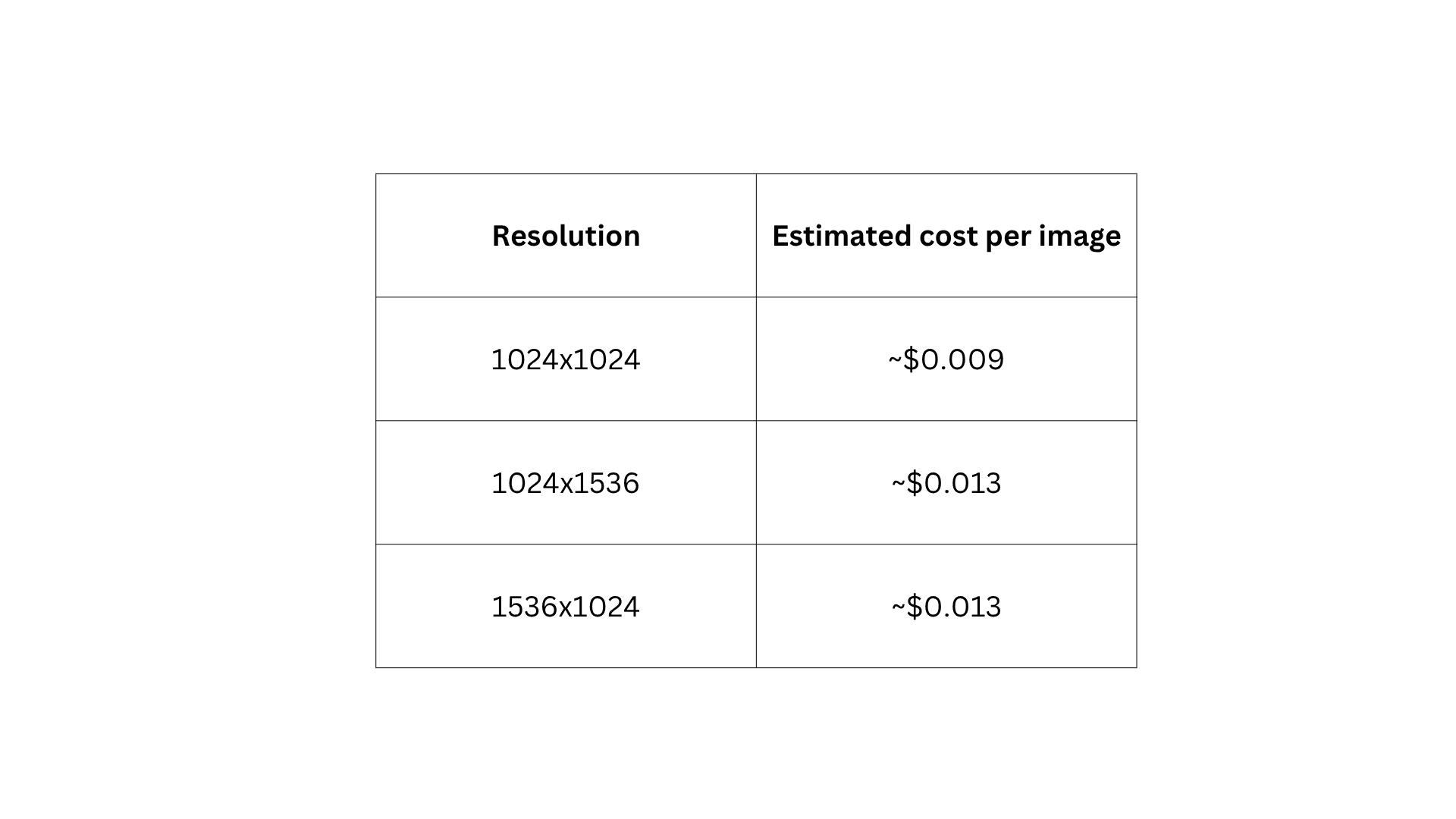
Medium quality (approximate):
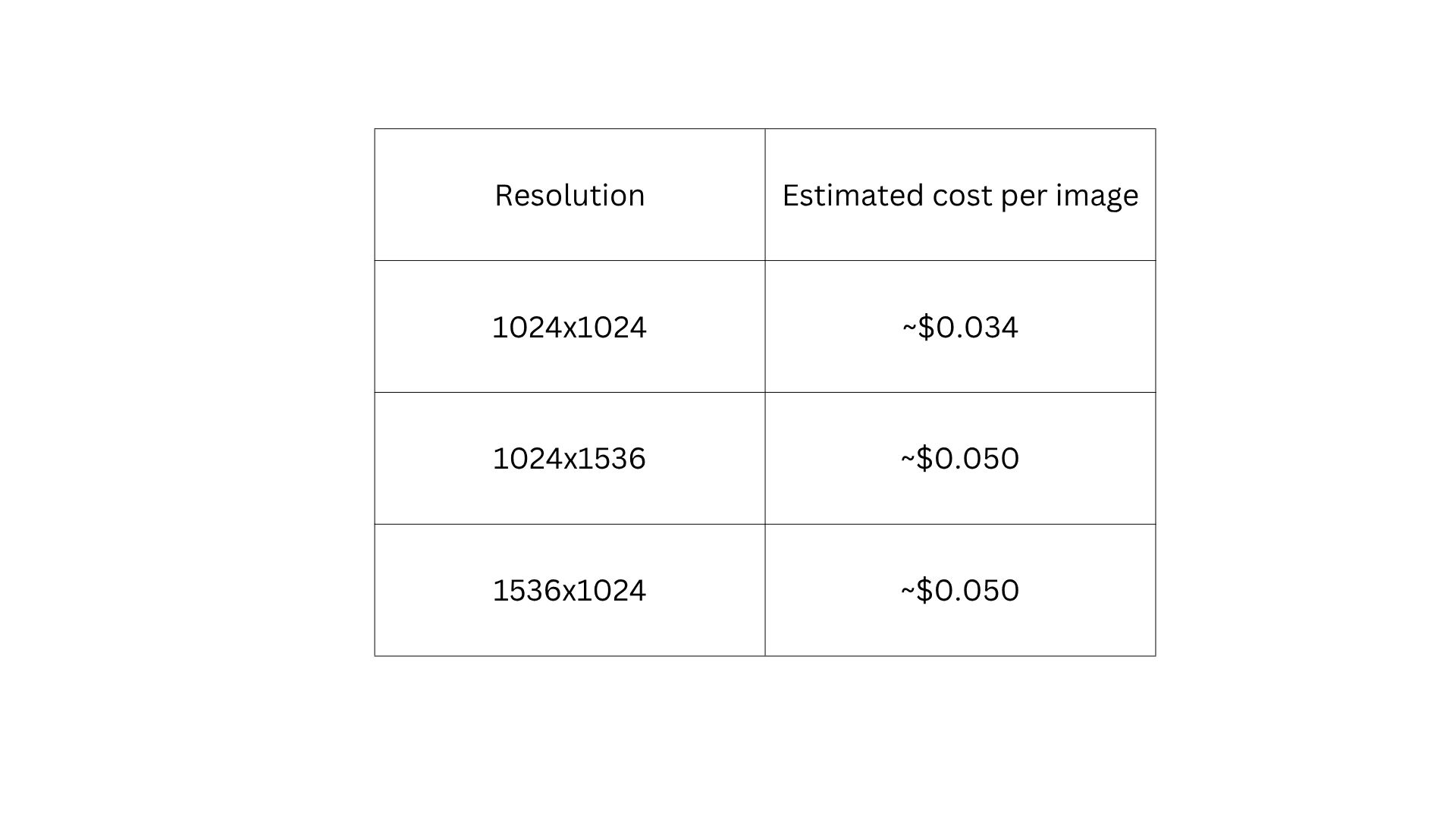
High quality (approximate):
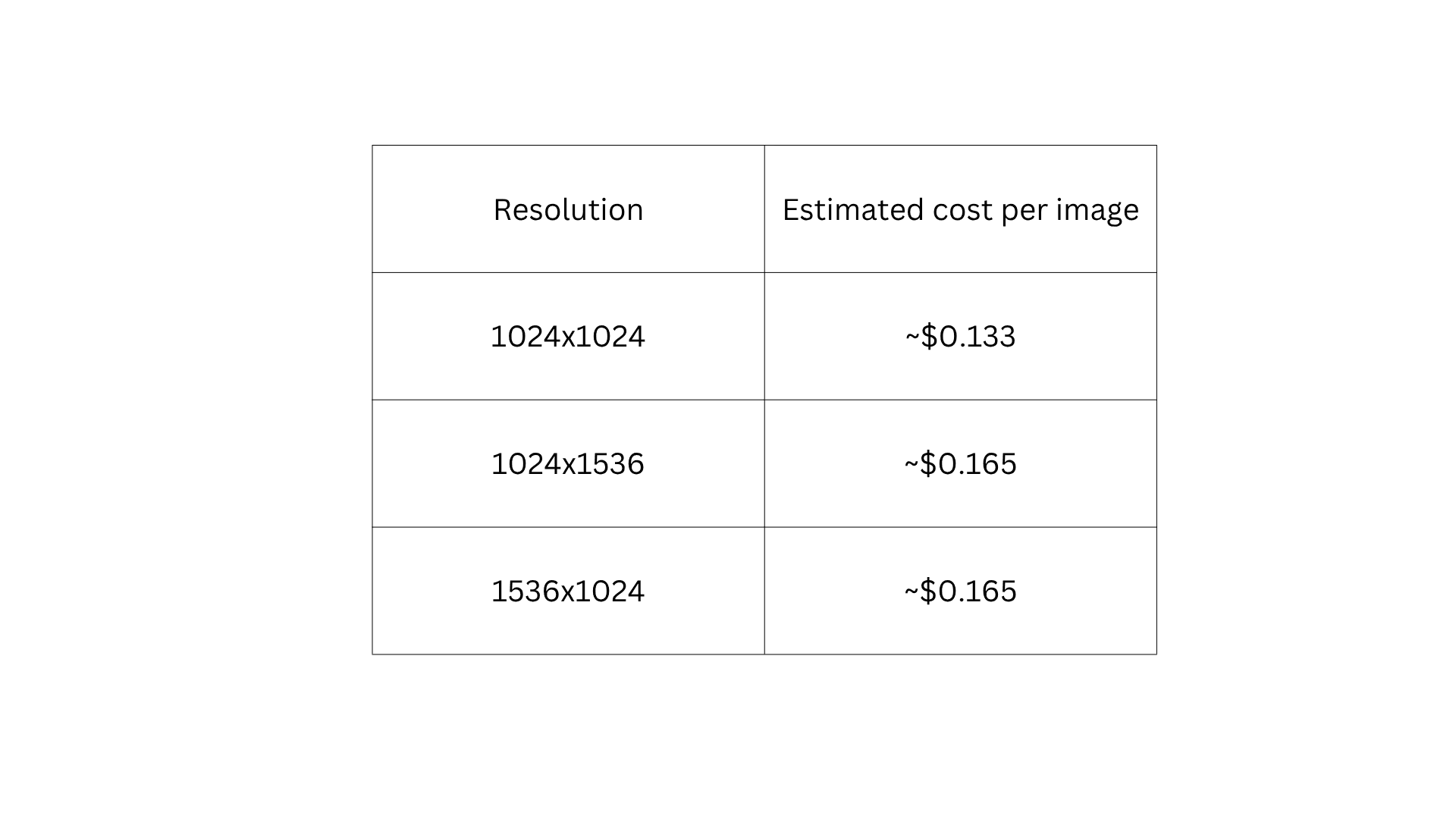
Always use OpenAI's official image generation calculator with your specific prompt and settings for exact cost estimates.
What Each Quality Setting Actually Produces
Quality settings are not just a dial between worse and better. Each tier suits specific use cases and choosing the right one has a direct impact on monthly costs:
- Low quality: Faster generation at the lowest cost. Works for drafts, small-format digital assets, and automated pipelines where cost control matters more than fine detail
- Medium quality: Appropriate for most marketing and content production: social media imagery, editorial graphics, product mockups, and campaign assets. Sufficient for professional publication in the majority of contexts
- High quality: Designed for final production assets where pixel-level accuracy matters: hero product photography, high-resolution print materials, packaging designs, and detailed UI mockups
API Pricing for Image Editing
GPT Image 2 supports targeted image editing through the API. Edit operations that include reference images bill at high-fidelity input token rates ($8.00 per 1M for image input). For edit-heavy workflows, factor in a 2 to 3x multiplier over baseline generation cost when budgeting.
ChatGPT Subscription Plans
For users who do not need direct API access, ChatGPT subscription plans provide image generation through the ChatGPT interface with monthly generation allowances.
ChatGPT Free
GPT Image 2 in Instant Mode is available to all ChatGPT users with limited access. OpenAI does not publish specific caps, but for consistent professional workflows the limits will interrupt your work.
ChatGPT Plus at $20 per Month
ChatGPT Plus costs $20 per month and unlocks:
- Thinking Mode, GPT Image 2's reasoning-enhanced generation for complex, multi-element compositions
- Higher generation limits than the free tier
- Priority queue access
For individual content creators, marketers, and designers who use image generation regularly, Plus is typically the right first paid option.
ChatGPT Pro at $200 per Month
ChatGPT Pro costs $200 per month and offers the highest individual user tier, including priority generation, the highest limits available to individual subscribers, and early access to new capabilities. Pro suits heavy users with time-sensitive generation needs or those consistently hitting Plus limits.
ChatGPT Team and Enterprise
Accessing GPT Image 2 Through Chatly and ImagineArt
Both Chatly and ImagineArt provide GPT Image 2 access through their own credit-based systems, which operate independently of OpenAI's API billing. On both platforms, GPT Image 2 is a Pro model only and is not available on free or entry-level plans.
GPT Image 2 Pricing on Chatly
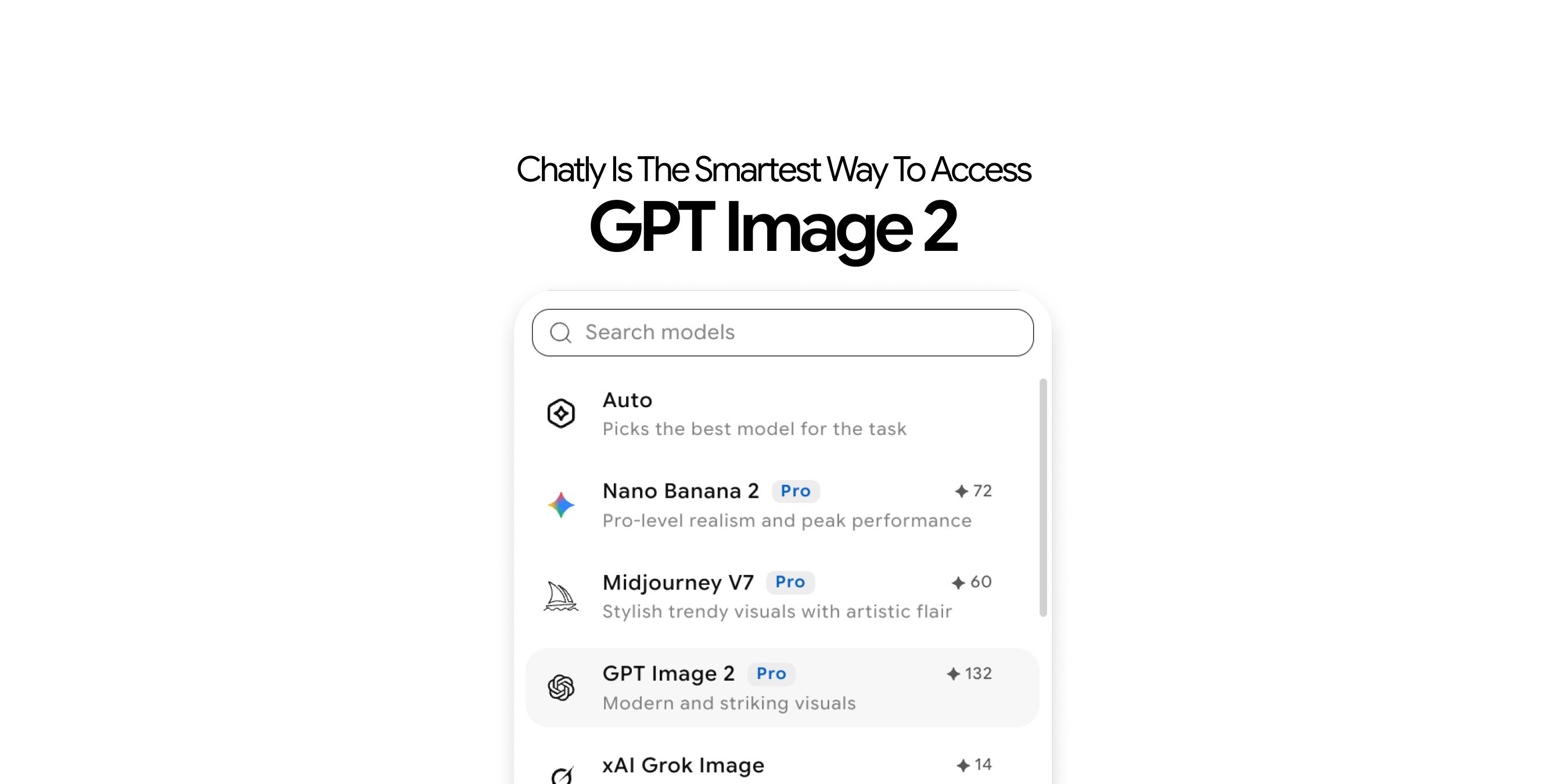
On Chatly, GPT Image 2 is a Pro model that costs 132 credits per generation. It is available on all paid plans, including Standard. Chatly operates as an all-in-one AI productivity platform, so your subscription also covers AI chat, AI docs, AI slides, and AI search, not just image generation.
Chatly pricing (effective monthly rate by billing term):
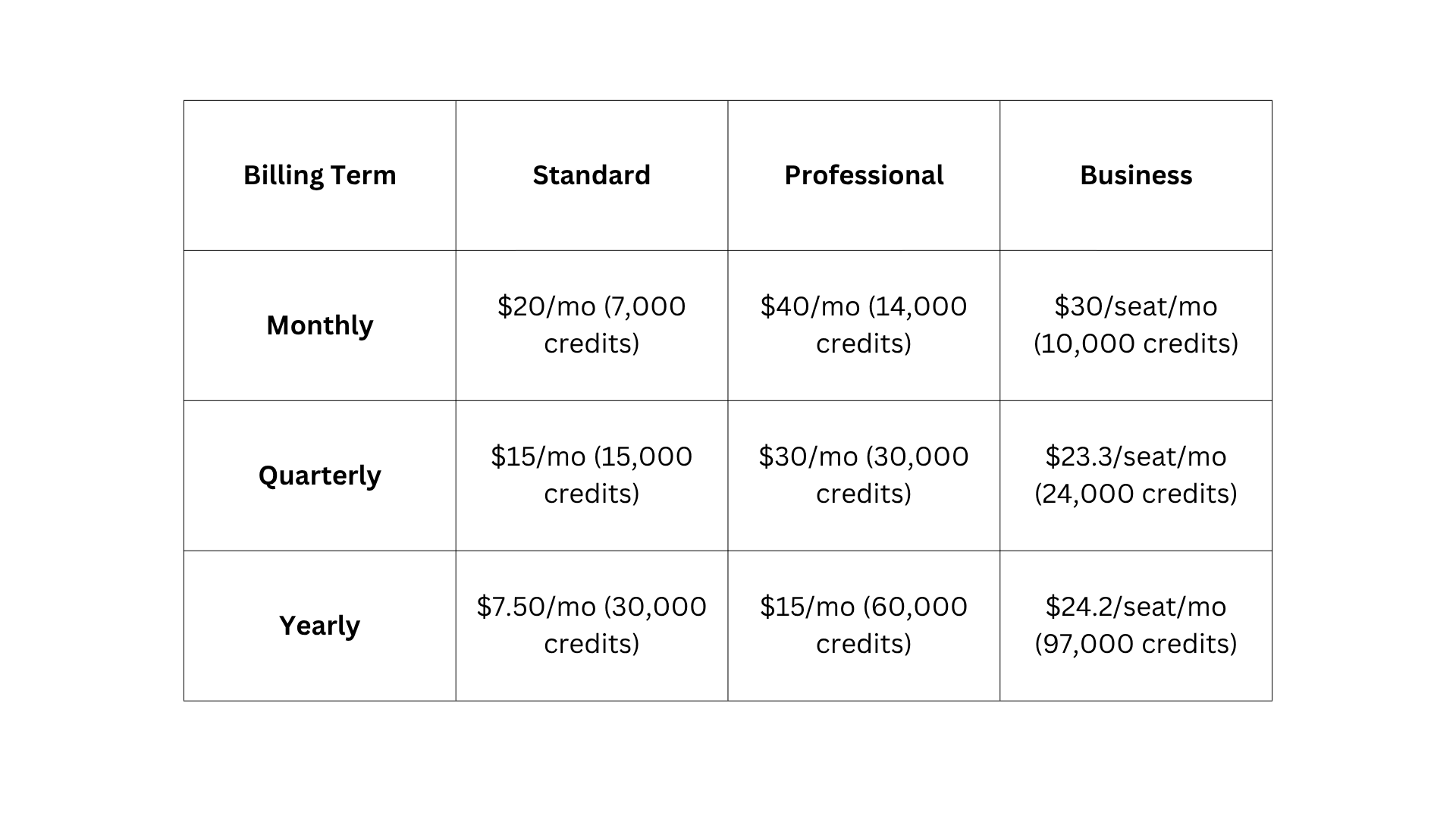
Credits refresh every billing cycle. All paid plans include access to the full model list, which includes GPT Image 2. The free plan does not include GPT Image 2.
At 132 credits per GPT Image 2 generation, the yearly Standard plan at $7.50 per month gives approximately 227 GPT Image 2 generations per month, alongside all other platform features.
For a detailed comparison of what Chatly offers versus single-purpose tools, the Chatly vs Arena AI comparison covering AI platform differences covers where all-in-one workspaces differ from dedicated image tools.
GPT Image 2 Pricing on ImagineArt
On ImagineArt, GPT Image 2 is a Pro model available on Ultimate and Creator plans only. The Standard plan gives access to limited models and does not include GPT Image 2. Credit cost per generation varies by resolution and quality setting, not a flat rate per image.
GPT Image 2 credit cost per image on ImagineArt (by resolution and quality):
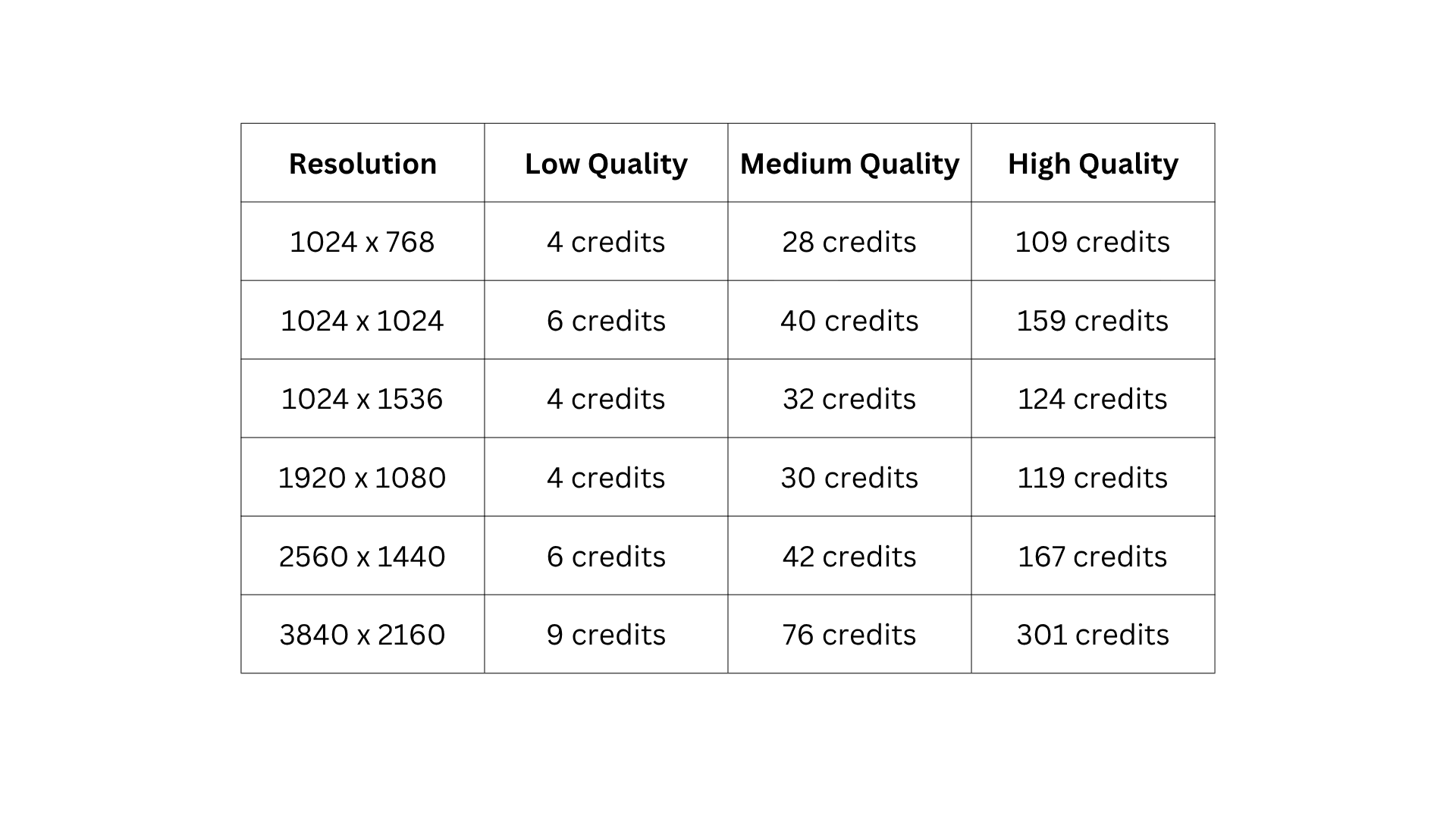
Credit costs are calculated from the OpenAI API token rates shown in the screenshot above. A 1024x1024 low-quality image costs 6 credits. A 4K (3840x2160) high-quality image costs approximately 301 credits. Choose your resolution based on what the asset actually requires, not the maximum available.
ImagineArt plan pricing (monthly):
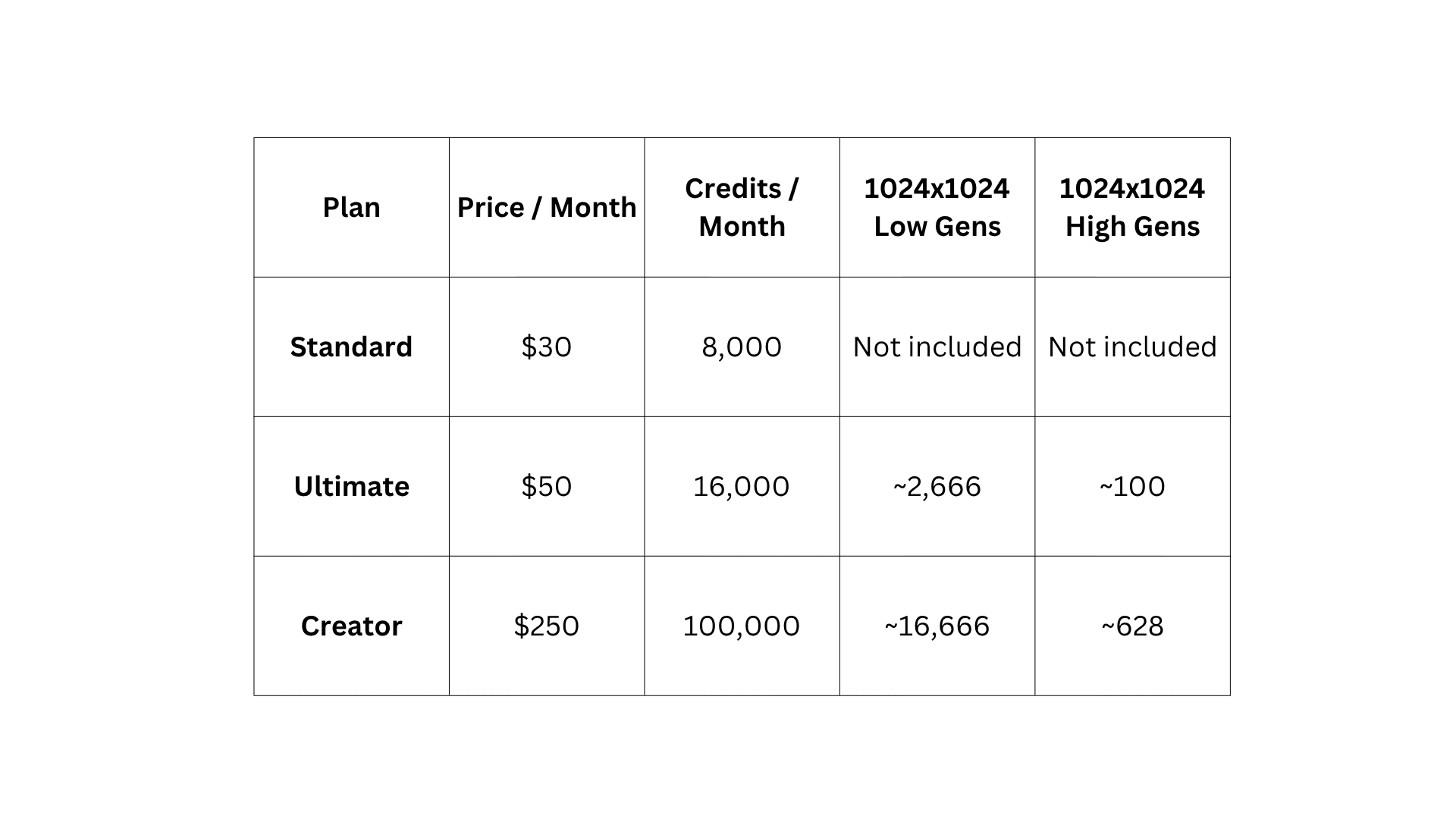
Quarterly billing applies a 15% discount. Yearly billing applies a 30% discount. Credits refresh monthly on all billing terms and do not roll over. The free plan includes 100 daily credits but does not include GPT Image 2 access.
For a direct comparison of GPT Image 2 and ImagineArt 2.0 output quality, the GPT Image 2 vs ImagineArt 2.0 side-by-side comparison covers both models across text accuracy, photorealism, and character consistency.
Real-World Monthly Cost Estimates
Pricing tables only tell part of the story. Here is what GPT Image 2 actually costs across different usage profiles.
For a Content Creator Generating 50 to 100 Images Per Month
- Via API at medium quality: approximately $5 per month for 100 images
- Via ChatGPT Plus: $20 per month covers those images and adds Thinking Mode and the full ChatGPT suite
- Via Chatly yearly Standard: $7.50 per month covers GPT Image 2 generations alongside AI chat, docs, and slides
For low-volume users generating fewer than 200 images per month, a ChatGPT Plus subscription or Chatly yearly plan typically offers better overall value than raw API access.
For a Marketing Team Generating 500 to 1,000 Images Per Month
- Via API at medium quality (1,000 images): approximately $53 per month
- Via API at high quality (1,000 images): approximately $165 per month
- Via ImagineArt Ultimate at 1024x1024 medium quality (40 credits each): $50 per month covers approximately 400 GPT Image 2 generations
- Via ImagineArt Ultimate at 1024x1024 low quality (6 credits each): $50 per month covers approximately 2,666 GPT Image 2 generations
At this volume, the right choice depends on the resolution and quality you need. For low-quality pipeline assets at 1024x1024, ImagineArt Ultimate covers high volume economically. For medium or high quality at 1024x1024, direct API access becomes more competitive above 400 images per month.
For a Developer Running an Image Pipeline at 5,000+ Images Per Month
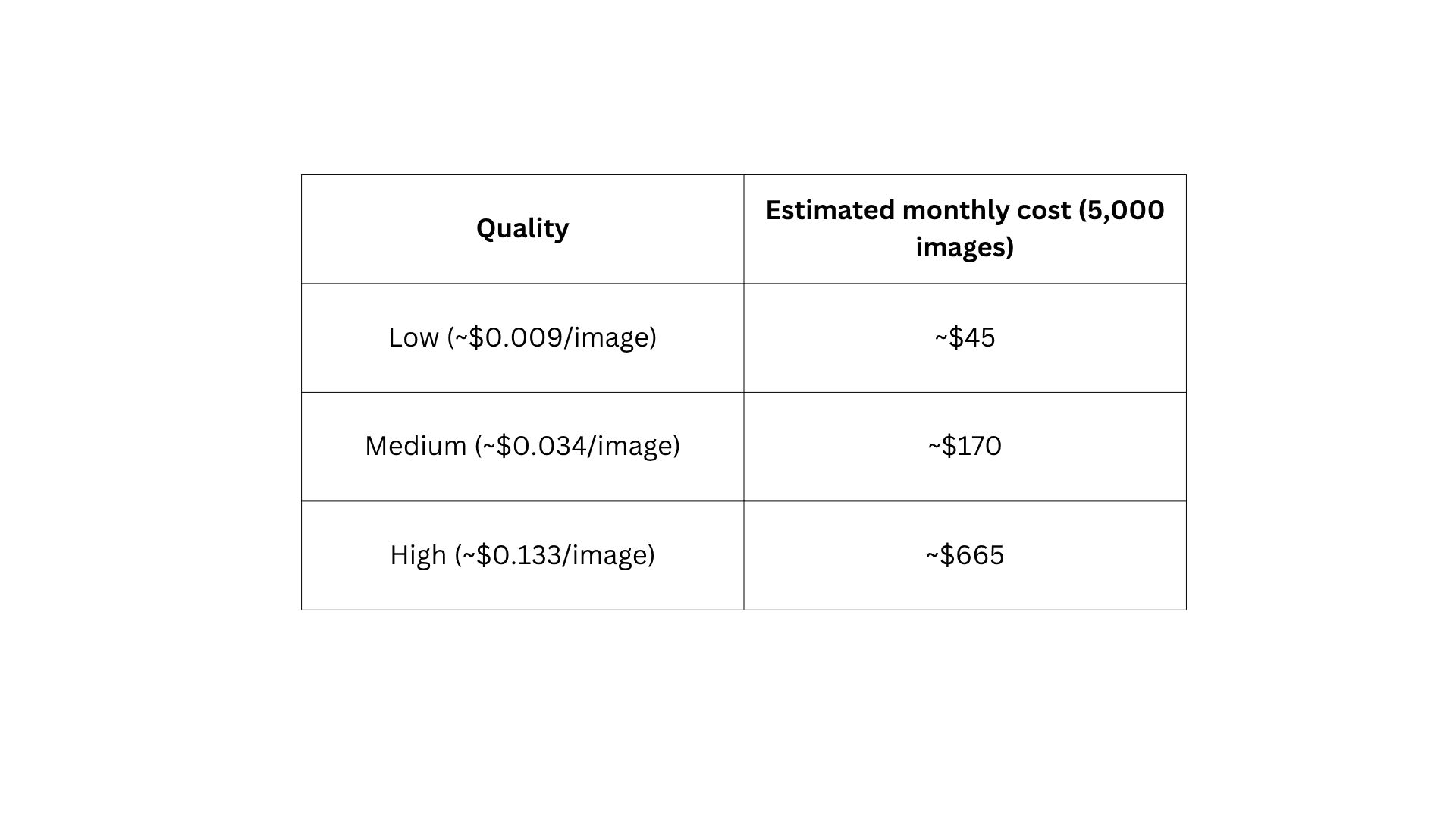
At this volume, raw API access is the most cost-efficient route. The difference between quality tiers at scale becomes a significant budget decision. Many automated pipelines operate effectively at low or medium quality for assets displayed at standard digital sizes.
For prompt structures that consistently produce usable results on the first attempt and reduce wasted regenerations, the guide to best system prompts for AI image generation covers the structures that get reliable output at every quality tier.
The Cheapest Way to Access GPT Image 2 by Volume
The cheapest access route depends entirely on how much you generate and what features you need.
- Under 50 images per month: The free ChatGPT tier covers occasional use at no cost. Note that GPT Image 2 is not available for free on Chatly or ImagineArt
- 50 to 500 images per month: ChatGPT Plus at $20 per month or Chatly yearly Standard at $7.50 per month are typically the best value, depending on whether you need image generation only or a broader productivity platform
- More than 500 images per month: At 1024x1024 low quality (6 credits each), ImagineArt Ultimate at $50 per month covers approximately 2,666 generations. At medium quality (40 credits each), it covers approximately 400 generations before API access becomes more cost-efficient
- More than 5,000 images per month: Raw API access at low or medium quality is the most cost-efficient route
For users whose primary need is portrait photography or character-consistent imagery, ImagineArt 2.0 may offer better per-image value for those specific output types. For users who need text-in-image accuracy or multilingual rendering, GPT Image 2 has no meaningful competition at any price point.
For a full comparison of where GPT Image 2 improves on its predecessor from a cost and capability standpoint, the GPT Image 2 vs DALL-E 3 upgrade guide covers the billing structure change alongside the capability differences.
Is the Cost Worth It?
The answer depends on the use case:
- For text-in-image accuracy: No cheaper alternative exists at comparable quality. GPT Image 2's multilingual text rendering and near-perfect accuracy for labels, banners, and UI mockups are unmatched at any price point. For workflows that depend on this capability, the cost is justified without question
- For photorealistic commercial imagery at medium volume: The value is strong. Production-quality product photography from a text prompt at approximately $0.034 per image represents a meaningful cost reduction compared to traditional alternatives
- For users on tighter budgets: ChatGPT's free tier covers occasional use. For regular use, Chatly's yearly plan at $7.50 per month gives access to GPT Image 2 alongside a full AI productivity suite
- For portrait-specific photorealism: ImagineArt's Ultimate plan at $50 per month offers strong per-image value at low quality (6 credits per 1024x1024 image). For high-quality 4K portrait work, the credit cost rises significantly to approximately 301 credits per image
For a detailed evaluation of GPT Image 2 across all dimensions beyond pricing, the complete GPT Image 2 overview and capabilities guide covers what the model can and cannot do before you commit to a plan.
Conclusion
The right GPT Image 2 access route depends on how much you generate and whether you need image generation alone or a broader productivity suite.
Low-volume users get the best value from ChatGPT Plus or Chatly's yearly Standard plan. Mid-volume users should compare ImagineArt Ultimate against direct API access at medium quality. High-volume pipelines run most efficiently on direct API at low or medium quality.
One thing that applies at every volume level: prompt quality directly determines how many generations you waste. A precise prompt that produces a usable output on the first attempt costs a fraction of running the same prompt five times. Get the prompts right before scaling the volume.
Frequently Asked Questions
Learn more about cost breakdown of GPT Image 2
More topics you may like
GPT Image 2 vs DALL-E 3: What Changed and Is It Worth the Upgrade?

Arooj Ishtiaq
GPT Image 2 Free: How to Use It Without Paying (2026)
Arooj Ishtiaq
GPT Image 2 vs ImagineArt 2.0: Textual Accuracy vs. Realism
Arooj Ishtiaq
What Is ChatGPT Images 2.0? Features, Capabilities, and How to Get Started
Arooj Ishtiaq