
ChatGPT Just Made Building AI Agents Simple: Here's What Changed
OpenAI just made building AI agents super simple, no code, no developer, no new tool to learn. You describe what you want, and ChatGPT builds it.
What ChatGPT Workspace Agents Actually Do
Workspace Agents are powered by Codex: OpenAI's coding and reasoning model. That means they don't just respond to questions. They plan, execute multi-step tasks, connect to your existing tools, and handle entire workflows from start to finish — on their own schedule, in the background, without anyone pressing a button.
Here are five real examples of what teams are already building:
- A software request agent that checks if a new tool request follows company policy, then routes it to the right person for approval
- A feedback agent that monitors Slack and support emails all week, then turns the most important issues into product tickets every Monday morning
- A weekly report agent that pulls the numbers, builds the charts, writes the summary, and sends it to the team, every Friday, automatically
- A sales agent who researches new leads, scores them, and drafts a follow-up email ready to send, before the sales rep even opens their inbox
- A risk agent that keeps an eye on third-party vendors and flags anything that looks off.
OpenAI's own sales team is already running the sales agent internally. It drafts follow-up emails from call notes before the rep finishes the call.
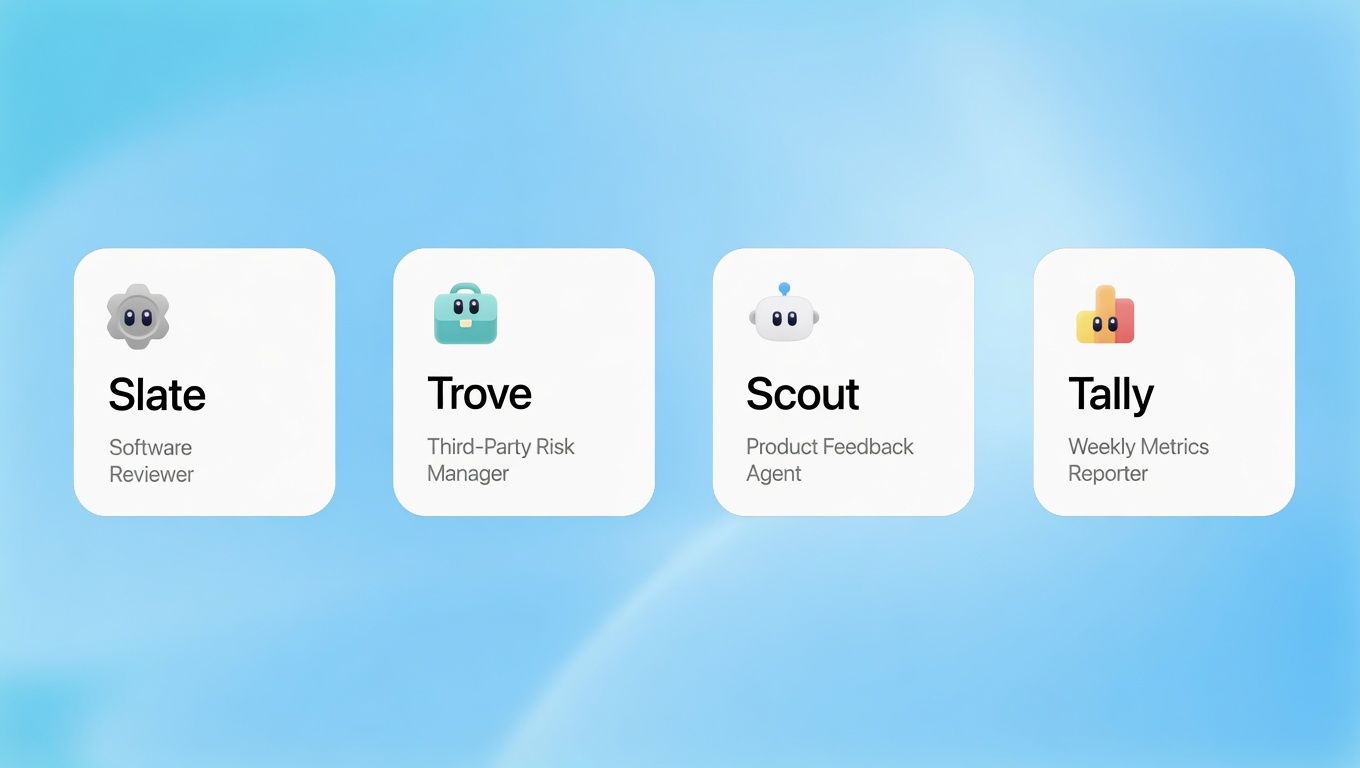
Real-world result from a beta customer: Rippling reported that one sales consultant built a sales opportunity agent with zero engineering support. It now researches accounts, summarizes sales calls, and posts deal briefs automatically, saving reps five to six hours every week.
How to Build One Workspace Agent?
You don't need a developer. Open ChatGPT, click Agents in the sidebar, and describe the workflow you want in plain English. ChatGPT walks you through every step — defining the process, connecting the tools, setting the schedule, and deciding which actions need a human sign-off before the agent moves forward.
To make it even faster, OpenAI ships ready-made templates for the most common business workflows across finance, sales, marketing, and IT. Pick one, customize it for your team's process, and you're live. No blank-page problem, no guesswork on structure.
Enterprise Governance and Visibility
Workspace Agents come with enterprise-grade monitoring and controls: so admins can protect sensitive data while giving teams a safe way to move faster with AI.
Here's what the control layer looks like:
- Tool and action controls: Enterprise and Edu admins set exactly which connected tools and actions each user group can access
- Access management: admins control who can use, build, and share agents across the organization
- Prompt injection protection: built-in safeguards keep agents aligned with your instructions even when they encounter misleading external content or injection attacks
- Compliance API: full visibility into every agent's configuration, updates, and run history, with the ability to suspend any agent at any time
- Admin console (coming soon): admins will see every agent built across the org, including usage patterns and connected data sources
Agents are on by default for Business plans and off by default for Enterprise, giving larger organizations time to evaluate before rolling out. Enterprise customers using EKM (Encryption Key Management) do not have access at launch.
What Happens to Custom GPTs
Custom GPTs are not going away immediately: OpenAI confirmed they remain available while teams test Workspace Agents. But the direction is clear. A conversion tool is coming soon to migrate existing GPTs into Workspace Agents.
The difference that matters: a Custom GPT waited for you to ask it something. A Workspace Agent goes and does things on its own, connected to real tools, running on a real schedule, improving over time.
If you want to explore what GPT-5.4 and Claude Opus 4.7 can already do for your team's daily work, Chatly's AI Chat gives you access to 30+ models from one workspace: no separate accounts needed. You can also use the AI Document Generator and AI Presentation Maker to automate your content workflow today while Workspace Agents roll out to your plan.
Pricing and Availability
Workspace Agents are free during research preview until May 6, 2026. Credit-based pricing kicks in after that. Available on ChatGPT Business, Enterprise, Edu, and Teachers plans, not on Plus, Pro, or Free.
Coming soon from OpenAI: automated triggers, performance dashboards, expanded app integrations, and Workspace Agent support inside the Codex app.
Read More
- OpenAI Launches ChatGPT Images 2.0: The Image Model That Thinks Before It Draws:
- Moonshot AI Open-Sources Kimi K2.6 A Coding Model That Runs Autonomously for Days
- Anthropic Launches Claude Design for Teams to Create Prototypes, Decks, and Landing Pages
- Google Launches Gemma 4, Its Most Capable Open Model Family
- OpenAI Closes Record $122 Billion Funding Round at $852 Billion Valuation
Frequently Asked Questions
What is a ChatGPT Workspace Agent in simple terms?
More topics you may like
10 Different Ways You Can Use Chatly AI Chat and Search Every Day

Faisal Saeed
11 Best ChatGPT Alternatives in 2026 (Tested, Compared & Priced)

Muhammad Bin Habib
28 Best AI Tools for Students in 2025 – The Complete AI-Powered Academic Success Guide
Muhammad Bin Habib
24/7 Customer Support with AI Chat: Benefits, Examples and More
Muhammad Bin Habib