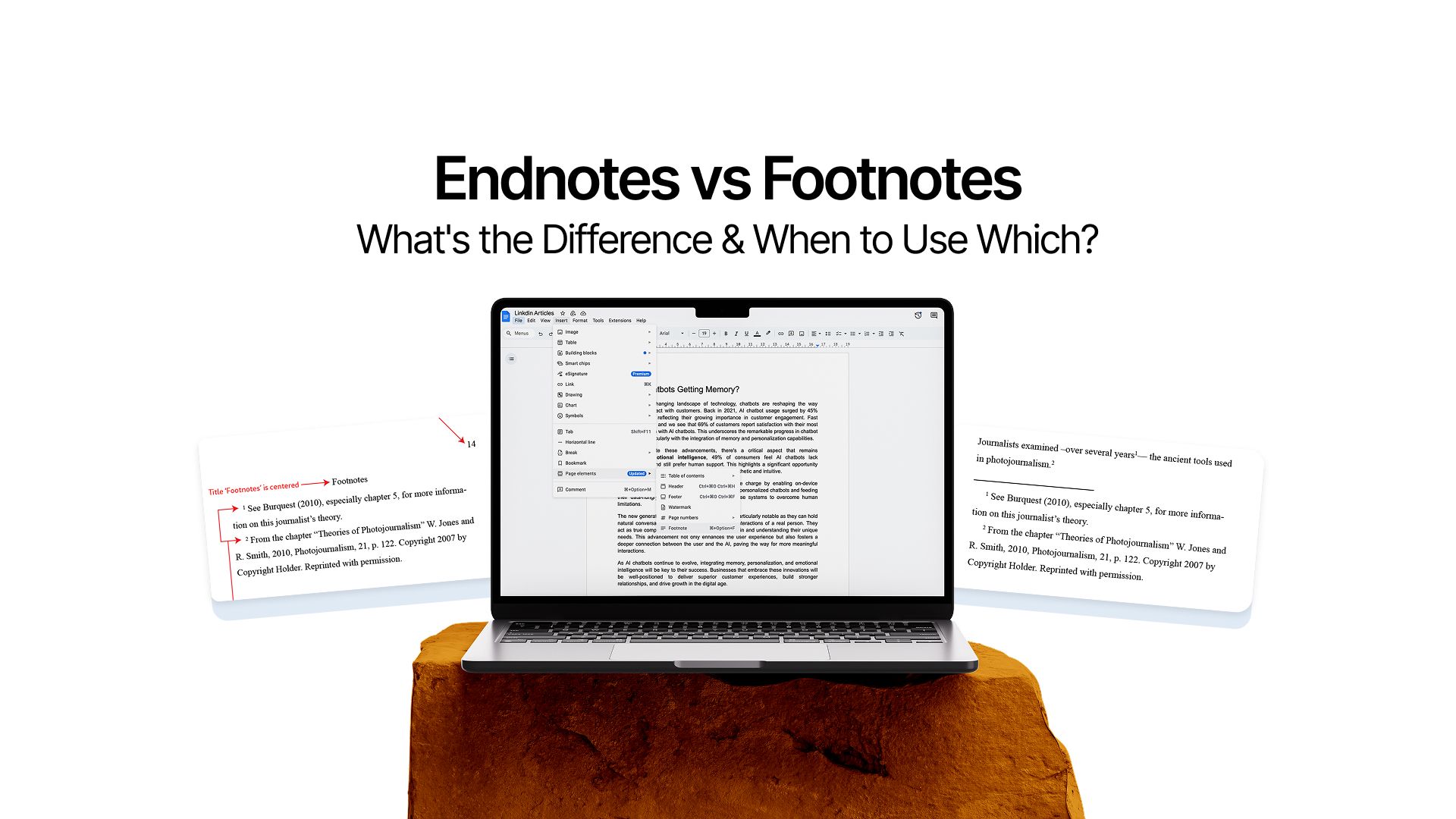
Endnotes vs Footnotes: What's the Difference and When to Use Which?
Research and writing a paper is not easy. You need to sift through hundreds of documents, websites, and journals to gather relevant and useful ideas. And not just that, you need to ensure you cite each source properly and give credit to adhere to fair use and plagiarism guidelines of your institute.
Each institute has its preferred way of doing so. But most of them opt for either footnotes or endnotes.
The choice can feel confusing, especially when both seem to serve the same purpose. But understanding the difference isn't just about following arbitrary rules. It's about making your work more readable, professional, and appropriate for your audience.
Whether you're a student crafting an academic paper, a researcher compiling findings, or a copywriter developing long-form content, knowing when and how to use footnotes and endnotes is essential.
This guide will walk you through everything you need to know, from basic definitions to practical tutorials for adding them in Word and Google Docs. By the end, you'll be able to confidently choose the right format for any project and implement it correctly.
But let’s start with the basics.
What Are Footnotes and Endnotes?
Before we get into the nitty gritty, let's establish what each one actually is.
Both are types of notes that provide additional information, but they appear in different locations within your document.
Understanding Footnotes
Footnotes are notes that appear at the bottom of the same page where the reference appears. When you add a footnote, a small superscript number appears in your text, and the corresponding note shows up below, separated from the main text by a short line.
Think of footnotes as immediate clarifications.
When your reader encounters that superscript number, they can simply glance down to the bottom of the page for more information. They don't need to flip pages or lose their place in the document.
Footnotes serve several purposes:
- Citations: Providing source information for quotes, data, or ideas
- Additional commentary: Offering extra context without disrupting the main text
- Definitions: Explaining technical terms or concepts
- Cross-references: Directing readers to related sections in your document
Understanding Endnotes
Endnotes function similarly to footnotes, but with one key difference: location.
Instead of appearing at the bottom of each page, endnotes are collected together at the end of your document, chapter, or section.Like footnotes, endnotes use superscript numbers in the main text.
Endnotes serve the same purposes as footnotes:
- Citing sources and references
- Providing supplementary information
- Offering clarifications or commentary
- Adding context without cluttering the main narrative
Now that we understand what footnotes and endnotes are, let's move along.
Key Differences Between Footnotes and Endnotes
While they serve similar purposes, the distinction in placement creates several practical implications.
- Location and Placement: Footnotes appear at the bottom of the page where the reference occurs, making each page self-contained. Endnotes gather at the end of the entire document, chapter, or section in a separate notes section.
- Reader Experience: Footnotes offer immediate access without page-flipping, whereas endnotes require scrolling or turning pages but create cleaner pages with fewer visual interruptions.
- Length Considerations: Short citations work well as footnotes without taking up much space. Lengthy commentary or multiple references in one note are better suited to endnotes where space isn't constrained.
- Editing Flexibility: Both formats automatically adjust as you edit your document. Footnotes can occasionally create pagination issues, while endnotes don't affect page layout during editing.
- Discipline and Style Preferences: Legal documents almost exclusively use footnotes for quick reference. Academic history typically employs footnotes for detailed citations. Books and creative nonfiction usually use endnotes for cleaner presentation.
When to Use Footnotes
Choosing footnotes over endnotes depends on your document type, audience needs, and how you want readers to interact with your supplementary information. Let's explore when footnotes are the better choice.
Document Type
Choice of footnotes and endnotes depends heavily on the kind of document you are working on and the audience you are catering to.
- Footnotes work exceptionally well in academic papers and research articles where readers need immediate access to sources.
- When your audience includes professors, peer reviewers, or fellow researchers, they'll appreciate being able to verify citations without flipping pages.
- Legal documents, like comparative case studies for law, are another prime candidate for footnotes. Attorneys and judges need quick access to case citations, statutes, and legal precedents. Footnotes allow them to check references instantly while reading arguments.
- Short to medium-length documents benefit from footnotes. If your paper is 10-20 pages long, footnotes won't create significant formatting challenges. The convenience they offer outweighs any layout considerations.
When Citations Are Brief and Frequent
If you're providing simple source citations throughout your text, footnotes are ideal. Brief references like author names, publication dates, and page numbers fit neatly at the bottom of pages without overwhelming the space.
Consider a research paper where you cite multiple sources per page. Footnotes keep these citations accessible without requiring readers to maintain a separate place in your notes section. They can quickly glance down, verify the source, and continue reading.
For Reader Convenience
Footnotes prioritize reader experience when notes need regular consultation. If you're writing for an audience that actively checks sources or needs clarification on technical points, footnotes eliminate the friction of page-turning.
Think about your reader's journey through your document.
- Will they want to verify most of your claims?
- Are they likely to look up unfamiliar terms you define?
If yes, footnotes create a smoother reading experience.
When Document Length Is Manageable
Footnotes make sense when your document won't become unwieldy with them. A 15-page essay with occasional footnotes maintains its professional appearance. A 300-page manuscript with hundreds of footnotes might become difficult to format and read.
Use this general guideline.
If your notes are consuming more than 20-25% of any given page, consider whether endnotes might work better. Excessive footnotes can make pages feel cramped and visually cluttered.
Potential Drawbacks to Consider
Footnotes aren't perfect for every situation. While using them, you must be aware that:
- They can create formatting headaches, especially when notes are lengthy or numerous. Pages with substantial footnotes sometimes look unbalanced or cramped.
- Long footnotes that span multiple pages can confuse readers. When a note starts at the bottom of page 5 and continues onto page 6, it disrupts the reading flow it was meant to preserve.
- Footnotes also limit how much explanatory content you can include. If you need to provide extensive commentary or multiple paragraphs of context, that information might work better as an endnote.
When to Use Endnotes
Endnotes shine in different circumstances than footnotes. Understanding when to choose endnotes helps you create documents that are both functional and visually appealing.
Content Type
Take a pause. Reflect on your piece and the audience that’s going to read it. What do they want? How do they read?
- Books and long-form manuscripts: When you're writing a 200-page thesis, business book, or historical narrative, endnotes keep your main pages clean and readable. Publishers often prefer or require endnotes for this reason.
- Creative nonfiction and narrative writing: These genres prioritize immersive storytelling, and footnotes can interrupt the narrative flow. Endnotes preserve the reading experience while still providing necessary citations and context.
- Documents with extensive commentary: If your notes include lengthy discussions, multiple source comparisons, or detailed explanations, placing them at the end prevents them from overwhelming individual pages.
When Notes Are Lengthy or Numerous
Endnotes give you unlimited space for each note. You can provide comprehensive source information, explain methodological choices, or offer detailed background without worrying about page layout. This freedom is invaluable for complex research projects.
For Clean Page Design
Endnotes create visually cleaner pages. Your main text flows uninterrupted from top to bottom, creating a more polished, professional appearance. This matters particularly in documents meant for publication or professional presentation.
When Readers Don't Need Constant Reference
When notes provide interesting context but aren't critical to understanding your main argument, placing them at the end respects readers who prefer an uninterrupted reading experience. Consider your audience's needs.
Potential Drawbacks to Consider
Endnotes risk being ignored entirely. Some readers never consult the notes section, missing potentially important information or context. If your notes contain critical information, footnotes ensure better visibility.
Digital documents mitigate some inconvenience through hyperlinks, but even clicking back and forth can disrupt concentration. Consider whether your audience will be reading in print or digitally when making your choice.
Footnotes and Endnotes in Different Writing Formats/Styles
Different style guides have specific rules about using footnotes and endnotes. Understanding these conventions ensures your work meets academic and professional standards.
Chicago Style Footnotes and Endnotes
Chicago style is the most prominent style guide that uses footnotes and endnotes extensively. It's the standard for history, literature, and many humanities disciplines.
1. The Notes-Bibliography System
Chicago offers two documentation systems, but the Notes-Bibliography system is where footnotes and endnotes come into play.
Each note begins with the corresponding superscript number, followed by the citation information.
First reference format provides complete bibliographic information. This includes the author's full name, the complete title, publication information, and specific page numbers. For example, a first reference to a book looks like this:
- Malcolm Gladwell, Outliers: The Story of Success (New York: Little, Brown and Company, 2008), 42.
Shortened subsequent references use a condensed format when citing the same source again. You typically include just the author's last name and page number:
- Gladwell, 67.
Chicago style also requires a bibliography at the end of your document. Even though your footnotes or endnotes provide complete citation information, the bibliography offers a comprehensive list of all sources.
2. Chicago Style Formatting Details
Notes in Chicago style follow specific formatting conventions. The first line of each note is indented, similar to a paragraph. Note numbers are full-sized (not superscript) and followed by a period.
For journal articles, the format includes author name, article title in quotation marks, journal name in italics, volume and issue numbers, publication date, and page numbers:
- Sarah Johnson, "Digital Transformation in Academic Publishing," Journal of Scholarly Communication 15, no. 3 (2020): 234-250.
Website citations include author (if available), page title, website name, publication or access date, and URL:
- American Historical Association, "Statement on Standards of Professional Conduct," accessed November 15, 2024, https://www.historians.org/jobs-and-professional-development/statements-standards-and-guidelines-of-the-discipline/statement-on-standards-of-professional-conduct.
MLA Style Footnotes and Endnotes (Limited Use)
MLA (Modern Language Association) style takes a different approach.
However, MLA does allow content notes (also called bibliographic notes) for specific purposes. These notes provide additional commentary, explanations, or supplementary information that doesn't fit smoothly into your main text.
MLA notes should be used sparingly. They're appropriate for:
- Providing additional context that would disrupt your paragraph flow
- Acknowledging limitations or exceptions to your argument
- Directing readers to additional resources
- Explaining methodological choices
MLA notes can be either footnotes or endnotes, though footnotes are more common. The note appears with a superscript number in your text, and the corresponding note provides your additional information. Unlike Chicago style, MLA notes don't replace your Works Cited page—you still need that complete list of sources.
An MLA content note might look like this:
- For a comprehensive discussion of this debate, see Thompson 45-67, Martinez 112-34, and Chen 89-102.
In short:
- Chicago style embraces footnotes and endnotes as primary citation methods.
- MLA, APA, and Harvard styles use them sparingly for supplementary content only.
Always check which style guide your institution, publisher, or professor requires. Using the wrong citation system, even if applied correctly, can result in significant revisions or reduced grades.
When in doubt, consult the official style manual, ask your instructor for clarification, or just enter a question in AI Chat.
How to Add Footnotes in Word vs Google Docs
Adding footnotes is straightforward in both Microsoft Word and Google Docs. Let's walk through the process for each platform so you can start using them immediately.
Adding Footnotes in Microsoft Word
Basic insertion is simple.
Place your cursor where you want the footnote number to appear. Go to the "References" tab in the ribbon and click "Insert Footnote." Word automatically adds a superscript number and moves your cursor to the bottom of the page.
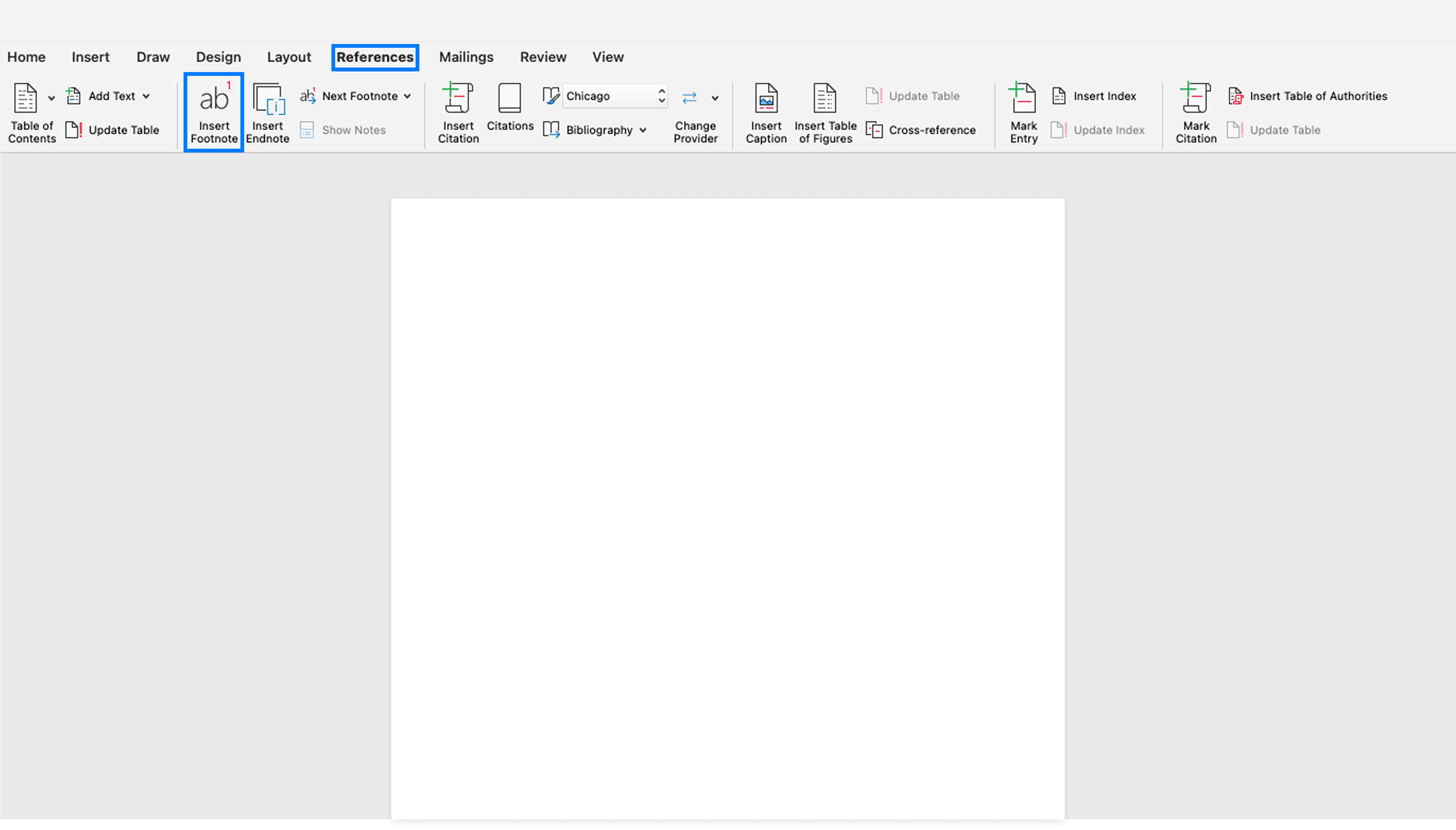
Alternatively, use the keyboard shortcut: Ctrl + Alt + F (Windows) or Command + Option + F (Mac). This is faster once you get used to it.
Type your footnote content at the bottom of the page. Word handles numbering automatically. Add more footnotes anywhere in your document, and Word renumbers them sequentially.
Customizing Footnotes
Click the small arrow in the bottom-right corner of the Footnotes section on the References tab. This opens the Footnote and Endnote dialog box where you can:
- Change numbering format (numbers, letters, symbols)
- Start numbering at a specific number
- Choose continuous numbering or restart on each page/section
- Adjust the footnote separator line
Managing Existing Footnotes
To edit a footnote, simply click on it at the bottom of the page and make changes. To delete a footnote, delete the superscript number in your main text—the footnote disappears automatically.
Adding Footnotes in Google Docs
Basic insertion in Google Docs is equally simple.
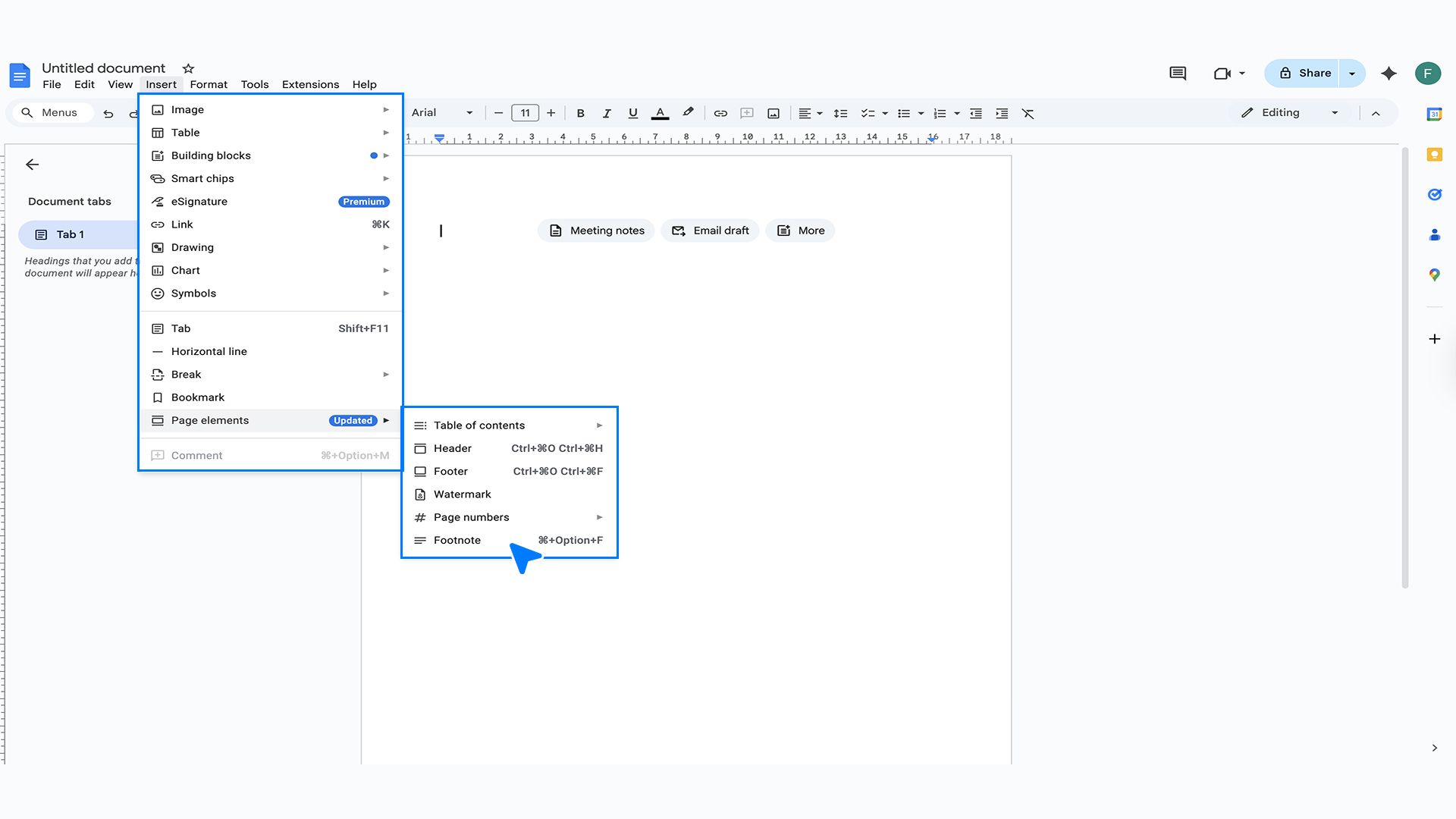
The keyboard shortcut is Ctrl + Alt + F (Windows/Chromium) or Command + Option + F (Mac).
Type your footnote content. Like Word, Google Docs handles numbering automatically as you add more footnotes throughout your document.
Managing Footnotes
Click on any footnote to edit it. To delete, remove the superscript number from your main text. Google Docs removes the corresponding footnote automatically.
Limitations to Note
Google Docs offers less customization than Word. You can't change the numbering format or adjust separator lines through built-in options. Footnotes are always numbered sequentially with Arabic numerals.
For basic academic and professional writing, Google Docs' footnote functionality works perfectly well. For complex documents requiring specific formatting, Word provides more control.
How to Do Endnotes in Word vs Google Docs
Endnotes work similarly to footnotes but appear at the document's end. The process differs slightly between Word and Google Docs.
Adding Endnotes in Microsoft Word
Place your cursor where you want the endnote reference. Go to the "References" tab and click "Insert Endnote." Word adds a superscript number and jumps to the end of your document where you type the note content.
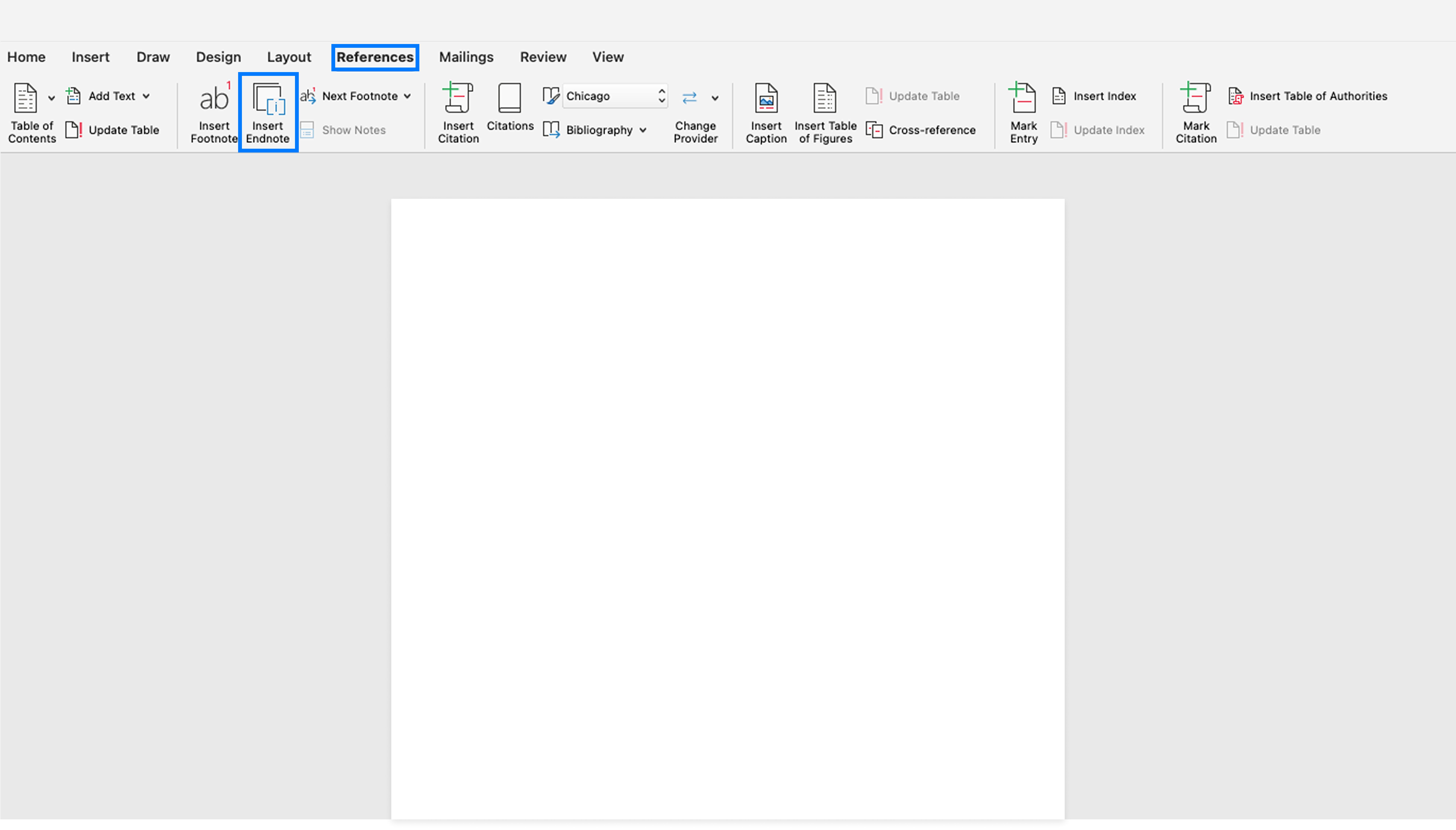
The keyboard shortcut is Ctrl + Alt + D (Windows) or Command + Option + E (Mac).
Word creates an "Endnotes" section automatically. All your endnotes appear here in numerical order. As you add or delete endnotes, Word renumbers them automatically throughout the document.
Customizing Endnotes
Open the Footnote and Endnote dialog box (small arrow on the References tab). You can:
- Change where endnotes appear (end of document or end of section)
- Modify numbering format
- Set starting numbers
- Choose numbering restart options
Switching Between Footnote and Endnote Views
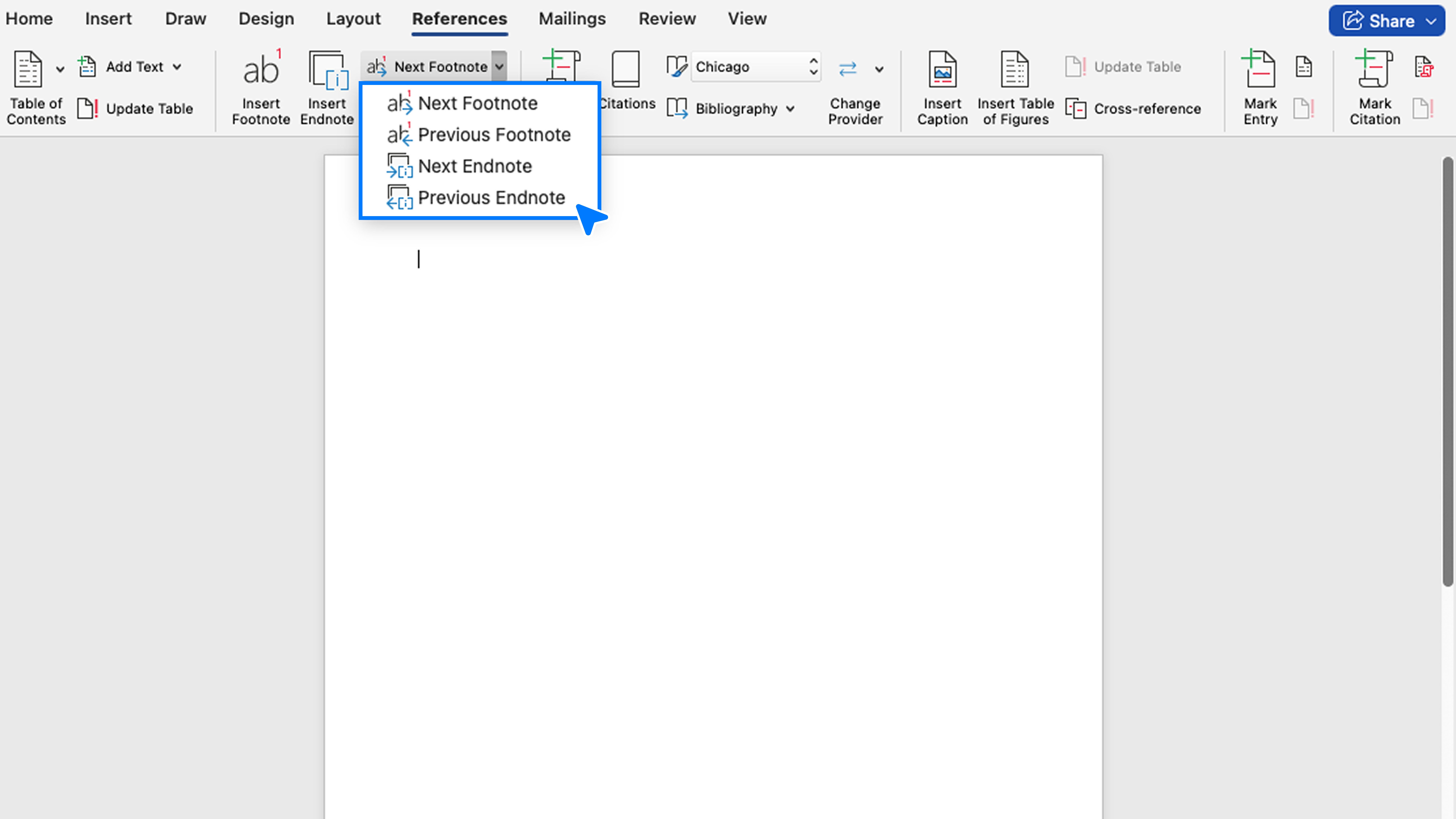
Adding Endnotes in Google Docs
Here's where Google Docs has a significant limitation: it doesn't have a built-in endnote feature. Google Docs only supports footnotes natively.
However, you can create manual endnotes, though it requires more work:
- Insert superscript numbers manually at reference points in your text (Format > Text > Superscript)
- Create an "Endnotes" or "Notes" section at the end of your document
- Type your notes with corresponding numbers
- Manually maintain numbering if you add or delete notes
This manual method lacks the automatic numbering and convenience of true endnotes. If your project requires extensive endnotes, consider using Microsoft Word or another word processor with built-in endnote support.
Alternative Approach
Use footnotes in Google Docs, then convert to endnotes after exporting to Word. This gives you automatic numbering while drafting, with the flexibility to switch formats later.
For most users working in Google Docs, footnotes are the practical choice. If endnotes are essential for your project, Microsoft Word or similar desktop applications provide better functionality.
How to Convert Footnotes to Endnotes in Word
Sometimes you'll need to switch between footnotes and endnotes. Microsoft Word makes this conversion simple with its built-in tool.
Using the Conversion Feature
Open your document in Word. Go to the "References" tab and find the Footnotes section. Click the small arrow in the bottom-right corner to open the Footnote and Endnote dialog box.
At the bottom of this dialog box, click the "Convert" button. A new window appears with three options:
- Convert all footnotes to endnotes
- Convert all endnotes to footnotes
- Swap footnotes and endnotes
Select "Convert all footnotes to endnotes" and click "OK." Word instantly moves all your footnotes to the end of the document. The superscript numbers in your text remain unchanged, but the notes themselves now appear in an Endnotes section.
Another way is to simply select any footnote and right click on it to open the editing and conversion options.
Converting Endnotes to Footnotes
The reverse process is equally simple. Follow the same steps, but select "Convert all endnotes to footnotes" instead. Word moves all notes to the bottom of their respective pages.
Important reminder: This conversion feature only works in Microsoft Word. Google Docs doesn't support conversion because it lacks native endnote functionality. If you need to convert notes in a Google Doc, export it to Word format first, perform the conversion, then continue working.
Reference Management Software for Footnotes and Endnotes
Managing citations manually can be time-consuming and error-prone, especially for long research projects. Reference management softwares automate the process of creating and formatting footnotes and endnotes.
Some of the most famous and commonly used software are:
- Zotero: A free, open-source tool that integrates with Word and Google Docs. It stores your research sources and inserts properly formatted citations with a single click. Zotero supports Chicago, MLA, APA, and thousands of other citation styles.
- Mendeley: It offers similar functionality with PDF annotation features. It's particularly popular among researchers working with academic papers. The free version handles most citation needs effectively.
- EndNote: The industry standard in many academic institutions. While more expensive, it offers powerful features for managing large research libraries and handles complex citations seamlessly with Microsoft Word.
- Citavi: Combines reference management with knowledge organization tools. It's especially useful for projects requiring extensive note-taking and literature review.
- RefWorks: A web-based option often provided by university libraries. If your institution offers access, it's worth using since it requires no software installation.
Reference managers save time by automatically formatting every citation according to your chosen style guide. Need to switch from Chicago to MLA? One click updates all your footnotes or endnotes throughout the document.
These tools also prevent formatting inconsistencies. Instead of manually checking every citation for correct punctuation and capitalization, the software ensures accuracy automatically.
Footnotes and Endnotes Examples
Seeing properly formatted examples helps you understand how footnotes and endnotes should look. Let's examine common citation scenarios.
Chicago Style Examples
1. First reference to a book:
- Maya Angelou, I Know Why the Caged Bird Sings (New York: Random House, 1969), 45.
2. Subsequent reference to the same book:
- Angelou, 102.
3. Journal article:
- Robert Chen, "Digital Literacy in Modern Education," Educational Research Quarterly 28, no. 4 (2023): 412-428.
4. Website:
- National Archives, "Declaration of Independence: A Transcription," last modified November 1, 2023, https://www.archives.gov/founding-docs/declaration-transcript.
5. Multiple authors:
- David Smith, Jennifer Martinez, and Alan Wong, Collaborative Writing Strategies (Boston: Academic Press, 2022), 78.
MLA Content Note Example
MLA notes provide additional context rather than citations:
- While this interpretation is widely accepted, some scholars argue for alternative readings. See Thompson 156-178 and Garcia 89-112 for contrasting perspectives.
Explanatory vs. Bibliographic Notes
1. Explanatory note (providing context):
- This terminology evolved significantly during the 1990s. Earlier scholarship used different classifications that are now considered outdated.
2. Bibliographic note (Chicago style citation):
- Margaret Atwood, The Handmaid's Tale (Toronto: McClelland and Stewart, 1985), 134.
Multiple Sources in One Note
Sometimes you need to cite several sources supporting the same point:
- Several studies confirm this trend. See Johnson, "Market Analysis," 45-67; Peters, Economic Shifts, 123; and Williams, "Consumer Behavior," 234-256.
Notes with Commentary Plus Citation
You can combine explanation with source information:
- This interpretation remains controversial among historians. For the traditional view, see Anderson, Historical Perspectives, 89-102. For revisionist arguments, see Chen, "Rethinking the Narrative," 412-428.
These examples show how flexible footnotes and endnotes can be. They accommodate simple citations, complex references, explanatory content, and combinations of all three.
Best Practices and Pro Tips
Mastering footnotes and endnotes goes beyond knowing how to insert them. These best practices ensure your notes enhance rather than hinder your writing.
1. Maintain Consistency
Choose either footnotes or endnotes for your entire document—don't mix them unless your style guide specifically allows it. Consistency looks professional and avoids confusing readers.
Use the same formatting throughout. If your first footnote has periods at the end, all footnotes should. If you abbreviate journal names, abbreviate them consistently. Small inconsistencies stand out and undermine your credibility.
2. Keep Notes Concise
Notes should supplement your main text, not replace it. If a point is essential to your argument, include it in the body of your writing. Reserve notes for citations, additional context, and tangential information.
Avoid lengthy paragraphs in notes. If a note extends beyond four or five sentences, consider whether that information belongs in your main text or can be condensed. Readers consult notes for quick reference, not extended reading.
Good use of footnotes and endnotes includes:
- Source citations and references
- Brief clarifications of complex terms
- Acknowledgment of limitations or exceptions
- Directing readers to additional resources
- Providing examples that would disrupt main text flow
Poor uses for notes includes:
- Essential information readers need to understand your argument
- Lengthy tangents unrelated to your main point
- Information that should be in your bibliography
- Obvious definitions or commonly known facts
3. Proofread Your Notes
Notes deserve the same editing attention as your main text. Check for typos, formatting errors, and incomplete citations. Missing publication dates or page numbers make your sources difficult to verify.
Verify that note numbers match correctly. If you've moved paragraphs around, ensure the notes still correspond to the right references. Word processors handle renumbering automatically, but the content must still align properly.
4. Consider Your Audience
Academic readers expect thorough citations and may consult every note. General readers might rarely check notes. Adjust your approach accordingly while maintaining proper attribution.
For academic work, err on the side of more documentation. For general audiences, use notes sparingly and only when necessary. Know what your readers need and expect.
5. Accessibility Matters
If your document will be read digitally, remember that screen readers handle footnotes and endnotes differently. Footnotes generally work better with assistive technologies because they're associated with specific pages.
Use clear, descriptive language in notes rather than vague references like "see above" or "as mentioned earlier." This helps all readers, especially those using assistive technologies.
6. Style Guide Is Your Authority
When in doubt, consult your required style guide. Chicago, MLA, APA, and other systems have specific rules about note formatting, placement, and content. Following these guidelines isn't optional if you're writing for academic or professional publication.
Keep a style guide handy while writing. Check citation formats as you work rather than trying to fix everything during revision. This saves time and ensures accuracy.
7. Common Mistakes to Avoid
Don't use notes to pad your word count. Professors and editors recognize this tactic, and it damages your credibility. Notes should add value, not filler.
Avoid making readers flip to notes for essential information. If readers can't understand your argument without consulting notes, that information belongs in your main text.
Don't forget that notes still require proper citation format. Just because information is in a note doesn't exempt it from style guide rules.
Conclusion
Understanding the difference between endnotes vs footnotes gives you greater control over how you present information. Both formats serve important purposes, and choosing the right one depends on your document type, audience needs, and style requirements.
Footnotes offer immediate accessibility, making them ideal for academic papers, legal documents, and shorter works where readers need quick reference to sources. Endnotes provide cleaner page layouts and unlimited space for commentary, making them perfect for books, long-form manuscripts, and documents with extensive annotations.
Remember that notes should enhance your writing, not overwhelm it. Use them to provide proper attribution, offer helpful context, and guide readers to additional resources. With practice, you'll develop an intuitive sense of when and how to use footnotes and endnotes effectively in any writing project.
Frequently Asked Question
Master endnote and footnote usage with this additional information.
More topics you may like
10 Different Ways You Can Use Chatly AI Chat and Search Every Day

Faisal Saeed

24/7 Customer Support with AI Chat: Benefits, Examples and More

Muhammad Bin Habib
21 Journaling Techniques That Actually Work in 2025
Muhammad Bin Habib

11 Best ChatGPT Alternatives in 2026 (Tested, Compared & Priced)
Muhammad Bin Habib

28 Best AI Tools for Students in 2025 – The Complete AI-Powered Academic Success Guide
Muhammad Bin Habib