Cost Efficiency in Claude Opus 4.5: Understanding Tokens, Effort Levels & When It’s Worth It
As the reasoning abilities and features advance with every new AI model, so does the cost of using them. But Claude Opus 4.5 did something different.
With a 67% price reduction from its predecessor, this frontier model now costs just $5 per million input tokens and $25 per million output tokens. But Opus 4.5 is the cheapest model in just the Opus family. It is still nearly two times more expensive per token than Sonnet 4.5, and when you're processing millions of tokens daily, those costs compound quickly.
So the choice becomes difficult for Sonnet users because they do want to benefit from the added features and abilities but the cost often proves too much.
The good news is that there are measures you can take to keep the cost in check.
Opus 4.5's superior intelligence often means you need fewer tokens to accomplish the same task. Combined with strategic optimization techniques, you can harness frontier-model capabilities while keeping costs surprisingly manageable. This guide will show you exactly how to do it.
Understanding the Pricing Landscape
Let's start with the numbers.
Claude Opus 4.5 costs $5 for input tokens and $25 for output tokens per million. Compare this to its predecessor, Opus 4.1, which charged $15 for input and $75 for output and you get a massive 67% reduction that fundamentally changes the economics of using frontier models.
But that’s not it.
Sonnet 4.5, the current favorite for most developers, costs $3 for input and $15 for output per million tokens. This makes Opus 4.5 more expensive per token than Sonnet. If you're processing 10 million input tokens and generating 5 million output tokens monthly, you're looking at $175 with Opus 4.5 versus $105 with Sonnet 4.5.
A significant difference every month.
However, this raw per-token comparison misses the bigger picture. Opus 4.5 consistently uses 50% fewer tokens to solve the same problems compared to Sonnet 4.5, thanks to more efficient reasoning and higher first-attempt success rates.
When you factor in reduced iterations, fewer debugging cycles, and less context needed for equivalent performance, the effective cost-per-task often becomes competitive. A task that requires 3 attempts with Sonnet might complete in one with Opus, fundamentally shifting the cost equation.
The Effort Parameter
The effort parameter is your most powerful tool for balancing performance and cost. It was introduced specifically to give developers fine-grained control over token expenditure. This parameter controls how much computational "thinking" the model invests across all response types including tool calls, reasoning, and text generation.
The parameter has three settings:
- Low
- Medium
- High (default)
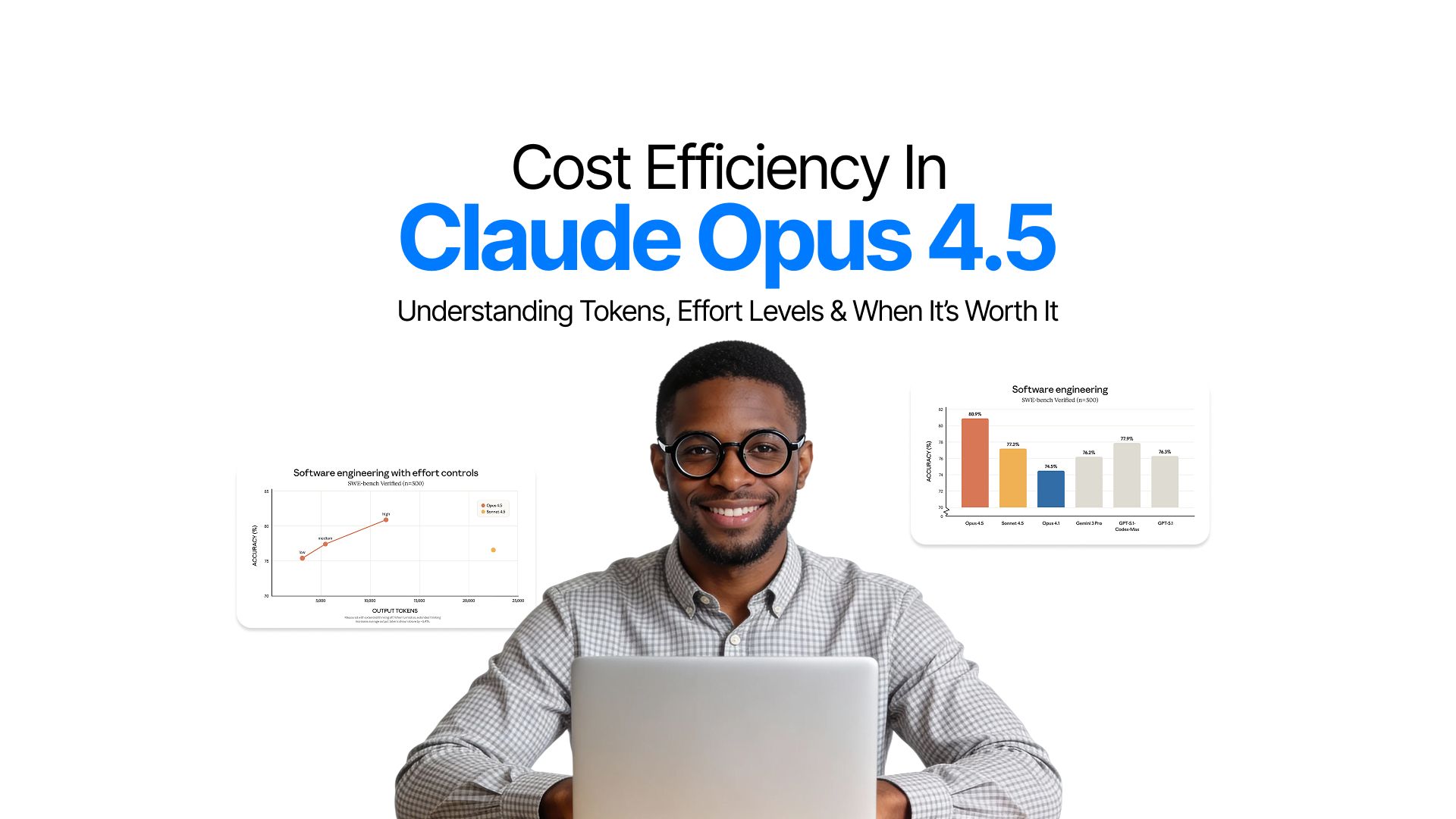
The impact on your token budget is substantial. When set to medium effort, Opus 4.5 matches Sonnet 4.5's performance while using 76% fewer output tokens. At high effort, it exceeds Sonnet's performance by 4.3% while still consuming 48% fewer tokens.
For high-volume use cases where speed matters more than depth, low effort provides rapid responses with minimal token expenditure.
The strategic application of effort levels can dramatically reduce costs:
- Low effort: Ideal for simple classification tasks, quick lookups, routine customer service queries, and any scenario where you need fast responses at scale. Think sentiment analysis, data validation, or basic question answering.
- Medium effort: Strikes the optimal balance for most production workloads. It handles complex coding tasks, multi-step reasoning, and typical agentic workflows while keeping token usage reasonable. This should be your default for cost-conscious deployments.
- High effort: Reserved for mission-critical tasks: complex debugging, architectural decisions, security-sensitive code reviews, or deep analytical work where accuracy absolutely cannot be compromised.
Here's how to implement this in your API calls:
import anthropicclient = anthropic.Anthropic(api_key="your_api_key")response = client.messages.create(
model="claude-opus-4-20250514",
max_tokens=1024,
thinking={
"type": "enabled",
"budget_tokens": 10000
},
messages=[{
"role": "user",
"content": "Refactor this legacy codebase for better performance"
}],
# Set effort level based on task complexity
effort="medium" # Options: "low", "medium", "high"
)
By dynamically adjusting effort based on task complexity, you can reduce your average token consumption by 40-60% without sacrificing output quality on critical tasks.
Maximizing Savings Through Prompt Caching and Batch Processing
Effort parameters are just the start. There are much more cost saving opportunities:
- Prompt Caching
- Batch API
Prompt Caching
This feature delivers up to 90% cost savings on repeated context by storing and reusing portions of your prompts.
The mechanics are straightforward.
Cache writes cost $6.25 per million tokens but cache reads cost just $0.50 per million tokens, a 90% discount. With a 5-minute time-to-live that extends to 1 hour for batch workflows, prompt caching excels in scenarios with repeated context.
Consider a typical agentic workflow where you're using a 10,000-token system prompt that defines your agent's behavior, tools, and guidelines.
Without caching, each of 100 iterations costs $0.05 for that system prompt alone which totals $5. With caching, you pay $0.0625 once to write the cache, then just $0.005 per read for the remaining 99 iterations, totaling $0.56. That's a 90% saving on this component alone.
Batch API
The Batch API takes optimization further with a flat 50% discount on both input and output tokens.
Designed for non-real-time processing, batch requests typically complete within an hour (with a 24-hour maximum). This makes it perfect for data pipelines, bulk content analysis, overnight processing jobs, and any workflow where immediate responses aren't required.
The real cost saving comes when you stack these optimizations.
Combining batch processing with prompt caching can deliver significant total cost reduction. A cached prompt read in batch mode costs just $0.25 per million tokens as compared to the standard $5 base rate. For high-volume operations, this compounds into massive savings.
Here's a practical implementation:
# Create a batch request with prompt caching
message_batch = client.messages.batches.create(
requests=[
{
"custom_id": f"analysis-{i}",
"params": {
"model": "claude-opus-4-20250514",
"max_tokens": 1024,
"system": [
{
"type": "text",
"text": "Your large system prompt here...",
"cache_control": {"type": "ephemeral"}
}
],
"messages": [{"role": "user", "content": f"Analyze document {i}"}]
}
}
for i in range(100)
]
)
Context Window Strategy and Long-Context Efficiency
Claude Opus 4.5 provides a standard 200K token context window, which handles most use cases effectively. However, how you use this context directly impacts your costs. Loading an entire codebase "just in case" when you only need 3 files is wasteful.
Instead, adopt selective file retrieval strategies and context compaction techniques.
For coding agents working with multi-file operations, Opus 4.5's superior reasoning means it needs less context to understand relationships between files. Benchmarks show that Opus 4.5 requires 30-40% less context than Sonnet 4.5 for equivalent comprehension in multi-file reasoning tasks.
When working with truly long-context tasks, consider chunking strategies.
Hidden Costs and Strategic Optimizations
Tools Use
Tool use, while powerful, comes with overhead.
- Basic tool definitions add 313-346 tokens per request.
- More complex tools like text editors add around 700 tokens
- Bash tools contribute roughly 245 tokens.
These seem small, but in high-volume applications, they add up quickly.
The good news is that Opus 4.5 offers tool search features. They can reduce context bloat by up to 85% by selectively loading only relevant tools for each task. Enable this feature to avoid paying for tool definitions you're not using.
Server Side Cost
Server-side tools carry their own costs. Web search costs $10 per 1,000 searches, while code execution is free for the first 50 hours daily, then $0.05 per hour. Don't forget to account for input and output tokens generated when processing search results.
A comprehensive web search response can easily consume 5,000-10,000 tokens.
Multi-model Routing
The most effective cost optimization strategy is multi-model routing.
- Default to Sonnet 4.5 for routine tasks like simple code completions, standard API responses, or basic content generation.
- Route complex reasoning, architectural decisions, and critical debugging to Opus 4.5.
This hybrid approach typically reduces average costs by 60% while maintaining high quality where it matters.
Cost Monitoring
Implement intelligent monitoring by tracking cost-per-successful-task rather than just cost-per-token. A model that costs twice as much per token but succeeds on the first attempt is cheaper than one that requires three iterations. Set up budget alerts at 80% thresholds and dynamically adjust effort parameters based on real-time cost tracking.
Why Opus 4.5 Excels for Coding Agents
Coding agents represent one of the most cost-sensitive use cases because they tend to make numerous API calls per task. Yet Opus 4.5 often proves more economical than cheaper alternatives in this domain.
- The model demonstrates 50-75% fewer tool calling errors compared to previous versions, which directly translates to fewer wasted tokens on failed attempts.
- When integrated with platforms like GitHub Copilot or custom coding agents, Opus 4.5 completes tasks in fewer iterations, using approximately 65% fewer tokens for the same pass rates as Sonnet 4.5.
Consider a code migration project where you're refactoring 100 files. With Sonnet 4.5, you might average 3 attempts per file to get it right, consuming 50,000 tokens per file across all attempts, totaling 5 million tokens at $105.
With Opus 4.5, the superior reasoning often means single-attempt success, consuming 30,000 tokens per file which means 3 million tokens total at $105. The effective cost is identical, but you've saved hours of development time and avoided the compounding token costs of multiple iterations.
The ROI calculation extends beyond direct API costs. Factor in developer time saved, reduced debugging cycles, and higher first-pass success rates. When an Opus 4.5 agent completes in 2 hours what would take a human developer 8 hours, the $20 in API costs is negligible against the $400+ in saved labor costs.
Conclusion
Claude Opus 4.5's 67% price reduction has democratized access to frontier intelligence, but smart optimization ensures you're not leaving money on the table.
The small optimizations have a compounding effect.
- Choosing medium effort for routine tasks
- Implementing prompt caching for repeated context
- Routing simple queries to Sonnet 4.5
- Batching non-urgent requests
These measures can reduce your effective costs by 70-80% compared to naive implementation.
Start with these quick wins:
- set your default effort level to medium
- implement prompt caching for any repeated context,
- enable batch processing for workflows that don't need real-time responses
These three changes alone typically reduce costs by 50-60% with minimal implementation effort. For advanced optimization, develop a multi-model routing strategy that treats Opus 4.5 as your specialist and Sonnet 4.5 as your generalist.
Opus 4.5 can be cost-competitive with mid-tier models while delivering frontier-level performance. Your effective cost isn't determined by base pricing alone; it's the result of base price multiplied by your optimization strategy. Master that multiplier, and you'll unlock elite AI capabilities at surprisingly reasonable costs.
Frequently Asked Question
Learn what concerns other people have about Claude Opus 4.5's cost.
More topics you may like

GPT-5.2 Is Here: What Changed, Why It Matters, and Who Should Care

Faisal Saeed

Gemini 3 Pro Overview: Features, Pricing, and Use Cases
Faisal Saeed
Anthropic Launched Claude Opus 4.5 — New Flagship Model for Coding and Complex AI Workflows
Faisal Saeed

What Is AI Image Generation? The Complete Practical Guide for 2025

Muhammad Bin Habib

How to Build Generative UI with Gemini 3 Pro: A Complete Guide
Faisal Saeed